
MSBA-251 · Lesson 6 of 12 · 19 min
AI Builder prompts and models
▶ Video coming soon A video version of this lesson is on the way.
Every morning about fifteen new work requests reached the dispatch office, and each one had to be read, given a category and given a priority. Bronwyn did it well; the casual staff who covered her holidays did it badly. A gas smell had once been logged as "Plumbing, normal". Signe's plan for the first AI component of the solution was a prompt that would read a request and suggest a category, a priority and a one-line summary, with the dispatcher confirming each suggestion.
This lesson covers prompts and AI models in Power Platform. Microsoft has long delivered these through AI Builder, and in the AB-410 skills they appear under "create prompts and models in AI hub". The capabilities are the same: reusable prompts that call a generative AI model, and prebuilt or custom AI models for tasks such as reading documents, all of which can be used in apps, flows and Dataverse columns.
What a prompt is
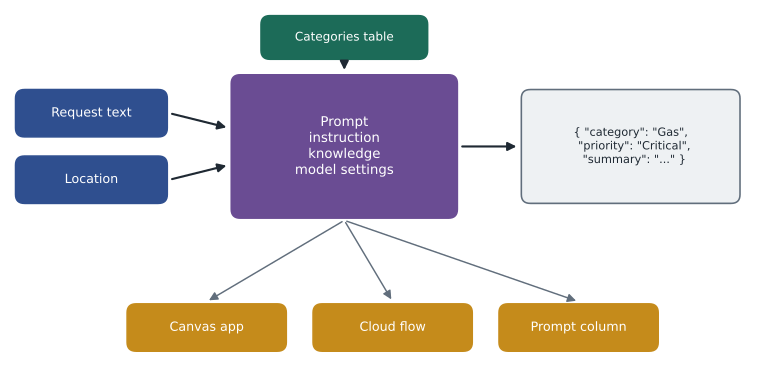
A prompt in Power Platform is a saved, reusable instruction to a large language model. It has a name, the instruction text, inputs that are filled in when it runs, optional knowledge from Dataverse that grounds the answer, settings that include which model to use, and an output, either text or a structured format such as JSON. Once saved in an environment, the prompt can be called from a canvas app, a cloud flow, a Copilot Studio agent or a Dataverse prompt column. Makers can start from a template, such as summarizing text or classifying it, or from blank.
Building the triage prompt
Signe built the prompt in the Facilities Dev environment and called it Triage Work Request. She wrote the instruction carefully, because the instruction is the prompt's program.
You help facilities dispatchers at a college triage work requests.
Read the request text and the location.
Choose one category from this list only:
Electrical, Heating and Cooling, Plumbing, Gas, Fume Hood, Building Fabric,
Grounds, Furniture, Other.
Choose a priority: Critical, High, Normal or Low.
Gas smells, fume hood alarms, flooding and electrical burning smells are always Critical.
If you are unsure of the category, choose Other. Never invent details.
Write a summary of no more than 15 words.
Return JSON with the keys category, priority and summary.

Request text: [Request text]
Location: [Location]
Several choices made the prompt reliable. The categories were listed explicitly so the model could not invent new ones. Safety rules were stated as absolute rules. "If unsure, choose Other" gave the model a safe option. The output was requested as JSON with fixed keys, so the app and flow could read each value reliably rather than parsing free text. The prompt designer lets the maker test with sample inputs and see the response before saving; Signe ran thirty real requests from the old spreadsheet through it and compared the results with Bronwyn's choices.
| Setting | What it controls | Triage prompt choice |
|---|---|---|
| Inputs | Values supplied each time the prompt runs | Request text and Location, both text |
| Knowledge | Dataverse data added to ground the answer | The Category table with descriptions |
| Model | Which generative model processes the prompt | The default model; a more capable one only if tests showed a need |
| Temperature or creativity | How varied the answers are | Low, for consistent classification |
| Output format | Text or structured JSON | JSON with category, priority, summary |
Adding knowledge
AB-410 includes "add knowledge to a prompt". Knowledge grounds the prompt in the organization's own data. A maker can add Dataverse tables and choose which columns and rows the prompt may use, with filters. Signe added the Category table, which had a short description for each category, such as "Building Fabric: doors, windows, roofs, walls, ceilings, flooring". With those descriptions the prompt stopped classifying broken windows as Other. Knowledge should be as small as necessary: every row added costs processing and can confuse the model if it is irrelevant.
Using a prompt in a canvas app
In a canvas app, a prompt is added as a data source like a table, and the app calls it with its inputs. The response comes back as a record whose fields can be shown in controls or written to Dataverse.
// OnSelect of the 'Suggest' button on the New Request screen
Set(
    varTriage,
    'Triage Work Request'.Predict(txtRequest.Value, drpLocation.Selected.Name)
);
// The prompt returns JSON as text; read each key
Set(varJson, ParseJSON(varTriage.text));
UpdateContext({
    ctxCategory: Text(varJson.category),
    ctxPriority: Text(varJson.priority)
})
Signe designed the screen so that suggestions filled dropdowns that the dispatcher could change, and a small label read "Suggested by AI, please check". Saving required a click by the dispatcher. The prompt saved time; it did not make the decision.
Using a prompt in a cloud flow
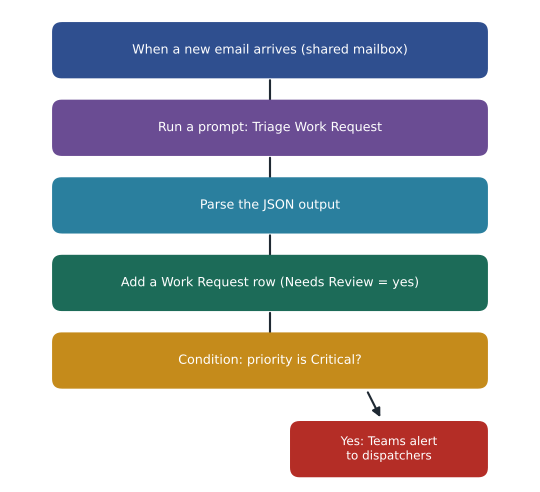
Requests that arrived by email bypassed the app entirely, so Signe also used the prompt in a cloud flow. The flow triggered when an email arrived in the facilities shared mailbox, called the prompt through the "Run a prompt" action with the email body as input, parsed the JSON and created a Work Request row with the suggested values and a Needs Review flag. A separate step sent an immediate Teams message to the dispatchers if the suggested priority was Critical, so a gas smell reported by email would not wait for someone to read the queue.
Prompt columns
Dataverse can also run a prompt as part of the data itself. A prompt column is a column whose value is generated by a prompt from other columns in the same row. AB-410 lists "configure prompt columns" under building data models. For Facilities, Signe considered a prompt column on Work Order that would produce a plain-language summary of technician notes for managers. She chose a prompt column for that because the output was informational, not a decision, and because it would be computed consistently however the row was created.
| Use the prompt in... | When it fits |
|---|---|
| A canvas app | The user is present and should review suggestions before saving |
| A cloud flow | Data arrives without a user, for example by email, and must be processed automatically |
| A prompt column | A value derived from other columns should be computed for every row, whatever creates it |
| A Copilot Studio agent | The prompt is one tool an agent uses during a conversation or task |
AI models
Besides prompts, AI Builder provides AI models for specific tasks. Prebuilt models work without training, for example invoice processing, receipt processing, identity document reading, text recognition, sentiment analysis, entity extraction and language detection. Custom models, such as document processing trained on an organization's own forms or object detection trained on images, are trained with the organization's examples. AB-410 asks builders to consume AI models in apps and in cloud flows. In a canvas app, models appear through AI controls or as data sources; in flows, through actions that take a file or text and return extracted values with a confidence score.
Facilities had an obvious candidate: contractor invoices for specialist work. A document processing model could extract the contractor, invoice number, date, total and work order number from each PDF, and a flow could match it to the work order. Signe noted it for phase two, because finance had its own process to agree first.
Worked problem
Using a confidence score
An invoice flow extracts the total from contractor invoices. Each value comes with a confidence score between 0 and 1. The finance team wants no manual checking for clear invoices but cannot accept a wrong total. How should the flow use the score?
Show solution
- Pick a threshold based on testing, for example 0.9, at which extracted totals were always correct in the sample.
- If the confidence is at or above the threshold and the total matches the work order's estimate within an agreed range, continue automatically.
- Otherwise create a review task for a person, showing the document and the extracted values.
- Review a sample of automatic cases each month to check the threshold still holds.
Answer: Use the confidence score with a tested threshold and a business check to route uncertain cases to a person.
Credits and cost
Prompts and models consume capacity. Microsoft is ending AI Builder credits progressively: new customers could no longer buy AI Builder capacity add-ons from November 1, 2025; from November 1, 2026 the add-ons reached end of life and new premium licenses no longer include seeded AI Builder credits, though existing credits are honored until the end of the contract term. Copilot Credits replace them. An environment uses any remaining AI Builder credits first, then Copilot Credits; if neither is available, usage is blocked. Different AI tasks consume credits at different rates, which Microsoft publishes in a rate table. Administrators track consumption per environment in the Power Platform admin center.
Rupert asked for an estimate before production. The triage prompt would run about 15 times a day from the app and about 10 times from the email flow. He allocated Copilot Credits to the Lakeshore Ops environment and set an alert, and asked Signe to avoid running prompts in loops or on every keystroke.
Responsible use
Prompts and models make mistakes, and some mistakes matter more than others. Signe's rules for Facilities were: a person confirms every AI suggestion that changes priority; AI output is labeled as such on screen; the prompt is retested whenever its instruction, knowledge or model changes; and a sample of AI decisions is reviewed monthly. These follow Microsoft's responsible AI principles of reliability and safety, transparency and accountability.
Choosing the model
Prompts in Power Platform let the maker choose which generative model processes the prompt, within the models Microsoft makes available in the environment. Different models trade speed, cost and reasoning quality. A small, fast model is usually enough for classification against a fixed list; a more capable model may be needed for long documents or complex reasoning, at a higher credit cost per run. AB-410 includes "customize prompt settings, including models". Signe's rule was to start with the default model, measure accuracy on the test set, and change models only if the numbers justified it.
| Task | Model choice to try first | Why |
|---|---|---|
| Classify short request text into fixed categories | Default or a fast model | Short inputs, clear rules, many runs |
| Summarize a long work order history | Default model | Moderate length, informational output |
| Describe a fault from a photo and a note | A model that accepts images | Image input needs a multimodal model |
| Reason over a long contract or policy document | A more capable model | Long context and careful reasoning |
Images as inputs
Prompts can take images as inputs where the selected model supports them, which made Delphine's idea of photographing a faulty part possible. Signe built a second prompt, Describe Fault, with two inputs: the technician's short note and a photo. The instruction asked for a plain description of the visible problem, the likely part name if clear, and the words "not clear from the photo" when it was not. In testing on 40 photos, the descriptions were useful in about three quarters of cases and occasionally confident about the wrong part. Signe decided the output would be shown to the technician as a suggestion to edit, never saved automatically, and she labeled the feature as a draft on screen.
Prompts in agents
Prompts can also be added to Copilot Studio agents as tools, so an agent calls the prompt when it needs that capability. The Monday repeat-failure agent from lesson 5 used a small prompt, Summarize Asset History, as one of its tools, to turn a list of work orders into a short paragraph for Delphine. Reusing the same prompt in the agent and in the app meant one place to improve the wording and one test set to rerun.
Finally, Signe documented each prompt in the solution: its purpose, inputs, knowledge, model, output keys, owner and the date of its last test-set run. When the colleges' auditors later asked how AI decisions were controlled, that page answered most of their questions.
Common mistakes
MistakeAsking for free-text output and parsing it in the app.
InsteadRequest structured JSON with fixed keys so apps and flows can read values reliably.
MistakeLetting the model invent categories.
InsteadList the allowed values in the instruction and give a safe fallback such as Other.
MistakeAdding whole tables as knowledge.
InsteadAdd only the columns and rows the prompt needs.
MistakeAssuming AI Builder credits will always be included with premium licenses.
InsteadFrom November 1, 2026 new premium licenses no longer include seeded AI Builder credits; plan for Copilot Credits.
After two weeks in test, the triage prompt agreed with Bronwyn on category in 27 of 30 sample requests and on priority in 29. In the one disagreement on priority, the prompt had marked a flooded washroom as Critical and Bronwyn had marked it High. After some discussion, the rule stayed.
Summary and key terms
- A prompt is a reusable instruction to a generative model with inputs, optional Dataverse knowledge, model settings and text or JSON output.
- Clear instructions, allowed values, safety rules, a fallback option and structured output make prompts reliable.
- Prompts can be used in canvas apps, cloud flows, prompt columns and agents; the right place depends on whether a user is present to review.
- Prebuilt and custom AI models extract or classify information from documents, images and text, with confidence scores.
- AI Builder credits are ending; Copilot Credits replace them, consumed at published rates and tracked per environment.
- Prompt
- A saved, reusable instruction to a generative AI model, with inputs, settings and an output.
- Knowledge (prompt)
- Dataverse data added to a prompt to ground its responses.
- Prompt column
- A Dataverse column whose value is generated by a prompt from other columns in the row.
- Prebuilt model
- An AI Builder model that works without training, such as invoice processing or sentiment analysis.
- Confidence score
- A value from 0 to 1 that a model returns to indicate how certain it is of a result.
Practice problems
Work each problem on paper first, then reveal the answer to check.
Why did Signe request JSON output from the triage prompt?
Show answer
So the app and flow could read category, priority and summary reliably from fixed keys.
When is a prompt column a better choice than calling a prompt from an app?
Show answer
When the value should be computed for every row however it is created, and it informs rather than decides.
What happens when an environment has neither AI Builder credits nor Copilot Credits?
Show answer
AI usage is blocked.
Lesson quiz · 5 questions
Score 60% or more to complete this lesson.
Create a free account to save your progress, take quizzes and earn a certificate.