
MSBA-251 · Lesson 10 of 12 · 18 min
Testing apps
▶ Video coming soon A video version of this lesson is on the way.
Two weeks before the planned go-live, Kofi found a bug that nobody else had noticed. If a dispatcher reassigned a job while the original technician was offline, the job appeared on both technicians' phones until the first one synced, and twice both men drove to the same building. The bug was not in any single formula. It came from the way the apps, the offline profile and a flow interacted. Signe's conclusion was that the project needed a proper test plan, not just enthusiastic clicking. AB-410 lists "test canvas apps, including using Monitor" and "test and troubleshoot cloud flows" as skills; this lesson covers testing for the whole solution.
Kinds of testing
| Kind of test | Question it answers | Who usually does it |
|---|---|---|
| Unit or component test | Does this formula, control or flow step do what it should? | Maker |
| Integration test | Do apps, flows, prompts and Dataverse work together? | Maker and developer |
| Security test | Can each persona see and do exactly what they should, and no more? | Maker with an administrator |
| Accessibility test | Can people using assistive technology use the app? | Maker or accessibility tester |
| Performance test | Is the app fast enough with realistic data and networks? | Maker and developer |
| User acceptance test (UAT) | Does the solution let real users do their real work? | Business users |
| Regression test | Did a change break something that worked before? | Maker, ideally automated |
Each kind catches different defects. Unit tests caught a misspelled status name in a filter. Security tests caught a dispatcher role that could delete assets. UAT caught the reassignment problem, because it was the first time real people worked real jobs in parallel.
A test plan
Signe wrote the test plan as a table in Dataverse, so each test case had an ID, a persona, steps, expected result, actual result, status and a link to any bug. Test cases came from the requirements in lesson 1: every requirement had at least one test, and every rule that must never be broken had several. The plan ran in the Facilities Test environment, which received a managed copy of the solution through the pipeline, so testers worked on exactly what would go to production.
| ID | Persona | Test | Expected result |
|---|---|---|---|
| T-04 | Dispatcher | Log a gas smell request by phone | Priority Critical and locked; Teams alert within one minute |
| T-11 | Technician | Close a job offline with a photo, then reconnect | Job completed in Dataverse with the photo after sync |
| T-17 | Technician | Try to open another technician's job by URL | Access denied |
| T-23 | Contractor | Sign in as the elevator contractor | Only that company's jobs listed |
| T-29 | Dispatcher | Reassign a job while the technician is offline | Job leaves the first technician's list after sync; no duplicate visit |
| T-35 | Screen reader user | Complete a job using TalkBack | All steps announced and operable |
Monitor
Monitor is the Power Apps tool for watching what an app does while it runs. A maker opens Monitor from the canvas designer or the model-driven app, and it records a live stream of events: formulas evaluated, data requests sent to Dataverse and connectors with their duration and size, responses, errors and warnings. A maker can also invite another user to a Monitor session, so the maker sees events from that user's device while they reproduce a problem, which is invaluable when a bug happens only on one technician's phone.
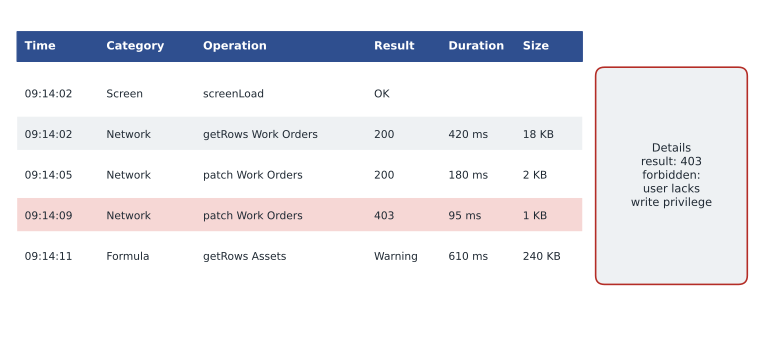
Monitor solved the reassignment mystery. Signe started a session with Arlo's phone while Kofi reassigned a job. The events showed Field Tech reading the job list from local offline data, as designed, and a flow updating the job in Dataverse; but the gallery was filtered on the technician column while a second flow, written earlier for notifications, briefly created a duplicate assignment row. The fix was to remove the duplicate logic from the older flow and to show a "reassigned" banner when a job's technician changed during sync.
| What to look for in Monitor | Why |
|---|---|
| Errors and their result codes | Shows failed saves, permission problems (such as 403) and connector failures |
| Long-running data requests | Points to slow queries, large payloads or chatty screens |
| Many requests on one screen load | Suggests formulas that could be combined or cached |
| Delegation warnings | Shows queries that run on partial data |
| Unexpected requests | Reveals formulas running when they should not |
App checker and solution checker
Two built-in checkers find problems before testers do. The App checker in the canvas designer lists formula errors, runtime warnings, accessibility issues, performance suggestions and delegation warnings. The solution checker analyses a whole solution against best-practice rules, including model-driven app customizations, plug-ins and web resources, and reports issues by severity. In a managed environment, administrators can require the solution checker to run when solutions are imported, and block imports with critical issues. Rupert set the Lakeshore Ops environment to warn on high-severity issues and block on critical ones.
Automated testing
Manual testing is essential but does not scale. When a change goes in, someone must check that the old features still work, and that is the job of automated regression tests. Microsoft previously offered Power Apps Test Engine for this; in April 2026 Microsoft deprecated Test Engine, citing very low usage and the limits of its Power Fx layer, and recommended using Playwright, the open-source browser automation framework on which Test Engine was built, with Microsoft's Power Platform Playwright samples. Playwright tests are written in code, open the app in a browser, perform steps and check results, and can run in a pipeline before each deployment.
Lumenvale did not yet have automated tests for any Power Platform solution. Signe wrote six Playwright tests for the most important dispatcher scenarios in Facilities Hub and ran them from the colleges' Azure DevOps pipeline after each deployment to the test environment. For Field Tech, mobile and offline behavior still needed manual testing on devices.
Testing AI features
AI features need their own tests because their output can vary. For the triage prompt, Signe kept a test set: 60 real requests from the old spreadsheet with the correct category and priority agreed by Bronwyn and Delphine. Each time the prompt, its knowledge or its model changed, she ran the whole set and compared the results with the agreed answers. She tracked two numbers: how often category matched, and how often a Critical request was not marked Critical. The second had to be zero.
Worked problem
Reading prompt test results
After a model update, the triage prompt is run on the 60-request test set. Category matches the agreed answer in 54 cases. Of the 9 requests agreed as Critical, the prompt marks 8 as Critical and 1 as High. Should the update go to production?
Show solution
- Category accuracy: 54 of 60 is 90 percent, close to the previous 27 of 30 (also 90 percent).
- Critical recall: 8 of 9 Critical requests were caught; one safety request was downgraded.
- The team's rule is that no Critical request may be missed.
- Investigate the missed request, strengthen the instruction or the safety rule list, and retest before release.
Answer: No. Category accuracy is acceptable, but a missed Critical request breaks the safety rule, so the change must be fixed and retested first.
Copilot in the model-driven app and smart form fill were tested differently: with each persona's account, on a fixed list of questions and emails, checking that answers were grounded in records the user was allowed to see and that suggestions were reviewed before saving.
Testing and troubleshooting flows
Cloud flows that support the apps need testing too. A maker can test a flow manually or with data from a previous run, and the run history shows every run with inputs and outputs of each action, which makes troubleshooting much easier than guessing. Typical problems are expired connections, wrong connection references after deployment, missing permissions for the account the flow runs as, and loops that hit limits. Signe added error-handling scopes to each flow so a failed notification would alert her instead of failing silently.
User acceptance testing
UAT is where real users do real work in the test environment and decide whether the solution is ready. For Facilities, the UAT group was both dispatchers, four technicians across the three campuses, Delphine and one contractor. Each tester had scripted scenarios and was also asked to work normally for two days. Feedback went into the same test table. Sign-off required no open critical or high-severity bugs and written approval from Delphine as the business owner.
Testing security systematically
Security testing follows a simple matrix: every persona against every important action. Signe built the matrix in a spreadsheet first and then converted it into test cases. The aim was to prove two things for each cell: that a person can do what they should, and that they cannot do what they should not.
| Action | Dispatcher | Technician | Manager | Contractor |
|---|---|---|---|---|
| Create a work order | Allowed | Allowed for own asset scans | Allowed | Not allowed |
| Reassign a job | Allowed | Not allowed | Allowed | Not allowed |
| See costing | Not allowed | Not allowed | Allowed | Not allowed |
| Delete an asset | Not allowed | Not allowed | Not allowed | Not allowed |
| See another company's jobs | Allowed | Allowed | Allowed | Not allowed |
The matrix found the problem with the dispatcher role that could delete assets, which had come from copying an older role. It also confirmed that a technician who guessed another job's web address could not open it, because Dataverse checked his privileges on the row, not just the app's navigation.
Recording and tracking defects
Every defect went into the test table with a severity: critical (blocks a safety process or exposes data), high (blocks a main task with no workaround), medium (a workaround exists) or low (cosmetic). Critical and high defects had to be fixed and retested before go-live; medium and low could be scheduled. Each fix was made in the development environment, deployed through the pipeline and retested in test, never patched directly in test. That discipline meant the solution that passed UAT was exactly the solution that would go to production.
Testing on many devices
Field Tech had to work on the phones technicians actually carried: two models of college-issued Android phone, several iPhones and the workshop tablet. Signe kept a small device list in the test plan and ran the core scenarios on each before UAT. One older Android phone showed the job cards with clipped text at the largest system font size, which led to a layout fix in the card component. Device testing is slow, so it focused on the scenarios most likely to break: start-up, offline completion, the camera and the scanner.
Testing the release process itself
One test is easy to forget: whether the solution deploys cleanly. Signe deployed the managed solution from development to test through the pipeline at least once a week during the build, even when nobody was testing, so problems with missing dependencies, environment variables or connection references would appear early rather than on the day of go-live. Two such problems did appear: a flow that referenced a connection in Signe's name rather than the service account, and a security role that had been left out of the solution. Both were easy to fix in week three and would have been stressful in the final week.
She also kept a short rollback plan. If a production deployment caused a serious problem, the previous managed solution version could be redeployed through the pipeline, and the team knew which data changes, if any, would need correcting. Rupert asked for that plan in writing before he approved any production deployment.
Common mistakes
MistakeTesting only as the maker, who has system administrator rights.
InsteadTest with each persona's account and roles.
MistakeTesting in the development environment.
InsteadTest the managed solution in a test environment that mirrors production.
MistakeStarting new automation on Test Engine.
InsteadTest Engine was deprecated in April 2026; use Playwright with Microsoft's Power Platform samples.
MistakeTesting an AI prompt with a few examples once.
InsteadKeep a test set with agreed answers and rerun it whenever the prompt, knowledge or model changes.
The second round of UAT ended on a Friday afternoon with no open critical bugs, one high-severity bug fixed that morning and a list of fourteen small improvements for after go-live. Delphine signed the approval form, and then asked whether she could keep the test environment "for practice". Rupert said yes.
Summary and key terms
- A test plan covers unit, integration, security, accessibility, performance, user acceptance and regression testing, traced to requirements.
- Monitor records live events such as data requests, durations, errors and warnings, and can follow another user's session.
- The App checker and solution checker find problems early; managed environments can enforce solution checker on import.
- Power Apps Test Engine was deprecated in April 2026; Microsoft recommends Playwright with its Power Platform samples for automated tests.
- AI features need repeatable test sets with agreed answers and strict rules for safety-critical cases.
- Monitor
- A Power Apps tool that records live events from a running app for troubleshooting.
- Solution checker
- A tool that analyses a solution against best-practice rules and reports issues by severity.
- Regression test
- A test that checks a change has not broken existing behavior.
- User acceptance testing
- Testing by real users to decide whether a solution is ready for production.
- Playwright
- An open-source browser automation framework that Microsoft recommends for automated Power Platform tests.
Practice problems
Work each problem on paper first, then reveal the answer to check.
How can a maker see what happens on a particular user's phone when a bug occurs?
Show answer
Invite the user to a Monitor session and watch the events while they reproduce the problem.
What replaced Power Apps Test Engine as Microsoft's recommendation for automated tests?
Show answer
Playwright, with Microsoft's Power Platform Playwright samples.
Why test Copilot features with each persona's account?
Show answer
Because answers depend on the data each user is allowed to access.
Lesson quiz · 5 questions
Score 60% or more to complete this lesson.
Create a free account to save your progress, take quizzes and earn a certificate.