
MSBA-251 · Lesson 4 of 12 · 19 min
Generative pages and plan designer
▶ Video coming soon A video version of this lesson is on the way.
Maribeth Ferreira-Quon had spent six weeks learning forms, views and Power Fx. Then, in the third session of the builder track, Signe opened plan designer and typed two paragraphs describing the facilities process. Within a couple of minutes the screen showed a proposed solution: user roles, requirements, a data model with tables and relationships, a model-driven app for dispatch, a canvas app for technicians and a flow for assignments. Maribeth's first reaction was dismay. "Did I waste six weeks?" Her second, after reading the plan closely, was relief. Half the tables were wrong, two requirements contradicted each other, and the flow did not know that safety jobs could not wait. The tool was fast. It still needed someone who understood the process and the platform.
This lesson covers the two AI-first ways of building that AB-410 and PL-900 now expect builders to know: plan designer, which turns a description of a business problem into a solution plan, and generative pages, which create pages in a model-driven app from natural language. It also places them alongside the newer code-first options, the vibe experience and code apps.
Plan designer
Plan designer starts from a description of the business problem, optionally with supporting files such as a process document, a spreadsheet or an image of a paper form. Copilot analyses the description and proposes a plan made of several parts. A builder reviews and edits each part before anything is created.
| Part of the plan | What Copilot proposes | What the builder checks |
|---|---|---|
| User roles | Who uses the solution and how | Are the personas complete? Are any missing, such as managers? |
| Requirements and user stories | What each role needs to do | Are they correct, testable and free of contradictions? |
| Process | The steps of the business process | Does it match how the work really happens, including exceptions? |
| Data model | Tables, columns and relationships, reusing standard tables where possible | Are names, data types and relationships right? Are existing tables reused? |
| Solution components | Apps, flows, agents and pages to build | Is each component justified? Is anything better done another way? |
After review, the builder can ask Copilot to create the data model and components in the environment, inside a solution. The result is a working starting point, not a finished product. The plan itself is saved and can be updated as requirements change, which also makes it useful documentation.
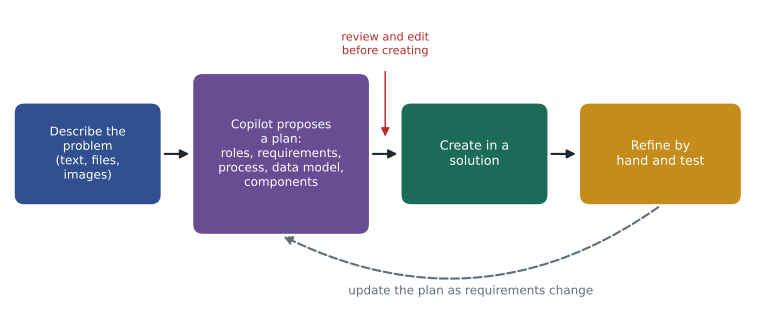
Signe and Maribeth used plan designer as a check on the design they had already made by hand. It suggested two things they had missed: a Parts Used table should relate to an inventory item rather than store free text, and managers needed a role of their own. It also made mistakes they had to correct. It proposed a custom Building table even though their Location table already had a building column, and it treated Work Request and Work Order as one table, which would have lost the distinction between what was asked for and what was done.
What makes a good description
The quality of the plan depends on the description. A good description names the people involved, the main process steps, the information that must be captured, the rules that must never be broken and how success will be measured. It mentions existing systems and data the solution must use. It avoids vague phrases such as "make it easy" and uses the organization's real vocabulary.
Worked problem
Improving a plan designer prompt
A first description reads: "An app for facilities work orders so technicians can see their jobs." What would improve the plan Copilot proposes?
Show solution
- Name the roles: dispatchers at a desk, technicians on phones, a facilities coordinator and managers.
- Describe the process: request received, triaged, assigned, worked, completed, with photos and parts recorded.
- State the rules: gas and fume hood jobs are critical and must be assigned within 30 minutes.
- Mention existing data: locations and assets already exist in the colleges' Dataverse tables.
- Say how success is measured: every request logged within an hour; time to close known per job.
Answer: A description that names roles, process, rules, existing data and success measures produces a far more accurate plan.
Generative pages
Model-driven apps have always had a consistent, generated layout. That consistency is a strength for data-heavy work and a limit when a team wants a page that looks different: a visual board, a map-style overview, or a combined view of several tables. Generative pages address that. A maker describes the page in natural language, can attach an image or sketch, and chooses the Dataverse tables it should use. The AI generates the page, including the code behind it, and the maker refines it with further instructions, previews it and adds it to the app's navigation. AB-410 lists "create generative pages by using natural language" as an objective under model-driven apps.
Delphine wanted a "board" for the dispatch office: columns for New, Scheduled, In Progress and Waiting for Parts, with a card for each work order, colored by priority, and a count at the top of each column. In a classic model-driven app that would have needed a custom component. Signe described it to the generative page designer, pointing it at the Work Order and Location tables. The first version had the right columns but put completed jobs in the board too. A follow-up instruction, "exclude completed and canceled jobs, and sort each column by due date", fixed that. A third asked for a filter by campus.
| Step | What the maker does |
|---|---|
| Describe | Explain the page's purpose, layout and behavior in plain language; optionally attach a sketch or screenshot |
| Choose data | Select the Dataverse tables the page reads and writes |
| Generate and refine | Review the result, then give further instructions to change layout, filters or behavior |
| Preview | Test the page with real data and check permissions |
| Publish | Save, add the page to the app's site map and publish the app |
Generative pages run inside the model-driven app and respect the signed-in user's Dataverse security: a dispatcher sees only rows her roles allow. Microsoft has continued to extend them during 2026. Generative pages can be embedded in a model-driven form tab or section, receiving the current record's ID, so a work order form could show a generated visual of the asset's repair history. A preview released in 2026 lets generative pages use data from connected services such as SharePoint or SQL, not only Dataverse. Makers can also work on generative pages with external AI coding tools. Because these features change quickly, the builder should check the current documentation for what is generally available and what is still in preview before relying on a feature in production.
When to use a generative page
A generative page is a good fit when a model-driven app needs one or two pages with a layout that forms and views cannot provide, and the team wants to stay inside the model-driven app and its security. It is a poor fit when the whole experience is custom, when the page must work offline on phones, or when the organization has no one who can review generated code if something goes wrong. Generated code is still code: someone should understand roughly what it does, and the page should be tested like any other component.
| Need | Best first option |
|---|---|
| Standard data entry and lists | Model-driven forms and views |
| A visual board, timeline or combined page inside a model-driven app | Generative page |
| A task-focused mobile app with offline use | Canvas app |
| A full custom web front end built by developers on Power Platform | Code app |
| A first draft of a whole solution from a business description | Plan designer |
The vibe experience and code apps
Two further options appeared in Power Apps in 2025 and 2026 and now feature in the PL-900 skills. Code apps let professional developers build a web app in a modern code framework on their own machine and run it on Power Platform, using its connectors, authentication and governance. The vibe experience in Power Apps, in preview during 2026, lets a maker describe an app conversationally; it generates a plan, data and an app with generated code, which can later be converted to a code app. Both bring AI-assisted, code-based building under the same environment, security and data policies as low-code apps.
For AB-410, the key skill is recommending the right approach for a requirement. Signe summarized it for Maribeth: low-code designers first, generative pages for special model-driven pages, code apps when a developer genuinely needs full control, and AI tools at every stage to draft and speed things up, always followed by human review.
Governance for AI-built components
Rupert added the governance view. Components created by plan designer, generative pages or code generation are created inside solutions in environments, so the usual controls apply: managed environment settings, data policies on connectors, solution checker and the pipeline to test and production. He asked for two extra steps: every generated page would be reviewed by Signe before it left the development environment, and the plan designer plan would be kept up to date as the solution's documentation.
Reviewing generated work
Whether a component comes from plan designer, a generative page or a code-generation tool, the review questions are the same. Does it meet the requirement it was created for? Does it use the right tables and columns, or did it create new ones that duplicate existing data? Does it respect security, and does it behave correctly for a user with limited permissions? Is it accessible, with labels, contrast and keyboard access? Does it perform with realistic data volumes? Could someone on the team change it later? Signe kept these questions on a short checklist and applied it to every generated item before it left the development environment.
| Review question | What Signe found on the dispatch board |
|---|---|
| Meets the requirement? | Yes, after excluding completed jobs and adding the campus filter |
| Right data? | Yes; it used existing Work Order and Location tables |
| Security? | Tested as a dispatcher and as a manager; each saw the correct rows |
| Accessible? | Card colors needed text labels for priority, added by instruction |
| Performs? | Loaded in under two seconds with 300 open jobs |
| Maintainable? | The instructions used were saved in the plan as documentation |
The accessibility finding was a reminder that generated pages are not automatically accessible. The first version showed priority only by card color, the same problem Field Tech had (lesson 7). One extra instruction added a text badge to each card. Signe also checked how the page read with a screen reader and how it behaved with the keyboard, because the dispatchers used keyboards heavily.
Using AI tools for small tasks too
AI-assisted building is not only for whole solutions. Copilot in Power Apps can create a table from a description, suggest columns, draft a canvas app from a table and explain what an existing formula does. Maribeth used it most for small tasks: generating realistic sample data for testing, describing an unfamiliar formula from an older app, and drafting the first version of a view filter. Each time she checked the result. Note that in canvas apps Microsoft announced the retirement of the Copilot features for creating and editing Power Fx formulas, and of Power Apps Ideas, on December 11, 2026 (lesson 5), so makers should not build their working habits around those particular tools.
Keeping documentation alive
Generated components are easy to create and easy to forget. Signe asked that every generative page and every plan designer output be described in the solution's documentation: what it does, which tables it uses, who reviewed it and when. Because plan designer keeps the plan alongside the solution, much of this came for free; the generative page instructions were pasted into the plan's notes.
Delphine later asked whether plan designer could design the preventive maintenance app described in lesson 12. Signe said it could produce a useful first plan in minutes, and that the team would then spend most of the time reviewing it against the existing solution so nothing was duplicated.
Common mistakes
MistakeAccepting a plan designer data model without review.
InsteadCheck every table, column and relationship; reuse existing tables and fix merged or duplicated concepts.
MistakeGiving plan designer a one-sentence description.
InsteadDescribe roles, process, rules, existing data and success measures.
MistakeUsing a generative page where a standard form or view would do.
InsteadUse generative pages for layouts forms and views cannot provide.
MistakeRelying on a preview feature in production without checking its status.
InsteadCheck current documentation for general availability and limitations first.
The dispatch board went into Facilities Hub as its second page. Bronwyn liked it so much she asked whether the whole app could look like that. Signe said no, and explained why: the forms did the careful work, and the board was for seeing the day at a glance.
Summary and key terms
- Plan designer turns a description of a business problem, with optional files, into a plan of roles, requirements, process, data model and components.
- The builder reviews and edits the plan before creating components; plan quality depends on a detailed description.
- Generative pages create model-driven app pages from natural language, respect Dataverse security and can be refined, previewed and published.
- In 2026 generative pages gained embedding in forms and, in preview, connector data; preview status should be checked before production use.
- Code apps and the vibe experience add AI-assisted, code-based building under the same platform governance.
- Plan designer
- A Power Apps experience where Copilot turns a business description into a solution plan and can create its components.
- Generative page
- A page in a model-driven app generated from a natural-language description and refined by the maker.
- Code app
- A web app built with a code framework by developers and run on Power Platform with its connectors and governance.
- Vibe experience
- A conversational Power Apps building experience, in preview in 2026, that generates a plan, data and an app with code.
Practice problems
Work each problem on paper first, then reveal the answer to check.
Name four parts of a plan produced by plan designer.
Show answer
Any four of: user roles, requirements or user stories, process, data model, solution components.
Does a generative page bypass the user's Dataverse security?
Show answer
No. It runs inside the model-driven app and respects the signed-in user's security roles.
When is a canvas app a better choice than a generative page?
Show answer
When the experience is task-focused, mobile or needs offline use, or the whole app needs a custom layout.
Lesson quiz · 5 questions
Score 60% or more to complete this lesson.
Create a free account to save your progress, take quizzes and earn a certificate.