
DCT-310 · Lesson 9 of 12 · 20 min
Hardware replacement procedures and ESD
By the middle of the term Jamal can name every part of a server and read its health in the BMC. Now Roz wants to see him replace parts the way Stonebridge expects, every time, on every kind of hardware. "Anybody can swap a power supply," she says. "What matters is that you swap the right one, in the right server, without breaking anything else, and that you can prove it afterwards." This lesson sets out the general procedure for replacing hardware: hot, warm and cold swaps, customer- and field-replaceable parts, protection against electrostatic discharge, methods of procedure, seating and torque, and the closing checks and records that complete every job.
Hot, warm and cold swaps
Parts are grouped by what must happen to the server before they can be replaced:
- Hot swap: the part can be removed and replaced while the server is running, with no action from the customer except, sometimes, telling the system to stop using it first. Most drives, power supplies and fan modules in current servers are hot-swappable.
- Warm swap: the server stays powered, but the part's function must be stopped first, for example a drive that must be taken offline by the customer's administrator before it is pulled, or a PCIe card that supports hot-plug only after the software releases it.
- Cold swap: the server must be shut down and its power cords removed before the part is touched. Memory, processors, most PCIe cards, risers, motherboards, boot drives inside the chassis and the CMOS battery are cold-swap parts in almost every server.
The vendor's service guide says which category each part falls into for that model. A technician never assumes: a part that is hot-swappable in one model may be cold-swap in another, and the customer's procedure may require a cold swap even where the hardware would allow a hot one.
For a cold swap the customer shuts down the operating system cleanly, and the technician then removes both power cords. Shutting down from the BMC or the power button is not enough on its own, because the motherboard keeps standby power to the BMC and other circuits while cords are connected. Many vendors' guides add a wait of a few seconds after unplugging so that the standby power drains.
CRUs and FRUs
Vendors also classify parts by who may replace them:
- Customer-replaceable units, CRUs, can be replaced by the owner or a trained technician without special tools or training: drives, power supplies, fans, memory and often PCIe cards.
- Field-replaceable units, FRUs, need the vendor's trained field engineer or a technician with specific training and tools: motherboards, processors, GPU baseboards, internal cables and liquid cooling assemblies.
Every part has a FRU or part number on its label, and the replacement must match it, or be an approved substitute listed by the vendor. Whether a Stonebridge technician may replace a FRU depends on the customer's contract and on Stonebridge's training records; Corvid AI, for example, has trained and authorized Stonebridge to replace whole GPU trays but not parts inside them.
Electrostatic discharge
DCT-120 explained how a person walking across a floor can build up thousands of volts of static charge without feeling it, and how a discharge too small to feel can damage or weaken the tiny circuits on memory, processors and boards. The damage may not show at once; a part weakened by ESD can fail weeks later. For hardware replacement, the rules are:
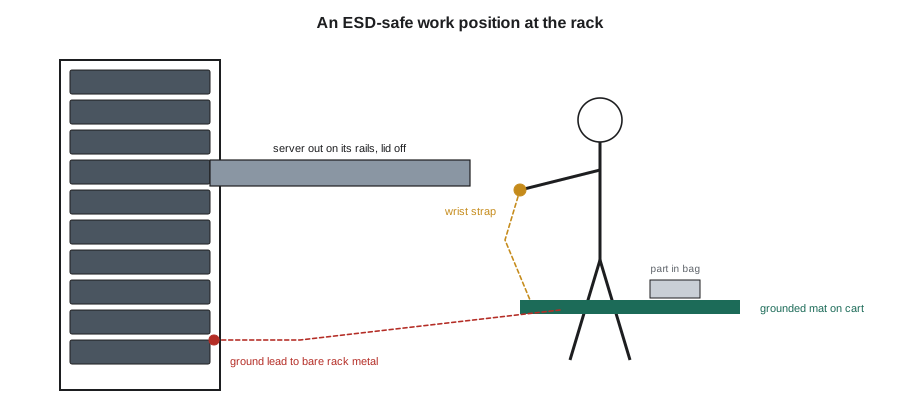
- Wear a wrist strap with its cord connected to a grounded point, or work on a grounded mat with the strap connected to the mat, whenever a server is open or a bare board is handled.
- Test the wrist strap at the tester by the operations room door at the start of the shift. The strap contains a resistor of about one megohm that limits current for safety; a strap that reads open or far out of range does nothing.
- Keep new parts in their antistatic bags until the moment they are installed, and put removed parts straight into the bag the new part came in.
- Handle boards and memory by their edges; never touch gold contacts, chips or connector pins.
- Do not place parts on top of their antistatic bags, which are often conductive on the outside only, or on ordinary surfaces such as the top of a rack or a cardboard box.
- Keep the humidity rules in mind: very dry air makes static worse, one reason humidity is monitored in the halls (DCT-230).
# Pre-work check for a hardware swap: ESD equipment and parts (values from the wrist strap tester and ticket)
strap_megohm = 1.1
mat_grounded = True
part_ordered, part_received = "DIMM 64GB DDR5-5600 RDIMM, FRU 03RX44", "DIMM 64GB DDR5-5600 RDIMM, FRU 03RX44"
ok_strap = 0.8 <= strap_megohm <= 10      # site tester pass band, around a 1 megohm resistor
print(f"Wrist strap {strap_megohm} megohm: {'pass' if ok_strap else 'FAIL - replace the strap'}")
print(f"Mat grounded: {'yes' if mat_grounded else 'NO'}")
print(f"Part matches the ticket: {'yes' if part_ordered == part_received else 'NO - stop'}")
print("Proceed" if ok_strap and mat_grounded and part_ordered == part_received else "Stop and fix before opening the server")Wrist strap 1.1 megohm: pass Mat grounded: yes Part matches the ticket: yes Proceed
The pre-work check is part of Stonebridge's method of procedure for any job that opens a server. It takes less than a minute and catches the two most common avoidable faults: a broken wrist strap, and a replacement part that does not match the one the ticket calls for.
The method of procedure
Every hardware replacement at Stonebridge follows a method of procedure, a MOP: a written list of steps, in order, with sign-offs. For routine work there is a standard MOP for each kind of part and each customer; for unusual or risky work, such as replacing a storage controller or a GPU tray, the MOP is written for the job and approved by the shift lead and the customer before work starts. DCT-330 covers how MOPs are written and approved; here the point is how they are followed.
# Walking a method of procedure: steps must be signed off in order
steps = ["Confirm ticket, customer approval and window", "Confirm server is drained/shut down by customer",
         "Match asset tag and serial", "Ground yourself; open the lid", "Replace the part; check seating",
         "Close lid; reconnect power and cables", "Power on; confirm health in BMC", "Customer confirms service"]
done = [True, True, True, True, True, True, False, False]
for i, (s, d) in enumerate(zip(steps, done), 1):
    print(f"{i}. [{'x' if d else ' '}] {s}")
nxt = done.index(False) + 1
print(f"Next step: {nxt}. Ticket stays open until step {len(steps)} is signed.")1. [x] Confirm ticket, customer approval and window 2. [x] Confirm server is drained/shut down by customer 3. [x] Match asset tag and serial 4. [x] Ground yourself; open the lid 5. [x] Replace the part; check seating 6. [x] Close lid; reconnect power and cables 7. [ ] Power on; confirm health in BMC 8. [ ] Customer confirms service Next step: 7. Ticket stays open until step 8 is signed.
The MOP is followed in order. Steps are not skipped, combined or rearranged, and each one is signed as it is done, not afterwards from memory. If something happens that the MOP does not cover, for example a part that does not fit or a second fault, work stops and the shift lead and customer are contacted. The ticket stays open until the last step, the customer's confirmation, is signed.
Getting into the server
Most rack servers slide forward on their rails for service. Before sliding one out, the technician checks:
- That the cables at the back have enough slack, or a cable management arm, to let the server slide without pulling anything out. Where they do not, the cables are labeled and disconnected first, with the customer's agreement.
- That the rails are rated for the server's weight when extended, and that the rack is stable and bolted down or fitted with its stabilizer feet. A heavy server extended from the top of an unbolted rack can tip it over (DCT-130).
- That the server's neighbors will not be disturbed. Brushing against a neighbor's power cord or pulling a cable bundle can take down a server that is not part of the ticket.
The lid usually lifts off after a latch is released. Inside, the service label shows the parts and the order for removing them. Air shrouds and baffles come out first, and their positions are noted so they go back the same way.
Seating, latches and torque
Most failures after a repair come not from a faulty new part but from one that is not quite seated. The checks are simple and worth doing every time:
- Memory: pushed straight down, evenly, until both latches snap closed on their own.
- PCIe cards: pressed firmly into the slot, with the gold contacts fully hidden, and the bracket screw or latch fastened.
- Drives and supplies: pushed until the latch clicks, then a gentle pull to confirm they are held.
- Cables: connectors pushed until the latch clicks, without bending pins; ribbon and high-speed cables routed exactly as before, away from the lid edge.
- Screws: driven to the torque the guide gives, with the torque-limited driver. Heat sink and cold plate screws in particular are tightened in the pattern and to the torque the guide sets, often in small turns on each screw in turn, so that the plate presses evenly on the processor.
Over-tightening is as harmful as under-tightening. A heat sink pressed unevenly can crack a processor's package or leave part of it without contact; a card screw driven too hard can strip its thread or crack a riser.
Closing checks and records
Before closing the lid and returning the server, the technician runs the closing checks:
- All shrouds, baffles, blanks and fillers back in place.
- No tools, screws or packaging left inside.
- The lid latched; the server slid back and locked on its rails.
- All cables reconnected to the ports they came from, matched to their labels, and power cords in the correct A and B outlets with their retention clips fastened.
- After power on: the server's LEDs normal, and the BMC or the customer confirming the new part is recognized, the right capacity or model, and healthy.
The record for the ticket includes photographs before and after, the serial numbers of the removed and installed parts, the bag number for any drive, the times of each step and any finding outside the ticket. This record is what the customer, the vendor and Stonebridge rely on if a question comes up later, and it is the evidence that the work was done as the MOP says.
Worked problem
A PCIe card that is not seen
Jamal replaces a failed network card in a Hall A server under a cold-swap MOP. After power on, the customer reports that the operating system does not see the new card, although the BMC inventory lists it.
Show solution
- The BMC lists the card, so the server can see something in the slot. Ask the customer for the card's link status: the BMC shows it trained at x1 instead of x16.
- That points at seating or the riser. With the customer's agreement, shut down again and remove the cords.
- Remove the riser. The card is in its slot, but the riser itself was not pushed fully into its motherboard connector when it went back.
- Reseat the riser until it sits flat on its standoffs, fasten its screws, and power on.
- The card now trains at x16, and the customer's operating system sees it.
Answer: The new part was fine; the riser it sat in was not seated. Checking the link width in the BMC pointed straight at the problem, and closing checks that include risers would have caught it before power on.
Working on a server next to live equipment
Most repairs happen in racks where every other server is running a customer's work. Brushing a neighbor's power cord, catching a cable bundle with a rail, or leaning on a server above can cause an outage that has nothing to do with the ticket. Stonebridge's habits for working in live racks are simple: move slowly, keep the tool bag on the cart rather than on top of equipment, hold cable bundles aside with a hook-and-loop strap rather than an elbow, and look at the neighboring servers' LEDs before leaving the rack. If any of them changed while the work was going on, the technician reports it at once, even if it seems unrelated, because a delayed report makes the cause much harder to find.
Common mistakes
MistakeTreating every part as hot-swappable because drives and supplies are.
InsteadCheck the vendor's guide for that model and the customer's MOP.
MistakeShutting a server down but leaving its cords connected for a cold swap.
InsteadRemove both power cords; standby power remains while they are connected.
MistakeWorking on an open server without a tested wrist strap.
InsteadTest the strap at the start of the shift and connect it before opening the lid.
MistakeSigning MOP steps from memory at the end of the job.
InsteadSign each step as it is done.
MistakeTightening heat sink screws fully one at a time.
InsteadFollow the guide's pattern and torque, in small turns on each screw.
Summary and key terms
- Hot-swap parts are replaced with the server running; cold-swap parts need it shut down and unplugged.
- CRUs can be replaced by trained technicians; FRUs may need vendor engineers or special authorization.
- ESD rules: tested wrist strap, grounded mat, parts kept in antistatic bags and handled by the edges.
- Every job follows a method of procedure, step by step, signed as it is done.
- Most post-repair faults are seating problems; check latches, links, cables and torque.
- Closing checks and records complete the job: shrouds, cables, health and photographs.
- Hot swap
- Replacing a part while the server keeps running.
- Cold swap
- Replacing a part with the server shut down and unplugged.
- CRU
- Customer-replaceable unit: a part the owner or a trained technician may replace.
- FRU
- Field-replaceable unit: a part that may need a vendor engineer or special training to replace.
- ESD
- Electrostatic discharge: a sudden flow of static charge that can damage electronics.
- MOP
- Method of procedure: a written, step-by-step procedure with sign-offs.
Practice problems
Work each problem on paper first, then reveal the answer to check.
Why must power cords be removed for a cold swap even after the server is shut down?
Show answer
The board keeps standby power to the BMC and other circuits while cords are connected.
What does the resistor in a wrist strap do?
Show answer
It limits the current that could flow through the wearer for safety, while still draining static.
After a card replacement, the BMC shows the link trained at x1. What do you suspect?
Show answer
The card or its riser is not fully seated.
What goes in the ticket record after a part replacement?
Show answer
Before and after photos, removed and installed serials, any bag number, times, and any extra findings.
Lesson quiz · 5 questions
Score 60% or more to complete this lesson.
Create a free account to save your progress, take quizzes and earn a certificate.