
DCT-310 · Lesson 7 of 12 · 21 min
Remote management: BMC, IPMI and Redfish
At three in the morning a customer's administrator in another time zone cannot walk into Hall A to look at a server that has stopped answering. Instead she opens a browser, connects to the server's management controller over a separate network, sees that it is powered on but stuck at a memory error during boot, and asks Stonebridge's shift to reseat a module. Most of the time she never needs a technician at all: she can power cycle the server, watch its console and read its logs from her desk. "The BMC is the reason a few dozen of us can look after tens of thousands of servers," Dmitri says. "It's also one of the most sensitive things on the network, so we look after it carefully." This lesson covers baseboard management controllers, the IPMI and Redfish interfaces used to talk to them, the management network, and the defensive practices that keep it secure.
The baseboard management controller
A BMC is a small computer built into the server's motherboard, with its own processor, memory, firmware and network port. It runs whenever the server has power from the PDU, even when the main system is switched off, has crashed or has no operating system installed. That independence is the point: it gives out-of-band access, separate from the server's main operating system and network.
Vendors give their BMCs brand names, and the menus look different, but they all do much the same things:
- Power control: power on, power off, graceful shutdown, reset and power cycle.
- Sensor readings: temperatures, fan speeds, voltages, power use and power supply status.
- Event logs: a record of hardware events, errors and threshold crossings.
- Remote console: a view of the server's screen and a virtual keyboard and mouse in a browser, even during boot.
- Virtual media: mounting a disc image over the network as if it were a drive plugged into the server, for installing an operating system.
- Inventory: the processors, memory, drives, cards, firmware versions and serial numbers in the server.
- Firmware updates for the BMC itself and often for the server's BIOS and other components.
- Identify: turning on the server's blue locate light so that a technician can find it in the rack.
The management network
Each BMC has its own network port, usually labeled MGMT or with a wrench symbol, separate from the server's data ports. In a well-run data center, these ports connect to a dedicated management network that is separate from the customer's data networks and from the internet. Only authorized administrators can reach it, usually through a secured jump host or a VPN, and its switches are in their own racks or the top of each rack.
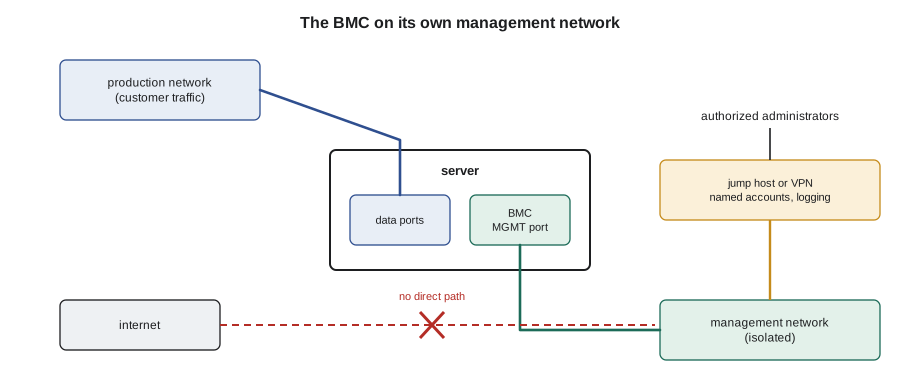
Some servers can share a data port with the BMC to save a cable, a feature called shared or sideband management. It is convenient, but it puts the BMC on the same network as the customer's traffic, and most security standards and Stonebridge's own cabling standard call for the dedicated port instead. When Jamal cables a new server, the MGMT port goes to the management switch, labeled and documented, every time.
IPMI
The Intelligent Platform Management Interface, IPMI, is the older standard for talking to BMCs. It was published in several versions, the last major one being IPMI 2.0, and is supported by almost every server in Hall A. Its most familiar tool is a command-line program that can read sensors, read the system event log, and send power commands. Technicians meet IPMI mostly through its event log, the SEL, which lesson 10 covers.
IPMI was designed when management networks were assumed to be private and trusted, and its network protocol has weaknesses that are well documented. It is no longer being developed. Security guidance from vendors and governments recommends disabling IPMI over the network, IPMI over LAN, where the newer Redfish interface is available, and never exposing either to the internet. Stonebridge's baseline turns IPMI over LAN off on every BMC it manages and asks customers to do the same on theirs.
Redfish
Redfish is the modern standard, published by the DMTF, an industry standards body. It uses the same technologies as web services: requests over HTTPS and responses in JSON, a plain text format that both people and programs can read. The DMTF publishes Redfish releases several times a year, adding new kinds of hardware; its 2025.4 release, published in January 2026, included the Redfish specification version 1.23.1.
Every resource in a Redfish system has an address. A server's main record lives at an address such as /redfish/v1/Systems/1, its chassis with fans and power at /redfish/v1/Chassis/1, and its BMC at /redfish/v1/Managers/1. A monitoring system can read these every minute from thousands of servers and raise alerts when any reports a problem. Each part's record has a Status block with a State and a Health field, and a HealthRollup that summarizes the health of everything below it.
# Reading health from a Redfish response (sample JSON saved from a BMC)
import json
sample = """{"Id": "1", "Name": "System", "PowerState": "On", "Status": {"State": "Enabled", "Health": "Critical", "HealthRollup": "Critical"},
 "Model": "GX-4200", "SerialNumber": "D3C7-0712",
 "Thermal": {"Fans": [{"Name": "Fan 3", "Reading": 0, "Status": {"Health": "Critical"}}, {"Name": "Fan 4", "Reading": 11200, "Status": {"Health": "OK"}}]},
 "Memory": [{"Id": "DIMM_B4", "Status": {"Health": "OK"}}, {"Id": "DIMM_C2", "Status": {"Health": "OK"}, "CorrectableECCErrorCount": 4120}]}"""
d = json.loads(sample)
print(f"{d['Model']} {d['SerialNumber']}: power {d['PowerState']}, health {d['Status']['Health']}")
for fan in d["Thermal"]["Fans"]:
    if fan["Status"]["Health"] != "OK":
        print(f"  {fan['Name']}: {fan['Reading']} RPM, health {fan['Status']['Health']}")
for m in d["Memory"]:
    ce = m.get("CorrectableECCErrorCount", 0)
    if m["Status"]["Health"] != "OK" or ce > 1000:
print(f" {m['Id']}: health {m['Status']['Health']}, but {ce} corrected errors: open a ticket to watch or replace")GX-4200 D3C7-0712: power On, health Critical Fan 3: 0 RPM, health Critical DIMM_C2: health OK, but 4120 corrected errors: open a ticket to watch or replace
The sample is the kind of response the monitoring system collects. The system's overall health is critical because fan 3 reads 0 RPM. A memory module still reports OK, but its corrected error count is high enough to watch. The technician does not normally write Redfish queries; the monitoring system and the customer's tools do. But being able to read a response, and to see which part is the cause of a rolled-up alert, makes the ticket far quicker to work.
Redfish also has an event service, which pushes alerts to subscribers as they happen, instead of waiting to be asked. Customers in Halls B and C subscribe their own monitoring to their servers' events; Stonebridge's monitoring subscribes to the BMCs it manages under contract.
What a technician uses the BMC for
In Stonebridge's halls, technicians use BMCs in a few specific ways, always within the customer's runbook:
- Identifying a server: the customer or the monitoring system turns on the locate light; the technician finds the blinking server.
- Reading status at the rack: many servers have a small front display or LED panel showing the BMC's status, and some can be reached with a laptop through a front service port.
- Confirming a repair: after replacing a part, the technician or the customer checks that the BMC sees it and reports it healthy.
- Watching the console: for some customers, the technician connects a crash cart to the server's video port, or watches the BMC console, while the customer reboots it.
- Collecting logs: exporting the event log or a support bundle for the vendor, under the ticket.
Technicians do not change BMC settings, user accounts or network addresses unless a written procedure for that customer tells them to. The BMC can do almost anything to a server, including erasing its disks or changing its firmware, and access to it is therefore restricted to the people who need it.
Securing the BMC
Because a BMC can power servers off, change their firmware and see their consoles, an attacker who gains access to one has a great deal of control. Data centers therefore treat BMCs as some of the most sensitive devices they manage. The defensive practices, which Stonebridge follows and recommends to customers, are well established:
- Change default passwords before a server is connected, and use a unique password for each BMC, stored in the customer's password vault.
- Use named accounts for each administrator rather than a shared account, so that every action can be traced to a person.
- Keep BMCs on the isolated management network only, never on a customer data network or the internet.
- Turn off services that are not needed, such as IPMI over LAN and old protocols, and allow HTTPS only.
- Keep BMC firmware at the vendor's current approved version, because vendors fix security problems in firmware updates (lesson 8).
- Log all access to BMCs and review the logs.
- Limit who can physically reach the front service ports, which is one of the reasons for locked cabinets and cages.
# A BMC hardening check against the site standard (defensive configuration audit)
standard = {"default_password_changed": True, "on_mgmt_network_only": True, "ipmi_over_lan": False,
            "https_only": True, "firmware_at_baseline": True, "accounts_named_not_shared": True}
bmcs = {
    "A31-03-U22": {"default_password_changed": True, "on_mgmt_network_only": True, "ipmi_over_lan": False,
                   "https_only": True, "firmware_at_baseline": True, "accounts_named_not_shared": True},
    "D3-07-T11": {"default_password_changed": True, "on_mgmt_network_only": True, "ipmi_over_lan": True,
                  "https_only": True, "firmware_at_baseline": False, "accounts_named_not_shared": True},
}
for host, cfg in bmcs.items():
    gaps = [k.replace("_", " ") for k, want in standard.items() if cfg.get(k) != want]
print(f"{host}: {'meets standard' if not gaps else 'gaps -> ' + '; '.join(gaps)}")A31-03-U22: meets standard D3-07-T11: gaps -> ipmi over lan; firmware at baseline
The audit compares each BMC against the site standard. The server in cage A-31 meets it. The GPU tray in rack D-3-07 has IPMI over LAN still enabled and BMC firmware behind the baseline; Jamal raises a ticket for Carmen's team, who own that configuration, to correct both in the next maintenance window. Finding such gaps and reporting them is the technician's role; changing the customer's configuration is not.
Crash carts and front-panel access
When a server's BMC is unreachable, or the customer wants a technician to watch the screen directly, Stonebridge uses a crash cart: a small trolley with a monitor, keyboard and mouse that plug into the server's video and USB ports. Some sites use a small portable device that does the same job through a laptop. The technician connects it only when the ticket asks, watches or types what the customer tells them, takes photos of what the screen shows, and disconnects it when the work is done.
Typing into a customer's console is a responsibility. Stonebridge's rule is that a technician types only what the customer dictates, reads it back before pressing Enter, and never enters a password the customer reads out loud in a shared space; instead, the customer sets a temporary password or types remotely through the BMC console.
Worked problem
A server that will not power on remotely
A Hall A customer reports that their server at unit 18 in rack A-27-02 does not respond to power commands through its BMC, and the BMC's web page will not load. They ask Stonebridge to check the server.
Show solution
- At the rack, confirm the asset tag. The server's front LEDs are all off, including the BMC's heartbeat LED.
- Check the power cords: both are plugged into the server, but at the PDU end, the cord for PSU2 is in an outlet that shows no power on the PDU display, and PSU1's cord is loose in its socket.
- With the customer's agreement, push PSU1's cord fully home and fasten its retention clip. The BMC's heartbeat LED starts blinking after a minute.
- The customer can now reach the BMC and powers on the server. Raise a separate ticket for the dead PDU outlet.
- Photograph and record both findings.
Answer: The BMC needs power from the PDU like everything else. When a BMC is unreachable, start with the basics at the rack: power, cables and LEDs, before suspecting the controller itself.
Support bundles and what not to share
When a vendor investigates a hardware fault, it usually asks for a support bundle: a file the BMC creates containing its event log, sensor history, inventory, firmware versions and configuration. Customers sometimes ask Stonebridge technicians to export one through the BMC or a front service port and attach it to their support case. The bundle can also contain information the customer may consider sensitive, such as network addresses and account names. Stonebridge's rule is that a technician exports a bundle only when the ticket asks, saves it only to the location the customer's procedure names, and never sends it to anyone, including the vendor, directly; the customer attaches it to their own case.
The same caution applies to screenshots of BMC pages and consoles. A photo of a console screen in a ticket is useful evidence; a photo that also shows a password, an encryption key or a customer's data on the screen is not. Technicians check what is in the frame before they take the picture.
Common mistakes
MistakeConnecting a server's BMC to a customer data port or the internet.
InsteadConnect the MGMT port to the isolated management network only.
MistakeLeaving default BMC passwords in place.
InsteadChange them before the server goes live, and use unique, stored passwords.
MistakeChanging a customer's BMC settings to fix a problem.
InsteadReport it; change settings only under the customer's written procedure.
MistakeTyping a password read out loud by a customer.
InsteadAsk the customer to type it through the remote console or set a temporary one.
MistakeAssuming an unreachable BMC means a failed board.
InsteadCheck power cords, PDU outlets and the management cable first.
Summary and key terms
- The BMC gives out-of-band control: power, sensors, logs, console, virtual media and inventory.
- BMCs belong on an isolated management network reached only through controlled entry points.
- IPMI is the older interface, no longer developed; IPMI over LAN should be disabled where possible.
- Redfish uses HTTPS and JSON; each part reports a Status with State and Health.
- Technicians use BMCs to identify servers, confirm repairs and collect logs, within the runbook.
- BMC security: unique passwords, named accounts, isolated network, minimal services, current firmware, logging.
- Out-of-band
- Management access that does not depend on the server's main operating system or data network.
- IPMI
- Intelligent Platform Management Interface: the older standard for BMC management.
- Redfish
- The DMTF's modern management standard using HTTPS and JSON.
- SEL
- System event log: the BMC's record of hardware events.
- Management network
- An isolated network used only for BMCs and other management interfaces.
- Crash cart
- A cart with a monitor and keyboard for direct console access to a server.
Practice problems
Work each problem on paper first, then reveal the answer to check.
Why does the BMC keep working when the server's operating system has crashed?
Show answer
It is a separate computer with its own processor and firmware, powered whenever the server has power.
Name three BMC hardening practices.
Show answer
Any three: unique passwords, named accounts, isolated management network, disable unused services such as IPMI over LAN, current firmware, logging.
In a Redfish response, what does HealthRollup show?
Show answer
A summary of the health of the resource and everything below it.
A BMC cannot be reached and the server's LEDs are all off. What do you check first?
Show answer
Power: the cords, their retention, and the PDU outlets.
Lesson quiz · 5 questions
Score 60% or more to complete this lesson.
Create a free account to save your progress, take quizzes and earn a certificate.