
DCT-310 · Lesson 3 of 12 · 20 min
GPUs and accelerators for AI
Hall D looks different from the other halls. The racks are taller and deeper, the floor is solid concrete rather than raised tiles, and every rack has pairs of coolant hoses running to its trays. Carmen Ortiz, Corvid AI's site lead, meets Jamal and Roz at rack D-3-07, the rack Jamal helped install last term. "Each tray in here is worth more than a car," she says. "When one drops out, a training job that uses thousands of GPUs slows down or stops. That's why we call you at two in the morning." This lesson explains what GPUs and other accelerators are, how AI servers and racks are built, how they connect to each other, and what a technician watches for when working on them.
Why accelerators
A CPU is built to run many different kinds of work, switching quickly from task to task. Training and running large AI models needs something different: the same mathematical operations, mostly multiplying large tables of numbers called matrices, repeated billions of times. A graphics processing unit, GPU, has thousands of small cores that do exactly that kind of arithmetic in parallel, and very fast memory stacked beside the chip to feed them.
GPUs are the most common accelerators, but not the only ones. Some cloud providers design their own AI chips, and other vendors build accelerators for specific tasks such as running trained models at low power. They all work in a similar way from the technician's point of view: a large, hot chip with its own memory, mounted on a board, connected to CPUs and to other accelerators by fast links, and cooled by air or liquid.
How AI servers are built
Two common designs are found in Hall D and in many AI data centers:
- An eight-GPU server: a large chassis, often 6U to 10U tall, with two CPUs on one board and eight GPUs on a separate baseboard. The GPUs on the baseboard connect to each other through switch chips on the same board, so any GPU can talk to any other at full speed. Each GPU also has its own high-speed network card for talking to GPUs in other servers.
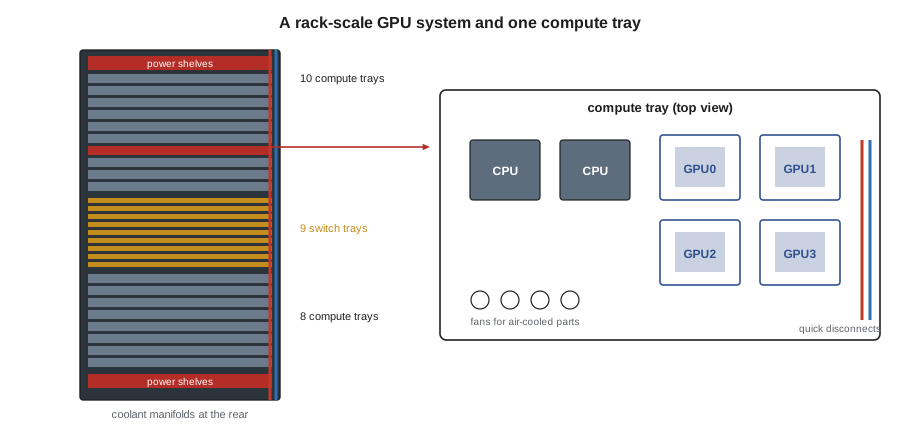
- A rack-scale system: the rack itself is the unit. Compute trays, each holding CPUs and GPUs, slide into the rack, and separate switch trays in the middle of the rack link every GPU in the rack to every other through a copper spine of cables at the back. Corvid AI's racks in Hall D are of this kind: 18 compute trays with two CPUs and four GPUs each, 72 GPUs in all, linked by 9 switch trays.
# A GPU rack at a glance: trays, GPUs and power (rounded, illustrative values for a 72-GPU rack)
compute_trays, gpus_per_tray, cpus_per_tray = 18, 4, 2
switch_trays = 9
rack_kw = 132
print(f"GPUs in the rack: {compute_trays * gpus_per_tray}, CPUs: {compute_trays * cpus_per_tray}")
print(f"Trays to manage: {compute_trays} compute + {switch_trays} switch = {compute_trays + switch_trays}")
print(f"Average power per compute tray if switches take 8 %: {rack_kw * 0.92 / compute_trays:.1f} kW")
for gpus_down in (1, 4):
print(f"{gpus_down} GPU(s) out of service: {gpus_down / (compute_trays * gpus_per_tray) * 100:.1f} % of the rack's GPUs")GPUs in the rack: 72, CPUs: 36 Trays to manage: 18 compute + 9 switch = 27 Average power per compute tray if switches take 8 %: 6.7 kW 1 GPU(s) out of service: 1.4 % of the rack's GPUs 4 GPU(s) out of service: 5.6 % of the rack's GPUs
With 27 trays in a rack and 60 racks in the hall, Hall D has more than 1,600 trays to track. The compute trays are where most hardware tickets land: GPUs that drop off, memory errors, failed fans in the small air-cooled parts of the tray, and leaking coolant fittings. Switch trays and power shelves fail less often, but when they do, they can take many compute trays with them.
GPU memory and errors
Each GPU has its own memory, called high-bandwidth memory, HBM, in stacks placed beside the GPU chip in the same package. It is far faster than server memory and is protected by ECC in the same way. A GPU that develops memory problems usually shows a rising count of corrected errors first. Modern GPUs can also retire or remap bad rows of memory on their own, recording each event, so that a few bad cells do not take the whole GPU out of service.
An uncorrected memory error is more serious. The job running on that GPU usually fails, and the GPU may need a reset before it can be used again. A GPU that keeps producing uncorrected errors, or that runs out of spare rows to remap, goes back to the vendor. The customer's software usually decides when a GPU is unhealthy; the technician sees the result as a ticket to drain, reseat or replace a tray.
def show(t): return f"{t * 1.8 + 32:.0f} F"
# Reading a GPU health report (sample values from a node's monitoring agent)
gpus = [  # (index, temperature C, power W, corrected memory errors, uncorrected errors, link up)
    (0, 61, 980, 0, 0, True), (1, 63, 1010, 2, 0, True),
    (2, 58, 420, 0, 0, False), (3, 64, 995, 410, 0, True),
]
for i, t, p, ce, ue, up in gpus:
    flags = []
    if not up: flags.append("link down: GPU not seen on its bus")
    if ue: flags.append("uncorrected memory error")
    if ce > 100: flags.append("many corrected memory errors: watch trend")
    if t > 85: flags.append("hot")
print(f"GPU {i}: {show(t)}, {p} W -> {'; '.join(flags) if flags else 'healthy'}")GPU 0: 142 F, 980 W -> healthy GPU 1: 145 F, 1010 W -> healthy GPU 2: 136 F, 420 W -> link down: GPU not seen on its bus GPU 3: 147 F, 995 W -> many corrected memory errors: watch trend
The report above is typical of what Carmen's team sends with a ticket. GPU 2 is not seen on its bus at all: it has dropped out, a fault the industry often calls a GPU "falling off the bus". GPU 3 is still working but has a high count of corrected memory errors. The first needs action now; the second needs watching. Lesson 10 shows how such codes are read.
Links between GPUs
A single GPU can do a great deal, but large AI models are trained across hundreds or thousands of them working together. They spend much of their time exchanging results, so the links between them matter as much as the GPUs themselves. There are three levels:
- Inside a server or rack, GPUs connect through a vendor's high-speed GPU interconnect, such as NVLink, often through switch chips or switch trays. These links run at many times the speed of PCIe.
- Between servers or racks, each GPU usually has its own network card, at 400 or 800 gigabits per second, connected to a dedicated AI network built from InfiniBand or Ethernet switches. This back-end network is separate from the ordinary front-end network the servers use for storage and management.
- To the CPU and local devices, each GPU connects over PCIe or a vendor's CPU-to-GPU link.
For the technician, this means a GPU tray has many more cables and connectors than a normal server, and a fault in any of them can look like a GPU fault. A single optical cable with a dirty connector, a network card that trained at a lower speed, or a loose connection at the copper spine can slow down a job across the whole cluster. DCT-210 covers the cabling and DCT-320 the network; this course concentrates on the trays.
Power and cooling of GPU trays
Each current GPU can draw around a kilowatt, and a compute tray several kilowatts. Power reaches the trays from power shelves in the rack, which convert the incoming AC supply to a DC busbar at the back of the rack. Each tray connects to the busbar when it slides in. That makes removing a tray simpler than unplugging cords, but it also means the busbar is live while trays are inserted and removed, so the procedure for sliding trays in and out must be followed exactly, with the tray powered off by the customer first.
The GPUs and CPUs are cooled by cold plates through which liquid flows, fed from the rack manifolds by quick-disconnect fittings on hoses. Smaller parts in the tray, such as memory, network cards and power converters, are still cooled by air from small fans. DCT-230 covered how the liquid system works; for tray work, the important points are:
- Before a tray is pulled, the quick disconnects are released in the order the procedure gives, with an absorbent pad underneath. The fittings are designed to seal when disconnected, but a few drops are normal.
- A tray must never be pulled with its hoses still connected; the hoses or fittings can be torn.
- After a tray is reinserted and reconnected, the procedure checks for leaks and confirms coolant flow before the customer powers it on.
- A GPU that overheats while its neighbors stay cool may have an air pocket in its cold plate, a partly closed valve, or a failed fan on the air-cooled parts of its tray.
Handling GPU hardware
GPU trays and baseboards are heavy, expensive and sensitive. Stonebridge's procedures for Hall D add rules beyond those for ordinary servers:
- Trays are moved only on the tray handling cart, never carried by one person, and the cart's height is set to the tray slot before sliding.
- The customer drains the tray first: its jobs are moved off, it is removed from the cluster, and it is powered down. The technician confirms this in the ticket and on the tray's status LED before touching it.
- Antistatic precautions apply as for any server, with extra care around the exposed connectors at the back of the tray.
- Parts inside a tray, such as an individual GPU or its cold plate, are usually not field-replaceable by the site technician. The unit of replacement is often the whole tray, which goes back to the vendor under an RMA (lesson 11).
- Photographs of the tray's labels, LEDs and connectors are taken before and after any work, because the vendor and the customer will ask for them.
Other accelerators and smart NICs
Not every accelerator does AI work. Some servers carry cards that offload other tasks from the CPU:
- Data processing units, DPUs, or smart network cards run networking, storage and security functions on the card itself, so the CPU is free for the customer's work. Cloud providers use them widely.
- Storage accelerators compress, encrypt or check data on the way to the drives.
- Field-programmable gate arrays, FPGAs, can be reprogrammed for specific tasks, such as financial trading or video processing.
From a hardware point of view these are PCIe cards like any other, and the same rules apply: confirm the slot and the card in the ticket, handle with ESD protection, seat fully and check the link width after replacement.
Worked problem
Two GPUs, two different tickets
Carmen's team sends two tickets for tray T05 in rack D-2-12. One says GPU 1 has had 600 corrected memory errors in a week and asks Stonebridge to note it for the next maintenance window. The other, an hour later, says GPU 3 in tray T14 of the same rack has fallen off the bus and asks for an urgent reseat.
Show solution
- The first ticket is informational: the GPU is still working, and Corvid AI's software will decide when to retire it. Record it and schedule it for the maintenance window.
- The second is urgent. Confirm in the ticket that T14 has been drained and powered off.
- At the rack, confirm the tray label and serial, and check the tray LED shows it powered off.
- Release the quick disconnects with a pad in place, slide the tray out on the cart, inspect the GPU 3 connectors and cold plate fittings, and reseat the tray as the procedure says.
- Reconnect the hoses, check for leaks, and tell Carmen's team it is ready for power-on and testing.
Answer: Not every GPU problem is urgent. A rising count of corrected errors is something to watch; a GPU that has dropped off its bus is something to act on now. Reading the ticket carefully tells the technician which is which.
Common mistakes
MistakePulling a GPU tray that the customer has not drained.
InsteadConfirm in the ticket and on the tray LED that it has been drained and powered off.
MistakeDisconnecting coolant hoses in any order.
InsteadFollow the procedure's order, with an absorbent pad, and never pull a tray with hoses connected.
MistakeCarrying a GPU tray by hand.
InsteadUse the tray handling cart set to the slot height.
MistakeTreating every GPU memory error as urgent.
InsteadCorrected errors are watched; uncorrected errors and dropped GPUs need action.
MistakeAssuming the GPU is at fault when a job slows down.
InsteadCables, network cards and links can cause the same symptoms.
Summary and key terms
- GPUs run the massively parallel arithmetic AI needs, using thousands of cores and fast stacked memory.
- AI servers come as eight-GPU chassis or rack-scale systems of compute and switch trays.
- GPU memory has ECC and can remap bad rows; uncorrected errors and dropped GPUs need action.
- GPUs connect to each other through fast GPU links and to other servers through a separate back-end network.
- GPU trays are liquid cooled, fed from a rack busbar, and must be drained before removal.
- The usual unit of replacement is the whole tray, returned to the vendor.
- GPU
- Graphics processing unit: a processor with thousands of cores for parallel arithmetic.
- HBM
- High-bandwidth memory stacked beside a GPU chip.
- NVLink
- A high-speed link between NVIDIA GPUs and their switches.
- Back-end network
- The dedicated network that links GPUs in different servers for AI work.
- Drain
- To move a customer's work off a server or tray so it can be taken out of service.
- DPU
- Data processing unit: a network card with its own processors that offloads work from the CPU.
Practice problems
Work each problem on paper first, then reveal the answer to check.
What does it mean when a GPU "falls off the bus"?
Show answer
The system can no longer see the GPU on its connection; it has dropped out and needs action.
In a 72-GPU rack, what share of the GPUs does one failed compute tray take out?
Show answer
Four of 72, about 5.6 percent.
Why must a GPU tray be drained before it is pulled?
Show answer
The customer's jobs must be moved off and the tray powered down so that work is not lost and the hardware is safe to handle.
Name two non-GPU faults that can slow a GPU cluster.
Show answer
Any two: a dirty optical connector, a network card at lower speed, a loose link at the switch spine, a degraded switch tray.
Lesson quiz · 5 questions
Score 60% or more to complete this lesson.
Create a free account to save your progress, take quizzes and earn a certificate.