
DCT-310 · Lesson 2 of 12 · 20 min
Server architecture: CPUs, memory and buses
On Tuesday Roz takes Jamal to the training bench in the operations room, where a retired two-socket server from Hall A sits with its lid off. "Before you replace anything in a customer's server, you should be able to point at every part and say what it does," she says, handing him a flashlight. "When the BMC says DIMM C2 or PCIe slot 4, you need to find it in the dark, in a cabinet, with the customer on the phone." This lesson takes a server apart, part by part: the motherboard, the processors, the memory, the expansion buses and the connections between them, and explains what each means for a technician's work.
The motherboard
Everything in a server connects to its main circuit board, the motherboard or system board. On a typical two-socket rack server, looking down from above with the front of the server toward you, the layout is:
- Drive bays and their backplane at the front, a board that connects the drives to the rest of the system.
- A row of fans behind the drives, pulling air from front to back.
- Two processor sockets in the middle, each under a large heat sink or a cold plate.
- Memory slots on both sides of each socket, in long rows.
- Expansion slots, called PCIe slots, toward the back, often on riser cards that hold cards horizontally.
- Power supplies at the back corners, and network, management and video ports on the rear panel.
- The BMC chip and its own small memory and network port somewhere on the board, along with a battery for the system clock.
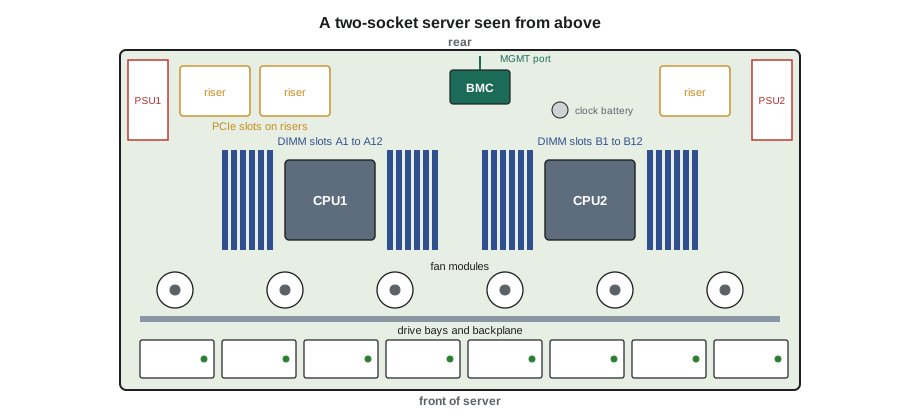
Every slot and connector has a printed label on the board, and most servers have a service label on the inside of the lid showing the layout, the memory population rules and the order for removing parts. Roz insists that Jamal read the lid label before touching anything. The names the BMC uses in its logs, such as CPU2, DIMM_B4 or PCIe slot 3, match those labels.
Processors
The central processing unit, CPU, runs the server's software. Server CPUs come mainly from two vendors in x86 servers, with Arm-based server processors now common in cloud halls and in GPU systems. A modern server CPU contains dozens of cores, each able to run its own work, along with memory controllers and PCIe controllers built into the same package.
Two-socket servers have two CPUs connected by high-speed links, so that each can reach the memory and devices attached to the other. Single-socket servers are common where a single large CPU has enough cores. For a technician, a few CPU facts matter:
- CPUs sit in a socket with hundreds or thousands of fine pins or contacts. A bent pin in a socket can make a server fail to boot or lose memory channels. CPU replacement is a careful, tool-guided job done only when a procedure calls for it, often by the vendor's field engineer.
- A CPU is cooled by a heat sink or a liquid cold plate pressed onto it with thermal interface material. If a heat sink is removed, the material must be replaced as the procedure says; reusing dried paste can overheat the CPU.
- Server CPUs are matched in pairs. A two-socket server needs two identical processors; mixing models or steppings is not supported.
- Each CPU has its own memory channels and its own PCIe lanes. A failed CPU, or a bent socket pin, takes its memory and cards out with it.
Memory
Server memory comes as dual in-line memory modules, DIMMs, plugged into slots next to the CPUs. Current servers use DDR5 memory; older ones in Hall A still use DDR4. The two are keyed differently and cannot be swapped.
Server DIMMs differ from desktop memory in two ways. They are registered, RDIMMs, with a buffer chip that lets more modules share a channel. And they use error-correcting code, ECC, which adds extra bits to every word so that a single-bit error is detected and corrected on the fly, and most multi-bit errors are at least detected. ECC is why one flaky memory chip usually shows up as a growing count of corrected errors in the logs rather than as a crash, and why a technician can often replace a module before it causes trouble.
Each CPU has several memory channels, commonly eight or twelve on current platforms, and each channel has one or two slots. The vendor's population rules say which slots to fill for a given number of modules. The rules matter because memory bandwidth depends on all channels being used evenly. A server with uneven channels still runs, but slower, and some platforms refuse to boot with certain mixes.
# Checking a memory configuration: channels, DIMMs per channel and capacity
sockets = 2
channels_per_socket = 12          # a current two-socket DDR5 server platform
slots_per_channel = 2
dimm_gb = 64
installed = {0: [2]*12, 1: [2]*10 + [1, 1]}   # DIMMs in each channel, per socket

for s, chans in installed.items():
    uneven = len(set(chans)) > 1
    cap = sum(chans) * dimm_gb
    print(f"Socket {s}: {sum(chans)} DIMMs, {cap} GB, {'UNBALANCED channels' if uneven else 'balanced'}")
total = sum(sum(c) for c in installed.values()) * dimm_gb
print(f"Total memory: {total} GB of a possible {sockets * channels_per_socket * slots_per_channel * dimm_gb} GB")
print("Balanced population (same DIMMs in every channel) gives full memory bandwidth.")Socket 0: 24 DIMMs, 1536 GB, balanced Socket 1: 22 DIMMs, 1408 GB, UNBALANCED channels Total memory: 2944 GB of a possible 3072 GB Balanced population (same DIMMs in every channel) gives full memory bandwidth.
The check shows a typical result after a rushed repair: socket 1 has two channels with one module instead of two. The server boots and reports 2,944 GB instead of 3,072 GB, and its memory bandwidth on socket 1 is lower. Somebody either removed two modules and did not replace them, or installed the replacements in the wrong slots. Before closing a memory ticket, Jamal compares the BMC's memory inventory with the expected configuration in the customer's runbook.
Memory slot names follow the vendor's scheme, such as A1 to A12 for socket 1 and B1 to B12 for socket 2, or channel letters with slot numbers. The BMC log names the failing module the same way, and the lid label shows where it is. Modules must be handled by their edges, inserted straight and pressed until both latches close; a module seated at an angle is a common cause of a server that will not start after a repair.
PCIe: the expansion bus
Network cards, storage controllers, NVMe drives and GPUs connect to the CPUs over PCI Express, PCIe. A PCIe link is made of lanes, each a pair of signal pairs in each direction. A slot or device may use 1, 4, 8 or 16 lanes, written x1, x4, x8 or x16. Each generation of PCIe has doubled the speed per lane:
# PCIe bandwidth per direction by generation and lane count (before protocol overhead)
gt_per_lane = {"3.0": 8, "4.0": 16, "5.0": 32, "6.0": 64, "7.0": 128}
for gen, gt in gt_per_lane.items():
    gbps_lane = gt / 8 * (128 / 130 if gen in ("3.0", "4.0", "5.0") else 1)
    print(f"PCIe {gen}: x1 about {gbps_lane:5.1f} GB/s, x16 about {gbps_lane * 16:6.1f} GB/s each way")
print("A card that trained at x8 instead of x16 gets half the bandwidth: check the link width.")PCIe 3.0: x1 about 1.0 GB/s, x16 about 15.8 GB/s each way PCIe 4.0: x1 about 2.0 GB/s, x16 about 31.5 GB/s each way PCIe 5.0: x1 about 3.9 GB/s, x16 about 63.0 GB/s each way PCIe 6.0: x1 about 8.0 GB/s, x16 about 128.0 GB/s each way PCIe 7.0: x1 about 16.0 GB/s, x16 about 256.0 GB/s each way A card that trained at x8 instead of x16 gets half the bandwidth: check the link width.
PCIe 5.0 is common in current servers. PCIe 6.0 doubles it again and began appearing in AI systems; the PCIe 7.0 specification was finalized in 2025. A device and a slot negotiate the fastest generation and the widest link they both support, a process called link training. When something is wrong, such as a card not fully seated, a damaged riser or a dirty contact, the link may train at a lower width or speed. The server works, but the device runs slower. The BMC and the operating system both report the trained width and speed, and a mismatch, a x16 card that trained at x8, is a common clue in performance complaints.
In GPU servers PCIe is only part of the picture. GPUs connect to each other through much faster links of their own, such as NVLink, through switch chips or switch trays, and to the network through high-speed network cards. Lesson 3 covers these.
Riser cards, backplanes and cables
Between the motherboard and the cards and drives sit several boards and cables that fail more often than people expect:
- Riser cards turn a slot sideways so that full-height cards fit in a 1U or 2U server. A riser that is not fully seated, or one with a cracked connector, can make the cards in it disappear.
- The drive backplane connects the front drive bays to the storage controller or to the CPUs. A faulty backplane can make several drives in a row look failed when they are healthy.
- Internal cables carry PCIe or SAS signals between boards. Modern servers route many high-speed cables inside, and a cable pinched by the lid or pulled loose during another repair causes faults that look like failed cards or drives.
When several components that share a riser, backplane or cable fail at the same time, the shared part is the more likely culprit. Jamal learns to ask what a group of failures has in common before replacing each part in turn.
Boot and the system firmware
When a server powers on, its firmware, the UEFI or older BIOS, tests the hardware, initializes memory and devices, and then hands over to the operating system. This power-on self test can take several minutes on a large server, most of it spent training memory. A server that sits on a blank screen for three minutes is often just training a terabyte or more of memory, not hung.
During boot the firmware writes progress codes and errors to the BMC's log, and many servers show a code on a small display or LED panel. A server that stops at the same code every time is pointing at the part that failed its test. Lesson 8 covers firmware updates and lesson 10 covers reading these codes.
Worked problem
Missing memory after a repair
A ticket from the cloud provider in Hall B asks Jamal to replace DIMM_B4 in server B-07-15, which the provider's monitoring shows with a rising count of corrected errors. After the swap the server boots, but the BMC shows 1,408 GB on socket 2 instead of 1,536 GB.
Show solution
- Compare the BMC memory inventory with the expected configuration: 12 channels, 2 modules each, 64 GB modules, 1,536 GB per socket.
- The inventory shows slots B4 and B10 empty. B10 was not part of the ticket.
- Open the server again under the same ticket after telling the customer. Module B10 is in the server, but seated at an angle: one latch is closed, the other is open.
- Reseat it straight until both latches close; reseat the new B4 module too to be sure.
- Boot: the inventory now shows 1,536 GB, and the provider's monitoring confirms.
Answer: Opening a server to replace one part can disturb others. Checking the full inventory against the expected configuration before closing the ticket catches it the same day, not after the customer's next complaint.
Reading the inventory before and after
Every server's BMC keeps a hardware inventory: each processor's model and stepping, each memory module's slot, size, speed and serial, each PCIe device and the slot it is in, and the firmware version of each part. Stonebridge's procedure for any job that opens a server is to save the inventory before the work and compare it with the inventory after. The comparison shows at once whether a module has gone missing, a card has moved slots, or a part has come back at a lower speed than before. It also gives the customer a record of exactly which serial numbers left the server and which went in.
For the cloud provider in Halls B and C, the inventory comparison is automatic: their software reads the server through Redfish when it returns to service and refuses to put it back into production if anything differs from the expected configuration for that model. Jamal's tickets there often end with a note from the provider's system saying the server passed its checks, which is the provider's way of closing the loop.
Common mistakes
MistakeReusing old thermal paste after lifting a heat sink.
InsteadClean and apply new thermal interface material as the procedure says.
MistakeInstalling DIMMs in any free slots.
InsteadFollow the population rules on the lid label for the number of modules.
MistakeReplacing each card in turn when several fail together.
InsteadLook first at the shared riser, backplane or cable.
MistakeAssuming a slow boot means a hung server.
InsteadLarge servers spend minutes training memory; watch the progress codes.
MistakeIgnoring a link that trained at lower width.
InsteadReport it; it usually means a seating or riser problem.
Summary and key terms
- The motherboard connects drives, fans, CPUs, memory, expansion slots, power supplies and the BMC.
- Server CPUs come in matched pairs in two-socket servers; each CPU owns its memory channels and PCIe lanes.
- Server memory is registered ECC DDR4 or DDR5; follow the population rules for full bandwidth.
- PCIe links are made of lanes; each generation doubles the speed per lane, and links can train lower if something is wrong.
- Risers, backplanes and internal cables are common, overlooked causes of faults.
- Firmware tests the hardware at boot and logs progress codes to the BMC.
- DIMM
- A memory module plugged into a slot next to the CPU.
- ECC
- Error-correcting code: extra memory bits that detect and correct errors.
- RDIMM
- Registered DIMM: a memory module with a buffer chip, used in servers.
- PCIe
- PCI Express: the serial expansion bus that connects cards, drives and GPUs to the CPU.
- Lane
- One pair of transmit and receive signal pairs in a PCIe link.
- Riser card
- A board that holds expansion cards at an angle to the motherboard.
Practice problems
Work each problem on paper first, then reveal the answer to check.
Why does a single failing memory chip usually not crash a server?
Show answer
ECC corrects single-bit errors and logs them, so the problem shows as a growing count of corrected errors.
A x16 GPU reports a link width of x8. What does that suggest?
Show answer
A seating, riser or contact problem; the device runs at half its bandwidth.
After a repair, a server reports less memory than expected. What do you check first?
Show answer
The BMC's memory inventory against the expected configuration, to find empty or unseated slots.
Why must both CPUs in a two-socket server be the same model?
Show answer
Mixing CPU models is not supported; the platform needs matched processors.
Lesson quiz · 5 questions
Score 60% or more to complete this lesson.
Create a free account to save your progress, take quizzes and earn a certificate.