
DCT-310 · Lesson 1 of 12 · 21 min
Servers in the data center
Jamal Pierce has spent his first months at Stonebridge Data learning the building: how power reaches the racks, how cold air or coolant reaches the equipment, how the halls are laid out and how to work safely in them. This term the focus moves inside the cabinet. IAD-3 hosts thousands of servers that belong to customers, and many of the tickets that reach the shift are about those machines: a drive with an amber light, a server that will not power on, a GPU tray that dropped out of its cluster at two in the morning. "Facilities keep the room alive," Roz Kerr tells him on the first morning. "Remote hands keep the customer's hardware alive. You'll do both." This course covers the hardware a data center technician handles every day: what is inside a server, how storage and accelerators work, how servers are managed remotely, how parts are replaced safely, how failures are diagnosed and how faulty parts go back to the vendor.
What a server is
A server is a computer built to run continuously, usually without a screen or keyboard attached, providing a service to other computers over a network. Inside it has the same basic parts as a desktop computer, a processor, memory, storage, a network connection and a power supply, but each is built for reliability, density and remote management rather than for a person sitting in front of it:
- Processors are more powerful and there are often two of them, each in its own socket.
- Memory uses error-correcting modules that detect and fix most memory errors without crashing the machine.
- Power supplies and fans are usually duplicated and can be replaced while the server keeps running.
- Drives sit in front-loading bays and can often be swapped without opening the case.
- A small separate computer on the motherboard, the baseboard management controller or BMC, lets an operator power the server on and off, read its sensors and see its console over the network, even when the main system is off or has crashed.
Servers are mounted in racks measured in rack units, U, of 1.75 in. A 1U server is about 1.75 in tall, a 2U server twice that. DCT-130 covered rails, mounting and rack elevations; this course starts where that one stopped, once the server is in the rack and running.
Kinds of servers in Stonebridge's halls
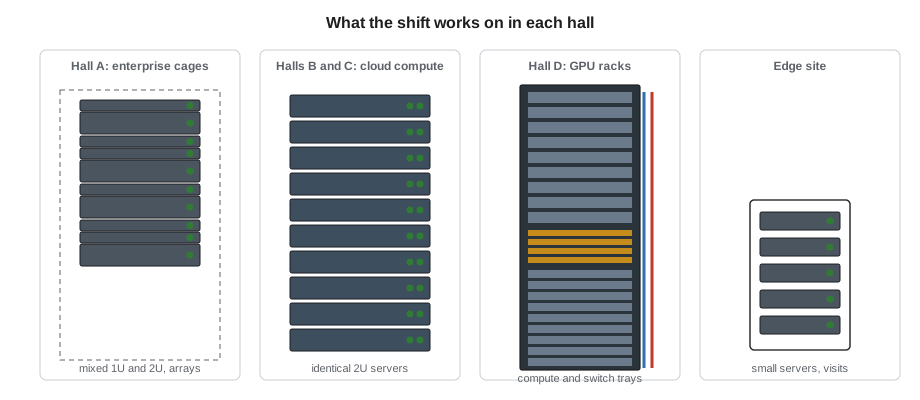
Each hall at IAD-3 holds a different mix of hardware, and the mix shapes the work the shift does there:
- Hall A, the enterprise colocation hall, has cages and cabinets rented by companies such as Bayview Credit Union. Their equipment is mostly 1U and 2U general-purpose servers, a few storage arrays, firewalls and switches. Each customer owns its hardware and decides what may be done to it; Stonebridge technicians act only on tickets the customer has authorized.
- Halls B and C are leased to a cloud provider that installs thousands of identical 2U compute servers. The provider's own staff run the software; Stonebridge's remote hands team replaces drives, memory and power supplies on request, following the provider's procedures and using parts the provider stocks on site.
- Hall D, the liquid-cooled hall, houses Corvid AI's GPU racks. Each rack holds 18 compute trays, each with two CPUs and four GPUs, plus switch trays that link the GPUs together. A single rack draws about 132 kW.
- The edge site has small servers in compact cabinets, maintained on scheduled visits.
# What is installed in Stonebridge's halls: a quick fleet summary by server type
fleet = [  # (hall, server type, count, average power per server in watts)
    ("A", "1U general-purpose", 2900, 350),
    ("A", "2U storage server", 210, 650),
    ("B", "2U cloud compute", 3900, 520),
    ("C", "2U cloud compute", 3650, 540),
    ("D", "GPU compute tray", 1080, 6400),
]
by_hall = {}
for hall, kind, n, w in fleet:
    kw = n * w / 1000
    by_hall[hall] = by_hall.get(hall, 0) + kw
    print(f"Hall {hall}: {n:5d} x {kind:20s} -> {kw:7,.0f} kW")
total = sum(by_hall.values())
for hall, kw in by_hall.items():
    print(f"Hall {hall} share of IT load: {kw / total * 100:5.1f} %")
print(f"Total servers: {sum(r[2] for r in fleet):,}, total IT load about {total:,.0f} kW")Hall A: 2900 x 1U general-purpose -> 1,015 kW Hall A: 210 x 2U storage server -> 136 kW Hall B: 3900 x 2U cloud compute -> 2,028 kW Hall C: 3650 x 2U cloud compute -> 1,971 kW Hall D: 1080 x GPU compute tray -> 6,912 kW Hall A share of IT load: 9.5 % Hall B share of IT load: 16.8 % Hall C share of IT load: 16.3 % Hall D share of IT load: 57.3 % Total servers: 11,740, total IT load about 12,062 kW
The fleet summary shows a pattern that has become common across the industry. Hall D holds about a tenth of the servers but draws well over half the IT power. One GPU tray draws as much as a dozen or more general-purpose servers, costs far more, and its failure stops a far larger share of a customer's work. That is why tickets in Hall D carry the highest priority on the shift's board.
Form factors: rack, blade, tray and sled
Servers come in a few physical forms, and a technician needs to recognize them on sight because the way parts are reached differs for each:
| Form | What it looks like | How parts are reached |
|---|---|---|
| Rack server (1U, 2U, 4U) | A self-contained box with its own power supplies and fans, on rails | Slide out on rails, lift the lid; drives and supplies from front or back |
| Blade server | A thin board that slides into a shared chassis with common power, fans and network | Pull the blade from the chassis; supplies and fans belong to the chassis |
| Multi-node chassis | Two or four small servers sharing one 2U box and its power supplies | Each node slides out the back on its own |
| Open-rack sled or tray | A bare tray in an Open Compute style rack, fed from a busbar at the back | Slide the tray out; power comes from the rack busbar, not a cord |
| GPU compute tray | A tray with CPUs, GPUs and liquid cooling connections in a high-density rack | Slide out after the customer drains it; quick-disconnect coolant fittings |
Many cloud providers use designs based on the Open Compute Project, an industry group that publishes open hardware specifications. Open racks are wider inside than the standard 19 in rack and feed power to the trays through a busbar at the back instead of through cords and PDUs. Technicians working in such halls follow the provider's own training for that hardware.
Who owns what
The most important rule in remote hands work is about ownership, not technology. Stonebridge owns the building, the power, the cooling, the cabinets in some halls and the cross-connects. The customer owns the servers, the drives, the data on them and the software. A technician may touch a customer's hardware only when the customer has asked, through a ticket, for a specific action on a specific device, and only within the customer's instructions.
That rule protects everyone. A technician who pulls the wrong drive from a customer's storage array may destroy data that cannot be recovered. One who powers off the wrong server may stop a bank's payment system. One who opens a server "to have a look" without authorization has breached the customer's contract and possibly their security rules. The remote hands procedures at Stonebridge are built around confirming that the right person has authorized the right action on the right device.
Ike Adeyemi, the security lead, adds a second rule: customer equipment never leaves the hall, and no part goes into or out of a customer's cage, without a ticket and a record. Drives in particular hold customer data. A failed drive that leaves the building in a technician's pocket is a data breach, whatever the intention.
The remote hands request
Most hardware work begins with a remote hands ticket. The customer's staff, who may be in another city or another country, cannot see the server; the technician is their eyes and hands. A good request contains:
- The ticket number and the customer's name.
- The exact location: site, hall, row, rack and rack unit.
- The device's asset tag and serial number, so the technician can confirm it is the right machine.
- The task, written as specific actions: "reseat the drive in bay 5", not "fix the storage".
- The name of the person who authorized the work and how to reach them during it.
- The time window, and whether the server is already shut down or the customer will shut it down first.
# Turning a customer's remote hands request into the facts a technician needs before touching anything
request = {
    "ticket": "RH-48211", "customer": "Bayview Credit Union", "location": "IAD3-A31-03",
    "asset_tag": "SB-A31-03-U22", "serial": "7TQ4K52",
    "task": "Reseat drive in bay 5; confirm amber fault LED clears",
    "authorized_by": "J. Okafor (customer on-call)", "window": "now",
}
required = ["ticket", "customer", "location", "asset_tag", "serial", "task", "authorized_by"]
missing = [k for k in required if not request.get(k)]
print("Missing fields:", ", ".join(missing) if missing else "none")
row, rack, unit = request["location"].split("-")[1], request["location"].split("-")[2], request["asset_tag"].split("-")[-1]
print(f"Go to row {row}, rack {rack}, unit {unit[1:]}; match tag {request['asset_tag']} and serial {request['serial']}")
print("Before work: photo of the front panel, LEDs noted, customer contact confirmed")Missing fields: none Go to row A31, rack 03, unit 22; match tag SB-A31-03-U22 and serial 7TQ4K52 Before work: photo of the front panel, LEDs noted, customer contact confirmed
If anything is missing or does not match when the technician arrives at the rack, the work stops until the customer confirms. Dmitri Volkov, the shift lead, puts it simply on the whiteboard in the operations room: wrong rack, wrong server, wrong drive. Each has happened somewhere in the industry, and each is prevented by checking the label against the ticket before touching anything.
What a technician does and does not do
Data center technicians work at the hardware level. Server administrators, who usually work for the customer, work at the software level. The line between them is drawn in each contract, but at Stonebridge it typically looks like this:
| Usually the technician | Usually the customer's administrator |
|---|---|
| Read front-panel LEDs and displays and report them | Decide whether a server can be taken out of service |
| Power cycle a server when the customer asks | Shut down the operating system and applications cleanly |
| Reseat or replace drives, memory, power supplies, fans and cards | Rebuild RAID arrays, restore data, reinstall software |
| Connect a crash cart or use the BMC to view a console on request | Log in to the operating system and change its settings |
| Collect logs and photos, and ship failed parts back under an RMA | Open the case with the hardware vendor and approve the replacement |
| Install, cable and label new servers | Configure the network addresses, firmware policies and software |
Some customers ask technicians to do more, such as running vendor diagnostics or updating firmware through the BMC under a written procedure. Others want only a pair of eyes and a camera. The runbook for each customer, kept in the ticket system, says what is allowed.
Tools of the trade
Jamal's remote hands kit, issued by Roz on his first day of the term, holds what most hardware tickets need:
- A wrist strap with a coiled cord and a portable grounding mat, used on every job that opens a server (lesson 9 and DCT-120).
- A cordless screwdriver with a torque-limiting clutch, and Phillips, Torx and hex bits in common sizes.
- A laptop with a USB serial adapter and a short network cable, for connecting to a BMC or a switch console when the customer asks.
- A label printer and asset tags.
- A flashlight and a phone camera for photos of LEDs, labels and part numbers, which go into the ticket.
- Antistatic bags and the site's sealed, numbered bags for failed drives, which are tracked separately from other parts.
Larger items, such as a crash cart with a monitor and keyboard, a server lift for heavy equipment and the GPU tray handling cart for Hall D, are signed out from the operations room.
Worked problem
A drive light in cage A-31
A ticket from Bayview Credit Union asks for the drive in bay 5 of the server at IAD3-A31-03, unit 22, to be reseated because the customer's monitoring reports it missing. When Jamal reaches the cabinet, the server in unit 22 has two amber lights: one on the drive in bay 5, one on the drive in bay 6.
Show solution
- Confirm the asset tag and serial on the server match the ticket. They do.
- Note both amber lights and photograph the front panel.
- The ticket names bay 5 only. Do not touch bay 6.
- Call the customer contact named in the ticket, report the second light, and ask whether to proceed with bay 5 only.
- The customer checks and says bay 6 has failed as well and is part of the same mirrored pair. Pulling bay 5 now could take the whole volume offline. They ask Jamal to wait while they move the workload.
Answer: The ticket said bay 5, but the server showed more than the ticket knew. Reporting what you see before acting gave the customer the chance to avoid an outage. A technician never assumes that a request still matches the hardware.
Common mistakes
MistakeWorking on a server because it looks like the one in the ticket.
InsteadMatch the asset tag and serial number before touching anything.
MistakeExpanding the task because something else looks wrong.
InsteadReport what you see and wait for the customer to authorize any extra work.
MistakeTreating a failed drive as ordinary scrap.
InsteadDrives hold customer data; track and handle them under the site's chain-of-custody procedure.
MistakePowering off a server to "reset" it without asking.
InsteadOnly the customer decides when a server may stop; power actions need their approval.
MistakeAssuming every hall's hardware is handled the same way.
InsteadFollow the runbook for that customer and that kind of hardware.
Summary and key terms
- A server is a computer built for continuous, remotely managed service, with redundant parts and a separate management controller.
- Stonebridge's halls hold different mixes: enterprise servers in Hall A, cloud servers in B and C, GPU trays in Hall D.
- Servers come as rack servers, blades, multi-node chassis, open-rack sleds and GPU trays; each is serviced differently.
- Customers own their hardware and data; technicians act only on authorized tickets.
- A good remote hands request names the location, the device, the task, the authorizer and the window.
- When the hardware does not match the ticket, stop and ask.
- Server
- A computer built to provide services over a network, usually without a local screen or keyboard.
- Remote hands
- Work done on a customer's equipment by data center staff at the customer's request.
- BMC
- Baseboard management controller: a small computer on the server board used for remote management.
- Rack unit (U)
- The standard height unit for rack equipment, 1.75 in (44.45 mm).
- Asset tag
- A unique label used to identify a specific piece of equipment.
- Runbook
- A customer's written instructions for what may be done to their equipment and how.
Practice problems
Work each problem on paper first, then reveal the answer to check.
Which part of a server lets it be managed over the network even when the main system is off?
Show answer
The baseboard management controller (BMC).
Why does Hall D carry the highest priority on the shift board?
Show answer
Each GPU tray is costly and supports a large share of a customer's work, so failures there have the largest effect.
Name three things a remote hands ticket must contain.
Show answer
Any three of: ticket number and customer, exact location, asset tag and serial, specific task, authorizer and contact, time window.
You find a second fault the ticket does not mention. What do you do?
Show answer
Photograph and report it to the customer contact, and act only on what they authorize.
Lesson quiz · 5 questions
Score 60% or more to complete this lesson.
Create a free account to save your progress, take quizzes and earn a certificate.