
DCT-310 · Lesson 11 of 12 · 20 min
Returns, RMA and spares management
Tomás Reyes runs shipping and receiving at IAD-3, and in a corner of his area stands a row of gray cages, each with a customer's name on it: spare parts on one side, failed parts waiting to go back on the other. "Half of hardware work happens here," he tells Jamal. "If the right spare isn't on the shelf when a tray fails at two in the morning, the customer waits days. If a failed part goes back with the wrong paperwork, the vendor won't credit it, and the customer pays twice." This lesson covers how failed parts are returned under a return merchandise authorization, how spare parts are stocked and tracked, how data-bearing parts are handled, and how the paperwork connects a failed part to its replacement.
Warranty and support contracts
Servers and their parts are covered by the vendor's warranty and, usually, a support contract that the customer buys. The contract sets how quickly the vendor must respond and replace parts, for example next business day, or four hours around the clock, and whether the vendor sends an engineer or only the part. Large customers such as the cloud provider in Halls B and C often buy parts in bulk and keep their own stock on site instead, replacing failed parts from that stock and returning the failures in batches.
For the technician, the support model decides where the replacement part comes from:
- Vendor-shipped: the customer opens a case with the vendor, the vendor approves the replacement and ships the part to the site, and the failed part goes back in the same box.
- Site stock: the customer, or Stonebridge on the customer's behalf, keeps spares on site. The technician takes a spare from the customer's cage, and the failed part is returned to the vendor later.
- Vendor engineer: for field-replaceable parts, the vendor's engineer arrives with the part; the technician escorts them and assists.
The RMA process
A return merchandise authorization, RMA, is the vendor's approval to return a failed part and receive a replacement or credit. Every return needs one. The steps are:
- The customer, or Stonebridge on their behalf, opens a support case and gives the vendor the evidence: the server's serial, the failed part's serial and part number, the error codes and logs, and often a diagnostics report.
- The vendor reviews the evidence and either approves the RMA, asks for more tests, or sends an engineer.
- The replacement part is shipped, or taken from site stock.
- The technician replaces the part, records the serials of both parts, and packs the failed part in the replacement's packaging with the vendor's return label.
- The return is shipped within the vendor's deadline, often 10 to 30 days. A part not returned in time may be charged to the customer.
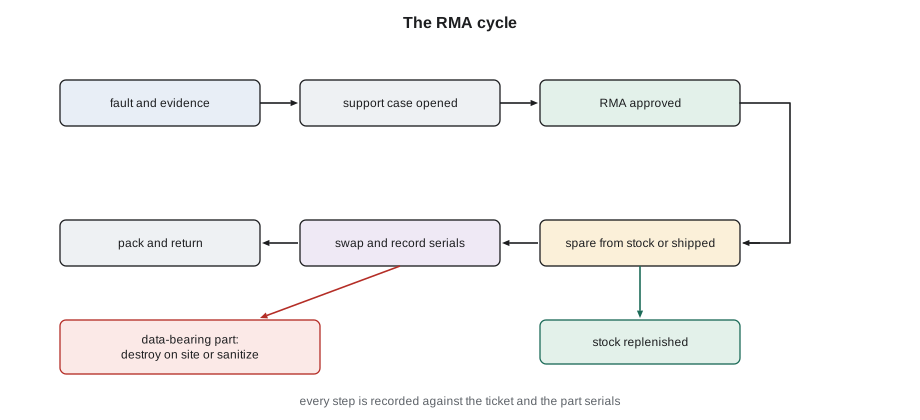
Good evidence decides how fast the RMA goes. A vendor that receives only "GPU broken" asks for logs and tests, and a day is lost. A vendor that receives the serials, the error codes with times, the event log export and the steps already tried, such as a reseat, usually approves at once. Jamal's ticket notes are written so that they can be pasted straight into the support case.
# Building an RMA record: every field the vendor and the customer's asset team need
rma = {"rma": "RMA-2611-0447", "ticket": "INC-30958", "customer": "Corvid AI", "site": "IAD-3 Ashburn",
       "part": "GPU compute tray", "fru": "699-2G548-0200", "failed_serial": "1652224018331",
       "replacement_serial": "1652224019020", "fault": "GPU 2 fell off the bus twice after reseat; fatal PCIe error in SEL",
       "data_bearing": False, "shipped": "2026-11-04", "carrier_ref": "1Z88F0A90311740522"}
for k in ("rma", "ticket", "part", "fru", "failed_serial", "replacement_serial", "fault"):
    print(f"{k:19s}: {rma[k]}")
print("Data-bearing part:", "yes - sanitize or destroy before shipping" if rma["data_bearing"] else "no - ship with RMA label")rma : RMA-2611-0447 ticket : INC-30958 part : GPU compute tray fru : 699-2G548-0200 failed_serial : 1652224018331 replacement_serial : 1652224019020 fault : GPU 2 fell off the bus twice after reseat; fatal PCIe error in SEL Data-bearing part: no - ship with RMA label
The RMA record links the ticket, the support case, the failed part and the replacement. It is the record that the customer's asset team uses to update its inventory, that the vendor uses to credit the return, and that Stonebridge uses to show the work was done.
Data-bearing parts
Lesson 5 explained why failed drives are treated as holding customer data. Other parts can hold data too: some network cards, storage controller cache modules, BMC boards that store configuration and logs, motherboards with built-in flash, and the trays of some GPU systems with local drives. Customers decide which parts count as data-bearing, and their runbooks say what happens to them:
- Keep and destroy: the vendor ships a replacement without the failed part being returned, under a keep-your-drive or similar service, and the part is destroyed on site.
- Sanitize and return: the part is erased with an approved method, such as the cryptographic erase built into many current drives, the erasure is verified and recorded, and the part is returned.
- Return with data removed: the drives are taken out of a tray or server before the rest is returned.
Stonebridge keeps a register of every data-bearing part removed from service: its serial, the ticket, the bag number, and its fate, with the destruction certificate number where it was destroyed. Ike audits the register against the drive cabinet and the destruction company's certificates.
Spare parts and how many to keep
A spare on the shelf costs money and space; a spare that is not on the shelf costs downtime. The right number depends on how many of a part are installed, how often they fail, and how long it takes to get a replacement:
# Spares stock: how many to keep on site from failure rate, fleet size and resupply lead time
import math
def poisson_quantile(mean, conf):
    k, p, cum = 0, math.exp(-mean), math.exp(-mean)
    while cum < conf:
        k += 1; p *= mean / k; cum += p
    return k
parts = {"NVMe 7.68 TB": (31000, 0.5, 10), "64 GB DIMM": (52000, 0.15, 7), "PSU 2700 W": (9200, 0.8, 14), "GPU compute tray": (1080, 3.0, 21)}
for name, (n, afr, lead_days) in parts.items():
    mean = n * afr / 100 * lead_days / 365
print(f"{name}: expect {mean:.1f} failures in a {lead_days}-day resupply time -> stock {poisson_quantile(mean, 0.95)} for 95 % cover")NVMe 7.68 TB: expect 4.2 failures in a 10-day resupply time -> stock 8 for 95 % cover 64 GB DIMM: expect 1.5 failures in a 7-day resupply time -> stock 4 for 95 % cover PSU 2700 W: expect 2.8 failures in a 14-day resupply time -> stock 6 for 95 % cover GPU compute tray: expect 1.9 failures in a 21-day resupply time -> stock 4 for 95 % cover
The calculation uses the expected number of failures during the resupply time, the lead time, and then finds how many spares would cover the demand 95 percent of the time, allowing for the way failures bunch together by chance. A part with a long lead time, such as a GPU compute tray with three weeks to resupply, needs more spares on site than its failure rate alone would suggest. The model is a starting point; customers adjust it for parts that matter most to them, for known bad batches, and for planned refresh cycles.
Spares are also checked when they arrive. A part may be the wrong model, have the wrong firmware, or be damaged in shipping. Tomás's receiving process opens each box, checks the part number and serial against the order, looks for damage, and records it in the customer's stock list before it goes into the cage.
Tracking parts
Every spare and every failed part is tracked by serial number from the moment it arrives to the moment it leaves:
| Event | Recorded | Where |
|---|---|---|
| Spare received | Part number, serial, condition, order or RMA number | Customer stock list |
| Spare issued for a ticket | Serial, ticket number, technician | Stock list and ticket |
| Part installed | Server serial and location, part serial, time | Ticket and customer asset system |
| Failed part removed | Serial, fault, bag number if data-bearing | Ticket and RMA or destruction register |
| Return shipped | RMA number, carrier reference, date | RMA record |
| Part destroyed | Serial, method, certificate number | Destruction register |
When the records are kept well, the customer can always answer two questions: where is every part, and which server is it in. When they are not, parts get lost, vendors refuse credits, and serial numbers in the customer's asset system stop matching what is in the servers, which causes trouble at the next audit or support case.
Dead on arrival and repeat failures
Occasionally a new part fails as soon as it is installed. A dead-on-arrival part is returned under its own RMA, and the vendor usually wants to know, because a run of DOA parts can mean a bad batch or damage in transport. Recording DOA parts separately, rather than as ordinary failures, lets the customer and vendor spot the pattern.
Repeat failures in the same position are another pattern to watch. If the drive in bay 5 of a server fails three times in a month with three different new drives, the drives are not the problem: the bay, the backplane or the cable is. The ticket history for the position, not just the part, makes this visible, and Jamal checks it before replacing a part for the second time in the same place.
Packing and shipping
Vendors reject returns that arrive damaged or packed wrongly, so failed parts go back in the packaging the replacement came in, with the antistatic bag, foam inserts and any shipping brackets. For GPU trays, the vendor's packaging includes a crate and specific instructions for draining residual coolant and capping the fittings. Labels go on the outside, the RMA number is written where the vendor asks, and the carrier's reference is recorded before the box leaves the dock.
Nothing leaves the building without a record: Tomás's dock log is matched to the RMA list each evening, and Ike's team checks that no data-bearing part has gone out in a return box.
Worked problem
A bay that keeps failing
The cloud provider asks Jamal to replace the drive in bay 9 of server C-03-21. While pulling the spare from the cage, he checks the ticket history for that server: bay 9 has had two drive replacements in the past six weeks, each new drive failing within days.
Show solution
- The drives came from two different batches, so a bad batch is unlikely.
- Three failures in one bay with different drives point at the bay, its backplane connector or the cable behind it.
- Jamal adds this to the ticket and asks whether the provider wants the drive replaced again or the server taken out for a backplane check.
- The provider drains the server. Under a cold-swap MOP, Jamal finds the backplane connector for bay 9 has a bent pin.
- The provider ships a replacement backplane, which Jamal fits. The two earlier failed drives are re-tested by the provider and found healthy; their RMAs are canceled and the drives return to stock after sanitization checks.
Answer: Checking the history of the position, not just the part, turned a cycle of drive replacements into one backplane repair, and saved two unnecessary RMAs.
Advance replacement and vendor engineers on site
Many support contracts offer advance replacement: the vendor ships the new part before receiving the failed one, so the server is repaired without waiting for the return. The customer then has a deadline to send the failed part back, and Stonebridge's dock log and RMA list are how that deadline is tracked. A return that is forgotten in the cage for two months usually becomes an invoice.
When a vendor sends its own field engineer for a FRU replacement, Stonebridge's technician escorts them under the site's visitor rules, checks their identity against the customer's authorization, takes them to the right rack, and stays while they work. The technician also checks that the engineer's part matches the ticket, that failed data-bearing parts stay on site under the customer's rules, and that the engineer's work is recorded in the ticket with the same detail as Stonebridge's own work.
Common mistakes
MistakeSending a vendor a one-line description of a fault.
InsteadInclude serials, error codes with times, logs and steps already tried.
MistakeReturning a drive in a vendor box without checking the runbook.
InsteadFollow the customer's rule for data-bearing parts: destroy, sanitize, or remove first.
MistakeMissing the vendor's return deadline.
InsteadShip returns promptly and record the carrier reference.
MistakeRecording a dead-on-arrival part as an ordinary failure.
InsteadRecord it as DOA so batch problems are visible.
MistakeReplacing the same part in the same position again and again.
InsteadCheck the position's history; repeated failures point at the slot, backplane or cable.
Summary and key terms
- Support contracts decide how replacement parts arrive: vendor-shipped, site stock or vendor engineer.
- An RMA is the vendor's approval to return a failed part; good evidence speeds approval.
- Data-bearing parts are destroyed on site, sanitized and verified, or stripped of drives before return.
- Spare stock depends on installed numbers, failure rates and resupply lead time.
- Every part is tracked by serial from receipt to installation, removal, return or destruction.
- Dead-on-arrival parts and repeat failures in one position reveal batch and slot problems.
- RMA
- Return merchandise authorization: approval to return a failed part for replacement or credit.
- Lead time
- The time from ordering a part to having it on site.
- DOA
- Dead on arrival: a new part that fails as soon as it is installed.
- Data-bearing part
- A part that can hold customer data, such as a drive or some controllers.
- Cryptographic erase
- Sanitizing a drive by destroying the key its data is encrypted with.
- Site stock
- Spare parts kept in the data center for a customer.
Practice problems
Work each problem on paper first, then reveal the answer to check.
What evidence should go into a vendor support case for a failed part?
Show answer
Server and part serials, part number, error codes with times, event log export, diagnostics results and steps already tried.
Why does a part with a long lead time need more spares on site?
Show answer
More failures can occur while waiting for resupply.
A drive in the same bay fails three times with new drives. What do you suspect?
Show answer
The bay, its backplane connector or the cable, not the drives.
Name two ways customers deal with failed data-bearing parts.
Show answer
Any two: destroy on site, sanitize and verify before return, remove the drives before returning the rest.
Lesson quiz · 5 questions
Score 60% or more to complete this lesson.
Create a free account to save your progress, take quizzes and earn a certificate.