
DCT-310 · Lesson 6 of 12 · 20 min
Storage systems: RAID, SAN, NAS and object storage
Bayview Credit Union's cage in Hall A holds a storage array: a 4U controller shelf with two controllers and 24 drives, and two expansion shelves of 24 drives each, cabled to the controllers. Most of the credit union's servers store their data there rather than on their own drives. "Replacing a drive in a server is one thing," Roz says. "Replacing a drive in an array that holds a bank's accounts is another. You need to know what the array will do when you pull it." This lesson covers how drives are combined for capacity and protection, what RAID levels mean for the technician, how long rebuilds take, and the main kinds of shared storage in data centers: SAN, NAS and object storage.
Why combine drives
A single drive is a single point of failure. If it fails, the data on it is gone unless there is a copy elsewhere. Combining drives into groups lets a system keep working when a drive fails and lets it present more capacity and speed than one drive could. The oldest and most common way to do this inside one server or one array is RAID, a redundant array of independent disks. Larger systems spread copies across many servers instead, which this lesson covers at the end.
RAID levels
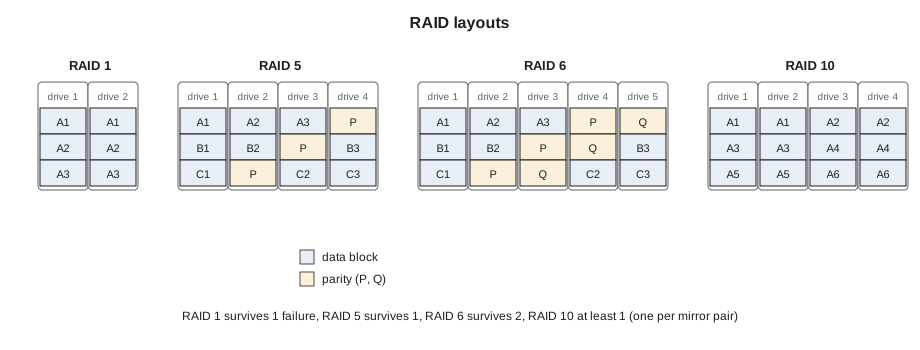
RAID levels are numbered, and each combines drives in a different way:
- RAID 0, striping: data is split across all drives. It is fast and uses all the capacity, but any drive failure loses the whole array. It has no protection and is used only for temporary data.
- RAID 1, mirroring: two drives hold identical copies. Either can fail without loss. Half the raw capacity is usable. It is common for server boot drives.
- RAID 5, striping with parity: data is split across the drives with one drive's worth of parity, extra calculated data from which any one missing drive can be rebuilt. One drive can fail without loss.
- RAID 6, striping with double parity: like RAID 5 with two drives' worth of parity, so any two drives can fail.
- RAID 10, mirrors striped together: pairs of mirrored drives with data striped across the pairs. It survives one failure in each pair, and is fast for databases.
# Usable capacity and fault tolerance of common RAID levels
def raid(level, n, size_tb):
    if level == "0": return n * size_tb, 0
    if level == "1": return size_tb, n - 1
    if level == "5": return (n - 1) * size_tb, 1
    if level == "6": return (n - 2) * size_tb, 2
    if level == "10": return n // 2 * size_tb, 1   # at least one; more if failures are in different mirrors
for level, n in [("0", 8), ("1", 2), ("5", 8), ("6", 8), ("10", 8)]:
    usable, tol = raid(level, n, 7.68)
print(f"RAID {level:2s} with {n} x 7.68 TB: {usable:6.2f} TB usable, survives {tol} drive failure(s)")RAID 0 with 8 x 7.68 TB: 61.44 TB usable, survives 0 drive failure(s) RAID 1 with 2 x 7.68 TB: 7.68 TB usable, survives 1 drive failure(s) RAID 5 with 8 x 7.68 TB: 53.76 TB usable, survives 1 drive failure(s) RAID 6 with 8 x 7.68 TB: 46.08 TB usable, survives 2 drive failure(s) RAID 10 with 8 x 7.68 TB: 30.72 TB usable, survives 1 drive failure(s)
The comparison shows the trade-off. RAID 0 gives all eight drives' capacity and no protection. RAID 6 gives six drives' capacity and survives two failures. RAID 10 gives half the capacity, and survives one failure for certain, more if the failures are in different mirror pairs. Customers choose the level; the technician needs to know which one an array uses, because it decides how many drives can safely be out at once.
RAID can be done by a hardware RAID controller card in the server, by the CPU in software, or by the controllers of a storage array. The method changes how failures are reported and how drives are replaced, but not the basic rule: never remove a working drive from an array that has already lost as many drives as it can tolerate.
Degraded arrays and rebuilds
When a drive in a protected array fails, the array becomes degraded. It keeps serving data, calculating the missing drive's data from the others, but it has less protection than before. A RAID 5 array with one failed drive has no protection left at all; one more failure loses the data. When the failed drive is replaced, or a hot spare drive kept in the array takes its place automatically, the array rebuilds: it reads all the surviving drives and writes the missing data onto the new one.
Rebuilds take time, and the larger the drives the longer they take:
# How long a RAID rebuild takes, and the chance of a second failure during it
size_tb = 20
for rate_mbs, label in [(200, "idle array"), (80, "busy array")]:
    hours = size_tb * 1e6 / rate_mbs / 3600
    print(f"Rebuild of a {size_tb} TB drive at {rate_mbs} MB/s ({label}): about {hours:.0f} hours")
survivors, afr = 11, 1.5
for hours in (28, 69):
    p = 1 - (1 - afr / 100 * hours / 8760) ** survivors
print(f"Chance another of {survivors} drives fails during {hours} h: about {p * 100:.2f} %")Rebuild of a 20 TB drive at 200 MB/s (idle array): about 28 hours Rebuild of a 20 TB drive at 80 MB/s (busy array): about 69 hours Chance another of 11 drives fails during 28 h: about 0.05 % Chance another of 11 drives fails during 69 h: about 0.13 %
A 20 TB hard drive takes more than a day to rebuild even on an idle array, and nearly three days on a busy one. During that time, every surviving drive is being read end to end, which is exactly the kind of heavy work that makes another failure more likely. The chance of a second failure during the rebuild is small for one array, but across hundreds of arrays it happens. This is why large-drive arrays use RAID 6 or wider protection rather than RAID 5, and why customers want failed drives replaced quickly.
For the technician, a degraded array changes the risk of every action near it:
- Replace the failed drive as soon as the customer authorizes it; every hour degraded is an hour without protection.
- Do not pull, reseat or power cycle any other drive in the array while it is degraded or rebuilding, unless the customer specifically tells you to.
- Avoid bumping or vibrating the shelf during a rebuild.
- Do not power off an array or a server during a rebuild without the customer's approval; most rebuilds restart from the beginning.
Hot spares and replacing a drive in an array
Many arrays keep one or more hot spares, drives installed and powered but unused. When a drive fails, the array starts rebuilding onto a spare at once, without waiting for a technician. The failed drive is then replaced at a convenient time, and the new drive becomes the new spare, or the array copies the data back to the original position, depending on its design.
Bayview's runbook for its array sets out the steps for a drive replacement, which follow the vendor's procedure:
- The customer opens a support case with the array vendor, which confirms the failed drive and ships a replacement.
- The customer turns on the locate LED for the failed drive and confirms in the ticket which shelf and bay it is in.
- Jamal confirms the array's status on its front display or with the customer: one drive failed, rebuild onto the spare complete, no other faults.
- He pulls only the drive with the fault and locate lights, waits for the array to register it removed, and inserts the replacement.
- The customer confirms the array accepts the new drive and shows no faults.
- The failed drive is bagged and logged; Bayview's contract requires destruction on site.
Direct-attached, SAN and NAS storage
Storage in data centers is organized in three main ways, and technicians meet all of them in Hall A:
| Kind | What it is | How servers reach it | Typical use |
|---|---|---|---|
| Direct-attached storage (DAS) | Drives inside the server or in a shelf cabled to it | Directly, through the server's controller | Boot drives, local data, cloud servers |
| Storage area network (SAN) | An array that presents blocks of storage, like virtual drives | Over a dedicated network: Fiber Channel or Ethernet with iSCSI or NVMe over fabrics | Databases, virtual machine storage |
| Network-attached storage (NAS) | An array or server that presents files and folders | Over the ordinary network, with file protocols such as NFS or SMB | Shared files, home folders, media |
| Object storage | Data stored as whole objects with metadata, spread over many servers | Over the network through a web-style interface | Backups, archives, cloud storage, AI data sets |
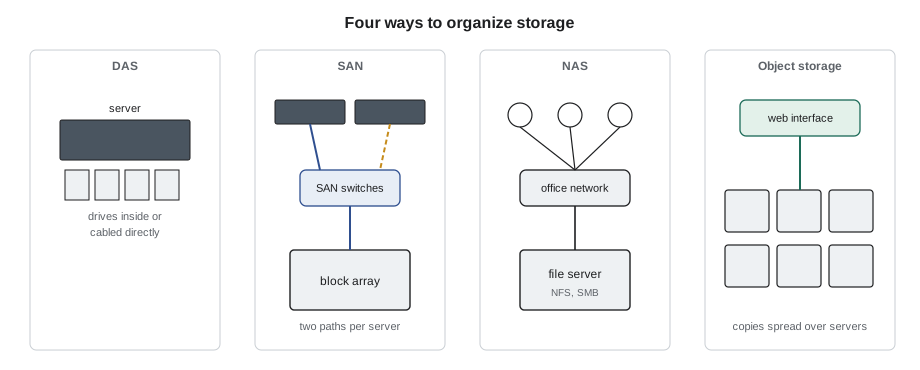
A SAN usually has its own switches and cabling, kept separate from the ordinary network so that storage traffic is fast and predictable. Fiber Channel SANs use their own optical links and switches. Each server connects to the SAN through two paths, through two adapters and two separate switches, so that a failed cable, adapter or switch does not cut it off. The same idea as the A and B power feeds applies: a server on a SAN should never lose both paths at once. When a ticket asks a technician to replace a SAN cable or an adapter, the procedure checks that the other path is up first.
Storage controllers
A storage array has controllers, the computers that run the array, usually in pairs. Either controller can run the whole array if the other fails, and data being written is protected by battery-backed or flash-backed cache so that a power failure does not lose it. Controllers fail rarely, but their batteries, cache modules and fans are common replacement parts.
Replacing a controller, or even reseating one, is always done under the vendor's procedure with the customer and often the vendor's engineer on the phone. The array must first move all its work onto the other controller. Pulling the active controller of a pair by mistake can make the array pause or drop the servers' connections. Jamal's rule from Roz: never touch an array controller without the vendor's step-by-step procedure in front of you.
Object storage and software-defined storage
The largest storage systems do not use RAID across a few drives at all. Object storage systems and cloud providers spread data across many servers, each with its own drives, and keep several copies of each object, or split it into pieces with extra coded pieces, an approach called erasure coding, so that any few drives or even whole servers can fail without loss. Software decides where data goes and repairs it automatically when a drive fails.
For technicians in Halls B and C, this changes the work. A failed drive in the cloud provider's servers is not urgent in the way a failed drive in a RAID 5 array is, because the data is already protected elsewhere and is being repaired in the background. The provider batches drive replacements, sending a list each morning. What matters to them is that the right drives are replaced, that the old ones are accounted for, and that whole servers are not taken offline by mistake.
Worked problem
A second failure during a rebuild
Bayview's array has a RAID 6 group of twelve 20 TB hard drives. One drive failed on Monday, and the array has been rebuilding onto its hot spare for 30 hours. On Tuesday afternoon a second drive in the same group shows a predicted-failure alert, and the customer asks whether to replace it now.
Show solution
- The group is RAID 6, so it can lose two drives. Right now one is failed and the spare is still rebuilding.
- Pulling the second, still-working drive now would leave the group with two missing drives and the rebuild unfinished. One more fault would lose data.
- Jamal tells the customer's administrator what he sees on the array display and suggests waiting for the rebuild to finish before touching the second drive. The administrator agrees after checking with the vendor.
- The rebuild completes on Wednesday morning. The administrator then marks the second drive for replacement, it rebuilds onto a new spare, and Jamal replaces it under a new ticket.
Answer: In a degraded or rebuilding array, the safe order of work matters as much as the work itself. The technician's job was to report clearly and to let the customer and vendor decide, not to pull a drive because it had a light on.
Common mistakes
MistakeAssuming a RAID 5 array with one failed drive is still protected.
InsteadIt has no protection left; replace the failed drive promptly.
MistakeReseating other drives in a rebuilding array.
InsteadLeave every other drive alone until the rebuild completes, unless told otherwise.
MistakeReplacing a SAN cable without checking the other path.
InsteadConfirm the second path is up before disconnecting the first.
MistakeReseating a storage controller without the vendor procedure.
InsteadControllers must be failed over first, under the vendor's steps.
MistakeTreating every failed drive as equally urgent.
InsteadUrgency depends on the protection left: RAID level, spares and replication.
Summary and key terms
- RAID combines drives for capacity and protection: 0 none, 1 mirror, 5 single parity, 6 double parity, 10 striped mirrors.
- A degraded array has less protection until the failed drive is replaced and the rebuild finishes.
- Rebuilds of large drives take a day or more and stress the surviving drives.
- Hot spares start rebuilds automatically; the failed drive is replaced later.
- DAS, SAN, NAS and object storage organize data in different ways; SANs use dual paths.
- Distributed object storage and erasure coding make single drive failures less urgent.
- RAID
- Redundant array of independent disks: a way of combining drives for capacity and protection.
- Parity
- Extra calculated data from which a missing drive's data can be rebuilt.
- Degraded
- An array that has lost a drive and is running with reduced protection.
- Rebuild
- Recreating a failed drive's data onto a replacement or spare.
- Hot spare
- A drive installed in an array, waiting to replace a failed drive automatically.
- SAN
- Storage area network: block storage reached over a dedicated network.
- NAS
- Network-attached storage: file storage reached over the ordinary network.
- Erasure coding
- Splitting data into pieces plus coded pieces so that lost pieces can be rebuilt.
Practice problems
Work each problem on paper first, then reveal the answer to check.
Eight 7.68 TB drives are in RAID 6. How much is usable, and how many failures can it survive?
Show answer
About 46 TB usable; two drive failures.
Why is a RAID 5 array with a failed drive urgent?
Show answer
It has no protection left; one more failure would lose data.
Why do large-drive arrays prefer RAID 6?
Show answer
Rebuilds take days, so the chance of a second failure during a rebuild is too high for single parity.
Before replacing a SAN cable, what must you confirm?
Show answer
That the server's other path to the SAN is up.
Lesson quiz · 5 questions
Score 60% or more to complete this lesson.
Create a free account to save your progress, take quizzes and earn a certificate.