
CMPUT-411 · Lesson 6 of 12 · 34 min
The GPU graphics pipeline and shaders
A modern GPU renders a frame by streaming geometry through a fixed sequence of stages, the graphics pipeline, some programmable and some built into hardware. Understanding the pipeline explains why real-time rendering is structured as it is: why scenes are made of triangles, why shaders are small programs that run millions of times per frame, why state changes and draw calls are expensive, and why techniques such as deferred shading exist. This lesson walks through the stages, implements clipping and z-buffered visibility in a few lines, introduces shaders and the major graphics APIs, and describes how GPUs achieve their throughput. CMPUT-229 explains processor pipelines, caches and parallelism in general (lessons 10 to 12); here we look at the specialized case.
A brief history
Early raster graphics systems of the 1970s and 1980s, such as those from Evans and Sutherland and Silicon Graphics, implemented transformation, lighting and rasterization in fixed hardware. Consumer 3D accelerators appeared in the mid-1990s; 3dfx's Voodoo (1996) rasterized and textured triangles while the CPU transformed them. NVIDIA's GeForce 256 (1999), marketed as the first GPU, added hardware transformation and lighting. The decisive change came in 2001 with programmable vertex and pixel shaders, introduced in DirectX 8 and the GeForce 3, which let developers replace fixed lighting formulas with their own programs. Unified shader architectures (2006 onward) ran all shader types on the same general-purpose cores, and general-purpose GPU computing through CUDA (2007) and OpenCL turned GPUs into the parallel processors that now train neural networks, as AI-480 describes. Hardware ray tracing arrived in consumer GPUs in 2018 (lesson 11).
The stages of the pipeline
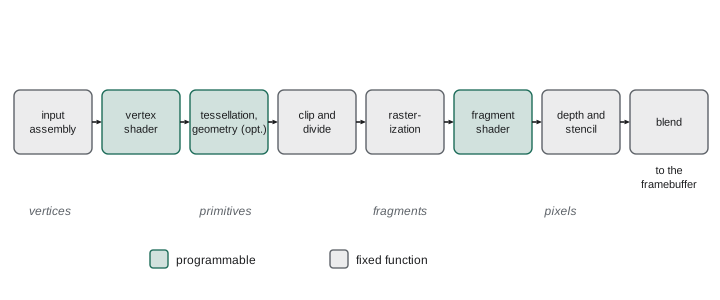
The application, running on the CPU, prepares data and issues draw calls: commands that say 'draw these triangles with this shader, these textures and these settings'. Vertex data, positions, normals, texture coordinates and other attributes, sits in GPU buffers, usually with an index buffer that lets triangles share vertices.
Input assembly reads vertices and indices and groups them into primitives (triangles, lines or points). The vertex shader runs once per vertex and must output a clip-space position; it typically transforms positions by the model-view-projection matrix, transforms normals by the normal matrix and passes texture coordinates and other values along. Optional tessellation stages subdivide patches into finer triangles on the GPU, useful for terrain and displacement, and an optional geometry shader can emit or discard primitives, though it is slow on most hardware and has largely been superseded. Newer GPUs offer mesh shaders (introduced with NVIDIA's Turing in 2018 and standardized in DirectX 12 Ultimate in 2020 and later in Vulkan), which replace the vertex front end with compute-style programs that process clusters of triangles, enabling fine-grained culling.
Next come fixed-function stages. Primitives are clipped against the view frustum in clip space, divided by w and mapped through the viewport. Back faces may be culled. The rasterizer determines which pixel samples each triangle covers (lesson 2) and generates fragments, candidate pixels carrying interpolated attributes. The fragment shader (called a pixel shader in Direct3D) runs once per fragment and computes its color, typically by sampling textures and evaluating a lighting model (lessons 8 and 9). Finally, per-sample operations test each fragment's depth against the depth buffer and its stencil value against the stencil buffer, and the surviving fragments are blended into the framebuffer.
Clipping
Triangles that straddle the frustum boundary must be clipped: the visible part is kept, and new vertices are generated where edges cross the boundary. Ivan Sutherland and Gary Hodgman's 1974 algorithm clips a polygon against one plane at a time. For each edge of the polygon it emits the current vertex if it is inside, and an intersection point when the edge crosses the plane. A triangle clipped against six planes can become a polygon with up to nine vertices, which is then split back into triangles. Hardware clips in homogeneous clip space and uses guard bands, a region larger than the screen where the rasterizer can handle slightly out-of-bounds triangles directly, to avoid most clipping work; only triangles that cross the near plane or extend far outside need true geometric clipping.
# Sutherland-Hodgman polygon clipping: clip a polygon against each edge of a
# convex window in turn. Here a triangle is clipped to the square [-1, 1]^2.
def clip_edge(poly, inside, intersect):
    out = []
    for i, cur in enumerate(poly):
        prev = poly[i - 1]
        if inside(cur):
            if not inside(prev): out.append(intersect(prev, cur))
            out.append(cur)
        elif inside(prev):
            out.append(intersect(prev, cur))
    return out
def lerp_at(a, b, axis, value):          # point on segment ab where coordinate == value
    t = (value - a[axis]) / (b[axis] - a[axis])
    return tuple(round(a[k] + t * (b[k] - a[k]), 4) for k in range(2))
def clip_to_square(poly):
    for axis, bound, sign in ((0, 1, 1), (0, -1, -1), (1, 1, 1), (1, -1, -1)):
        poly = clip_edge(poly, lambda p, a=axis, b=bound, s=sign: s * p[a] <= s * b,
                         lambda p, q, a=axis, b=bound: lerp_at(p, q, a, b))
        print(f"after clipping to {'xy'[axis]} {'<=' if sign > 0 else '>='} {bound:2}: {len(poly)} vertices")
    return poly
tri = [(-0.5, -1.5), (1.8, 0.2), (-0.2, 1.4)]
result = clip_to_square(tri)
print("clipped polygon:", result)
area = 0.5 * abs(sum(p[0] * q[1] - q[0] * p[1] for p, q in zip(result, result[1:] + result[:1])))
print(f"area inside the window: {area:.4f}")after clipping to x <= 1: 4 vertices after clipping to x >= -1: 4 vertices after clipping to y <= 1: 5 vertices after clipping to y >= -1: 6 vertices clipped polygon: [(-0.2414, 1.0), (-0.4483, -1.0), (0.1765, -1.0), (1.0, -0.3913), (1.0, 0.68), (0.4667, 1.0)] area inside the window: 2.3537
Each pass against one edge can add vertices; the triangle, which pokes out past the right, top and bottom edges, becomes a hexagon, and its area is the part inside the window. Cohen and Sutherland's earlier outcode algorithm (1967) clips line segments efficiently by classifying endpoints into regions with a 4-bit code and trivially accepting or rejecting most lines without computing intersections; Liang–Barsky clipping uses parametric line equations for the same job.
Visibility and the z-buffer
When several surfaces cover the same pixel, the nearest should be seen. The painter's algorithm sorts objects back to front and draws them in order, letting nearer ones overwrite farther ones, but sorting is expensive, and no order works for intersecting or cyclically overlapping triangles. Wolfgang Straßer and Edwin Catmull independently proposed the z-buffer (depth buffer) in 1974: store a depth value for each pixel, initialized to the far plane, and when a fragment arrives, keep it only if it is nearer than the stored depth, updating both color and depth. The z-buffer needs no sorting, handles intersections automatically and processes triangles in any order, at the cost of memory for depth and a test per fragment. Its simplicity is why it won: it is implemented in every GPU, with compression and hierarchical depth (storing the farthest depth per tile) to reject hidden fragments early.
# A tiny pipeline: vertex stage (project), rasterize with edge functions,
# interpolate depth, and resolve visibility with a z-buffer. Two triangles
# intersect, so neither painter's ordering would be correct everywhere.
import numpy as np
W, H = 32, 14
def project(p):                      # simple perspective onto a W x H screen
    x, y, z = p
    s = 12 / z
    return (W / 2 + x * s, H / 2 - y * s, z)
def edge(a, b, p): return (b[0] - a[0]) * (p[1] - a[1]) - (b[1] - a[1]) * (p[0] - a[0])
def draw(tri, tag, zbuf, img):
    a, b, c = (project(v) for v in tri)
    area = edge(a, b, c)
    if area < 0: b, c, area = c, b, -area          # make winding consistent
    for y in range(H):
        for x in range(W):
            p = (x + 0.5, y + 0.5)
            w0, w1, w2 = edge(b, c, p), edge(c, a, p), edge(a, b, p)
            if min(w0, w1, w2) < 0: continue
            l = np.array([w0, w1, w2]) / area
            inv_z = l @ [1 / a[2], 1 / b[2], 1 / c[2]]   # 1/z interpolates linearly on screen
            z = 1 / inv_z
            if z < zbuf[y, x]:                      # depth test: nearer wins
                zbuf[y, x] = z; img[y][x] = tag
zbuf = np.full((H, W), np.inf)
img = [['.'] * W for _ in range(H)]
red = [(-2.0, -1.0, 4.0), (2.0, -1.0, 4.0), (0.0, 1.5, 8.0)]      # tilts away
blue = [(-2.0, 1.0, 4.0), (2.0, 1.0, 4.0), (0.0, -1.5, 8.0)]      # tilts the other way
draw(red, 'R', zbuf, img)
draw(blue, 'B', zbuf, img)
for row in img: print(''.join(row))
print("pixels showing R:", sum(r.count('R') for r in img), " showing B:", sum(r.count('B') for r in img))................................ ................................ ................................ ................................ ...........BBBBBBBBBB........... ............BBBBBBBB............ .............BBBBBB............. .............RRRRRR............. ............RRRRRRRR............ ...........RRRRRRRRRR........... ................................ ................................ ................................ ................................ pixels showing R: 24 showing B: 24
The two triangles intersect, each tilting away from the camera in opposite directions, so each is in front over part of the image; no single drawing order could be correct, but the z-buffer resolves visibility pixel by pixel. The row where the image switches from B to R is where the two triangles pass through each other. Note that the code interpolates \(1/z\) with the screen-space barycentric weights and inverts the result, rather than interpolating z directly, as lesson 5 explained. GPUs perform an early depth test before running the fragment shader when the shader does not modify depth, which avoids shading fragments that will be hidden; a depth prepass, drawing all geometry once with only depth, then shading with an equal-depth test, guarantees each pixel is shaded once.
Shaders
Shaders are small programs written in a shading language and compiled for the GPU. GLSL is used with OpenGL and, via compilation to the SPIR-V intermediate representation, with Vulkan; HLSL is used with Direct3D and increasingly elsewhere; the Metal Shading Language with Apple's Metal; and WGSL with WebGPU. All have vector and matrix types, built-in mathematical functions, and qualifiers for inputs from the previous stage, outputs to the next and uniforms, values constant across a draw call such as matrices and light parameters. Textures and buffers are bound as resources. Each invocation is independent: a vertex shader cannot see other vertices, and a fragment shader cannot see neighboring pixels except through derivative functions, which is what makes massive parallelism possible.
#version 330 core
// Vertex shader: runs once per vertex
layout(location = 0) in vec3 aPosition;     // object-space position
layout(location = 1) in vec3 aNormal;
layout(location = 2) in vec2 aUV;
uniform mat4 uModel, uView, uProj;
uniform mat3 uNormalMatrix;                 // inverse transpose of the model matrix (3 x 3)
out vec3 vWorldPos;
out vec3 vNormal;
out vec2 vUV;
void main() {
    vec4 world = uModel * vec4(aPosition, 1.0);
    vWorldPos = world.xyz;
    vNormal = uNormalMatrix * aNormal;
    vUV = aUV;
    gl_Position = uProj * uView * world;     // clip-space position for the rasterizer
}

// Fragment shader: runs once per covered sample, with interpolated inputs
#version 330 core
in vec3 vWorldPos;
in vec3 vNormal;
in vec2 vUV;
uniform sampler2D uAlbedo;                  // an sRGB texture, decoded to linear by the sampler
uniform vec3 uLightDir;                     // unit vector toward the light
out vec4 fragOut;
void main() {
    vec3 n = normalize(vNormal);
    float diffuse = max(dot(n, uLightDir), 0.0);
    vec3 albedo = texture(uAlbedo, vUV).rgb;
    fragOut = vec4(albedo * (0.1 + 0.9 * diffuse), 1.0);
}
The vertex shader writes the built-in clip-space position and passes world position, normal and texture coordinates to the rasterizer, which interpolates them across each triangle. The fragment shader renormalizes the interpolated normal, which shortens between vertices, computes a diffuse term and multiplies by the texture color. The same program in WGSL shows the newer explicit style, with attributes for bindings and locations. WebGPU, the successor to WebGL for the browser, offers compute shaders and a modern resource model; Chrome shipped it in 2023, and by late 2025 Firefox (on Windows and Apple silicon Macs) and Safari (in the 2025 operating system releases) supported it too, as of 2026, with some platforms still in progress.
// The same shading in WGSL, the shading language of WebGPU
struct Uniforms { model : mat4x4<f32>, viewProj : mat4x4<f32>, lightDir : vec3<f32> };
@group(0) @binding(0) var<uniform> u : Uniforms;
struct VsOut { @builtin(position) pos : vec4<f32>, @location(0) normal : vec3<f32> };
@vertex
fn vs(@location(0) p : vec3<f32>, @location(1) n : vec3<f32>) -> VsOut {
    var o : VsOut;
    o.pos = u.viewProj * u.model * vec4<f32>(p, 1.0);
    o.normal = (u.model * vec4<f32>(n, 0.0)).xyz;       // w = 0: direction (uniform scale assumed)
    return o;
}
@fragment
fn fs(i : VsOut) -> @location(0) vec4<f32> {
    let d = max(dot(normalize(i.normal), u.lightDir), 0.0);
    return vec4<f32>(vec3<f32>(0.1 + 0.9 * d), 1.0);
}
Graphics APIs
Applications talk to the GPU through a graphics API and a driver. OpenGL (1992) and Direct3D (1995) dominated for two decades with a design in which the driver tracked state and did much work behind the scenes, which simplified programming but caused unpredictable overheads. Explicit, low-level APIs followed: Apple's Metal (2014), Direct3D 12 (2015) and the Khronos Group's Vulkan (2016, with version 1.4 released in December 2024). They give applications direct control over memory allocation, synchronization and command buffers recorded on multiple CPU threads, in exchange for far more code and responsibility. Apple deprecated OpenGL on its platforms in 2018. Game engines such as Unreal, Unity and Godot hide these differences behind their own rendering layers.
| API | Introduced | Platforms | Shading language |
|---|---|---|---|
| OpenGL / OpenGL ES | 1992 / 2003 | Desktop, mobile, embedded (deprecated on Apple platforms) | GLSL |
| Direct3D 11 and 12 | 2009 / 2015 | Windows, Xbox | HLSL |
| Metal | 2014 | Apple platforms | Metal Shading Language |
| Vulkan | 2016 | Windows, Linux, Android, others; via translation layers on Apple | GLSL or HLSL compiled to SPIR-V |
| WebGL 2 / WebGPU | 2017 / 2023 onward | Web browsers | GLSL ES / WGSL |
How GPUs achieve throughput
GPUs are throughput machines. Instead of a few complex cores optimized to finish one thread quickly, they have thousands of simple arithmetic units grouped into streaming multiprocessors (NVIDIA) or compute units (AMD). Threads run in groups of 32 or 64, called warps or wavefronts, that execute the same instruction on different data (single instruction, multiple threads). When a warp waits for memory, the scheduler switches to another warp at no cost, hiding latency with parallelism rather than large caches. This explains several performance rules. Divergent branches, where threads in a warp take different paths, serialize execution. Small triangles waste work, because fragment shaders run on 2 by 2 pixel quads so that texture derivatives can be computed, and a one-pixel triangle still occupies a whole quad. And memory bandwidth, not arithmetic, is often the bottleneck.
Mobile GPUs, such as Arm Mali, Qualcomm Adreno and Apple's GPUs, use tile-based deferred rendering to save power: they sort triangles into small screen tiles, then render each tile entirely in fast on-chip memory, writing to main memory only once per tile. Bandwidth is the main consumer of energy on mobile, so this matters more than raw arithmetic. Desktop GPUs are immediate-mode renderers with large caches, though they borrow tiling ideas.
Forward and deferred rendering
In forward rendering, each object's fragment shader computes lighting from all relevant lights as it is drawn. With many lights this becomes expensive, and shading work is wasted on fragments later hidden. Deferred shading, popular since the late 2000s, splits rendering in two passes. The geometry pass writes surface attributes, albedo, normal, roughness, depth and so on, into several render targets collectively called the G-buffer. The lighting pass then computes lighting once per pixel per light, reading the G-buffer, so cost scales with pixels and lights rather than with objects and lights. Deferred shading handles hundreds of lights but uses more memory bandwidth, struggles with transparency and MSAA (lesson 2), and restricts material variety. Tiled and clustered forward rendering (Forward+) divides the screen or view volume into tiles or clusters, builds a list of lights affecting each, and shades in a forward pass using only those lights, combining many lights with the flexibility of forward rendering. Most current engines use one of these hybrids.
Worked examples
Worked problem
Counting shader invocations
A frame draws a mesh of 200,000 vertices (indexed, 400,000 triangles) covering 600,000 pixels at 1080p with an overdraw of 2.5. Roughly how many vertex and fragment shader invocations occur?
Show solution
- Vertex shader: about once per unique vertex if the post-transform cache works well, so roughly 200,000 to 300,000.
- Fragment shader: covered pixels times overdraw, 600,000 × 2.5 = 1.5 million, unless an early depth test or prepass removes hidden fragments.
- With a depth prepass, close to 600,000 fragment shader runs, plus the cheap depth-only pass.
Answer: Hundreds of thousands of vertex invocations and about 1.5 million fragment invocations, reduced toward 0.6 million by early depth testing.
Worked problem
Clipping a segment
Clip the segment from (0.5, 0.5) to (2, 1.25) to the window x ≤ 1.
Show solution
- The first endpoint is inside, the second outside.
- Parameter where x = 1: \(t = (1 - 0.5)/(2 - 0.5) = 1/3\).
- y at that point: \(0.5 + (1/3)(0.75) = 0.75\).
Answer: The clipped segment runs from (0.5, 0.5) to (1, 0.75).
Worked problem
G-buffer size
A deferred renderer at 2560 by 1440 stores four RGBA8 targets and a 32-bit depth buffer. How much memory is that, and how much bandwidth to write it once per frame at 60 frames per second?
Show solution
- Pixels: \(2560 \times 1440 = 3{,}686{,}400\). Bytes per pixel: \(4 \times 4 + 4 = 20\).
- Memory: \(3.69\text{M} \times 20 = 73.7\) MB.
- Writing it 60 times per second: about 4.4 GB/s, before the lighting pass reads it back.
Answer: About 74 MB and several gigabytes per second of bandwidth, which is why G-buffer layouts are packed tightly.
Common mistakes
MistakeSort all geometry back to front to get correct visibility.
InsteadUse the z-buffer for opaque geometry; sort only transparent surfaces.
MistakeAssume the interpolated normal in a fragment shader is unit length.
InsteadRenormalize it, because linear interpolation shortens vectors between vertices.
MistakeIssue one draw call per small object without batching.
InsteadBatch or instance objects; each draw call carries CPU and driver overhead.
MistakeWrite branch-heavy shaders without considering warps.
InsteadDivergent branches serialize warps; prefer uniform branches or branch-free arithmetic.
MistakeUse deferred shading for scenes with heavy transparency and expect MSAA to work.
InsteadConsider forward or clustered forward rendering, or render transparency in a separate forward pass.
Summary and key terms
- The pipeline runs input assembly, vertex shading, clipping, rasterization, fragment shading and per-sample tests and blending.
- Vertex shaders output clip-space positions; fragment shaders compute colors from interpolated attributes.
- Sutherland–Hodgman clips polygons against one plane at a time; hardware clips in clip space with guard bands.
- The z-buffer resolves visibility per sample without sorting and handles intersecting surfaces.
- Explicit APIs (Vulkan, Direct3D 12, Metal, WebGPU) trade driver convenience for control and predictability.
- GPUs hide memory latency with thousands of threads in warps; divergence, tiny triangles and bandwidth limit performance.
- Deferred and clustered forward rendering make scenes with many lights affordable.
- Graphics pipeline
- The sequence of stages that turns vertices into pixels on a GPU.
- Draw call
- A command from the application asking the GPU to render a batch of primitives with given state.
- Vertex shader
- A program run once per vertex that outputs a clip-space position and attributes.
- Fragment shader
- A program run once per covered sample or pixel that computes its color.
- Fragment
- A candidate pixel generated by rasterization, carrying interpolated attributes.
- Z-buffer
- A per-pixel depth buffer used to keep only the nearest fragment.
- Clipping
- Removing the parts of primitives outside the view volume.
- Warp
- A group of GPU threads that execute the same instruction together.
- G-buffer
- Render targets storing surface attributes for deferred shading.
- Tile-based rendering
- Rendering the screen in small tiles kept in on-chip memory to save bandwidth.
Practice problems
Work each problem on paper first, then reveal the answer to check.
Which stages of the pipeline are programmable in a typical GPU?
Show answer
Vertex, tessellation, geometry (or mesh and task) and fragment shaders, plus compute shaders outside the pipeline.
What must every vertex shader output?
Show answer
A clip-space position.
Why does the painter's algorithm fail for intersecting triangles?
Show answer
No single drawing order makes each triangle correctly in front over all of its area.
What value initializes a depth buffer in a standard (not reversed) setup?
Show answer
The far value, typically 1.
How many vertices can a triangle have after clipping against one plane?
Show answer
At most four.
What is a guard band?
Show answer
A region beyond the screen within which the rasterizer handles triangles without geometric clipping.
Why do fragment shaders run on 2 by 2 quads?
Show answer
So texture coordinate derivatives can be computed for filtering.
What is the main advantage of deferred shading?
Show answer
Lighting cost scales with pixels and lights rather than objects and lights.
Name the shading language of WebGPU.
Show answer
WGSL.
Why do mobile GPUs use tile-based rendering?
Show answer
To keep framebuffer traffic on chip and save memory bandwidth and power.
Lesson quiz · 5 questions
Score 60% or more to complete this lesson.
Create a free account to save your progress, take quizzes and earn a certificate.