
NET-101 · Lesson 4 of 12 · 23 min
Laptops, mobile devices and printers
▶ Video coming soon A video version of this lesson is on the way.
Desktops sit on desks; most of the computing at Ridgeline happens elsewhere. Kai carries ROAST-LT between the roaster and the office, Mei's baristas tap orders on tablets, Rosa runs the business from her phone, and the cafe and office depend on three very different printers. Each of these devices raises its own support questions: which parts can be replaced, how batteries age, how phones and tablets are kept secure, and why printers seem to cause more tickets than everything else put together. This lesson covers them in turn.
Laptops
A laptop contains the same parts as a desktop, rearranged to save space and power. The processor and graphics are usually soldered to the motherboard, and so, increasingly, is the memory. The storage is normally an M.2 NVMe drive that can be replaced. The keyboard, touchpad, screen, speakers, webcam, microphone and wireless card are all built in. Before opening a laptop, a technician checks the maker's service manual, because the order of disassembly and the hidden screws differ from model to model, and some parts, such as batteries glued into the case, are not meant to be replaced by users at all.
| Part | Usually replaceable? | Notes |
|---|---|---|
| Storage (M.2 SSD) | Yes | The most common laptop upgrade and repair |
| Memory | Sometimes | SO-DIMM slots on some models; soldered on many thin laptops |
| Battery | Often, by a technician | Internal and screwed or glued; external batteries are rare now |
| Keyboard | Yes, with effort | Often part of the top case, which must be replaced as a unit |
| Screen | Yes | Check the exact panel part number and connector |
| Wireless card | Sometimes | An M.2 card on some models, soldered on others |
| Processor and graphics | No | Soldered to the motherboard |
Laptops now charge mostly through USB-C, using USB Power Delivery, a standard in which the charger and the laptop agree on a voltage, up to 20 volts on most chargers and up to 48 volts under the newer extended power range, and therefore a power level. Kai's laptop came with a 65 watt charger. A smaller phone charger will still charge it, slowly, or only keep it from draining while it is in use; a larger charger is perfectly safe, because the laptop only draws what it needs. A docking station on the office desk connects ROAST-LT to a monitor, keyboard, mouse, wired network and power through a single USB-C or Thunderbolt cable, which is why Kai can arrive from the roaster and be working at a full desk setup in seconds.
Laptop batteries are lithium-ion, and they age. Every full charge and discharge cycle wears them slightly, and heat speeds the wear. After a few hundred cycles a battery holds noticeably less charge than when new, and after several years it may last only an hour. Windows can produce a battery report showing the design capacity and the current full-charge capacity, which tells you how worn the battery is. Laptops that live on a dock, as Kai's does in the office, benefit from a firmware setting that stops charging at about 80 in 100 of full, which greatly slows ageing. A battery that swells, pushing up the keyboard or the touchpad, is a fire risk: the laptop must be shut down, not charged, and the battery replaced and recycled properly, never punctured or thrown in the garbage.
# Estimating battery runtime from a battery report
design_wh = 54.0        # capacity when new, in watt-hours
full_charge_wh = 41.6   # capacity now
average_draw_w = 9.5    # typical power draw during Kai's work

health = full_charge_wh / design_wh
runtime_h = full_charge_wh / average_draw_w
print(f"Battery health: {health * 100:.0f} in 100 of design capacity")
print(f"Expected runtime: {runtime_h:.1f} hours")
if health < 0.8:
print("Below 80 in 100 of design capacity: plan a replacement")Battery health: 77 in 100 of design capacity Expected runtime: 4.4 hours Below 80 in 100 of design capacity: plan a replacement
Try it yourself
Battery runtime check
Write a function runtime_hours(full_charge_wh, draw_w) that returns the expected runtime in hours, rounded to one decimal place, and a function needs_replacing(design_wh, full_charge_wh) that returns True when the battery holds less than 80 in 100 of its design capacity.
For Kai's battery, runtime_hours(41.6, 9.5) is 4.4 and needs_replacing(54.0, 41.6) is True.
def runtime_hours(full_charge_wh, draw_w):
    return 0

def needs_replacing(design_wh, full_charge_wh):
    return False

print(runtime_hours(41.6, 9.5), needs_replacing(54.0, 41.6))
Phones and tablets
Mobile devices are complete computers running mobile operating systems: Apple's iOS and iPadOS, or Google's Android in its many manufacturer versions. Their parts are almost never user-serviceable; support is about configuration, connectivity, accounts and security. Ridgeline's two point-of-sale tablets are a good example of what that involves.
Each tablet is enrolled in mobile device management, MDM, a service that lets Sam configure and secure devices remotely. Through MDM, the tablets are locked to the point-of-sale app in a kiosk mode, so customers cannot wander into other apps; updates are applied overnight; the staff Wi-Fi settings are pushed automatically; and a lost or stolen tablet can be locked or wiped from anywhere. Rosa's own phone, which she uses for company email, is handled differently: rather than managing the whole phone, the MDM service manages only a work profile that keeps company email and files separate from her personal apps and photos. That arrangement, common where staff use their own devices, respects privacy while protecting business data.
Mobile devices connect to accessories over Bluetooth, a short-range wireless standard. Pairing creates a trusted link between two devices, sometimes confirmed with a PIN or a matching code; after that, the devices reconnect automatically. Most Bluetooth tickets come down to a device paired to the wrong tablet, a flat battery in the accessory, or too many old pairings cluttering the list. The card readers at Ridgeline's counter each pair with one tablet, and the first fix for a reader that will not connect is to remove the pairing on both sides and pair again. Near-field communication, NFC, works over a few centimetres and is what makes tap-to-pay cards and phones work with the card reader.
Phones and tablets also synchronize data with cloud accounts: an Apple or Google account for contacts, photos and backups, and a Microsoft 365 or Google Workspace account for business email, calendars and files. When a user says their new phone has no email, the usual cause is that the business account was never added, or the account requires multi-factor authentication that has not been set up on the new device.
Printers
Printers generate a remarkable share of support tickets, because they combine moving mechanical parts, consumables that run out, drivers that must match the operating system and network connections that can change. Ridgeline uses three different printing technologies, and knowing how each works explains most of their faults.
| Type | How it prints | Ridgeline example | Common faults |
|---|---|---|---|
| Laser | A laser draws the image on a charged drum; toner powder is fused onto paper with heat and pressure | OFFICE-MFP | Paper jams, streaks from a worn drum, toner smudging from a failing fuser |
| Inkjet | Tiny nozzles spray drops of liquid ink onto the paper | None (photos are sent out) | Clogged nozzles, dried ink, costly cartridges |
| Thermal | A heated print head darkens special heat-sensitive paper; no ink at all | CAFE-PRN1 receipts, the label printer | Faded print from a dirty head, labels loaded upside down, wrong label size |
| Impact | Pins strike an inked ribbon against paper, printing through multipart forms | None (some kitchens and warehouses) | Worn ribbons, misaligned forms |
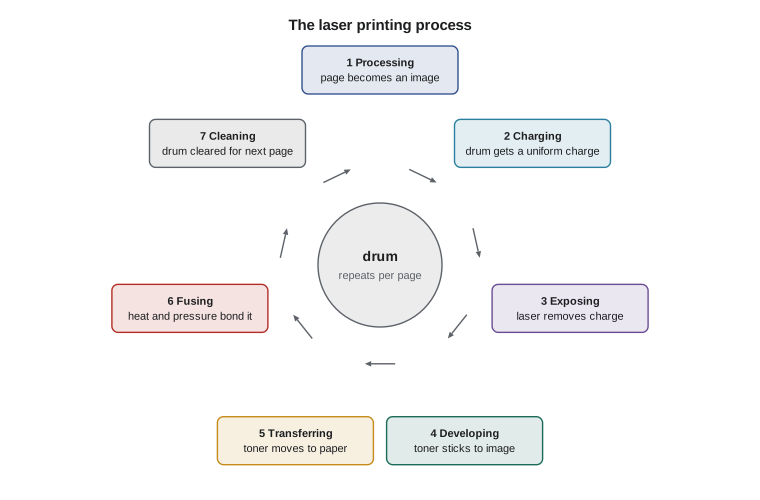
The laser printing process is a favourite exam topic and also explains real faults. It runs in seven steps: processing the page into an image; charging the drum with a uniform electrical charge; exposing the drum with the laser, which removes the charge where the image will be; developing, where toner sticks to the exposed areas; transferring the toner from the drum to the paper; fusing the toner to the paper with a hot roller and pressure; and cleaning the drum of leftover toner and charge. A repeated mark at regular intervals down the page usually comes from a damaged drum or roller, and the distance between the marks often identifies which one. Toner that rubs off a printed page means the fuser is not getting hot enough.
Try it yourself
Put the laser steps in order
The list scrambled holds the seven laser printing steps in the wrong order. Write a function in_order(steps) that returns the steps sorted into the correct order, using the list ORDER as the reference, and print the result joined with arrows.
The printed line should be processing -> charging -> exposing -> developing -> transferring -> fusing -> cleaning.
ORDER = ["processing", "charging", "exposing", "developing", "transferring", "fusing", "cleaning"]
scrambled = ["fusing", "charging", "cleaning", "processing", "transferring", "exposing", "developing"]

def in_order(steps):
    return steps

print(" -> ".join(in_order(scrambled)))
Printers connect by USB, by the network, either wired or Wi-Fi, or through cloud print services. Network printers are best given a fixed address, set either on the printer or reserved for it on the router, so that computers can always find them; a printer whose address changes after a power cut is a classic cause of a sudden can't-print ticket. Each operating system needs a driver for the printer, although many modern printers support driverless standards such as the Internet Printing Protocol with AirPrint or Mopria, which let phones and tablets print without installing anything. On Windows, the print spooler service queues jobs; a stuck job at the front of the queue blocks everything behind it, and clearing the queue or restarting the spooler is one of the most common printer fixes of all.
Thermal printers need care in a different way. Receipt and label paper must be the right width and loaded with the heat-sensitive side facing the print head; a roll loaded backwards prints blank receipts, which is the first thing to check when CAFE-PRN1 produces paper with nothing on it. Theo's label printer must be told the label size, four by six inches for most shipping labels, or it prints across the gaps between labels. Thermal print heads collect dust and adhesive and should be cleaned occasionally with an isopropyl alcohol pen.
Worked problem
Streaks on every page
Anita reports that every page from OFFICE-MFP has a faint grey mark repeating about every 94 millimetres down the page, and toner on the printed pages smudges slightly when rubbed. What should Jordan suspect?
Show solution
- A mark repeating at a fixed interval comes from a rotating part: the drum or one of the rollers. The printer's service guide lists the circumference of each, and a roughly 94 mm interval matches this model's drum.
- Toner that smudges means it is not being fused properly, which points at the fuser.
- Two separate symptoms suggest a printer near the end of its maintenance cycle; the printer's status page shows the drum and fuser page counts.
- Order the maintenance kit, which contains the drum and fuser for this model, and replace them following the guide, letting the fuser cool first because it runs at about 200 degrees Celsius.
Answer: The repeating mark comes from the worn drum and the smudging from the fuser; both are replaced in a maintenance kit.
Common mistakes
MistakeOpening a laptop without the service manual.
InsteadFind the maker's service guide first; screw lengths, hidden clips and ribbon cables differ by model.
MistakeCharging a swollen battery.
InsteadShut the device down, do not charge or puncture it, and replace and recycle the battery properly.
MistakeFixing a Bluetooth problem by repeatedly turning Bluetooth off and on.
InsteadRemove the pairing on both devices and pair again; check the accessory's battery.
MistakeLetting a network printer get a new address every time it restarts.
InsteadGive it a fixed address or a DHCP reservation so computers always find it.
MistakeReinstalling drivers to fix one stuck print job.
InsteadClear the print queue or restart the print spooler first.
MistakeLoading thermal paper the wrong way round and replacing the printer.
InsteadCheck that the heat-sensitive side faces the print head.
Summary and key terms
- Laptops contain desktop parts in compact form; storage is usually replaceable, memory and processors often are not.
- USB-C Power Delivery lets chargers and laptops agree on power; docks connect a laptop to a desk setup through one cable.
- Lithium-ion batteries wear with cycles and heat; battery reports show health, and swollen batteries are a fire risk.
- Mobile devices are supported through configuration, accounts and MDM; Bluetooth pairing and NFC connect accessories.
- Laser printers use a seven-step process; repeating marks point to the drum or rollers, smudging to the fuser.
- Thermal printers need heat-sensitive paper loaded correctly and the right label size.
- Fixed printer addresses, correct drivers and a healthy print spooler prevent most printer tickets.
- USB Power Delivery
- A standard that negotiates voltage and power over USB-C.
- docking station
- A device that connects a laptop to peripherals through one cable.
- MDM
- Mobile device management: remote configuration and security of devices.
- kiosk mode
- A configuration that locks a device to one app.
- Bluetooth pairing
- Creating a trusted wireless link between two devices.
- NFC
- Near-field communication over a few centimetres, used for tap-to-pay.
- fuser
- The heated roller assembly that bonds toner to paper.
- drum
- The light-sensitive cylinder that carries the image in a laser printer.
- thermal printer
- A printer that darkens heat-sensitive paper with a heated head.
- print spooler
- The Windows service that queues print jobs.
Practice problems
Work each problem on paper first, then reveal the answer to check.
A laptop's battery report shows 30 Wh full charge against 50 Wh design capacity. What is its health?
Show answer
60 in 100 of design capacity; it should be replaced.
Will a 100 W USB-C charger damage a laptop that came with a 65 W charger?
Show answer
No; the laptop negotiates and draws only what it needs.
Receipts come out blank but paper feeds normally. What is the first check?
Show answer
Whether the thermal paper is loaded with the heat-sensitive side facing the print head.
Name the step in the laser process where toner is bonded to the paper.
Show answer
Fusing.
A card reader will not connect to its tablet. What is the usual fix?
Show answer
Check the reader's battery, remove the pairing on both devices and pair again.
Why does Rosa's phone use a work profile rather than full management?
Show answer
It separates and protects company data while leaving her personal apps and data private.
Lesson quiz · 5 questions
Score 60% or more to complete this lesson.
Create a free account to save your progress, take quizzes and earn a certificate.