
NET-101 · Lesson 12 of 12 · 25 min
Capstone: a day on the help desk
▶ Video coming soon A video version of this lesson is on the way.
This final lesson brings the whole course together. It follows Jordan through one busy Saturday, the first day Sam has left him in charge of Ridgeline's IT support on his own, with Sam reachable by phone for anything serious. Each ticket draws on earlier lessons: hardware, operating systems, files and backups, connections, the troubleshooting method, software and malware, and professional practice. Read each one and decide what you would do before reading Jordan's approach. At the end you will find a review of the course and the skills to carry into the rest of the IT program.
Morning: setting up for the day
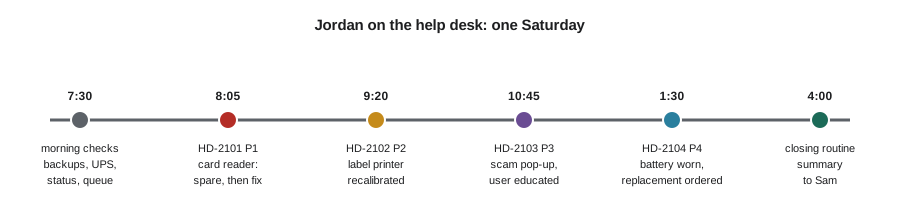
Jordan arrives at 7:30, half an hour before the cafe opens. Sam taught him to start every shift with a short routine rather than waiting for problems to arrive. He checks the overnight backup report from OFFICE-NAS, which shows that every job succeeded and the cloud copy finished at 2:14 a.m. He checks the UPS status page, which reports a healthy battery. He glances at the service status pages for the point-of-sale provider, the online shop platform and Microsoft 365, which all show normal operation. Then he opens the ticket queue, where three tickets came in overnight and Friday afternoon.
| Ticket | From | Summary | Impact | Urgency | Priority |
|---|---|---|---|---|---|
| HD-2101 | Mei | CAFE-POS1 card reader keeps disconnecting | High | High | P1 |
| HD-2102 | Theo | Label printer prints half the label on the next label | Medium | High | P2 |
| HD-2103 | Anita | Pop-up says the computer is infected and to call a number | Low | High | P3 |
| HD-2104 | Kai | ROAST-LT battery runs out quickly away from the dock | Low | Low | P4 |
The priorities come straight from Ridgeline's matrix in lesson 8. The card reader affects every card payment at the busiest time of the week, so it comes first. Jordan reorders the queue accordingly and sets out to the counter with a fully charged spare reader in his pocket, because Sam taught him that the fastest fix for a critical problem is often a workaround that restores the service while the real cause is investigated.
MATRIX = {("high", "high"): 1, ("high", "medium"): 2, ("high", "low"): 3,
          ("medium", "high"): 2, ("medium", "medium"): 3, ("medium", "low"): 4,
          ("low", "high"): 3, ("low", "medium"): 4, ("low", "low"): 4}
queue = [
    ("HD-2103", "Pop-up says the computer is infected", "low", "high"),
    ("HD-2101", "CAFE-POS1 card reader keeps disconnecting", "high", "high"),
    ("HD-2104", "ROAST-LT battery runs out quickly", "low", "low"),
    ("HD-2102", "Label printer misaligned", "medium", "high"),
]
queue.sort(key=lambda t: MATRIX[(t[2], t[3])])
for number, summary, impact, urgency in queue:
print(f"P{MATRIX[(impact, urgency)]} {number} {summary}")P1 HD-2101 CAFE-POS1 card reader keeps disconnecting P2 HD-2102 Label printer misaligned P3 HD-2103 Pop-up says the computer is infected P4 HD-2104 ROAST-LT battery runs out quickly
8:05 a.m. HD-2101: the card reader
The first customers are already in line. Mei explains that the reader on CAFE-POS1 has disconnected three times since Friday afternoon, each time needing to be re-paired, and that the reader on CAFE-POS2 is fine. Jordan swaps in the spare reader, pairs it with CAFE-POS1 and asks Mei to run the next payment, which goes through. Service restored, he turns to the cause while the cafe keeps trading on the spare.
Identifying the problem: only one reader is affected, and the disconnections began on Friday afternoon. Asked what changed, Mei remembers that a delivery of new menu boards was installed on Friday, including a small wireless speaker for background music, placed on the shelf right behind CAFE-POS1. Theory: interference or a pairing conflict from the new Bluetooth speaker, or a failing battery in the reader. Testing: the original reader's battery reads 96 in 100. Jordan checks the speaker and finds it was paired from CAFE-POS1 by the installer to test it, and the tablet keeps switching its Bluetooth attention between the two devices.
The fix: remove the speaker's pairing from CAFE-POS1, pair the speaker instead with the music phone that Mei uses for the playlist, and move the speaker off the shelf directly behind the tablet. Verifying: the original reader stays connected for the rest of the morning, so Jordan swaps it back in and returns the spare to its charger. Documenting: the ticket records the symptom, the cause, a speaker paired to the point-of-sale tablet, and the fix, and Jordan adds a line to the counter equipment notes: nothing else is ever paired with the POS tablets.
9:20 a.m. HD-2102: the label printer
Theo's first shipping batch of the day comes out wrong: each label prints partly across the gap onto the next label. The printer itself works and the text is sharp, so the print mechanism and driver are basically fine; this is an output configuration problem. Jordan asks what changed. Theo loaded a new roll of labels from a different supplier on Friday. The new labels are the same four by six inch size, but the gaps between them are slightly wider, and the printer is still calibrated for the old roll.
Thermal label printers detect the gaps between labels with a sensor and must be calibrated when the label stock changes. Jordan runs the printer's calibration routine, holding the feed button until it feeds a few labels and measures the gaps, then prints a test label from the shipping software, which lands perfectly. He checks one more thing: the label size in the printer driver's preferences is still four by six inches. Verifying with Theo, the next ten labels print correctly. Preventive measure: Jordan writes a short knowledge base article titled Recalibrate the label printer after changing label rolls and tapes a printed copy inside the printer cover.
Try it yourself
Daily ticket summary
At the end of each day Jordan sends Sam a summary. Write a function summary(tickets) that takes a list of tickets, each a dictionary with keys number, category and minutes, and returns a dictionary with three keys: count (the number of tickets), minutes (the total minutes spent) and by_category (a dictionary mapping each category to its number of tickets).
For the starter list, summary(day)["by_category"] is {"hardware": 2, "printing": 1, "security": 1} and the total is 105 minutes.
day = [
    {"number": "HD-2101", "category": "hardware", "minutes": 35},
    {"number": "HD-2102", "category": "printing", "minutes": 20},
    {"number": "HD-2103", "category": "security", "minutes": 40},
    {"number": "HD-2104", "category": "hardware", "minutes": 10},
]

def summary(tickets):
    return {"count": 0, "minutes": 0, "by_category": {}}

print(summary(day))
10:45 a.m. HD-2103: the scary pop-up
Anita, who came in to catch up on bookkeeping, sent the ticket at 10:40 with a photo from her phone: a full-screen browser page with flashing red text claiming that OFFICE-01 is infected and that she must call a support number immediately, with a fake countdown timer and a loud alarm sound. She has not called the number and has not clicked anything. Jordan recognizes it from his course work as a tech support scam: a web page, usually reached through a malicious advertisement, designed to frighten users into calling scammers who then ask for remote access and payment.
He follows the method rather than assuming. Identifying: the page appeared while Anita was searching for a supplier's website and clicked a sponsored result. The browser is in full-screen mode, which makes it look like a system message. Theory: a scam web page, not an actual infection; possible but less likely, a malicious extension or adware. Testing: pressing F11 leaves full-screen mode and shows that it is just a browser tab; closing the browser through Task Manager ends it. Reopening the browser shows no unknown extensions, and the browser's history confirms the page came from an advertisement on a search results page.
Even though the evidence points to a scam page only, Jordan runs a full Microsoft Defender scan, which finds nothing, checks the browser's settings and startup items, and confirms that no remote access software was installed. Because the user did not call or enter anything, there is nothing to change. Verifying: the browser and accounting software work normally. Educating, the step that matters most here: Jordan thanks Anita for reporting it rather than calling the number, and explains that real security warnings never ask you to phone a number, that Microsoft does not contact people this way, and that sponsored search results are worth skipping for supplier sites. He writes up the ticket, including the advertisement's address, and Sam later adds the scam domain to the network's web filter.
1:30 p.m. HD-2104: Kai's battery
After the lunch rush, Jordan turns to the lowest-priority ticket. Kai reports that ROAST-LT lasts only about two hours away from the dock, compared with most of a working day when it was new. Jordan generates a Windows battery report, which shows a design capacity of 54 watt-hours and a full-charge capacity of 31 watt-hours: the battery holds 57 in 100 of its original charge. The usage history shows the laptop spends most nights on the dock at full charge in the warm roasting room, which is exactly what wears lithium-ion batteries fastest.
This is not a fault to fix today but a part to replace and a habit to change. Jordan checks the inventory: the laptop is two and a half years old, out of warranty, and its battery is a replaceable internal part. He raises a request for Sam to order the correct battery, switches on the laptop's firmware setting that limits charging to 80 in 100 when docked, and suggests Kai keep the laptop on the office dock overnight rather than in the roasting room. Documenting: the ticket records the battery report figures, so the replacement can be justified to Rosa and the next battery's ageing can be compared.
Try it yourself
Response time check
Ridgeline's targets are to start work on a P1 ticket within 15 minutes, P2 within 60, P3 within 240 and P4 within 2880 (two days). Write a function late_tickets(tickets) that takes a list of (number, priority, minutes_to_start) tuples and returns a list of the numbers of tickets where work started later than the target for their priority.
For the starter list, only HD-2108 is late.
TARGET = {1: 15, 2: 60, 3: 240, 4: 2880}
week = [("HD-2101", 1, 5), ("HD-2102", 2, 55), ("HD-2103", 3, 5), ("HD-2108", 1, 40)]

def late_tickets(tickets):
    return []

print(late_tickets(week))
The tests for that exercise use their own lists of tickets as well as the one on screen, including a ticket exactly on its target. Testing a function with data you control, especially at the boundaries where a less-than should have been a less-than-or-equal, is a habit worth carrying into every script you write for a help desk.
Late afternoon: wrapping up
At four o'clock Jordan does the closing routine Sam taught him. He confirms every ticket is updated and closed with clear notes, or left open with a note saying what happens next. He checks that the spare card reader is back on its charger, that the label printer's knowledge base article is in the shared folder, and that the battery order request reached Sam. He sends Sam a short end-of-day summary, generated from the ticket data and checked by hand, listing the tickets, the causes and the follow-ups.
Looking back, none of the day's tickets needed deep technical wizardry. What made the day go smoothly was method: a morning routine that caught problems early, priorities that put the most important problem first, a workaround that kept the business trading, careful questions that found the real causes, one change at a time, verification with the user, and notes clear enough that Sam could follow every decision from home. That is what good IT support looks like at any scale, from a coffee roaster to a hospital.
Course review
| Lesson | Key skills |
|---|---|
| 1. Inside a computer | Components, the input-processing-output-storage model, software layers, inventories |
| 2. Processors, memory and storage | Reading specifications, paging, SSD and HDD types, decimal and binary units |
| 3. Motherboards and power supplies | Form factors, PCIe, UEFI settings, power budgets, safe assembly |
| 4. Laptops, mobile devices and printers | Laptop parts, batteries, MDM, Bluetooth, laser and thermal printing |
| 5. Operating systems | Editions, requirements, installation methods, partitions, drivers, accounts |
| 6. Files and backups | File systems, permissions, the 3-2-1 rule, backup types, RAID, restore testing |
| 7. Connections and networking | USB, video, cables, binary and hex, IP addresses, DHCP and DNS |
| 8. Troubleshooting method | The six steps, questioning, priority, communication, documentation |
| 9. Hardware and boot problems | Start-up stages, POST, recovery tools, stop codes, heat, SMART |
| 10. Software and malware | App fixes, performance, logs, malware types and removal |
| 11. Professional practices | Safety, ESD, environment, UPS, disposal, licences, privacy, conduct |
From here, the IT program branches out. NET-103 takes you into Linux administration and NET-105 into Windows Server and Active Directory. NET-110 develops the networking basics of lesson 7 into a full understanding of how networks work. CYB-101 builds on lessons 10 and 11 to cover security fundamentals, and ITSM-201 turns the ticket handling of lessons 8 and 12 into professional service desk practice. If you are working toward CompTIA A+, this course covers the foundations of both exams; the A+ prep program adds exam-focused review and practice.
Worked problem
Choosing a workaround first
Why did Jordan swap in the spare card reader before investigating HD-2101, but investigate HD-2104 without any workaround?
Show solution
- HD-2101 was P1: high impact (every card payment) and high urgency (a line of customers on a Saturday morning). Every minute of investigation without a workaround cost sales.
- A known-good spare restored the service in a minute without changing anything else, so it did not interfere with diagnosing the original reader.
- HD-2104 was P4: one user, with a workaround already available (keeping the laptop docked or plugged in), so there was no pressure to restore service first.
- In both cases the cause was still found and fixed, and the ticket documented.
Answer: Workarounds come first when the impact and urgency are high; low-priority problems can be investigated directly, but every problem still gets a root cause and documentation.
Common mistakes
MistakeWorking tickets in the order they arrived.
InsteadWork them by priority, calculated from impact and urgency.
MistakeInvestigating a P1 problem while the business stays down.
InsteadRestore service with a workaround first if one exists, then find the cause.
MistakeAssuming a scary pop-up is a real infection, or ignoring it.
InsteadFollow the method: test the theory, scan to confirm, and educate the user.
MistakeClosing tickets without telling the user or recording the cause.
InsteadVerify with the user and write clear notes for every ticket.
MistakeSkipping the morning checks because nothing has been reported.
InsteadCheck backups, power and service status daily to catch problems early.
MistakeTesting code only with the data on screen.
InsteadTest functions with data you control, including edge cases.
Summary and key terms
- Start each shift with routine checks: backups, power, service status and the queue.
- Sort tickets by priority and restore critical services with workarounds before investigating.
- Ask what changed: a new speaker, a new label roll and a sponsored search result caused three of the day's four tickets.
- Tech support scam pages are browser pages, not infections; close them safely, scan to confirm and educate the user.
- Battery reports turn a vague complaint into evidence for a replacement.
- Close the day with updated tickets, knowledge base articles and a summary.
- Method, communication and documentation matter as much as technical knowledge.
- workaround
- A temporary way to restore service while the cause is found.
- root cause
- The underlying reason a problem occurred.
- calibration
- Adjusting a device, such as a label printer, to match its materials.
- tech support scam
- A fraud that frightens users into calling fake support lines.
- response target
- The maximum time before work starts on a ticket of a given priority.
- knowledge base article
- A written record of a known problem and its fix.
- battery report
- A Windows report comparing design and current battery capacity.
- end-of-day summary
- A short report of the day's tickets, causes and follow-ups.
Practice problems
Work each problem on paper first, then reveal the answer to check.
Two tickets arrive together: the online shop checkout fails for every customer, and the office printer is printing slowly. Which comes first and why?
Show answer
The checkout: high impact and high urgency (lost sales for everyone), while slow printing is low impact with a workaround.
What should a user do when a web page claims their computer is infected and shows a phone number?
Show answer
Not call or click anything, close the browser (using Task Manager if needed) and report it to IT.
Why did Jordan check the label size in the driver after calibrating the printer?
Show answer
To verify that the whole printing path was correct, not just the symptom, before closing the ticket.
A battery report shows 40 Wh full charge against 60 Wh design. What should be recorded and recommended?
Show answer
Record the figures (67 in 100 health) and recommend a replacement and charge-limiting habits.
Name three checks in Jordan's morning routine.
Show answer
Any three of: backup reports, UPS status, provider service status pages, the ticket queue.
What turns one technician's fix into team knowledge?
Show answer
Clear ticket notes and knowledge base articles.
Lesson quiz · 5 questions
Score 60% or more to complete this lesson.
Create a free account to save your progress, take quizzes and earn a certificate.