
MSBA-291 · Lesson 7 of 12 · 23 min
Packages and registries
▶ Video coming soon A video version of this lesson is on the way.
Source code is only half of what an engineering organization produces. The other half is what it builds: container images, libraries and installers that other systems download and run. At Skerry those artifacts lived in four places. The e-commerce group pushed container images to a cloud provider's registry. The data group published Python libraries to a server under a desk. The store-systems group kept point-of-sale installers on a file share. And a scattering of teams had started using GitHub Packages without anyone deciding they should. The platform team's question for this session was simple: what should live in GitHub's registries, who should control it, and how would anyone know a package came from Skerry's own build?
What GitHub Packages provides
GitHub Packages is GitHub's package hosting service. It hosts several package formats side by side, under the same accounts and permissions as the code that builds them.
| Registry | Package format | Typical address |
|---|---|---|
| Container registry | Docker and OCI container images | ghcr.io |
| npm registry | JavaScript packages | npm.pkg.github.com |
| Maven and Gradle registry | Java packages | maven.pkg.github.com |
| NuGet registry | .NET packages | nuget.pkg.github.com |
| RubyGems registry | Ruby gems | rubygems.pkg.github.com |
The Container registry replaced an older Docker registry in GitHub Packages, and new container work should use ghcr.io. Formats that GitHub Packages does not host, such as Python packages, need another registry; Skerry's data group kept its Python libraries in its cloud provider's artifact service and connected it to GitHub through the private registry configuration described below.
Permissions: granular and repository-scoped
Packages inherit permissions in one of two ways, depending on the registry.
Granular permissions apply to the Container, npm, NuGet and RubyGems registries. A package belongs to a user or an organization and has its own access settings: its own visibility, and its own list of people, teams and repositories that can read, write or administer it. A package can be linked to a repository, and it can inherit access from that repository, so that people with access to the code get matching access to the package.
Repository-scoped permissions apply to the Maven and Gradle registry. A package published there belongs to a repository and takes its permissions from it: people who can read the repository can download the package, and people who can write to it can publish.
Package visibility follows the same three choices as repositories. A public package can be downloaded by anyone. A private package only by people and workflows granted access. An internal package, available for organizations in an enterprise, by every member of the enterprise. Internal visibility made sense for Skerry's shared base images, which every team built on.
Publishing from workflows
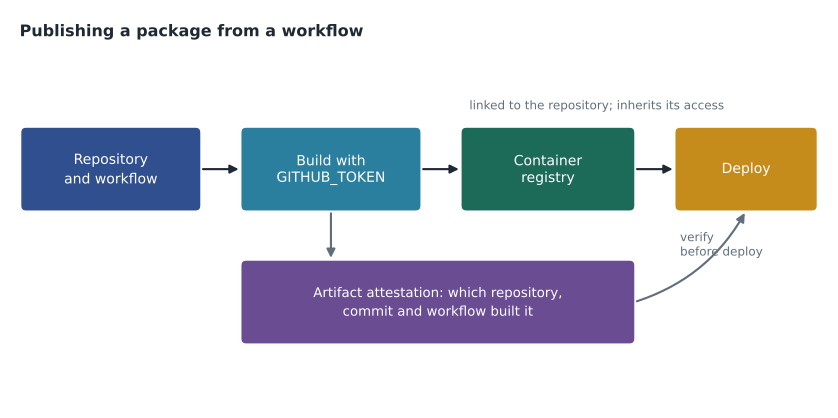
The safest way to publish a package is from an Actions workflow using the workflow's own GITHUB_TOKEN, with the packages: write permission requested in the workflow. When a workflow publishes to the Container registry this way, the package is created with a link to the repository, and the workflow can publish new versions without anyone holding a long-lived token.
name: publish-image
on:
  push:
    tags: [ "v*" ]
permissions:
  contents: read
  packages: write
  id-token: write
  attestations: write
jobs:
  build:
    runs-on: ubuntu-latest
    steps:
      - uses: actions/checkout@v5
      - uses: docker/login-action@v3
        with:
          registry: ghcr.io
          username: ${{ github.actor }}
          password: ${{ secrets.GITHUB_TOKEN }}
      - id: push
        uses: docker/build-push-action@v6
        with:
          push: true
          tags: ghcr.io/skerry/checkout-service:${{ github.ref_name }}
      - uses: actions/attest-build-provenance@v3
        with:
          subject-name: ghcr.io/skerry/checkout-service
          subject-digest: ${{ steps.push.outputs.digest }}
          push-to-registry: true
The policy point is that people should not be publishing packages from their laptops with personal tokens. Skerry's rule was that every package version consumed in production had to be published by a workflow in a repository the package was linked to.
Organization controls
Organization owners have several settings for packages. They can decide which visibilities members may choose when packages are created, for example allowing private and internal packages but not public ones. They can manage the access of each package individually. And they can see every package the organization owns, with its versions, downloads and linked repository.
| Control | Where | Skerry's choice |
|---|---|---|
| Package creation visibility | Organization member privileges for packages | Private and internal only in skerry and skerry-stores |
| Inherit access from source repository | Each package's settings, default on for packages published by workflows | Required; exceptions reviewed |
| Who can delete package versions | Package admin permission | Platform team and package owners only |
| Public packages | skerry-oss enterprise only | Two public libraries |
Deleting a package version that something depends on breaks every deployment that pulls it, so deletion deserves the same caution as deleting a repository. GitHub allows a deleted package or version to be restored for a limited period. Skerry's habit was not to delete production versions at all, and to use retention rules in the build pipeline to remove old development images automatically.
Billing and storage
GitHub Packages is free for public packages. For private packages, each plan includes some storage and data transfer, and usage beyond that is billed. Data transfer from workflows running on GitHub-hosted runners to GitHub Packages is free, which encourages teams to keep build and storage on the same platform. Container images are the usual source of cost surprises, because each tag of a large image adds storage until old versions are cleaned up.
Worked problem
Estimating image storage
The checkout service publishes a 600-megabyte image on every merge to main, about 25 times a week. Layers shared between versions mean each new version adds only about 120 megabytes of new storage. If no versions are ever deleted, roughly how much storage does the service add in a year?
Show solution
- New storage per version: about 120 megabytes.
- Versions a year: 25 a week times 52 weeks, about 1,300.
- Storage added: 1,300 times 120 megabytes is 156,000 megabytes, about 156 gigabytes.
Answer: About 156 gigabytes a year, which is why the team kept only the last 30 development versions and every tagged release.
Packages on Enterprise Server
GitHub Packages on Enterprise Server needs extra setup. A site administrator must enable it and connect the appliance to external blob storage, such as an Amazon S3 bucket or an Azure Blob Storage container, because package files are not kept on the appliance's own disks. Each package format can then be enabled or disabled separately. Roderick's old appliance had never had Packages enabled, which was why store systems used a file share. Moving to Enterprise Cloud removed that step entirely.
Private registries for Dependabot and code scanning
Many teams depend on packages in registries outside GitHub. Dependabot, which raises pull requests to update dependencies, and code scanning, which may need to resolve dependencies to analyze code, both need to reach those registries. Organization owners can configure private registries at organization level, with their addresses and credentials stored centrally, so that every repository's Dependabot and default code scanning setup can use them without each team storing its own secrets. Skerry configured the data group's Python artifact service and the cloud container registry the e-commerce group still used for some images.
Knowing where a package came from
The last question in the session was the hardest one: how would anyone know a package in production had been built by Skerry's own workflow, from Skerry's own code? Freya had read about software supply chain attacks in which an attacker publishes a look-alike package, or replaces a build output after the fact. Two GitHub features addressed this.
Artifact attestations let a workflow create a signed statement, called build provenance, that records which repository, commit and workflow produced an artifact, using the Sigstore signing approach. The attestation can be stored with the package and verified later with the GitHub CLI. A deployment system can then refuse to run an image unless its attestation shows it came from an approved workflow in an approved repository.
# Verify that an image was built by a workflow in the skerry organization
gh attestation verify oci://ghcr.io/skerry/checkout-service:v4.12.0 \
  --owner skerry
The second feature is the dependency graph and its software bill of materials export, which lists the components a repository depends on. Lesson 8 covers it with the other security features. Together they answer the two questions an auditor asks about any artifact: what went into it, and who built it.
| Question | GitHub feature | Evidence |
|---|---|---|
| Which workflow and commit built this artifact? | Artifact attestations | Signed build provenance verified with the GitHub CLI |
| What does this artifact contain? | Dependency graph and SBOM export | A software bill of materials in a standard format |
| Who could publish it? | Package permissions and linked repository | Access settings and audit log events |
| Has it changed since it was built? | Image digests and attestations | The digest in the attestation matches the deployed image |
Worked problem
Designing a deployment check
Store-systems wants its deployment workflow to refuse any image not built by the stores build workflow. What should the check do?
Show solution
- The build workflow attaches a provenance attestation to each image it publishes.
- Before deploying, the deployment workflow runs gh attestation verify against the image, requiring the skerry-stores organization and the expected signer workflow.
- If verification fails, the deployment stops.
- The check runs on the stores-deploy runner group from lesson 6, which only the deployment workflow can use.
Answer: Verify the image's attestation against the expected organization and build workflow before every deployment, and stop if it fails.
By the end of the session the plan was clear. Container images and npm libraries would move to GitHub Packages, published only by workflows and attested. Python libraries would stay in the cloud artifact service, reached through organization private registries. Point-of-sale installers would become release assets of the store-systems repositories, also attested. And the server under the desk would be switched off.
Package governance in practice
The team wrote a short package standard to go with the settings. Every package had to be linked to the repository that built it, so that its owner was clear and its access followed the code. Package names followed the repository naming convention from lesson 1, so commerce-checkout-service built the image ghcr.io/skerry/commerce-checkout-service. Internal base images lived in one repository, skerry/base-images, with internal visibility, and were rebuilt weekly with security updates. And every production deployment pulled images by digest, the fixed fingerprint of an exact image, rather than by tag, so a moved tag could not change what was deployed.
| Rule | Reason |
|---|---|
| Link every package to its source repository | Ownership and access follow the code |
| Name packages after their repositories | Easy to find who owns an image |
| Publish only from workflows | No long-lived personal credentials |
| Attest every production artifact | Provenance can be verified at deployment |
| Deploy by digest, not tag | A moved tag cannot change what runs |
| Clean up development versions automatically | Storage and cost stay predictable |
Migrating packages
Packages do not travel with repositories in a migration, as lesson 11 explains. For container images Skerry chose not to copy old images at all. Each service's first build in the new enterprise published a fresh image to the new organization's registry, attested, and deployments switched to it. Old images stayed in the cloud provider's registry for 90 days in case a rollback was needed, then were deleted. For npm libraries that other teams depended on, the team republished the latest supported versions to the new registry and kept the old registry read-only until every consumer had switched, which took six weeks and one spreadsheet.
Worked problem
Pulling by digest
A deployment manifest references ghcr.io/skerry/commerce-checkout-service:v4.12.0. A compromised build script later pushes different content to the same tag. What protects production, and what should the manifest use instead?
Show solution
- A tag is a movable label, so a manifest that pulls by tag would pick up the new content on its next deployment.
- A digest identifies one exact image; content pushed later has a different digest.
- The attestation check from this lesson would also fail, because the new image was not built by the approved workflow.
- The manifest should reference the image by digest, recorded by the build workflow when it published the release.
Answer: Reference images by digest and verify attestations; either check alone would stop the swapped image, and together they make the failure obvious.
Common mistakes
MistakePublishing packages from laptops with personal tokens.
InsteadPublish from workflows with the GITHUB_TOKEN and packages: write.
MistakeExpecting the Maven registry to have its own package access lists.
InsteadMaven and Gradle packages take their permissions from the repository.
MistakeDeleting old production package versions to save space.
InsteadKeep released versions; clean up development versions automatically.
MistakeTrusting a package because it has the right name.
InsteadVerify its build attestation before deploying it.
Summary and key terms
- GitHub Packages hosts container images, npm, Maven and Gradle, NuGet and RubyGems packages under GitHub accounts.
- Container, npm, NuGet and RubyGems packages have granular permissions and can inherit access from a linked repository; Maven and Gradle packages use repository permissions.
- Publish from workflows using the GITHUB_TOKEN, not personal tokens.
- Packages are free for public use; private storage and transfer beyond plan allowances are billed.
- Enterprise Server needs external blob storage to enable Packages.
- Artifact attestations and SBOMs show who built an artifact and what is in it.
- GitHub Packages
- GitHub's service for hosting packages and container images.
- Container registry
- The GitHub Packages registry for Docker and OCI images, at ghcr.io.
- Granular permissions
- Package access settings separate from any repository.
- Repository-scoped permissions
- Package access inherited from the repository that owns the package.
- Artifact attestation
- A signed statement recording which workflow, repository and commit built an artifact.
- Build provenance
- Information about how and where an artifact was built.
- Private registry configuration
- Organization-level credentials that let Dependabot and code scanning reach outside registries.
Practice problems
Work each problem on paper first, then reveal the answer to check.
Which registries use granular package permissions?
Show answer
Container, npm, NuGet and RubyGems.
What does an Enterprise Server administrator need before enabling Packages?
Show answer
External blob storage connected to the appliance.
How can a deployment confirm that an image came from the expected workflow?
Show answer
Verify the image's artifact attestation with the GitHub CLI.
Lesson quiz · 5 questions
Score 60% or more to complete this lesson.
Create a free account to save your progress, take quizzes and earn a certificate.