
MSBA-291 · Lesson 6 of 12 · 20 min
Self-hosted and larger runners
▶ Video coming soon A video version of this lesson is on the way.
A runner is the machine that executes a job in a GitHub Actions workflow. Choosing where jobs run is one of the decisions with the largest effect on cost, speed and security, and at Skerry it was also the most political. The e-commerce group was happy with GitHub-hosted runners. The data group wanted much bigger machines for its model training jobs. Roderick Pemberton-Quaye's store-systems group needed jobs that could reach test payment terminals on the network of the main distribution centre, which no machine in GitHub's cloud could do. And Yevgenia's build infrastructure team had inherited 140 self-hosted runners scattered across virtual machines, some registered to individual repositories, two running under the personal account of an engineer who had moved to another company.
Three kinds of runner
Standard GitHub-hosted runners are virtual machines that GitHub provides for each job and throws away afterwards. They come in Linux, Windows and macOS images with common tools preinstalled. For public repositories they are free. For private repositories each plan includes a monthly allowance of minutes, and usage beyond that is billed per minute, with Windows and macOS minutes priced higher than Linux.
Larger runners are GitHub-hosted runners with more resources and more control. Organizations and enterprises on GitHub Team or GitHub Enterprise can create them with more processor cores and memory, GPU machines for some workloads, and Arm processors. They can be given static IP address ranges, so that a firewall can allow them by address, and on GitHub Enterprise Cloud they can use Azure private networking, so that jobs run inside a company's own Azure virtual network and reach private resources there. Larger runners are always billed per minute; plan minutes do not cover them.
Self-hosted runners are machines the customer provides and manages, on premises or in its own cloud account, with the GitHub Actions runner application installed. The customer is responsible for their operating system, tools, security and capacity. They can reach anything on the customer's network, which is both their purpose and their risk.
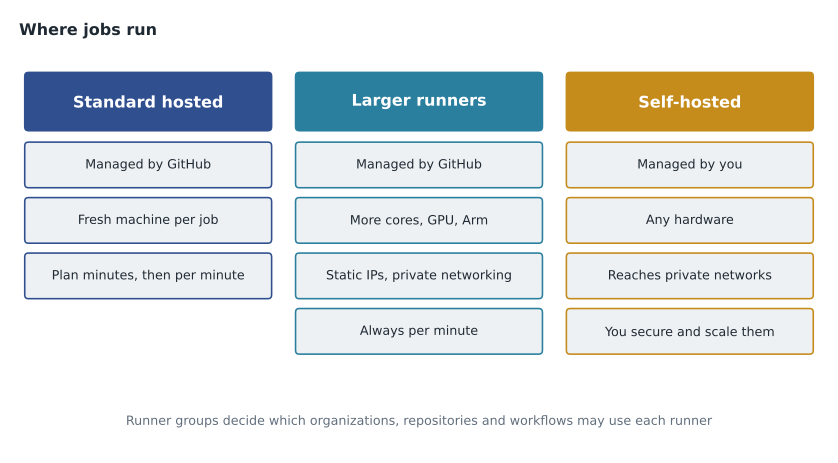
| Question | Standard hosted | Larger runners | Self-hosted |
|---|---|---|---|
| Who maintains the machine? | GitHub | GitHub | The customer |
| Fresh machine for every job? | Yes | Yes | Only if configured as ephemeral |
| Can reach the company's private network? | No | Through static IPs and firewall rules, or Azure private networking | Yes |
| Custom hardware? | No | Choice of sizes, GPU and Arm | Anything |
| How is it paid for? | Plan minutes, then per minute | Per minute | The customer's infrastructure |
What changed in pricing
Runner economics moved during 2026, and administrators need to know the current position. In December 2025 GitHub announced that prices for GitHub-hosted runners would fall by up to 39 percent from January 1, 2026, depending on machine type, with free minute quotas unchanged. In the same announcement it proposed a platform charge of 0.002 US dollars per minute for jobs on self-hosted runners in private repositories from March 1, 2026. After strong criticism, GitHub postponed the self-hosted charge to re-evaluate its approach and gave no new date. The original announcement said the change would not affect GitHub Enterprise Server. Administrators planning budgets should check GitHub's current Actions pricing before assuming self-hosted minutes cost nothing on GitHub.com.
Worked problem
Estimating a self-hosted platform charge
Skerry's self-hosted runners execute about 1.8 million job minutes a month in private repositories. If a charge of 0.002 US dollars per minute were introduced, what would it add each month?
Show solution
- Multiply minutes by the rate: 1,800,000 times 0.002.
- That gives 3,600.
- So the charge would add about 3,600 US dollars a month, or about 43,200 a year.
Answer: About 3,600 US dollars a month; Lorcan Adeyemi-Brooke kept it in the budget as a risk line while the charge was postponed.
Registering runners at the right level
Self-hosted runners and larger runners can be added at three levels. A repository runner serves one repository. An organization runner can serve any repository in the organization that its runner group allows. An enterprise runner can serve organizations across the enterprise. Registering runners at repository level is how Skerry's old estate ended up with 140 machines nobody could account for: any repository administrator could add one.
Enterprise owners can disable repository-level self-hosted runners for all organizations, or specifically in repositories owned by managed users, which stops this sprawl. Workflows can still use enterprise and organization runners. Skerry turned off repository-level runners everywhere in the new enterprise, so every self-hosted machine would be registered at organization or enterprise level by the build infrastructure team.
Runner groups
Runner groups control which organizations, repositories and workflows can use which runners. An enterprise runner group chooses the organizations that can use its runners. An organization runner group chooses the repositories. Both can also be restricted to selected workflows, so that, for example, only the deployment workflow in the shared-workflows repository can use the runners that hold production network access.
| Runner group at Skerry | Level | Runners | Who may use it |
|---|---|---|---|
| hosted-standard | Enterprise | Standard and 4-core larger Linux runners | All organizations |
| data-gpu | Organization (skerry) | GPU larger runners | Repositories with owning-team set to the data group |
| stores-lab | Organization (skerry-stores) | Self-hosted runners in the distribution centre lab | Point-of-sale repositories, test workflows only |
| stores-deploy | Organization (skerry-stores) | Self-hosted runners with production network access | Only the deployment reusable workflow |
| azure-private | Enterprise | Larger runners using Azure private networking | skerry and skerry-stores, selected repositories |
When Skerry disabled access to standard GitHub-hosted runners outside its runner groups, which the enterprise policy allows, every workflow had to name a runner group or label that existed in the new design. That made the rules explicit: no team could silently start using a more expensive machine type.
Securing self-hosted runners
A self-hosted runner executes whatever code the workflow gives it, with whatever access the machine has. The risks follow from that.
| Risk | Example | Mitigation |
|---|---|---|
| Untrusted code | A pull request from a fork runs on a runner inside the network | Never use self-hosted runners for public repositories; keep fork workflows on hosted runners |
| Persistence between jobs | One job leaves a modified tool or stolen token for the next | Use ephemeral runners that take one job and are destroyed |
| Excessive network reach | A test runner can reach the payment database | Separate runner groups and network zones for test and deployment |
| Out-of-date software | An old runner application or operating system with known flaws | Rebuild images regularly; keep the runner application current |
| Stored credentials | Long-lived cloud keys on the machine | Use OpenID Connect to obtain short-lived cloud credentials per job |
An ephemeral runner registers for a single job and is removed when the job finishes, so nothing persists from one job to the next. Ephemeral runners are usually created automatically by an autoscaler. GitHub also supports just-in-time runner registration through the API, which creates a one-time configuration for a single job without a long-lived registration token.
GitHub's guidance is direct about public repositories: self-hosted runners should almost never be used with them, because anyone can open a pull request that runs code on the machine. Skerry's two public libraries in skerry-oss used only GitHub-hosted runners.
Scaling with Actions Runner Controller
Running self-hosted runners at scale means starting and stopping them as demand changes. Actions Runner Controller, usually called ARC, is GitHub's supported way to do this on Kubernetes. ARC uses runner scale sets: a group of runners that ARC creates on demand, typically one ephemeral pod per job, and removes afterwards. Yevgenia's team replaced the 140 long-lived virtual machines with two ARC scale sets on Skerry's Kubernetes cluster for general work and a small fixed pool of ephemeral lab machines for jobs that needed to reach physical payment terminals.
# Install a runner scale set with Helm (simplified; see the ARC documentation for current chart names and values)
helm install stores-lab-set \
  --namespace arc-runners --create-namespace \
  --set githubConfigUrl="https://github.com/skerry-stores" \
  --set githubConfigSecret=arc-github-app \
  --set runnerGroup="stores-lab" \
  --set minRunners=0 --set maxRunners=20 \
  oci://ghcr.io/actions/actions-runner-controller-charts/gha-runner-scale-set
ARC authenticates to GitHub with a GitHub App, following the principle from lesson 3. The workflows target the scale set by name in runs-on, exactly as they would target any other runner.
Monitoring and capacity
Runner problems show up as queued jobs. GitHub's usage and Actions performance metrics show how long jobs waited, how long they ran and which runners they used, and the audit log records runner registration and removal. Skerry's build infrastructure team watched two numbers each week: the 95th-percentile queue time per runner group, with a target under two minutes, and the share of minutes on larger runners, which drove cost.
Worked problem
Right-sizing a larger runner
The data group's training job takes 80 minutes on an 8-core larger runner and 44 minutes on a 16-core one. If the 16-core runner costs twice as much per minute, which is cheaper per job?
Show solution
- Call the 8-core price one unit per minute; the 16-core price is two units.
- 8-core cost: 80 minutes times 1 equals 80 units.
- 16-core cost: 44 minutes times 2 equals 88 units.
- The 8-core runner is slightly cheaper, but the 16-core runner saves 36 minutes of waiting.
Answer: The 8-core runner costs about 9 percent less per job; the team chose it for nightly runs and the 16-core runner for urgent retraining.
Custom images for hosted runners
Teams often move to self-hosted runners because they need tools that are not on the standard images. GitHub now lets enterprises and organizations build custom images for larger runners, and enterprise policies control whether custom images can be used and how long versions are kept. Where a custom image meets the need, it removes the maintenance burden of self-hosting while keeping the convenience of a GitHub-managed machine. Skerry used a custom image with its internal certificate authority and build tools preinstalled for the azure-private runner group.
Enterprise Server runners
On GitHub Enterprise Server, standard GitHub-hosted runners are not available, so every job runs on self-hosted runners unless GitHub Connect is used to reach some cloud services. Roderick's old appliance used 30 self-hosted runners, several of them years out of date. Moving store systems to Enterprise Cloud, covered in lesson 11, let most of those jobs move to hosted runners, with only the lab jobs staying on self-hosted machines.
Connecting runners to clouds without stored keys
Deployment jobs need to reach cloud accounts, and the old way was to store a cloud access key as a repository secret. Keys stored that way last until someone rotates them, and they work from anywhere. Actions supports OpenID Connect instead: a workflow requests a short-lived identity token from GitHub, the cloud provider checks the token's claims, such as the repository, branch and environment, and issues temporary credentials for that job only. The cloud side decides which claims it trusts, so a deployment role can be limited to the main branch of one repository in one environment.
jobs:
  deploy:
    runs-on:
      group: stores-deploy
    environment: production
    permissions:
      id-token: write
      contents: read
    steps:
      - uses: azure/login@v2
        with:
          client-id: ${{ vars.AZURE_CLIENT_ID }}
          tenant-id: ${{ vars.AZURE_TENANT_ID }}
          subscription-id: ${{ vars.AZURE_SUBSCRIPTION_ID }}
      - run: ./deploy.sh
Skerry removed 170 long-lived cloud keys from repository and organization secrets during the migration and replaced them with OpenID Connect trust relationships. The runner groups from earlier in this lesson and the environment protection rules on production then formed two independent checks: the job had to run on an approved runner, and the cloud had to trust the job's identity.
Planning capacity
Self-hosted capacity is a trade-off between waiting and paying. Too few runners and jobs queue; too many and machines sit idle. Autoscaling with ARC removed most of that tension for Skerry's general work, because pods were created only when jobs arrived. The lab runners were different: there were only as many as there were physical test terminals, eight in all. Yevgenia's team published a simple rule for the store-systems group: lab jobs ran only on merges to main and release branches, never on every push, which kept the eight terminals busy without long queues.
Common mistakes
MistakeLetting repository administrators register their own self-hosted runners.
InsteadDisable repository-level runners and register runners centrally in runner groups.
MistakeUsing self-hosted runners for public repositories.
InsteadUse GitHub-hosted runners for anything that runs untrusted code.
MistakeKeeping long-lived runner machines that accumulate state.
InsteadUse ephemeral runners, created per job by ARC or another autoscaler.
MistakeAssuming plan minutes cover larger runners.
InsteadLarger runners are always billed per minute.
Summary and key terms
- Runners are standard GitHub-hosted, larger GitHub-hosted, or self-hosted machines the customer manages.
- Larger runners add size, GPU, Arm, static IP ranges and Azure private networking, and are billed per minute.
- Hosted runner prices fell by up to 39 percent from January 1, 2026; a proposed self-hosted platform charge was postponed.
- Runners registered at organization or enterprise level and controlled by runner groups replace repository-level sprawl.
- Self-hosted runners should be ephemeral, separated by network zone and never used for public repositories.
- Actions Runner Controller scales ephemeral runners on Kubernetes using runner scale sets.
- Runner
- The machine that executes a job in a workflow.
- Larger runner
- A GitHub-hosted runner with more resources or networking options, billed per minute.
- Self-hosted runner
- A runner on infrastructure the customer provides and manages.
- Runner group
- A set of runners with rules about which organizations, repositories and workflows may use them.
- Ephemeral runner
- A runner that takes one job and is then removed.
- Actions Runner Controller
- GitHub's Kubernetes operator for scaling self-hosted runners.
- Runner scale set
- An ARC-managed group of runners created on demand.
Practice problems
Work each problem on paper first, then reveal the answer to check.
Why are self-hosted runners unsafe for public repositories?
Show answer
Anyone can open a pull request that runs code on the machine.
What stops repository administrators adding their own runners?
Show answer
An enterprise policy that disables repository-level self-hosted runners.
Which runner option lets a GitHub-hosted job reach resources inside a company's Azure network?
Show answer
A larger runner using Azure private networking.
Lesson quiz · 5 questions
Score 60% or more to complete this lesson.
Create a free account to save your progress, take quizzes and earn a certificate.