
MSBA-291 · Lesson 4 of 12 · 21 min
Personal access tokens policies
▶ Video coming soon A video version of this lesson is on the way.
Amadou Ferrand-Bakari, Skerry's identity engineer, had spent October getting people signed in the right way. In November he turned to the credentials people used when they were not signing in at all. "Single sign-on and Conditional Access protect the browser," he said at the start of the session. "A personal access token walks straight past both of them. If someone copies a token into a script on a build server, that script is them, with everything they can reach, for as long as the token lives."
The old organizations showed what he meant. Secret scanning had found 23 leaked credentials during the Driftline acquisition in MSBA-290's capstone, and the pattern was the same in Skerry's own code: tokens pasted into configuration files, into wiki pages and, once, into a public gist. A survey of the old enterprise found 2,960 active classic personal access tokens authorized for single sign-on, of which 640 had no expiry date and 210 belonged to people who had since left the company but whose personal accounts still existed outside Skerry's control.
Two kinds of personal access token
A personal access token, usually shortened to PAT, is a password-like string that lets a person, or a script running as that person, call the GitHub API and use Git over HTTPS. There are two kinds.
A personal access token (classic) carries broad scopes, such as repo for full control of private repositories or admin:org for organization administration. It works on every repository and organization the user can reach that the scopes cover. It can be created without an expiry date, and it has historically been the most common credential behind leaked-secret incidents.
A fine-grained personal access token is limited to one resource owner, either the user or one organization, and to chosen repositories within it. It requests specific permissions, much like a GitHub App: read access to contents, write access to issues and so on. It always has an expiry date. And an organization can require that fine-grained tokens be approved by an owner before they can reach the organization's resources.
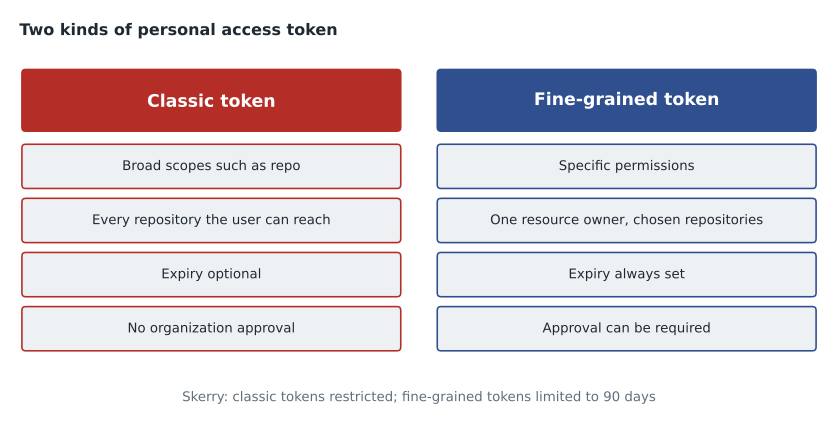
| Property | Classic token | Fine-grained token |
|---|---|---|
| Access model | Broad scopes | Specific permissions per resource |
| Which repositories | Every repository the user can reach within the scopes | Chosen repositories under one resource owner |
| Expiry | Optional unless a policy requires it | Always set |
| Organization approval | Not available | Can be required by the organization |
| Visible to organization owners | Through single sign-on authorizations and the audit log | Listed with their permissions; owners can review and revoke |
| Typical use today | Older tools that do not support fine-grained tokens | A developer's own scripts and tools |
Organization policies
Organization owners control personal access tokens through a group of settings described in GitHub's documentation on personal access token policies.
| Setting | Options | Default |
|---|---|---|
| Access by classic tokens | Allow, or restrict so classic tokens cannot reach the organization's resources | Allowed |
| Access by fine-grained tokens | Allow, or restrict | Allowed |
| Approval of fine-grained tokens | Require owner approval, or do not require it | Approval required |
| Maximum lifetime of fine-grained tokens | A maximum number of days | 366 days |
| Maximum lifetime of classic tokens | A maximum number of days, or no requirement | No requirement |
Several details matter. Restricting a token type means those tokens cannot reach the organization's private resources, though they can still read public resources and SSH keys created with them keep working. Approval applies only to fine-grained tokens: an owner sees a request listing the token's repositories and permissions, and can approve or deny it. Tokens created by organization owners do not need approval. And a lifetime policy does not revoke tokens that break it. A token with a longer lifetime than the policy allows is simply blocked from the organization, and the user sees an error when their API call fails.
Enterprise policies
Enterprise owners can set the same policies across every organization in the enterprise, using the usual choice between an enforced value and No policy. When an enterprise policy is enforced, organization owners cannot loosen it. Skerry enforced three values across skerry, skerry-stores and skerry-sandbox:
| Enterprise policy at Skerry | Value | Reason |
|---|---|---|
| Classic tokens | Restricted | Broad scopes and missing expiry made them the main leak risk |
| Fine-grained tokens | Allowed | Developers still need tokens for their own scripts |
| Approval of fine-grained tokens | Required in skerry-stores; not required in skerry and skerry-sandbox | Point-of-sale code needs a human check; elsewhere approval would be a rubber stamp |
| Maximum lifetime of fine-grained tokens | 90 days | Short enough that forgotten tokens expire quickly |
The approval row needed a compromise, because enterprise policies impose one value everywhere. The team left approval at No policy at enterprise level and set it in each organization, recording the reason in the governance standard. Restricting classic tokens, by contrast, applied everywhere and was enforced.
Worked problem
Predicting the effect of a lifetime policy
Skerry sets a 90-day maximum lifetime for fine-grained tokens. A developer has a fine-grained token created two months ago with a lifetime of one year. What happens to it the day the policy takes effect?
Show solution
- The token's lifetime, one year, is longer than the 90-day maximum.
- Lifetime policies do not revoke or shorten tokens.
- Tokens that do not comply are blocked from the organization's resources.
- The developer's API calls to the organization start failing with an error that names the policy.
Answer: The token still exists but is blocked from the organization; the developer must create a new token with a lifetime of 90 days or less.
Tokens in a managed users enterprise
Skerry's new enterprise uses managed user accounts, which changes the token story in useful ways. A managed user's tokens belong to an account the company controls. When the identity provider suspends the account, through the SCIM deprovisioning covered in MSBA-290, every token the account created stops working at once. The 210 tokens owned by departed staff in the old enterprise could not happen in the new one, because a departed employee's managed account is suspended by the same process that disables their company sign-in.
The old enterprise, with personal accounts, relied on single sign-on authorization instead. A classic token had to be authorized for the organization's SAML single sign-on before it could reach the organization, and owners could see and revoke those authorizations. That helped, but a person's token stayed valid for everything outside the organization, and the authorization survived until someone revoked it. Until the old enterprise was retired, Amadou ran a weekly job that revoked single sign-on authorizations for anyone the identity provider showed as having left.
# List fine-grained token requests waiting for approval in an organization
gh api /orgs/skerry-stores/personal-access-token-requests \
  --jq '.[] | [.owner.login, .token_name, .token_expires_at, (.permissions.repository | tostring)] | @tsv'

# List approved fine-grained tokens that can reach the organization
gh api --paginate /orgs/skerry-stores/personal-access-tokens \
  --jq '.[] | [.owner.login, .token_name, .token_expires_at] | @tsv'
Detecting and responding to leaks
Policies reduce the damage a token can do. They do not stop people pasting tokens where they should not. For that, GitHub's secret scanning looks for known token formats in repositories, and push protection blocks pushes that contain them. GitHub tokens have a recognizable prefix, such as ghp_ for classic tokens and github_pat_ for fine-grained tokens, which makes them easy to detect reliably. For public repositories GitHub also scans for its own tokens and revokes them automatically when they leak.
Lesson 8 covers enabling secret scanning and push protection across an enterprise. For tokens specifically, Skerry's response plan was short:
| Step | Who | Action |
|---|---|---|
| 1 | Security on-call | Confirm the alert is a real, active token |
| 2 | Token owner or an owner | Revoke the token immediately |
| 3 | Security on-call | Search the audit log for the token's recent activity |
| 4 | Repository owner | Remove the secret from the code and, where needed, from history |
| 5 | Platform team | Replace the use with a GitHub App or a scoped token, and close the alert |
The order matters. Removing a token from the code first, before revoking it, does nothing to stop someone who has already copied it. Revocation is the step that ends the risk.
Worked problem
Sizing the classic-token problem
The old enterprise had 2,960 active classic tokens authorized for single sign-on. 640 had no expiry and 210 belonged to departed staff, with 80 tokens in both groups. How many tokens were in at least one of the two risk groups?
Show solution
- Tokens with no expiry: 640.
- Tokens of departed staff: 210.
- Tokens in both groups are counted twice, so subtract them once: 640 plus 210 minus 80.
- That gives 770.
Answer: 770 tokens, about 26 percent of the 2,960, were in at least one risk group.
Moving people off classic tokens
Restricting classic tokens broke things, as expected. The platform team prepared by publishing a guide for the commonest cases and running the restriction in stages: first in skerry-sandbox, then skerry, then skerry-stores, two weeks apart. The guide answered four questions.
| If you used a classic token for | Use instead |
|---|---|
| Git over HTTPS on your laptop | Git Credential Manager or the GitHub CLI, which sign you in through the browser |
| A personal script | A fine-grained token for the repositories the script needs, with a short expiry |
| A workflow reaching another repository | A GitHub App installation token |
| A shared service or bot | A GitHub App registered to the organization |
| A tool that only supports classic tokens | Ask the platform team for an exception with a review date, while the vendor is asked to support fine-grained tokens or GitHub Apps |
Eleven exceptions were requested. Seven were for one build tool that did not support fine-grained tokens; its vendor released support within the quarter. The remaining four were for internal scripts that were rewritten to use the release app.
Other credentials worth governing
Personal access tokens are not the only long-lived credentials. SSH keys let people push and pull over SSH, and in an enterprise with personal accounts they also need single sign-on authorization. Deploy keys give a server access to one repository. SSH certificate authorities, available to enterprise and organization owners, let a company issue short-lived SSH certificates from its own authority instead of letting people register long-lived keys. Skerry used an SSH certificate authority for the store-systems build servers, so that a stolen server key would expire within a day.
Priya summarized the session in her notes in one line: the best token is the one nobody has to remember to delete. Short lifetimes, managed accounts and apps instead of people all serve that goal.
Auditing tokens in practice
Policies only help if someone looks at what they allow. Organization owners can list the fine-grained tokens that have access to the organization, with each token's owner, repositories, permissions and expiry, and can revoke any of them. The audit log records token requests, approvals, denials and revocations, and records programmatic access events with the type of credential used. Skerry's quarterly access review added three token questions: are there fine-grained tokens with write access to restricted repositories, are there token exceptions past their review date, and did any automation use a person's token during the quarter.
The last question was the most revealing. Audit log events can show whether an API call came from a person's token, an app or a workflow token. In the first quarter after the new policies, two scheduled scripts were still using people's fine-grained tokens. One belonged to a data engineer who had created it for a weekend experiment that became a nightly job. Both were moved to the release app's sibling, an internal reporting app with read-only permissions, within a week.
| Review question | Where to look | Action if yes |
|---|---|---|
| Fine-grained tokens with write access to restricted repositories? | Organization list of approved tokens | Confirm the need with the owner, or revoke |
| Token exceptions past their review date? | Exception register | Renew with a new date, or revoke |
| Automation using a person's token? | Audit log programmatic access events | Move it to a GitHub App |
| Tokens owned by suspended accounts still listed? | Organization token list | Revoke; investigate why deprovisioning did not remove them |
Developer experience
None of this should make everyday Git work harder. Developers who sign in through Git Credential Manager or the GitHub CLI never handle a token at all: the tool opens the browser, the person signs in with single sign-on and Conditional Access, and the tool stores a credential that it renews as needed. The platform team made that the default in its laptop setup scripts, so that for most developers the classic-token restriction was invisible.
Common mistakes
MistakeAssuming a lifetime policy revokes long-lived tokens.
InsteadNon-compliant tokens are blocked from the organization, not revoked.
MistakeRemoving a leaked token from code before revoking it.
InsteadRevoke first; cleaning the code does not stop someone who already has it.
MistakeUsing an owner's personal token for automation because it avoids approval.
InsteadUse a GitHub App; owner tokens carry all of an owner's power.
MistakeRestricting classic tokens everywhere on one day.
InsteadStage the change, publish replacements and handle exceptions with review dates.
Summary and key terms
- Classic tokens carry broad scopes and optional expiry; fine-grained tokens have specific permissions, chosen repositories and required expiry.
- Organizations can restrict each token type, require approval for fine-grained tokens and set maximum lifetimes.
- Enterprise owners can enforce token policies across all organizations.
- Managed user accounts tie tokens to accounts the company controls, so deprovisioning ends them.
- Secret scanning and push protection detect tokens in code; revocation is the step that ends a leak.
- Replace classic tokens with browser sign-in, fine-grained tokens or GitHub Apps, in stages.
- Personal access token (classic)
- A token with broad scopes that works across everything the user can reach.
- Fine-grained personal access token
- A token limited to one resource owner, chosen repositories and specific permissions, with an expiry.
- Token approval
- An organization requirement that owners approve fine-grained tokens before they reach its resources.
- Maximum lifetime policy
- A rule that blocks tokens whose lifetime exceeds a set number of days.
- Single sign-on authorization
- Linking a token or SSH key to an organization that uses SAML single sign-on.
- SSH certificate authority
- An owner-configured authority that issues short-lived SSH certificates for access.
Practice problems
Work each problem on paper first, then reveal the answer to check.
Which token type can an organization require owners to approve?
Show answer
Fine-grained personal access tokens.
What is the default maximum lifetime for fine-grained tokens in an organization?
Show answer
366 days.
Why did the departed-staff token problem disappear in the managed users enterprise?
Show answer
Deprovisioning suspends the managed account and with it every token it created.
Lesson quiz · 5 questions
Score 60% or more to complete this lesson.
Create a free account to save your progress, take quizzes and earn a certificate.