
MSBA-291 · Lesson 3 of 12 · 19 min
GitHub Apps and OAuth apps
▶ Video coming soon A video version of this lesson is on the way.
The third session began with a number that made the room quiet. Freya had asked the API for every integration installed or authorized across Skerry's old organizations. There were 214 GitHub App installations and 1,370 OAuth app authorizations. Some were obvious, such as the project tracker, the chat integration and the code coverage service. Others were mysteries: an OAuth app called deploy-helper authorized by 40 developers, an app installed on all repositories in the e-commerce organization that nobody in e-commerce recognized, and three different continuous integration services, two of which Skerry had stopped paying for years earlier but which still had access to code.
Integrations are the quiet half of access management. Identity work controls which people can sign in. Integrations decide which software can act on GitHub, often with more access than any person, and often without anyone remembering they exist. This lesson covers the two kinds of integration GitHub supports, how to choose between them, and how an enterprise controls who may install them.
Two kinds of integration
A GitHub App is an integration that acts in its own right. It is registered once by a person, an organization or an enterprise, and then installed on accounts, where an owner chooses which repositories it can reach. The app requests specific, fine-grained permissions, such as read access to contents or write access to pull requests, and it can do only what those permissions allow on the repositories where it is installed. When it acts, it shows up as itself, for example as skerry-release[bot], not as a person.
An OAuth app is an integration that acts on behalf of a user. A person authorizes it, and it receives a token with scopes such as repo or read:org. It can then do anything that user could do within those scopes, on every repository the user can reach. When it acts, the action appears as the user. If the user leaves, the token stops working, and if the user has broad access, so does the app.
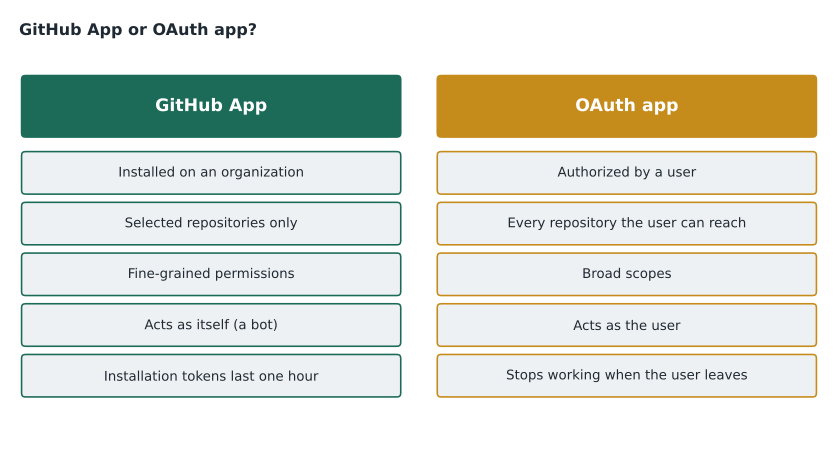
| Question | GitHub App | OAuth app |
|---|---|---|
| Who does it act as? | Itself (a bot), or a user when it uses a user access token | The user who authorized it |
| How is access granted? | Installed on an account with selected repositories | Authorized by a user |
| How fine is access? | Fine-grained permissions per resource | Broad scopes |
| Which repositories? | Only those chosen at installation | Every repository the user can reach |
| Token lifetime | Installation tokens expire after an hour | Tokens last until revoked unless the app uses expiring tokens |
| When the person who set it up leaves | Keeps working, because it does not depend on a user | Stops working when the user's access ends |
| Rate limits | Scale with the number of repositories and users in organizations it is installed in | Shared with the user's own limit |
GitHub recommends GitHub Apps for new integrations, and the reasons are visible in the table. A GitHub App's access is narrower, is limited to repositories someone chose, and does not depend on any one employee staying at the company. OAuth apps remain common because many older tools were built that way, and some tasks, such as signing in to a third-party site with a GitHub account, genuinely need to act as the user. GitHub Apps can also act as a user through user access tokens when a tool needs both, for example when a developer tool wants to open a pull request that shows the developer as its author.
Installation tokens and private keys
A GitHub App authenticates in two steps. First it signs a short JSON Web Token with its private key, proving it is the app. Then it exchanges that token for an installation access token for one installation, which it uses to call the API. Installation tokens expire after one hour, so a leaked token is useful to an attacker only briefly. The private key is the long-lived secret, and protecting it is the main operational duty of whoever runs the app.
Skerry stored the private keys for its own apps in a cloud key vault, rotated them every six months, and gave each app at least two keys during rotation so that the new key could be deployed before the old one was deleted. Within Actions workflows, teams used the official action that creates an installation token from an app ID and private key stored as secrets, so that workflows could act as an app rather than as a person.
jobs:
  tag-release:
    runs-on: ubuntu-latest
    permissions:
      contents: read
    steps:
      - name: Create an installation token for the release app
        id: app-token
        uses: actions/create-github-app-token@v2
        with:
          app-id: ${{ vars.RELEASE_APP_ID }}
          private-key: ${{ secrets.RELEASE_APP_PRIVATE_KEY }}
      - name: Create the release tag as the app
        env:
          GH_TOKEN: ${{ steps.app-token.outputs.token }}
        run: gh release create "v${{ github.run_number }}" --generate-notes
Who can install and authorize
Controls over integrations work at different levels for the two kinds.
For GitHub Apps, only organization owners can install an app on an organization, and repository administrators can install an app only on repositories they administer when the organization allows it. Members who want an app can request it, and the request appears for owners to approve or deny. Organizations can also grant the app manager permission, at organization level, to people who manage the organization's own app registrations. At enterprise level, the app manager role introduced in MSBA-290 lets a person manage GitHub App registrations owned by the enterprise without being an owner.
For OAuth apps, the key control is OAuth app access restrictions. When restrictions are enabled for an organization, an OAuth app can reach the organization's private resources only after an owner approves it. Members can still authorize the app for their own use, but it cannot see the organization's private repositories until approved. Restrictions are a strong control, and enabling them on an organization that has run without them breaks every unapproved integration at once, so owners should review existing authorizations before turning them on.
| Control | Applies to | Who sets it | Effect |
|---|---|---|---|
| App installation | GitHub Apps | Organization owners | Only owners install apps on the organization; members request |
| Repository selection | GitHub Apps | The person installing | The app reaches all repositories or only selected ones |
| App manager permission | GitHub Apps registered by the organization or enterprise | Organization or enterprise owners | Lets a non-owner manage app registrations |
| OAuth app access restrictions | OAuth apps | Organization owners | OAuth apps reach private resources only after approval |
| Enterprise policy on app installation and OAuth restrictions | Both | Enterprise owners | Some app-related settings can be enforced across organizations |
In a managed users enterprise, integrations have one more consideration. Managed users can authorize OAuth apps and install GitHub Apps only according to the enterprise's settings, and apps that need to reach resources outside the enterprise will not work for them. That suited Skerry: its developers had no business connecting company accounts to outside services the company had not approved.
Reviewing what is installed
Freya's 1,584 integrations had to be sorted before the migration, because the new enterprise would start with none and every one would need a decision. The team built a short review process.
| Question | If yes | If no |
|---|---|---|
| Is there a contract or a named business owner? | Continue | Remove |
| Has it acted in the last 90 days (audit log, app activity)? | Continue | Remove, or ask the owner |
| Is it a GitHub App with only the permissions it needs? | Approve for the repositories that need it | Ask the vendor for a GitHub App or narrower permissions |
| Is it an OAuth app that cannot be replaced? | Approve with a review date | Replace with a GitHub App |
| Does it need access to all repositories? | Approve only with security sign-off | Install on selected repositories |
The results changed the shape of the problem. Of the 214 app installations, 61 survived, most of them reinstalled on selected repositories rather than all. Of the 1,370 OAuth authorizations, which belonged to only 38 distinct OAuth apps, 12 apps were approved for the new enterprise and 9 were replaced by the vendors' GitHub Apps. The mystery app installed on all e-commerce repositories turned out to be a code-quality trial from 2022 that still had read access to every repository. The deploy-helper OAuth app had been written by a former employee and stored tokens for 40 developers in a database nobody could find. Its removal was the most satisfying moment of the session.
Worked problem
Approving an integration request
A developer in the data group requests a documentation-site GitHub App. It asks for read and write access to contents, read access to metadata and write access to pages, on all repositories. Only the data group's 30 documentation repositories need it. What should an owner do?
Show solution
- Check that the app has a business owner and a contract or acceptable terms.
- Read the permissions: write access to contents is broad, but publishing documentation plausibly needs it.
- Refuse all-repository access; install the app on the 30 selected repositories only.
- Record the decision and a review date.
Answer: Approve the installation for the 30 documentation repositories only, not all repositories, with a recorded owner and review date.
Choosing the right credential for automation
Most of the integrations the team removed had been built because someone needed automation and reached for the nearest credential. The governance standard therefore included a short rule for automation: use the narrowest credential that does the job.
| Need | Preferred credential | Why |
|---|---|---|
| A workflow acting on its own repository | The workflow's automatic GITHUB_TOKEN | Expires when the job ends; permissions set in the workflow |
| A workflow acting on other repositories | A GitHub App installation token | Narrow permissions, short-lived, not tied to a person |
| A service integrating with many repositories | A GitHub App | Installed on chosen repositories; survives staff changes |
| Read-only access to one repository from a server | A deploy key | Scoped to one repository; no user needed |
| A developer's own scripts | A fine-grained personal access token with an expiry | Limited to chosen repositories and permissions |
| A tool that must act as the user | A GitHub App user access token, or an OAuth app if unavoidable | Acts as the person with their consent |
Personal access tokens, which appear in the last rows, are the subject of the next lesson. The point here is that they come last. A personal access token always carries a person's identity and access, and it outlives the job it was created for unless someone remembers to remove it.
Apps owned by the enterprise
GitHub Apps can be registered by a personal account, an organization or an enterprise. An app registered by a personal account is a governance problem waiting to happen: when that person leaves, the app's registration leaves with them. Skerry's rule was that every internal app would be registered by an organization or by the enterprise, never by a person, with at least two people holding the app manager permission. Registering apps at enterprise level made sense for apps installed in several organizations, such as the release app and the access-review bot. Registering at organization level made sense for apps that served one organization, such as the store-systems deployment app.
Priya asked how this related to Copilot and the agents she had seen in MSBA-303 and MSBA-304. Marisol pointed out that many AI coding tools connect to GitHub through exactly these mechanisms, and that the same review questions apply: who acts, with what permissions, on which repositories, and who owns the integration if something goes wrong.
Webhooks and the audit trail of integrations
Many integrations also receive webhooks, messages GitHub sends to a URL when events happen, such as a push or a new pull request. A GitHub App receives webhooks for the events its permissions cover, configured once in the app's registration. Repository and organization webhooks can also be created directly by administrators, which is how older integrations were often wired up. Each webhook has a secret that the receiver uses to check the message came from GitHub. Skerry's review found 96 organization webhooks pointing at addresses that no longer resolved, each one quietly failing on every event. The audit log records webhook creation and changes, and the webhook settings show recent deliveries and their responses, which made the dead ones easy to find and remove.
The audit log is also where integrations show what they did. Events performed by a GitHub App carry the app as the actor, so a report of an app's actions is a simple search. Events performed by an OAuth app carry the user who authorized it, with the app recorded as well, which is one more reason Skerry preferred apps: when something went wrong, the record pointed at the integration rather than at a person who had done nothing themselves.
Common mistakes
MistakeUsing an OAuth app or a personal token for a shared service.
InsteadRegister a GitHub App owned by the organization or enterprise and install it on selected repositories.
MistakeInstalling apps on all repositories by default.
InsteadSelect the repositories that need the app.
MistakeTurning on OAuth app access restrictions without reviewing existing authorizations.
InsteadList current OAuth apps, approve the needed ones, then enable restrictions.
MistakeLetting an app's private key live in a developer's laptop.
InsteadStore keys in a managed vault and rotate them.
Summary and key terms
- GitHub Apps act as themselves with fine-grained permissions on selected repositories; OAuth apps act as the authorizing user with broad scopes.
- GitHub recommends GitHub Apps for new integrations because they are narrower, short-lived and independent of any one person.
- Apps authenticate with a private key and exchange a signed token for installation tokens that expire after an hour.
- Organization owners install apps and approve requests; OAuth app access restrictions require approval before OAuth apps reach private resources.
- Review existing integrations for an owner, recent activity and least privilege before migrating them.
- Register internal apps to an organization or enterprise, never a person.
- GitHub App
- An integration that acts as itself with fine-grained permissions on the repositories where it is installed.
- OAuth app
- An integration that acts on behalf of the user who authorized it, using scopes.
- Installation access token
- A short-lived token a GitHub App uses to act on one installation.
- User access token
- A token that lets a GitHub App act on behalf of a user.
- OAuth app access restrictions
- An organization setting that requires owner approval before OAuth apps reach private resources.
- Scope
- A broad permission category granted to an OAuth app or classic token.
- Deploy key
- An SSH key that gives a server access to one repository.
Practice problems
Work each problem on paper first, then reveal the answer to check.
Why does a GitHub App keep working when the person who set it up leaves?
Show answer
It acts as itself and does not depend on a user account.
How long does an installation access token last?
Show answer
One hour.
What should an owner do before enabling OAuth app access restrictions on a busy organization?
Show answer
Review existing OAuth app authorizations and approve the ones still needed.
Lesson quiz · 5 questions
Score 60% or more to complete this lesson.
Create a free account to save your progress, take quizzes and earn a certificate.