
MSBA-291 · Lesson 1 of 12 · 24 min
Repository creation and visibility policies
▶ Video coming soon A video version of this lesson is on the way.
By the time Priya Nair arrived for the next Thursday working session at Skerry Outdoor Group, the identity work from the autumn was settling down. Managed user accounts were flowing in from Entra ID, the enterprise teams existed, and the four enterprise owners had stopped arguing about who should be one. Marisol Varga-Reyes, Skerry's director of platform engineering, opened the meeting with a different list. "We have decided who can sign in," she said. "Now we have to decide what they can do once they are inside, and how we stop the new enterprise turning into the old one."
The old one was easy to describe. Across the 14 organizations Skerry had inherited there were about 6,800 repositories. The platform team's inventory showed that 1,900 of them had not received a push in two years, that 140 were public although nobody could say why, and that 63 had been created by people who had since left the company. Some repositories were copies of other repositories made by forking a private project into a personal account. One held the configuration for the store app's payment screen and had been visible to every member of a large organization because someone had chosen the wrong option on the creation form in 2021. None of it was malicious. All of it was the predictable result of giving everyone every permission by default and never revisiting the choice.
This course follows the platform team as it turns those lessons into enterprise governance: repository policies in this lesson, then rulesets, apps and tokens, Actions and runners, packages, security configurations, compliance evidence, data residency and the migration of the remaining old organizations and the Enterprise Server appliance. Lesson 12 pulls the pieces together into a governance model the team can defend to its auditors and explain to its developers.
Three visibilities
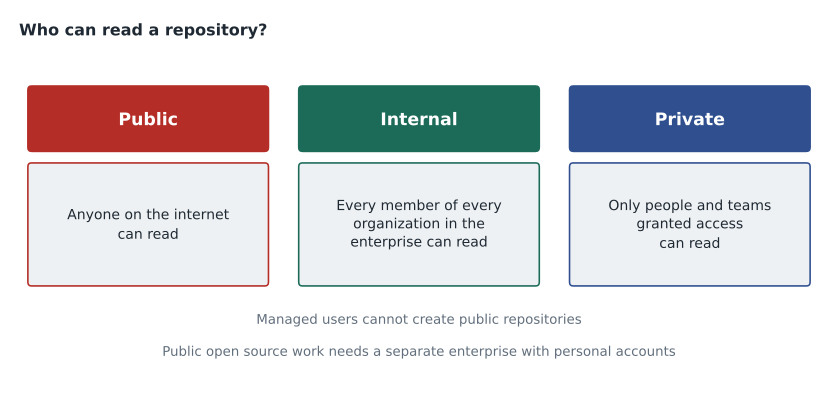
Every repository on GitHub has one of three visibilities. A public repository can be read by anyone on the internet, though only people with access can push to it. A private repository can be read only by people who have been given access, directly or through a team or role. An internal repository sits between the two: it can be read by every member of every organization in the enterprise, but not by the public. Internal visibility exists only for organizations owned by an enterprise account, which is one reason it is new to teams that grew up on the Team plan.
Internal repositories are the foundation of innersource, the practice of developing internal software the way open source projects are developed: openly, with contributions welcome from anyone in the company. A shared component such as Skerry's design system or its payment client library is a natural internal repository. Any developer can read it, open an issue or propose a change, but the code never becomes public. Marisol wanted most of Skerry's shared libraries to become internal so that teams would stop copying code between repositories and start contributing to one copy.
Managed user accounts add a constraint. In an enterprise that uses Enterprise Managed Users, managed users cannot create public repositories or contribute to public repositories outside the enterprise. That is one of the reasons Skerry kept its two public open source libraries in a separate small enterprise, skerry-oss, which uses personal accounts. Inside the main enterprise, the realistic choices are private and internal.
Who can create repositories
Repository creation is controlled first at the organization level. Organization owners decide whether members can create repositories at all and, if they can, which visibilities they may choose. The options are expressed as member privileges in the organization's settings: members can be allowed to create public, private or internal repositories, any combination of the three, or none. Organization owners can always create repositories.
Enterprise owners can then set an enterprise policy for repository creation. Like every enterprise policy, it can either be left as No policy, which lets each organization choose its own setting, or set to an enforced value that every organization must follow. When an enterprise policy is enforced, the matching setting in each organization's settings becomes read-only, and organization owners see that the enterprise has decided it for them.
| Setting | Where it lives | Typical values | What it controls |
|---|---|---|---|
| Repository creation | Enterprise policy or organization member privileges | Members can create private and internal; members can create none | Who may create repositories and with which visibilities |
| Base permissions | Enterprise policy or organization member privileges | No permission, read, write, admin | What every organization member can do in every repository by default |
| Repository visibility change | Enterprise policy or organization member privileges | Owners only; members with admin access | Who may change a repository from private to internal or public |
| Repository deletion and transfer | Enterprise policy or organization member privileges | Owners only; members with admin access | Who may delete a repository or move it to another owner |
| Forking of private and internal repositories | Enterprise policy or organization member privileges | Disabled; within the same organization; within the enterprise | Where copies of non-public code may be created |
| Default branch name | Enterprise policy or organization setting | main | The name of the first branch in new repositories |
Skerry's platform team decided on three rules for repository creation. Members of skerry and skerry-stores could create private and internal repositories but not public ones, which in any case managed users cannot create. Members of skerry-sandbox could create private repositories only. And repositories created by people outside the platform team would have to carry the custom properties described below, so that nobody ended up with the next anonymous repository holding payment configuration.
Worked problem
Choosing an enforced value
The commerce group wants its developers to create repositories freely, but the security lead, Freya Abernathy-Oduya, wants to make sure nobody can create a public repository in the main enterprise. Should the platform team enforce an enterprise policy or leave the choice to organizations?
Show solution
- Managed users already cannot create public repositories, so the risk Freya describes is mostly covered by the identity model.
- The remaining risk is that an organization owner could change a setting so that members can create internal repositories in the sandbox organization, where experiments should stay private.
- Enforcing an enterprise policy that allows private and internal creation in the main organizations, and setting the sandbox organization separately, would require a single policy value that fits all of them, which it does not.
- Leave the enterprise policy at No policy, set the organizations individually, and record the decision in the governance standard so that changes are reviewed.
Answer: Leave the enterprise policy unset because the organizations need different values, configure each organization deliberately, and review changes through the audit log.
The example shows a general point that recurs throughout this course. An enterprise policy is a blunt instrument: it imposes one value on every organization. Where the organizations genuinely need the same rule, enforcing it removes the chance of drift. Where they need different rules, it is better to leave the policy unset and govern each organization through a documented standard and the audit log.
Base permissions
Base permissions decide what every member of an organization can do in every repository the organization owns, before any team or individual access is added. The choices are no permission, read, write and admin. Many organizations that grew up informally use write, which means every member can push to every repository unless something else blocks them. Skerry's old organizations used write in five places and admin in one.
The platform team set base permissions to no permission in skerry-stores, where point-of-sale code must be tightly controlled, and to read in skerry, where innersource was the goal. Read as a base permission makes every private repository readable by every organization member, which is close to internal visibility within a single organization. The difference is that internal visibility extends across every organization in the enterprise, while base permissions apply only inside one organization.
Changing base permissions on a live organization is a large change. When Skerry reduced the data group's base permission from write to read during the pilot, 31 developers who had relied on the default lost push access to repositories their teams owned. The fix was to grant the owning teams write access through their team, which was how it should have been granted in the first place. The lesson the team drew was to measure before changing: the audit log and the repository access pages show who has been pushing where, and that list is the starting point for team grants.
Forking
A fork is a copy of a repository under a different owner that keeps a link to the original so that changes can be proposed back. Forking public repositories is how open source contribution works. Forking private and internal repositories needs more care, because a fork can end up somewhere the original's access controls do not reach.
Organization owners decide whether private and internal repositories can be forked, and enterprise owners can enforce a policy about where forks may be created. In a managed users enterprise, forks of internal and private repositories stay inside the enterprise: a managed user can fork into another organization in the enterprise or into their own managed user namespace, but never out to GitHub.com at large. Personal-account enterprises need the policy more, because without it a developer can fork a private repository into a personal account that the company does not control.
Skerry's 2019 Enterprise Cloud account used personal accounts, and the inventory found 212 forks of company repositories in personal namespaces. Most were harmless, created to try a change. A few contained configuration files that should never have left the company. The migration plan in lesson 11 dealt with that estate. For the new enterprise, the policy allowed forking of internal repositories within the enterprise, so that innersource contributions could use the fork-and-pull-request model, and disabled forking of private repositories in skerry-stores entirely.
Changing visibility, deleting and transferring
Three more member privileges control dangerous actions. Visibility change decides who may change a repository's visibility, for example from private to internal. Deletion and transfer decides who may delete a repository or transfer it to another organization or user. Issue deletion decides whether members with admin access can delete issues. In each case the safe default for a regulated organization is to restrict the action to organization owners, so that the event is rare, deliberate and visible.
Skerry's store-systems lead, Roderick Pemberton-Quaye, pushed back at first. His team regularly archived old point-of-sale branches by moving them into an archive repository and deleting the original. Asking an owner each time sounded like bureaucracy. The compromise was to keep deletion restricted to owners and to make archiving, rather than deletion, the normal way to retire a repository. An archived repository becomes read-only, stays searchable and keeps its history, and it can be unarchived if needed. Deletion can be reversed for a limited period, but archiving never needs reversing.
Naming, templates and custom properties
Policies say who can create repositories. They do not say what a good repository looks like. For that, Skerry used three tools that scale better than rules written in a wiki.
First, template repositories give new projects a known starting point. Skerry's platform team published templates for a service, a library and a data pipeline. Each contained a README skeleton, a CODEOWNERS file, issue and pull request templates, a security policy file and a basic continuous integration workflow. Developers who used a template started with the structure the rulesets and security configurations in later lessons expected.
Second, a naming convention made repositories findable. The convention was short: owning area, then component, then type, in lowercase with hyphens, for example commerce-checkout-service or data-forecast-pipeline. Rulesets cannot enforce repository names, but the convention made it possible to target rules by name pattern while custom properties were being rolled out, and it made the repository list readable.
Third, custom properties gave every repository structured metadata. In MSBA-290 the team defined three enterprise custom properties: data-classification, owning-team and lifecycle. Custom properties can be required, can have a fixed list of allowed values and can be set when a repository is created. Skerry made data-classification and owning-team required in skerry and skerry-stores, so the creation form could not be completed without them. That small step turned out to be the most valuable governance control in the whole programme, because almost every other control in this course can target repositories by property.
| Custom property | Allowed values at Skerry | Used by |
|---|---|---|
| data-classification | public, internal, confidential, restricted | Rulesets, security configurations, runner group access, access reviews |
| owning-team | One of the enterprise team slugs | Ownership reports, alert routing, archiving reviews |
| lifecycle | experimental, active, maintenance, retired | Archiving, ruleset strictness, cost reviews |
# List repositories in an organization with their custom property values
gh api --paginate \
  /orgs/skerry/properties/values \
  --jq '.[] | [.repository_name, (.properties[] | select(.property_name=="data-classification") | .value)] | @tsv'
Cleaning up the old estate
Policies stop new problems. They do nothing for the 6,800 repositories already sitting in the old organizations. Skerry's approach was to sort the estate into four groups before migrating anything.
| Group | Test | Action | Count at Skerry |
|---|---|---|---|
| Active | Push or pull request in the last 12 months | Migrate, set properties, assign an owning team | About 3,100 |
| Dormant but needed | No activity, but named in a system inventory or deployment | Migrate and archive | About 900 |
| Abandoned | No activity in two years and no known use | Export an archive, do not migrate, delete after a retention period | About 1,900 |
| Duplicates and personal forks | Fork or copy of another repository | Contact the creator, merge useful changes, do not migrate | About 900 |
Worked problem
Working out the migration load
Of Skerry's 6,800 repositories, about 3,100 are active and 900 are dormant but needed. The rest will not be migrated. What share of the old estate will move to the new enterprise, and how many repositories will arrive already archived?
Show solution
- Repositories to migrate: 3,100 active plus 900 dormant gives 4,000.
- Share of the estate: 4,000 divided by 6,800 is about 0.59, so roughly 59 percent.
- The 900 dormant repositories are archived after migration, so 900 arrive read-only.
Answer: About 4,000 repositories, roughly 59 percent of the estate, will migrate, and about 900 of them will be archived on arrival.
Priya noted that the sorting exercise was as much social as technical. The platform team could produce the lists in a day from the API, but deciding which dormant repositories were still needed meant asking people. Roderick's store-systems group found 40 repositories that looked abandoned but held the only copy of firmware build scripts for older payment terminals. Without the conversation, those would have been deleted.
Policies and the audit log
Every change to the settings in this lesson leaves an event in the audit log: repository creation, visibility changes, deletions, transfers, base permission changes and member privilege changes. Lesson 9 of MSBA-290 covered searching and streaming the audit log. For repository governance the useful habit is a weekly report of a short list of event types, reviewed by a person. Skerry's report listed repository visibility changes, repository transfers, deletions and changes to member privileges. Most weeks it was empty. When it was not, someone asked why.
Priya asked whether all this was too much control for a company that wanted innersource. Marisol's answer became a line in the governance standard: "We restrict the few actions that are hard to undo and leave the many everyday actions open." Creating a private repository, forking an internal library and opening a pull request are everyday. Making code public, deleting history and moving repositories between owners are not.
Common mistakes
MistakeUsing write as the base permission so that teams do not need explicit access.
InsteadUse no permission or read, and grant write through the owning team.
MistakeEnforcing an enterprise policy when organizations genuinely need different values.
InsteadLeave the policy unset, configure each organization and review changes.
MistakeTreating internal visibility as the same as read base permissions.
InsteadInternal reaches every organization in the enterprise; base permissions apply inside one organization.
MistakeDeleting old repositories to tidy up.
InsteadArchive repositories that may still be needed; delete only after an export and a retention period.
Summary and key terms
- Repositories are public, private or internal; internal repositories are readable by every member of the enterprise and support innersource.
- Managed users cannot create public repositories, so public open source work needs a separate enterprise with personal accounts.
- Organization member privileges control repository creation, base permissions, forking, visibility changes, deletion and transfer.
- Enterprise policies either impose one value on every organization or are left as No policy.
- Templates, naming conventions and required custom properties make good repositories the default.
- Sort an existing estate into active, dormant, abandoned and duplicate groups before migrating it.
- Internal repository
- A repository readable by every member of every organization in the enterprise, but not by the public.
- Innersource
- Developing internal software openly so that anyone in the company can read and contribute.
- Base permissions
- The access every organization member has to every repository before team or individual grants.
- Member privileges
- Organization settings that control what members can do, such as creating or deleting repositories.
- Enterprise policy
- A setting enforced by enterprise owners across all organizations, or left as No policy.
- Archived repository
- A read-only repository that keeps its history and can be unarchived.
- Custom property
- Structured metadata on a repository that rules and reports can target.
Practice problems
Work each problem on paper first, then reveal the answer to check.
Who can read an internal repository?
Show answer
Every member of every organization in the enterprise, but not the public.
Why did Skerry keep its open source libraries in a separate enterprise?
Show answer
Managed users cannot create or contribute to public repositories, so public work needs personal accounts.
What is the safer way to retire a repository that might still be needed?
Show answer
Archive it, which makes it read-only but keeps its history.
Lesson quiz · 5 questions
Score 60% or more to complete this lesson.
Create a free account to save your progress, take quizzes and earn a certificate.