
MSBA-291 · Lesson 11 of 12 · 20 min
Migrations to GitHub
▶ Video coming soon A video version of this lesson is on the way.
Every decision in the previous ten lessons applied to an enterprise that was still almost empty. Skerry's code was elsewhere: in three Team-plan organizations on GitHub.com, in the three organizations of the 2019 Enterprise Cloud account that used personal accounts, and on the store-systems Enterprise Server appliance in the main distribution centre, which was running a release that had gone out of support. Lesson 1 sorted the 6,800 old repositories and found about 4,000 worth moving. This session planned how to move them without stopping Skerry's developers from shipping.
Migration paths
GitHub documents a recommended path for each combination of source and destination. The tool and what it can move depend on both ends.
| Source | Destination GitHub.com (including Enterprise Cloud) | What moves |
|---|---|---|
| GitHub Enterprise Server 3.4.1 or later | GitHub Enterprise Importer | Full: source, history and metadata |
| GitHub.com (another organization or enterprise) | GitHub Enterprise Importer, or GitHub Expert Services | Full |
| Azure DevOps Services | GitHub Enterprise Importer | Full |
| Azure DevOps Server | Move to Azure DevOps Services first, then GitHub Enterprise Importer | Full after the intermediate step; otherwise source and history |
| Bitbucket Server or Data Center | GitHub Enterprise Importer | Full |
| GitLab | GitHub Enterprise Importer | Full |
| Bitbucket Cloud | Git command line or GitHub Importer | Source and history |
| Any Git repository | Git command line, or GitHub Importer if publicly reachable | Source and history |
| Subversion, Mercurial, TFVC, Perforce | Conversion tools, then the Git command line | Source and history |
The table uses GitHub's terms for scope. A full migration moves the Git source and history together with metadata such as pull requests, issues, comments and reviews. A source and history migration moves only what Git itself knows: commits, branches and tags. Pull request discussions, for example, are lost. That difference decides how much of a team's working history survives the move.
GitHub Enterprise Importer
GitHub Enterprise Importer, often called GEI, is GitHub's tool for full migrations into GitHub.com and GHE.com. It runs as a set of GitHub CLI extensions, one for each kind of source. The gei extension handles migrations from GitHub sources, ado2gh from Azure DevOps and bbs2gh from Bitbucket Server; GitHub's documentation describes the current extensions and their commands for each source, including GitLab. Migrations run on GitHub's side: the CLI asks GitHub to migrate a repository, and GitHub fetches it from the source or from an archive the source produces.
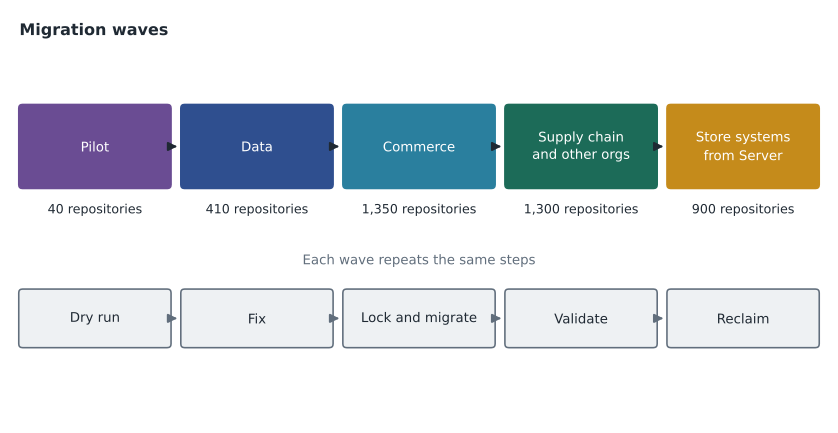
A migration with GEI has a standard shape. First a dry run, sometimes called a trial migration, copies repositories to a test organization without changing the source, so the team can check what arrives. Then fixes: settings, integrations and workflows that need attention. Then the production migration, ideally with the source repository locked or set read-only so that nobody pushes to the old copy during the move. Then validation and the follow-up tasks below.
# Migrate one repository from the old GitHub.com organization to the new managed users enterprise
# Tokens are read from environment variables GH_SOURCE_PAT and GH_PAT
gh gei migrate-repo \
  --github-source-org skerry-ecommerce-legacy \
  --source-repo checkout-service \
  --github-target-org skerry \
  --target-repo commerce-checkout-service \
  --target-repo-visibility internal

# Generate a script for a whole organization, then review it before running
gh gei generate-script \
  --github-source-org skerry-ecommerce-legacy \
  --github-target-org skerry \
  --output migrate-ecommerce.ps1
Mannequins and reclaiming
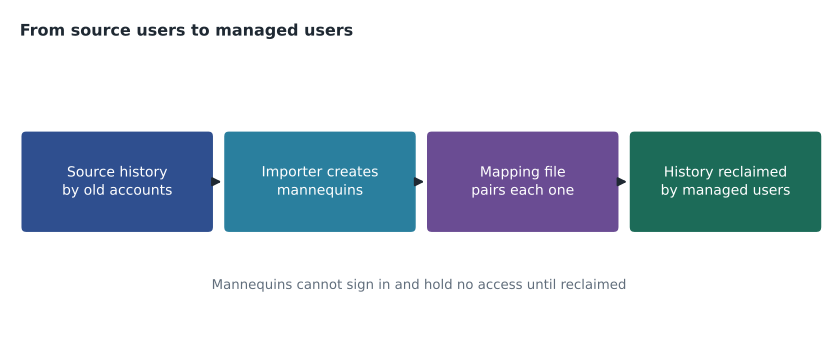
When GEI migrates pull requests, issues and comments, it needs to attribute each one to a person in the destination. The people in the source are often not the same accounts as in the destination, especially when moving from personal accounts to managed user accounts. GEI therefore creates mannequins: placeholder identities that hold the history of each source user. After the migration, an organization owner reclaims each mannequin by mapping it to a real account in the destination, and the history is reattributed.
| Step | What happens | Notes |
|---|---|---|
| Migrate | GEI creates a mannequin for each source user who appears in the history | Mannequins have no access and cannot sign in |
| Generate a mapping file | The CLI lists mannequins with source logins | Prepared as a CSV for review |
| Map | Owners fill in the destination account for each mannequin | For managed users, the login includes the shortcode suffix |
| Reclaim | Owners run the reclaim command or use the web interface | In managed users enterprises, reclaiming can be done without the user accepting an invitation |
Skerry generated mapping files from the Entra ID export, because each developer's old personal login had been recorded during the identity work in MSBA-290. Of 1,240 mannequins created across the waves, 1,170 were mapped automatically, 52 were people who had left and were left as mannequins on purpose, and 18 needed a conversation.
What does not migrate
Even a full migration does not move everything. Repository content and history move; much of the configuration around a repository does not, and teams should plan to recreate it. The exact list depends on the source and changes over time, so GitHub's documentation for each path is the reference. In practice Skerry's runbook listed these as items to check and recreate after every wave:
| Item | Why it needs attention | How Skerry handled it |
|---|---|---|
| Actions secrets and variables | Secret values cannot be exported | Recreated from the vault by a script, scoped per environment |
| Webhooks and app installations | Integrations point at the old location and must be reapproved | Reinstalled from the lesson 3 approved list |
| Branch protections and rulesets | Central rulesets replace old per-repository rules | Old rules dropped; enterprise and organization rulesets apply by property |
| Team and user access | Access in the source does not map to the new teams | Granted to owning teams from enterprise teams |
| Packages | Packages are stored separately from repositories | Republished from builds in the new enterprise |
| Security settings | Configurations from lesson 8 must be applied | Applied automatically at the end of each batch |
| Custom properties | New in the destination | Set from the lesson 1 inventory |
Moving pipelines
Repositories move; so must the builds that depend on them. GitHub Actions Importer helps teams move pipelines from other continuous integration systems, such as Jenkins, Azure Pipelines and GitLab CI/CD, into Actions workflows. It audits existing pipelines, estimates how much can be converted automatically, and produces draft workflows for engineers to review. Skerry's commerce group still had 60 Jenkins jobs; the importer converted most of them to drafts that Yevgenia's team finished by hand, using the shared reusable workflows from lesson 5 wherever possible.
Moving off Enterprise Server
The store-systems appliance was the most delicate source. It ran a release that had left its support window, hosted 900 repositories that Roderick's team needed, and connected to physical test equipment through self-hosted runners. Its data had to move to the new enterprise on GitHub.com. GEI supports Enterprise Server 3.4.1 and later as a source, so the appliance's version was supported for export, but the team upgraded it to a supported release first, both to apply security fixes and to reduce migration surprises. On Enterprise Server sources, GEI needs blob storage, such as an Azure Storage account or an Amazon S3 bucket, to hold migration archives on the way.
For moves to GHE.com rather than GitHub.com, lesson 10 introduced Enterprise Live Migrations, which syncs continuously from a recent Enterprise Server release and allows a short cutover. Skerry's destination was GitHub.com, so live migrations did not apply; the store-systems team instead scheduled its production migration over a weekend when stores were closed overnight, with the appliance set to read-only for the repositories being moved.
Worked problem
Planning a cutover window
Dry runs showed that the 900 store-systems repositories take about 7 hours to migrate in parallel batches, plus about 3 hours for validation and secrets. The stores close at 22:00 on Saturday and the first point-of-sale build is needed by 08:00 on Sunday. Does the window fit, and with how much slack?
Show solution
- The window from 22:00 to 08:00 is 10 hours.
- Migration plus validation takes 7 plus 3, which is 10 hours.
- There is no slack, so a single problem would delay Sunday's build.
Answer: It fits exactly, with no slack; the team split the move across two weekends, moving the less critical 600 repositories first.
Validation
Each wave ended with checks that the migration had worked. Skerry's validation script compared counts of branches, tags, commits on the default branch, pull requests and issues between source and destination for every repository, and flagged any difference. A human sampled ten repositories per wave and checked that a pull request discussion, a release and a workflow run all looked right. Any repository that failed validation was migrated again from the locked source.
| Check | Method | Pass condition |
|---|---|---|
| Branches and tags | Compare lists through the APIs | Identical |
| Default branch history | Compare the head commit and commit count | Identical |
| Pull requests and issues | Compare counts by state | Identical, or explained by documented limits |
| Large files | Check repositories that used Git LFS | LFS objects present and downloadable |
| Builds | Run the main workflow once | Succeeds on the new runners |
Communication and freeze
Developers needed to know what would happen to their work. Skerry published each wave's dates two weeks ahead, told teams to merge or close open pull requests where possible before the freeze, and redirected the old repositories to a page explaining where code had gone. After a wave, the old repositories were archived for 90 days and then deleted with their organizations. The old Team-plan subscriptions were cancelled after the last GitHub.com wave, and the 2019 enterprise account was closed once its last organization was empty.
Worked problem
Counting what the waves moved
The waves planned were a 40-repository pilot, then 410, 1,350, 1,300 and 900 repositories. Does that match the roughly 4,000 repositories lesson 1 selected?
Show solution
- The pilot repositories were moved for real, so they count.
- Add the waves: 40 plus 410 plus 1,350 plus 1,300 plus 900.
- That gives 4,000.
Answer: Yes; the waves add up to 4,000 repositories, matching the inventory.
Priya asked what the team would do differently. Marisol's answer was that they had planned the technical work well and underestimated the integrations. Reinstalling and reconfiguring apps, webhooks and deployment credentials took longer than moving the code.
Choosing the order of waves
The order of migration waves is a risk decision. Skerry started with a pilot of 40 repositories chosen to cover every awkward case the inventory had found: Git LFS, very large histories, submodules, repositories with thousands of pull requests and repositories with complex webhooks. Problems found in the pilot were cheap to fix. The data group went next because its 120 developers had already worked in the new enterprise during the identity pilot. Commerce followed, then supply chain and the remaining GitHub.com organizations. Store systems went last, because it was the most critical and the team wanted every lesson learned before touching it.
Tokens and permissions for the migration itself
GEI needs credentials for both ends. On the source, a token or app with enough access to read the repositories and their metadata. On the destination, a token for an organization owner or a person granted the migrator role, which GitHub provides so that migrations can be run without full ownership. Skerry granted the migrator role to two members of the platform team for the duration of the programme and removed it when the last wave closed. The tokens used were fine-grained where the source supported them, stored in the vault, and given expiry dates that matched the migration calendar.
| Credential | Where | Scope at Skerry |
|---|---|---|
| Source token for GitHub.com organizations | Old organizations | Read access to repositories and metadata; expired at the end of the programme |
| Source access for Enterprise Server | The appliance | A site administrator token for export, kept in the vault |
| Destination token | New organizations | Held by people with the migrator role, not owners |
| Blob storage credentials | Azure Storage account | Write access for archives, deleted after the last wave |
Common mistakes
MistakeAssuming every migration moves pull requests and issues.
InsteadCheck the path: some sources move only source and history.
MistakeRunning production migrations without a dry run.
InsteadDry-run each wave and fix problems before the real move.
MistakeLeaving the source writable during the move.
InsteadLock or set the source read-only so no work is lost.
MistakeForgetting secrets, webhooks and app installations.
InsteadRecreate them from an inventory as part of the runbook.
Summary and key terms
- GitHub documents a migration path for each source and destination; full paths move metadata, others only source and history.
- GitHub Enterprise Importer runs through GitHub CLI extensions and supports Enterprise Server, GitHub.com, Azure DevOps, Bitbucket Server and GitLab sources.
- Dry runs, locked sources and validation make migrations predictable.
- Mannequins hold source users' history until owners reclaim them to destination accounts.
- Secrets, webhooks, apps, access and packages need to be recreated after migration.
- GitHub Actions Importer helps convert pipelines from other CI systems.
- GitHub Enterprise Importer
- GitHub's tool for full migrations into GitHub.com and GHE.com.
- Full migration
- A migration that moves source, history and metadata such as pull requests and issues.
- Dry run
- A trial migration into a test location that leaves the source unchanged.
- Mannequin
- A placeholder identity that holds a source user's history after migration.
- Reclaiming
- Mapping a mannequin to a real destination account so history is reattributed.
- GitHub Actions Importer
- A tool that audits and converts pipelines from other CI systems to Actions.
- Cutover
- The point at which work switches from the old system to the new one.
Practice problems
Work each problem on paper first, then reveal the answer to check.
What does a source-and-history migration leave behind?
Show answer
Metadata such as pull requests, issues and their discussions.
Why lock the source repository during a production migration?
Show answer
So nobody pushes work to the old copy that would not be migrated.
What must happen to mannequins after a migration?
Show answer
Owners reclaim them by mapping them to destination accounts.
Lesson quiz · 5 questions
Score 60% or more to complete this lesson.
Create a free account to save your progress, take quizzes and earn a certificate.