
MSBA-291 · Lesson 2 of 12 · 21 min
Rulesets at scale
▶ Video coming soon A video version of this lesson is on the way.
Freya Abernathy-Oduya, Skerry's security lead, arrived at the second working session with a printout of branch protection settings. She had sampled 200 active repositories from the old organizations. Branch protection was configured on 117 of them, in 43 different combinations. Some required one approving review, some two, some none. Some required status checks with names that no longer existed, so nobody could merge without an administrator overriding the rule. Eleven had protection on a branch called master although the default branch had been renamed main years earlier. "Every one of these was somebody's best guess," she said. "I want one set of rules that we write once and that applies everywhere it should."
That is what rulesets are for. A ruleset is a named collection of rules that applies to branches, tags or pushes in a set of repositories, with a defined list of who may bypass it. Rulesets were introduced as a more flexible successor to classic branch protection rules, and at enterprise scale they have three advantages that classic rules lack: they can be defined once at the organization or enterprise level, they can target repositories by name pattern or custom property, and several rulesets can apply to the same branch at once.
Rulesets and classic branch protection
Classic branch protection rules still exist and still work. They are configured one repository at a time, one branch pattern at a time, and only one classic rule applies to a given branch: if several patterns match, the most specific wins. Rulesets differ in ways that matter to an administrator.
| Feature | Classic branch protection | Rulesets |
|---|---|---|
| Where defined | Each repository | Repository, organization or enterprise |
| How many apply to a branch | One (the most specific pattern) | Several; their rules are combined |
| Targets | Branch name patterns | Branches, tags or pushes; repositories by name or custom property |
| Status | Active or not | Active, disabled or evaluate |
| Who can see the rules | Repository administrators | Anyone with read access can see which rules apply |
| Bypass | Administrators, sometimes specific people or teams | A bypass list of roles, teams, apps and deploy keys |
The visibility point is easy to miss. With classic protection, a developer whose pull request will not merge often cannot see why without asking an administrator. With rulesets, anyone with read access to the repository can view the rules that apply to a branch and which ruleset each one comes from. At Skerry that alone cut a category of help requests.
Classic rules and rulesets can coexist on the same branch, and when they do, both apply. The platform team's plan was to stop creating classic rules in the new enterprise, define rulesets centrally, and remove the classic rules from migrated repositories once the rulesets were active.
Layers: enterprise, organization and repository
Rulesets can be created at three levels. A repository ruleset applies to one repository and is managed by its administrators. An organization ruleset applies to a chosen set of repositories in the organization. An enterprise ruleset, generally available since March 2025, applies to chosen organizations and repositories across the enterprise. Because rulesets aggregate, a branch can be governed by an enterprise ruleset, an organization ruleset and a repository ruleset at the same time. When they set the same rule with different values, the most restrictive value applies. If one ruleset requires one approval and another requires two, two are required.
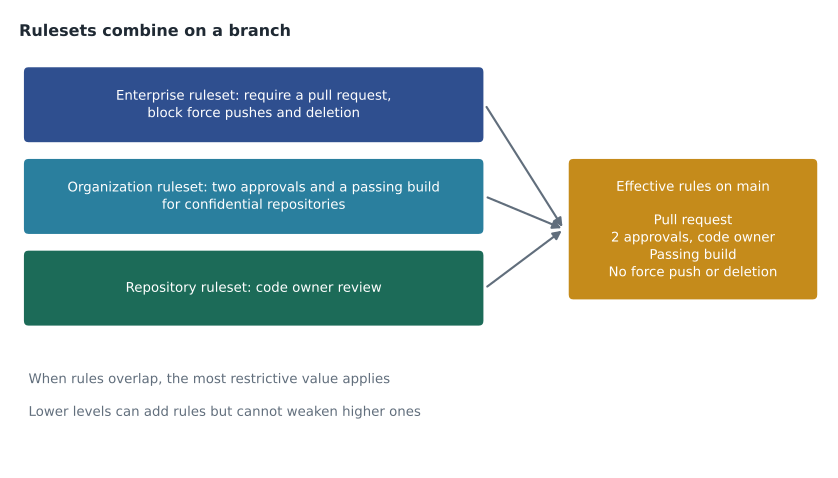
That aggregation suggested a design to Skerry. The enterprise ruleset would hold the few rules that should be true everywhere. Organization rulesets would add rules suited to that organization's risk. Repository rulesets would be left to teams for anything stricter they wanted. Nobody below the enterprise could weaken the baseline, because aggregation only ever adds restrictions.
Targeting repositories and branches
An organization or enterprise ruleset has two kinds of target. The repository target decides which repositories it applies to: all repositories, repositories whose names match patterns, or repositories whose custom properties have chosen values. Enterprise rulesets also choose organizations. The ref target decides which branches or tags it applies to inside those repositories: the default branch, all branches, or branches matching name patterns such as release/**.
Targeting by custom property is what makes rulesets scale. Skerry's organization ruleset for confidential code targeted repositories where data-classification was confidential or restricted. When a team created a new repository and set its classification to confidential on the creation form, the ruleset applied immediately, with nobody in the platform team doing anything. When a repository was reclassified, its rules changed with it.
| Ruleset at Skerry | Level | Repository target | Ref target | Main rules |
|---|---|---|---|---|
| Baseline | Enterprise | All repositories in skerry and skerry-stores | Default branch | Require a pull request; block force pushes; block deletion |
| Confidential code | Organization (skerry) | data-classification is confidential or restricted | Default branch and release/** | Two approvals; code owner review; passing build and code scanning |
| Store systems | Organization (skerry-stores) | All repositories | Default branch and release/** | Two approvals; signed commits; linear history |
| Release tags | Enterprise | All repositories | Tags matching v* | Only the release app may create, update or delete |
| Sensitive files | Organization push ruleset (skerry-stores) | All repositories | Pushes | Block files larger than 50 megabytes and paths under secrets/ |
Rule types
A ruleset is made of rules, and the list of available rules has grown steadily. The table groups the ones administrators use most. Exact names in the interface change from time to time, so the course describes them by what they do.
| Group | Rules | Typical use |
|---|---|---|
| Restrictions | Restrict creations, updates or deletions; block force pushes | Protect the default branch and release tags |
| History | Require linear history; require signed commits | Keep history readable and attributable |
| Pull requests | Require a pull request before merging, with approvals, code owner review, dismissal of stale approvals, approval of the most recent push and resolved conversations | Make review mandatory |
| Checks | Require status checks to pass; require workflows to pass; require code scanning results | Make automated testing and scanning mandatory |
| Deployments and queues | Require deployments to succeed in chosen environments; require a merge queue | Control what reaches production and in what order |
| Metadata | Restrict commit messages, author or committer email addresses, branch or tag names by pattern | Enforce conventions such as ticket numbers in messages |
| Push rules | Restrict file paths, file extensions, file size and path length | Keep secrets, binaries and huge files out of private repositories |
Two rules deserve a closer look. Require workflows to pass lets an organization or enterprise ruleset name a workflow file kept in a central repository and make it a required check in every targeted repository. That is how Skerry ran one security workflow in every confidential repository without copying the file into each one. Require code scanning results blocks a merge when code scanning reports alerts at or above a chosen severity, linking rulesets to the security configurations in lesson 8.
Push rules work differently from branch rules. A push ruleset inspects every push to a repository, on any branch, and rejects pushes that add forbidden content: files over a size limit, files with certain extensions, or files under certain paths. Push rulesets apply to private and internal repositories and to the whole fork network of a repository, so a contributor cannot get around them by pushing to a fork.
Bypass
Every ruleset has a bypass list: the people, teams, roles, GitHub Apps and deploy keys allowed to act without following its rules. A bypass entry can allow bypass always, or only through pull requests, which means the actor can merge a pull request that does not satisfy the rules but cannot push directly. Bypasses are recorded, and rule insights show when they happened.
Skerry's bypass design followed the break-glass approach from MSBA-290. The platform-oncall enterprise team could bypass the baseline enterprise ruleset only through pull requests, which kept a reviewable record of every exception. The release GitHub App was the only actor that could create or move release tags. No individual person appeared on any bypass list, and repository administrators were not given bypass for organization or enterprise rulesets.
Worked problem
A bypass request
During a store outage, Roderick Pemberton-Quaye's team needs to ship a one-line fix to the point-of-sale service immediately. The store-systems ruleset requires two approvals, but only one reviewer is awake. What should happen?
Show solution
- The fix should still go through a pull request so that it is recorded and tested.
- The platform-oncall team can bypass the ruleset through pull requests, so an on-call engineer can merge the pull request with one approval.
- The bypass appears in rule insights and the audit log.
- The next morning the second approval is added after the fact and the incident review notes the bypass.
Answer: Merge the fix through a pull request using the on-call team's pull-request-only bypass, then review the bypass in the incident follow-up.
Evaluate mode and rule insights
A ruleset can be active, disabled or, in GitHub Enterprise, set to evaluate. In evaluate mode the ruleset does not block anything, but GitHub records what it would have blocked. That makes it possible to test a strict ruleset against real traffic before turning it on.
Rule insights is the page that shows the results. For each ruleset it lists recent pushes, pull request merges and bypasses, whether each passed or would have failed, and which rule was responsible. Skerry ran the confidential-code ruleset in evaluate mode for two weeks during the data group pilot. Insights showed 340 merges, of which 61 would have failed: 44 for a missing second approval, 12 because code scanning had not run, and 5 because a status check name in the ruleset was misspelled. The misspelling would have blocked every merge in the commerce group when the ruleset went live. It was fixed before anyone noticed.
Worked problem
Reading evaluate results
In evaluate mode, a ruleset saw 340 merges, and 61 would have failed. If 5 of those failures came from a misconfigured rule and are fixed, what share of the remaining merges would still be blocked when the ruleset becomes active?
Show solution
- Failures caused by real rule violations: 61 minus 5 gives 56.
- 56 divided by 340 is about 0.165.
- So about 16 or 17 percent of merges would still be blocked until teams adjusted their habits.
Answer: About 16 percent, which told the team to warn developers and give them a week before enforcing.
Managing rulesets as code
Rulesets can be exported to a JSON file and imported again, and they can be managed through the REST API. Skerry kept its organization and enterprise rulesets in a governance repository. A change to a ruleset was a pull request against that repository, reviewed by the platform team and security, and a workflow applied the change through the API after merge. That gave rulesets the same review, history and rollback as code.
{
  "name": "Confidential code",
  "target": "branch",
  "enforcement": "evaluate",
  "conditions": {
    "ref_name": { "include": ["~DEFAULT_BRANCH", "refs/heads/release/**"], "exclude": [] },
    "repository_property": {
      "include": [ { "name": "data-classification", "property_values": ["confidential", "restricted"] } ],
      "exclude": []
    }
  },
  "rules": [
    { "type": "pull_request", "parameters": { "required_approving_review_count": 2, "require_code_owner_review": true,
      "dismiss_stale_reviews_on_push": true, "require_last_push_approval": true, "required_review_thread_resolution": true } },
    { "type": "non_fast_forward" },
    { "type": "deletion" }
  ],
  "bypass_actors": [ { "actor_type": "Team", "actor_id": 0, "bypass_mode": "pull_request" } ]
}
Rolling out rulesets without stopping work
The platform team settled on a rollout sequence that it later reused for every new ruleset.
| Step | What happens | Why |
|---|---|---|
| 1. Draft as code | Write the ruleset JSON in the governance repository | Review and history from the start |
| 2. Evaluate | Import with enforcement set to evaluate on a pilot set of repositories | See what would fail without blocking anyone |
| 3. Fix and communicate | Correct misconfigured rules; tell affected teams what will change | Avoid surprise blocks |
| 4. Widen evaluate | Extend targets to all intended repositories | Catch edge cases at scale |
| 5. Activate | Switch to active with a published date | Rules now block |
| 6. Remove classic rules | Delete overlapping classic branch protection | One place to look |
Priya noticed that the sequence spent more time on communication than on configuration. Freya agreed. "The configuration takes an afternoon," she said. "Getting 1,100 developers to understand why their merge button is grey takes a month."
Rulesets and merge queues
Busy repositories run into a different problem once rules are strict: pull requests that passed their checks against an older version of the default branch can break it when several merge at once. A merge queue solves this by testing each pull request against the latest default branch plus everything ahead of it in the queue, and merging only when that combined state passes. The ruleset rule that requires a merge queue makes the queue mandatory for a branch. Skerry's commerce group turned it on for the checkout service, where 40 or more pull requests merged on a busy day and broken main builds had cost hours of investigation each week.
Common mistakes
MistakeExpecting the most specific ruleset to win, as with classic branch protection.
InsteadRulesets aggregate, and the most restrictive value of each rule applies.
MistakeActivating a strict ruleset across the enterprise on day one.
InsteadRun it in evaluate mode, read rule insights and fix problems first.
MistakePutting individual administrators on bypass lists.
InsteadUse a small team with pull-request-only bypass and review every use.
MistakeCopying a required workflow file into every repository.
InsteadUse a ruleset that requires a workflow kept in a central repository.
Summary and key terms
- Rulesets are named collections of rules for branches, tags or pushes, defined at repository, organization or enterprise level.
- Several rulesets can apply to one branch; their rules combine and the most restrictive value wins.
- Organization and enterprise rulesets target repositories by name pattern or custom property, so new repositories are covered automatically.
- Bypass lists name the roles, teams, apps and deploy keys that may act outside the rules, always or only through pull requests.
- Evaluate mode and rule insights let administrators test rules against real traffic before enforcing them.
- Managing rulesets as code gives them review, history and rollback.
- Ruleset
- A named collection of rules that applies to branches, tags or pushes in chosen repositories.
- Enterprise ruleset
- A ruleset created by enterprise owners that applies across chosen organizations and repositories.
- Push ruleset
- A ruleset that inspects every push and rejects forbidden files, paths, extensions or sizes.
- Bypass list
- The actors allowed to act without following a ruleset's rules.
- Evaluate mode
- A ruleset status that records what would be blocked without blocking it.
- Rule insights
- A view of recent pushes, merges and bypasses and how rulesets evaluated them.
- Required workflow
- A workflow from a central repository that a ruleset requires to pass before merging.
Practice problems
Work each problem on paper first, then reveal the answer to check.
Two rulesets apply to main; one requires one approval and one requires three. How many are required?
Show answer
Three, because the most restrictive value applies.
What lets a new confidential repository receive the right rules without anyone configuring it?
Show answer
An organization or enterprise ruleset that targets the data-classification custom property.
What does a pull-request-only bypass allow?
Show answer
Merging a pull request that does not satisfy the rules, but not pushing directly.
Lesson quiz · 5 questions
Score 60% or more to complete this lesson.
Create a free account to save your progress, take quizzes and earn a certificate.