
MSBA-270 · Lesson 9 of 12 · 19 min
Testing strategies
▶ Video coming soon A video version of this lesson is on the way.
Maribeth's three-door test of the safety plug-in, trying to close a job from the model-driven app, the canvas app and a flow, was a good instinct, but Signe pointed out its weakness: it was done by hand, once, by one person, in one environment. The next change to the work order table could break the rule and nobody would know until a technician closed a safety job without a photo in January. Testing in Power Platform has to work the way it does in any software team, with some twists for a platform where makers and developers change the same solution.
Layers of testing
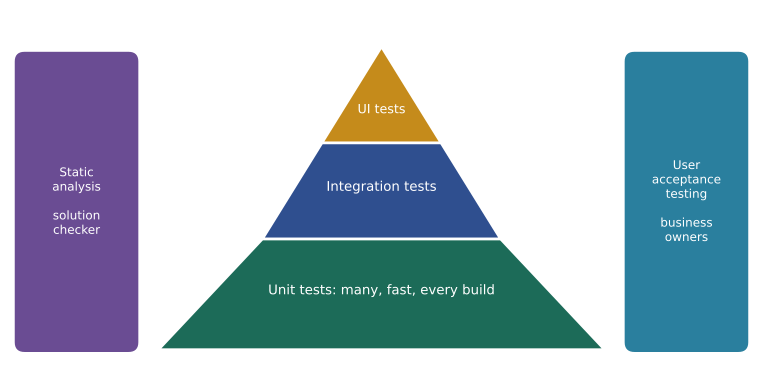
A familiar way to think about tests is a test pyramid. At the base are many small, fast unit tests that check one piece of code in isolation. In the middle are fewer integration tests that check pieces working together against a real environment. At the top are a handful of end-to-end or UI tests that drive an app the way a user would. Around all of them sit static analysis, such as solution checker, and user acceptance testing, where the people who own the process confirm it does what they need.
Unit testing plug-ins
A plug-in is a .NET class, so it can be unit tested with a normal test framework such as MSTest, xUnit or NUnit. The challenge is that the plug-in expects Dataverse to supply its service provider, context, organization service and tracing service. Tests replace these with test doubles: fake or mocked objects that return chosen values. Developers write the doubles with a general mocking library or use a Dataverse-specific testing framework that simulates the context and an in-memory organization service. Either way, a unit test sets up a context, for example "Update of a safety work order to Completed with no photos", runs Execute, and checks that the plug-in threw the right exception or set the right values.
Good plug-in design makes this easier. Signe asked Wiremu to move the decision itself, "is this change allowed?", into a small class with no Dataverse dependencies, and keep the plug-in class as a thin shell that reads the context, calls the decision and throws or returns. The decision class could then be tested with plain values, dozens of cases in milliseconds.
[TestClass]
public class SafetyCloseRuleTests
{
    [TestMethod]
    public void Safety_job_without_photo_cannot_complete()
    {
        var result = SafetyCloseRule.Check(category: Category.Safety, newStatus: Status.Completed, photoCount: 0);
        Assert.IsFalse(result.Allowed);
        StringAssert.Contains(result.Message, "photo");
    }

    [TestMethod]
    public void General_job_without_photo_can_complete()
    {
        var result = SafetyCloseRule.Check(category: Category.General, newStatus: Status.Completed, photoCount: 0);
        Assert.IsTrue(result.Allowed);
    }
}| Case | Category | New status | Photos | Expected |
|---|---|---|---|---|
| 1 | Safety | Completed | 0 | Blocked |
| 2 | Safety | Completed | 1 | Allowed |
| 3 | Safety | In Progress | 0 | Allowed |
| 4 | General | Completed | 0 | Allowed |
| 5 | Safety (status not in Target) | unchanged | 0 | Plug-in exits early |
Integration testing against an environment
Unit tests cannot prove that a step is registered on the right message, stage and filtering attributes, or that a custom API's privilege is set correctly. Integration tests run against a real test environment, usually through the SDK or Web API using an application user with a known role. A test creates a safety work order, tries to complete it without a photo and expects a failure; then adds a photo and expects success; then cleans up. These tests run in the pipeline after the managed solution is imported to test. Because they use a real environment, they need test data that is created and removed by the tests themselves, never real student or staff records.
Testing apps: from Test Engine to Playwright
For canvas and model-driven apps, Microsoft offered Power Apps Test Engine, an open-source tool that ran tests written in Power Fx. Microsoft deprecated Test Engine in April 2026 and now recommends Playwright, a widely used open-source browser automation framework, together with Microsoft's Power Platform samples for Playwright, which show how to sign in, find controls and work with model-driven and canvas apps. Playwright tests are written in TypeScript or another supported language, run in headless browsers in a pipeline and can record traces and screenshots when a test fails. Teams still using Test Engine should plan to move.
UI tests are slow and fragile compared with unit tests, so they should cover only the key journeys: a dispatcher assigns a job, a technician completes it with a photo, a safety job without a photo is refused. Tests should find controls by stable names or accessible labels, not by position on the screen, and should wait for elements rather than for fixed times.
// Playwright test (TypeScript, simplified)
import { test, expect } from "@playwright/test";

test("safety job cannot be completed without a photo", async ({ page }) => {
  await page.goto(process.env.FACILITIES_HUB_URL + "&pagetype=entityrecord&etn=lcc_workorder&id=" + process.env.TEST_JOB_ID);
  await page.getByLabel("Status").selectOption("Completed");
  await page.getByRole("button", { name: "Save" }).click();
  await expect(page.getByText("A safety job needs at least one photo")).toBeVisible();
});
Testing flows, prompts and agents
Cloud flows can be tested by running them in the test environment with prepared data and checking the results, and the flow run history shows each action's inputs and outputs. Prompts and agents need a different approach, because their output varies. For prompts, the team keeps a set of test inputs with expected categories or fields and measures how many outputs match, as the MSBA-251 builders did with triage prompts. Copilot Studio offers agent evaluations, which run a set of test questions against an agent and score the answers. The aim is not a perfect score but a known level of quality that does not drop when something changes.
Static analysis and solution checker
Solution checker analyses a solution against Microsoft's rules for performance, reliability, supportability and security, covering plug-ins, web resources, component controls and some app configurations. It runs from the maker portal, from pac solution check, and from pipeline tasks. Managed Environments can be set to run checks automatically during import and to warn or block when issues are found. Lumenvale's pipeline failed the build on any critical or high issue. Code also benefits from ordinary static analysis, such as compiler warnings treated as errors and a linter for TypeScript.
User acceptance testing and non-functional testing
User acceptance testing (UAT) is done by the people who will use the solution, in the test environment, against scenarios written with the business owner. For the facilities release, Delphine wrote fifteen scenarios with Arlo and the two dispatchers, Bronwyn and Kofi, and signed off when all passed. Performance and load testing check behaviour under realistic volume; for the alarm feed design, Signe planned a load test with simulated alarms before the building management connector went live, watching service protection responses and execution time. Accessibility testing, with keyboard-only use and a screen reader, belongs in the plan for any app with a user interface.
Worked problem
Writing a test plan for the fee custom API
The Calculate Transcript Fee custom API takes a delivery method, a recipient type and an urgent flag and returns a fee, using rates from the Transcript Fee Rate table. Outline tests at each layer.
Show solution
- Unit: test the fee calculation class with every combination of the three inputs and a fixed set of rates, including a missing rate.
- Integration: call the API in the test environment as an application user with the Transcript Adviser role, and check the result against a seeded rate; call it as a user without the role's access and expect a privilege error.
- UI: one Playwright test in the advisers' canvas app checking that the estimated fee appears when the options are chosen.
- Static: solution checker on the solution containing the plug-in.
- UAT: Maribeth confirms fees for ten realistic requests.
Answer: Most cases are unit tests; a few integration tests check registration and security; one UI test covers the journey; UAT confirms the business result.
Test environments and data
Tests need somewhere to run. Unit tests run on any machine. Integration and UI tests need an environment that matches production closely, with the same solutions installed as managed and the same security roles, but without real personal data. Lumenvale's Facilities Test environment held synthetic buildings, rooms, technicians and work orders, created by a small data script that tests could rerun. Some organizations copy production into a sandbox for realistic testing; when they do, administrators can copy only customizations and schema rather than data, or anonymize data afterward, so that test environments do not become an unprotected copy of everyone's records.
Regression testing and continuous testing
A regression is something that used to work and has broken. The main value of automated tests is catching regressions as soon as they happen. Running the unit tests on every pull request, and the integration and UI tests after every deployment to test, means a change that breaks the safety rule is found within an hour, by the developer who made it, rather than in January by a technician. Over time the test suite becomes a description of what the solution promises to do, which is useful documentation in its own right.
| When | Tests that run | Who acts on failures |
|---|---|---|
| Every pull request | Unit tests, build, solution checker | The developer who opened it |
| After deployment to test | Integration and UI tests | The release owner |
| Before production release | UAT sign-off by the business owner | The business owner and developer together |
| Monthly, after platform updates | Full regression suite in test | The CoE developers |
Testing after Microsoft's updates
Power Platform is updated by Microsoft continuously, and major release waves arrive twice a year. Most updates are invisible to custom code, but occasionally a change in behaviour, a deprecated API or a new default setting affects a solution. Many organizations run their full regression suite in a test environment after significant updates, and Microsoft offers early access to release wave features in sandbox environments so teams can test before features reach production. Lumenvale scheduled a regression run in the first week of each month and before turning on each release wave's early access features.
Accessibility testing
Apps at Lumenvale had to meet the college's accessibility standard, which follows the Web Content Accessibility Guidelines. Model-driven apps and standard controls are built by Microsoft with accessibility in mind, but custom controls, code apps and canvas apps can easily break it. The test plan for any user interface work therefore included keyboard-only navigation, a screen reader pass, colour contrast checks and checks that every control had an accessible name. Some of this can be automated: accessibility checking libraries can run inside Playwright tests and fail the build on clear problems such as missing labels. The rest needs a person, ideally someone who uses assistive technology daily. Ingrith Varsamis from accessibility services reviewed the RoomPicker design and asked for the room highlight to be announced to screen readers, which became a requirement.
Measuring test effectiveness
A large number of tests is not the same as good tests. Two simple measures helped the team. Code coverage shows which lines of the plug-in and control code the unit tests ran; low coverage on decision logic is a warning sign, although high coverage does not prove the tests check the right things. Escaped defects, problems found in UAT or production that tests should have caught, show where the suite has gaps. Each escaped defect led to a new test, so the same mistake could not happen twice.
Testing component controls and client scripts
Client-side code needs tests too. The decision logic inside a component control, such as working out which part of a floor plan to highlight, can be unit tested in TypeScript with a JavaScript test runner, with the framework's context replaced by simple test objects. Client scripts can be tested the same way by passing a fake form context. The rendering itself, and the control's behaviour inside a real form, is covered by a small number of Playwright tests. Keeping logic out of the parts that touch the screen is the same principle as separating decision logic from the plug-in shell, applied in the browser.
Common mistakes
MistakeTesting only by hand before a release.
InsteadAutomate unit, integration and key UI tests in the pipeline.
MistakePutting all logic inside the plug-in's Execute method.
InsteadSeparate decision logic into plain classes that are easy to unit test.
MistakeStarting new UI test suites in Power Apps Test Engine.
InsteadTest Engine was deprecated in April 2026; use Playwright with Microsoft's Power Platform samples.
MistakeUsing copies of real student records as test data.
InsteadCreate synthetic test data in the tests and remove it afterwards.
Wiremu's safety rule ended the session with eleven unit tests, three integration tests and one Playwright test. "Fifteen tests for one rule," he said. "And they all run in four minutes," Signe replied, "every time anyone changes anything."
Summary and key terms
- A test pyramid has many unit tests, fewer integration tests and a few UI tests, plus static analysis and user acceptance testing.
- Plug-ins are unit tested with test doubles for the context and services; separating decision logic makes testing easy.
- Integration tests run against a test environment to check registrations, security and custom APIs with synthetic data.
- Power Apps Test Engine was deprecated in April 2026; Microsoft recommends Playwright with its Power Platform samples for UI tests.
- Prompts and agents are tested against sets of expected results and agent evaluations; solution checker and UAT complete the strategy.
- Unit test
- A small, fast test of one piece of code in isolation.
- Test double
- A fake or mock object that stands in for a real dependency in a test.
- Integration test
- A test that checks components working together in a real environment.
- Playwright
- An open-source browser automation and testing framework.
- Solution checker
- A Power Platform tool that analyses solutions against rules for performance, reliability, supportability and security.
Practice problems
Work each problem on paper first, then reveal the answer to check.
Why separate a plug-in's decision logic from the IPlugin class?
Show answer
So the logic can be unit tested with plain values, without simulating the Dataverse context.
What does Microsoft recommend for UI testing after Test Engine's deprecation?
Show answer
Playwright, with Microsoft's Power Platform samples.
Name two things an integration test can verify that a unit test cannot.
Show answer
That the step is registered on the right message and stage, and that security, such as a custom API privilege, is set correctly.
Lesson quiz · 5 questions
Score 60% or more to complete this lesson.
Create a free account to save your progress, take quizzes and earn a certificate.