
MSBA-270 · Lesson 2 of 12 · 19 min
Platform architecture and limits
▶ Video coming soon A video version of this lesson is on the way.
Wiremu's first real design question came from the building management system. The Lakeshore campus runs a system that watches boilers, air handlers and greenhouse heaters, and it raises alarms when a temperature drifts or a pump stops. Delphine Okoro-Vance, the facilities coordinator, wanted every serious alarm to become a work order automatically. Wiremu sketched an answer in five minutes: a small service that polls the alarm feed every ten seconds and creates a row in Dataverse for each alarm. Signe asked him how many alarms the feed produced on a bad night. He did not know. The vendor's documentation said up to several thousand an hour during a power event, most of them repeats. "Then the design is not finished," she said. "We need to know where each piece runs and what the platform will let it do."
The layers of Power Platform
Power Platform is a set of services that share a common foundation. Understanding the layers helps a developer see where code can attach and what it inherits.
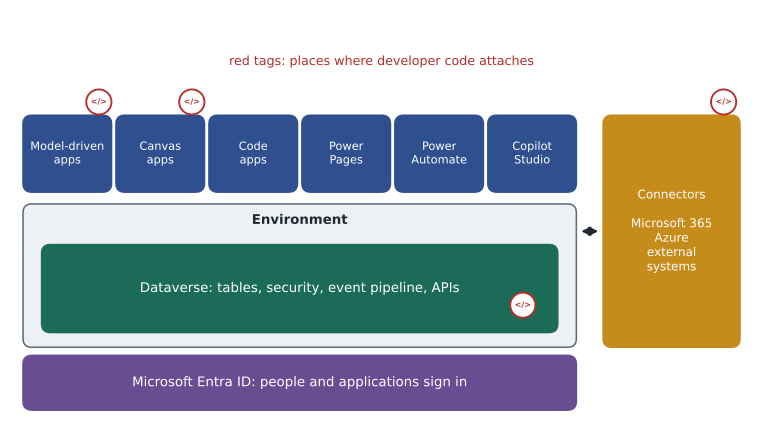
At the base is Microsoft Entra ID, which signs people and applications in. Everything else lives inside an environment, a container with its own Dataverse database, security, region and settings. Dataverse stores data in tables, enforces security roles and business units, runs business logic and exposes the data through APIs. On top of Dataverse sit the experiences: model-driven apps, canvas apps, code apps, Power Pages sites, cloud flows and Copilot Studio agents. Connectors link all of these to other services, from Microsoft 365 and Azure to hundreds of third-party systems, and a developer can add custom connectors for anything else.
For a developer the most important fact about this structure is that Dataverse is the shared heart. Every app and flow that changes a Dataverse row goes through the same API layer and the same event pipeline. That is why server-side logic in Dataverse is so powerful: it is the one place where a rule applies to every caller.
Dataverse table types
AB-400 asks developers to choose between table types, and the choice affects what code can do later. Most tables are standard tables, stored in Dataverse's relational database with full transactions, relationships, security, auditing and business logic. Elastic tables are designed for very large volumes of data with flexible structure, such as sensor readings or logs; they scale horizontally, support time-to-live so old rows expire automatically, and handle bulk writes well, but they do not support every feature of standard tables, and transactions across many rows work differently. Virtual tables show data that lives in another system as if it were a Dataverse table, without copying it; reads and sometimes writes go to the source through a data provider.
| Table type | Best for | Watch out for |
|---|---|---|
| Standard | Business records that need relationships, security and full business logic | Storage cost and throughput at very high volume |
| Elastic | High-volume, append-heavy data such as telemetry and logs; data that expires | Some relational and business logic features are not available |
| Virtual | Data that must stay in its source system but appear in apps | Performance and availability depend on the source; limited features |
For the alarm feed this choice mattered immediately. Several thousand raw alarms an hour, most of them duplicates, did not belong in the Work Order table. Signe suggested two stages: raw alarms could land in an elastic table that expires rows after thirty days, and only alarms that met a rule, such as a boiler fault lasting more than five minutes, would create a work order in the standard table. That kept the work order list clean and kept the raw data cheap to store and easy to query for patterns.
Where business logic belongs
The exam lists "determine where to implement business logic" as a design skill, and it is one of the most consequential decisions in a design. Logic can live in several places, each with its own reach and cost.
| Place | Runs | Good for |
|---|---|---|
| Business rule | On the form, and on the server when scoped to the table | Simple validation, defaults, show and hide on columns |
| Calculated, formula and rollup columns | In Dataverse | Derived values that must always be consistent |
| Power Fx in apps | In the app | Experience logic specific to one app |
| Cloud flow | Asynchronously in Power Automate | Notifications, approvals, integrations that can wait seconds |
| Plug-in | Synchronously or asynchronously in the Dataverse pipeline | Validation and changes that must happen with the transaction |
| Custom API | In the pipeline, called on demand | Reusable operations exposed to apps, flows and integrations |
| Azure service | Outside Dataverse | Long-running, compute-heavy or language-specific work |
Two questions narrow the choice quickly. Must the logic finish before the user sees the result, or can it run a few seconds later? And must it apply to every way the data changes, or only in one app? Logic that must be immediate and universal points to the server pipeline. Logic that can wait points to an asynchronous plug-in or a flow. Logic tied to one screen belongs in that app. The exam also distinguishes deterministic logic, which always gives the same result for the same input, from non-deterministic logic such as a call to a language model. Deterministic rules, such as "a safety job needs a photo", belong in code or configuration. Non-deterministic work, such as drafting a summary, belongs in prompts or agents and should not be the only safeguard for something that must be correct.
Limits that shape every design
Power Platform is shared infrastructure, and it protects itself and its customers with limits. A developer who knows the limits designs around them; one who does not discovers them in production.
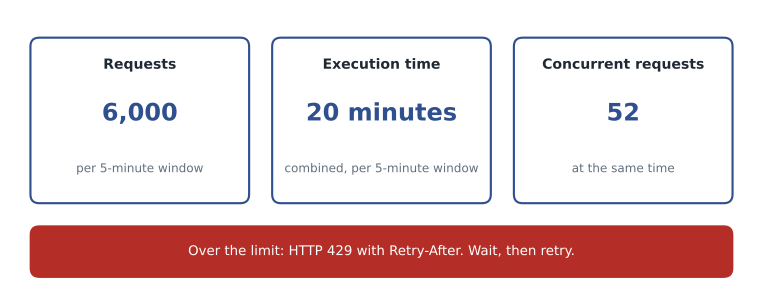
Service protection limits apply to every caller of the Dataverse APIs, measured per user and per web server over a sliding window of 300 seconds. By default a user can send 6,000 requests in that window, use 1,200 seconds (20 minutes) of combined execution time and have 52 requests running at once. Microsoft notes that the defaults can differ between environments. When a caller exceeds a limit, the Web API returns HTTP status 429, Too Many Requests, with a Retry-After header saying how many seconds to wait; the .NET SDK returns a fault with a specific error code and the same retry information. The longer a client keeps sending demanding requests, the longer the wait becomes, so the correct response is to back off and retry after the stated delay.
Request entitlements are a separate idea. Each licence comes with a daily allowance of Power Platform requests, and capacity add-ons increase it. Service protection limits stop sudden bursts; entitlements govern sustained use over a day. A busy integration user, such as an application account for the alarm feed, needs both considered.
Other limits appear in specific places. A synchronous plug-in, or any single operation in the pipeline, must finish within two minutes or it fails. Canvas apps delegate queries to the source or work on at most 2,000 downloaded rows. Cloud flows have limits on actions, run duration, loop iterations and request rates by licence. Connectors have their own throttling, set by the service behind them; the SharePoint connector, for example, limits calls per connection. Each of these limits is documented, and Microsoft revises them, so Signe kept a short page in the team wiki that linked to the current limits pages rather than copying the numbers.
// Web API response when a service protection limit is exceeded
HTTP/1.1 429 Too Many Requests
Retry-After: 18
Content-Type: application/json

{
  "error": {
    "code": "0x80072322",
    "message": "Number of requests exceeded the limit of 6000 over time window of 300 seconds."
  }
}
Designing within the limits
For the alarm feed, the limits changed the design in three ways. First, polling every ten seconds and writing one row per alarm would burn through requests fast on a bad night. Instead the building management system could push alarms to an Azure Service Bus queue, and a small Azure Function could read batches and write them to the elastic table with bulk operations. Second, the function had to respect Retry-After when Dataverse pushed back, rather than retrying immediately and making the throttling worse. Third, creating work orders from alarms needed a rule that ran on a small, filtered set, so a plug-in or flow on the elastic table was the wrong trigger; a scheduled function that summarized the last five minutes of alarms and called a custom API to create work orders would make far fewer calls.
Worked problem
Estimating load against the limits
During a power event the alarm feed sends 3,600 alarms an hour, evenly spread. Wiremu's first design writes each alarm with its own create request using one application user. Will it stay under the request limit of 6,000 per five minutes? What changes if each alarm also triggers two more requests to look up the asset and the room?
Show solution
- 3,600 alarms an hour is 300 alarms every five minutes.
- One request per alarm is 300 requests per five-minute window, well under 6,000.
- With two lookups per alarm, each alarm costs three requests: 900 per window, still under the limit.
- The risk is not this average but bursts: a power cut can produce thousands of alarms in a minute, and retries add more. Batching and caching the asset and room lookups remove most of the load.
Answer: The average load fits, at 300 or 900 requests per window, but bursts and retries can exceed the limit, so batching, caching and honouring Retry-After are still required.
Environments and regions
Architecture also includes where the solution runs. Lumenvale's environments are in the Canada region, and the college's privacy officer, Dr. Philippa Ondaatje-Ruiz, had a standing requirement that student and staff personal data stay in Canada. That affects developer choices: an Azure Function that processes Dataverse data should run in a Canadian Azure region, a custom connector should call services whose data stays in an approved location, and any AI service used by an agent must respect the environment's settings for moving data across regions. Developers also need their own environments. Microsoft provides developer environments for building and testing, separate from the shared test and production environments, and Lumenvale's pattern was one developer environment per developer, a shared test environment and managed production.
Integration patterns at a glance
Integration with other systems takes a few standard shapes, and naming them helps a design conversation. In a request and response pattern, one system calls another and waits for the answer, as when a canvas app calls the Student Records connector to check a hold. In an event-driven pattern, a system announces that something happened and others react in their own time, as when Dataverse posts a message to Azure Service Bus after a work order is completed. In a batch pattern, data is moved in bulk on a schedule, as with a nightly load of course data. In a virtual pattern, data stays where it is and is read on demand through a virtual table. Event-driven and batch patterns cope much better with high volume and with the other system being briefly unavailable, because nothing waits on them in real time.
| Pattern | Power Platform tools | Strength | Weakness |
|---|---|---|---|
| Request and response | Connectors, custom connectors, custom APIs | Immediate answer | Caller waits; fails if the other side is down |
| Event-driven | Service endpoints, webhooks, business events, Service Bus | Decoupled, absorbs bursts | Eventual consistency; more moving parts |
| Batch | Dataflows, bulk messages, scheduled functions | Efficient for large volumes | Data is only as fresh as the last run |
| Virtual | Virtual tables | No copy to keep in sync | Depends on the source's speed and availability |
Common mistakes
MistakePutting high-volume telemetry in a standard table.
InsteadUse an elastic table for high-volume, short-lived data, and move only meaningful events into standard tables.
MistakeRetrying immediately after a 429 error.
InsteadWait the Retry-After duration; immediate retries lengthen the throttling.
MistakeCopying limit numbers into design documents as permanent facts.
InsteadLink to Microsoft's current limits pages; the values can change.
MistakeUsing a language model as the only check for a rule that must be correct.
InsteadKeep deterministic rules in code or configuration; use AI for drafting and assistance.
By the end of the session Wiremu's five-minute sketch had become a page of boxes: alarm system, Service Bus queue, Azure Function in a Canadian region, elastic table, summarizing function, custom API and work order table. "It is more pieces," he admitted. "But each piece does one thing, and none of them will fall over on a bad night." The design was recorded as a plan for the new year; the building management connector was not yet funded.
Summary and key terms
- Power Platform sits on Microsoft Entra ID and environments; Dataverse is the shared heart that every app, flow and integration goes through.
- Standard tables suit business records, elastic tables suit high-volume and expiring data, and virtual tables show data that stays in another system.
- Business logic can live in business rules, columns, apps, flows, plug-ins, custom APIs or Azure; choose by whether it must be immediate, universal and deterministic.
- Service protection limits are 6,000 requests, 20 minutes of execution time and 52 concurrent requests per user per web server over 300 seconds; exceeding them returns 429 with Retry-After.
- Designs must also respect plug-in time limits, delegation, flow limits, connector throttling, request entitlements and data location requirements.
- Environment
- A container for apps, flows, data and settings, with its own Dataverse database, region and security.
- Elastic table
- A Dataverse table type built for very large, flexible data volumes, with automatic expiry of rows.
- Virtual table
- A Dataverse table that presents data stored in another system without copying it.
- Service protection limits
- Dataverse limits on requests, execution time and concurrency per user that protect the service from overload.
- Retry-After
- A response header that tells a throttled client how many seconds to wait before retrying.
Practice problems
Work each problem on paper first, then reveal the answer to check.
What status code does the Web API return when a service protection limit is exceeded?
Show answer
429 Too Many Requests, with a Retry-After header.
Which table type would you choose for a year of sensor readings that are kept for 30 days?
Show answer
An elastic table, which handles high volume and can expire rows automatically.
Why is Dataverse a good place for a rule that must always hold?
Show answer
Every app, flow and integration that changes the data goes through the same API layer and event pipeline.
Lesson quiz · 5 questions
Score 60% or more to complete this lesson.
Create a free account to save your progress, take quizzes and earn a certificate.