
MSBA-270 · Lesson 5 of 12 · 18 min
Choosing between low-code and pro-code
▶ Video coming soon A video version of this lesson is on the way.
By the third session the request list had grown. Delphine wanted the floor plan for dispatchers. Kwabena wanted a nightly feed of completed work orders into the institutional research warehouse. Maribeth wanted the transcript solution to calculate a processing fee that depended on the delivery method, the recipient and whether the request was urgent. The athletics department had asked for an equipment-loan app that looked like the college website rather than a Power Apps screen. Rupert asked Signe for a way to decide, request by request, whether the answer was low-code, pro-code or a mix, so that the decision did not depend on who happened to pick up the ticket.
Why the choice matters
Low-code and pro-code are not rivals. Most real solutions mix them: a model-driven app with a few client scripts, a cloud flow that calls a custom API, a canvas app with one code component. The question for each piece is which approach gives a correct, supportable result at the lowest total cost. Total cost includes building, testing, documentation, licences, the skills needed to change it later, and the risk that the person who built it leaves. Low-code features are maintained, secured and updated by Microsoft; code is maintained by the organization for as long as it exists.
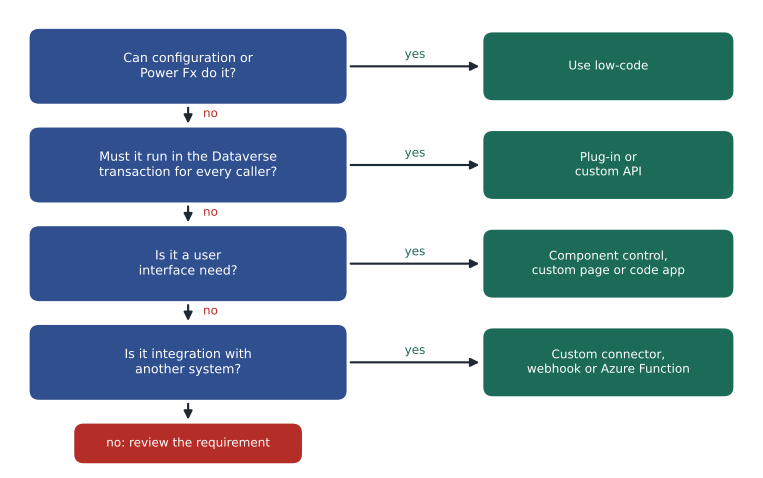
Signe summarized the trade-off for the group with a simple table, and then a decision chart that the team pinned to the wiki.
| Consideration | Favours low-code | Favours pro-code |
|---|---|---|
| Who will change it later | Makers in the business | A developer team |
| Complexity of logic | Clear rules, a few branches | Complex algorithms, heavy data processing |
| Volume and performance | Moderate volume | High volume, tight time limits |
| User experience | Standard forms, views and screens | Custom visuals, full web-style design |
| Integration | An existing connector does the job | Unusual APIs, protocols or transformations |
| Where it must apply | One app or process | Every caller, inside the transaction |
Logic: rules, columns, flows, plug-ins and custom APIs
Maribeth's fee calculation was a good test case. The fee depended on three values and a table of rates that the registrar changed once a year. A business rule could not look up a rate table. A formula column could calculate values from the same row and related rows, but the rate table and the urgency surcharge made the formula long and hard for the registrar to maintain. A cloud flow could calculate it, but would run a few seconds after the save, so the adviser would see a blank fee on the form. A plug-in in PreOperation could read the rate table and set the fee on the Target before the row was saved, so the fee was always correct, immediate and the same in every app.
The team chose a hybrid. The rates lived in a Dataverse table, Transcript Fee Rate, that the registrar maintained through a model-driven view, so changing a rate needed no developer. A short plug-in read the matching rate and set the fee. Because the advisers' canvas app also needed to show an estimated fee before submitting, Signe wrapped the same calculation in a custom API, Calculate Transcript Fee, which the canvas app could call through the Dataverse connector and the plug-in could also use. One piece of logic, two consumers.
| Need | First choice | When to move to code |
|---|---|---|
| Validate a value on a form | Business rule | When the rule needs data from other tables or must be very fast for imports |
| Derive a value | Formula, calculated or rollup column | When it needs lookups the column types cannot do |
| Notify or approve | Cloud flow | Rarely; flows are well suited |
| Enforce a rule for every caller | Business rule scoped to the table | Plug-in when the rule is more than simple validation |
| Reusable operation for apps and integrations | Instant flow or Power Fx function | Custom API for transactional, fast, reusable logic |
User experience options
The exam lists several ways to build user experience, and each has a clear place.
| Option | What it is | Use when |
|---|---|---|
| Model-driven forms and views | Generated UI from Dataverse metadata | Dense, data-heavy back-office work |
| Canvas app or custom page | Low-code designed screens with Power Fx | Task-focused screens, mobile, custom layout |
| Generative page | A page in a model-driven app generated from a description | Quick, tailored views of data inside a model-driven app |
| Component framework control | A TypeScript control used in forms, views or canvas apps | A visual or interaction no standard control offers |
| Web resource with client script | JavaScript attached to forms and commands | Form behaviour beyond business rules |
| Code app | A full web app in React, Vue or similar, hosted by Power Platform | A web-style experience with full design control |
| Agent or MCP app widget | Conversational UI and interactive cards in Copilot experiences | When users work through chat or agents |
Delphine's floor plan pointed to a component framework control: dispatchers lived in Facilities Hub, a model-driven app, and wanted the plan inside the work order form. A control could read the room from the form, draw the floor and highlight the room, and be reused on the inspection form too. The athletics loan app pointed the other way. The department wanted full control over layout and branding and had a web developer on staff, so a code app fitted, built in React and hosted by Power Platform with the same governance as other apps. Signe noted the trade-off: code apps need a Premium licence for each user, and every screen is code that the athletics department's developer would own.
Integration options
Kwabena's warehouse feed needed no new code at all. Dataverse can export tables continuously to a data lake through Azure Synapse Link for Dataverse or to Microsoft Fabric through Link to Microsoft Fabric, and the institutional research team already used Fabric. Turning on the link and choosing the work order tables did the job without a single line of integration code, and it scaled far better than a nightly flow that read thousands of rows. This is a common pattern: the right answer to an integration request is often a platform feature that a developer would not think of if they started by opening an editor.
| Integration need | Low-code or platform option | Pro-code option |
|---|---|---|
| Call an external REST API from apps and flows | Existing connector | Custom connector from an OpenAPI definition |
| Push Dataverse changes to another system | Cloud flow | Service endpoint, webhook or business event |
| Analytics on Dataverse data | Link to Microsoft Fabric or Azure Synapse Link | Custom export through the Web API (rarely needed) |
| Show external data without copying | Virtual table with a provided connector | Custom virtual table provider |
| Heavy processing outside Dataverse | Not suited | Azure Functions |
AI options: Copilot Studio or Microsoft Foundry
AB-400 adds a choice that PL-400 did not have: when to build an agent in Copilot Studio and when to use Microsoft Foundry. Copilot Studio is low-code, runs inside Power Platform, uses environments, data policies and solutions, and connects to Dataverse and connectors directly. Foundry is Microsoft's code-first platform for building AI applications and agents with full control over models, prompts, tools and hosting. A maintenance agent that answers technicians' questions from work order history and manuals fits Copilot Studio. A custom model pipeline that analyses years of building sensor data to predict failures would fit Foundry, perhaps exposed back to Power Platform through a connector or an MCP server.
Worked problem
Classifying the request list
Sort the five requests into approaches: (a) transcript fee calculation; (b) floor plan on the work order form; (c) completed work orders into the research warehouse; (d) athletics equipment-loan app with full branding; (e) a question-and-answer agent over maintenance manuals.
Show solution
- (a) Rates in a Dataverse table maintained by the registrar, a plug-in to set the fee and a custom API for estimates: a hybrid with a small amount of code.
- (b) A component framework control on the model-driven form: pro-code, reusable.
- (c) Link to Microsoft Fabric: platform configuration, no code.
- (d) A code app in React hosted by Power Platform: pro-code, with Premium licences for users.
- (e) A Copilot Studio agent with the manuals as knowledge: low-code AI.
Answer: Two of the five need significant code, one needs a little, and two need none. That ratio was typical of Lumenvale's requests.
When generative pages are enough
A newer option sits between configuration and code. Generative pages let a maker describe a page in natural language inside a model-driven app, and the platform generates a page, built with React behind the scenes, that shows and edits Dataverse data. The page respects Dataverse security and can be refined with further prompts. For the dispatchers' request to see a board of jobs grouped by technician, the MSBA-251 builders used a generative page instead of a custom control, and it took an afternoon. For the floor plan, which needed precise drawing of building layouts and reuse on several forms, a component control was still the better choice. A useful test is whether the need is a new way of arranging and editing data, which generative pages handle well, or a genuinely new visual or interaction, which calls for a control or a code app.
Hybrid patterns
Many good designs combine approaches deliberately. A cloud flow handles a long-running approval and calls a custom API for the step that must be transactional. A canvas app uses one component control for signature capture and standard controls for everything else. A Copilot Studio agent calls a custom connector built by a developer, which wraps an Azure Function. The design principle is to keep each piece in the tool that suits it, with clear interfaces between them, so that makers can change the low-code parts without touching the code and developers can change the code without breaking the apps.
| Hybrid pattern | Low-code part | Code part |
|---|---|---|
| Flow plus custom API | Approval and notifications in a cloud flow | Transactional update in a custom API |
| Canvas app plus code component | Screens, navigation and forms | One specialized control |
| Agent plus custom connector | Conversation design in Copilot Studio | Connector and Azure Function to an external system |
| Model-driven app plus plug-in | Forms, views and business rules | Server-side validation that needs other tables |
Estimating the cost of code
Rupert asked for a rough way to estimate the long-term cost of code so that the CoE could compare options fairly. Signe's rule of thumb was that every piece of custom code would need about as much effort over its life again as it took to build: updates when Microsoft changes or deprecates an API, fixes when data changes in ways nobody expected, reviews when security requirements change and handover when people leave. A plug-in that took three days to build should be expected to take around three more days of effort over the following few years. That made a low-code option that took twice as long to configure, but needed no code maintenance, a fair comparison rather than an obvious loser.
Revisiting decisions
A decision to use code is not permanent. Platform features improve, and something that needed a plug-in in one year may be possible with configuration the next. Formula columns, for example, have taken over calculations that once needed plug-ins, and generative pages now cover some needs that once required custom controls. Signe added a line to each solution's design document listing the custom code it contained and the reason for each piece, and the CoE reviewed the list once a year. If a feature had arrived that could replace a piece of code, the team weighed the effort of switching against the cost of keeping the code. Twice in 2026 the answer had been to remove code.
Common mistakes
MistakeStarting every request in an editor.
InsteadStart with configuration and platform features; add code only where they fall short.
MistakeHard-coding rates and thresholds in a plug-in.
InsteadKeep values that business staff change in a table or environment variable.
MistakeBuilding a nightly flow to copy Dataverse data to analytics.
InsteadUse Link to Microsoft Fabric or Azure Synapse Link.
MistakeChoosing a code app without considering licensing and ownership.
InsteadConfirm Premium licences and who will maintain the code.
Rupert adopted the decision chart for the CoE intake form. Every request now carried a short "approach" field filled in at triage: configuration, low-code, hybrid or pro-code. After a month the split was close to Signe's guess, with roughly one request in four needing a developer at all.
Summary and key terms
- Most solutions mix low-code and pro-code; choose for each piece by correctness, supportability and total cost.
- Business rules, columns and flows come first; plug-ins and custom APIs handle logic that must be immediate, universal or reusable.
- User experience options range from model-driven forms and generative pages to component framework controls, client scripts and code apps.
- Many integration needs are met by platform features such as connectors, Link to Microsoft Fabric and virtual tables.
- Copilot Studio suits low-code agents governed by Power Platform; Microsoft Foundry suits code-first AI with full control.
- Pro-code
- Building with general-purpose programming languages and developer tools.
- Custom API
- A developer-defined Dataverse message with its own inputs and outputs, backed by a plug-in.
- Component framework control
- A reusable TypeScript control built with the Power Apps component framework.
- Link to Microsoft Fabric
- A Dataverse feature that makes table data available in Microsoft Fabric for analytics without custom export code.
- Microsoft Foundry
- Microsoft's code-first platform for building AI applications and agents.
Practice problems
Work each problem on paper first, then reveal the answer to check.
Why did the team put transcript fee rates in a table rather than in the plug-in?
Show answer
So the registrar could change rates without a developer or a deployment.
What platform feature replaced a custom warehouse feed?
Show answer
Link to Microsoft Fabric, which makes Dataverse tables available in Fabric.
Give one reason to build an agent in Copilot Studio rather than Foundry.
Show answer
It is low-code and governed by Power Platform environments, data policies and solutions, with direct Dataverse access.
Lesson quiz · 5 questions
Score 60% or more to complete this lesson.
Create a free account to save your progress, take quizzes and earn a certificate.