
MSBA-270 · Lesson 10 of 12 · 19 min
Copilot for developers
▶ Video coming soon A video version of this lesson is on the way.
Wiremu used GitHub Copilot every day at his old agency, and in his first week at Lumenvale he asked it to write the safety job plug-in. It produced something that compiled in thirty seconds. It also registered nothing, read the photo count with a separate Retrieve of every column, ran as SYSTEM "to avoid permission issues" and threw a generic exception with the text "Error". Signe did not ban the tool. She spent a session on how to use it well, because AI assistance is now part of every developer's toolkit, part of the AB-400 exam's design choices, and a source of both speed and new kinds of mistakes.
Where AI helps a Power Platform developer
AI assistance shows up in several places in a developer's week, each with different strengths.
| Tool | What it does for developers | Watch for |
|---|---|---|
| GitHub Copilot in Visual Studio Code or Visual Studio | Completes code, answers questions in chat and, in agent mode, makes multi-file changes and runs commands | Plausible but wrong API usage; outdated patterns |
| Copilot in Power Apps, Power Automate and Copilot Studio | Generates apps, flows, agents and formulas from descriptions | Generated designs still need review against requirements and limits |
| Plan designer | Turns a business description into a solution plan with tables, apps and flows | Plans are drafts; developers decide where code is really needed |
| Dataverse and Power Apps MCP servers | Expose data and app actions as tools that agents and MCP clients can use | Security, consent and data policy settings |
| Microsoft Foundry | Code-first building of AI apps and agents | Responsible AI, evaluation and cost |
Formula help is changing. Microsoft announced that the canvas app feature "Use Copilot to create and edit Power Fx formulas", along with Power Apps Ideas, retires on December 11, 2026. Makers will still get AI help in the studio through newer Copilot experiences, and developers can still ask GitHub Copilot to explain or draft Power Fx in an editor, but material that describes the old formula feature is out of date.
GitHub Copilot for plug-ins, components and code apps
For code, GitHub Copilot is the main assistant. It is good at boilerplate, such as the IPlugin skeleton, the component framework's init, updateView and getOutputs methods, TypeScript types for a code app's data, and unit test scaffolding. It is good at explaining unfamiliar code and at turning a clear description into a first draft. It is weaker at platform specifics that change, such as current CLI options or the latest bulk messages, and at the design judgments in earlier lessons: which stage, which mode, which columns, which user.
The way a developer asks makes a large difference. A prompt that states the platform rules gets better output than a bare request. Signe kept a short instructions file in the repository, which GitHub Copilot reads as context for chat and agent requests in that repository. It listed the team's rules: use the calling user unless told otherwise, list columns explicitly, prefer images to retrieves, throw InvalidPluginExecutionException with user-friendly messages, never write personal data to traces, use the lcc prefix and separate decision logic for testing.
<!-- .github/copilot-instructions.md (excerpt) -->
# Lumenvale Power Platform code conventions
- Dataverse plug-ins: run as the calling user unless the design document says otherwise.
- Never use ColumnSet(true); list columns. Prefer pre/post images over Retrieve.
- Validation: throw InvalidPluginExecutionException with a message a user can act on.
- Do not write names, dates of birth, student numbers or health details to ITracingService.
- Put decision logic in plain classes under /src/Rules with unit tests under /tests.
- Publisher prefix: lcc. Choice values come from the generated constants file, not literals.
With the instructions in place, Wiremu asked Copilot again for the plug-in. This time it used a pre-image, filtered on the status column in the registration notes it suggested, ran as the calling user and separated the rule into a class with tests. It still guessed one choice value wrongly, which a unit test caught.
Agent mode and the CLI
GitHub Copilot's agent mode in Visual Studio Code can make changes across several files and run terminal commands, such as dotnet build, npm test or pac commands, then read the output and fix errors. That is powerful for tasks like "add a new column to the code app's data types and update the list screen", and risky for tasks that touch environments. Lumenvale's rule was that agents could run build, test and read-only pac commands such as pac org who freely, but any command that changed an environment, such as an import, required the developer to read and approve it. Commands that delete or reset environments were never to be run by an agent.
MCP servers: making Power Platform a tool for agents
The Model Context Protocol (MCP) is an open standard that lets AI agents discover and call tools provided by servers. Power Platform uses it in two directions. Agents built in Copilot Studio can call external MCP servers as tools, and a developer can build an MCP server, for example as an Azure Function, to expose an organization's systems to agents. In the other direction, Microsoft provides MCP servers that expose Power Platform to agents. The Dataverse MCP server lets MCP clients work with Dataverse tables and data; it is enabled by default only for Copilot Studio as a client, and administrators must allow other clients, such as a developer's editor, in the environment's settings. The Power Apps MCP server, in preview in 2026, exposes app actions to agents.
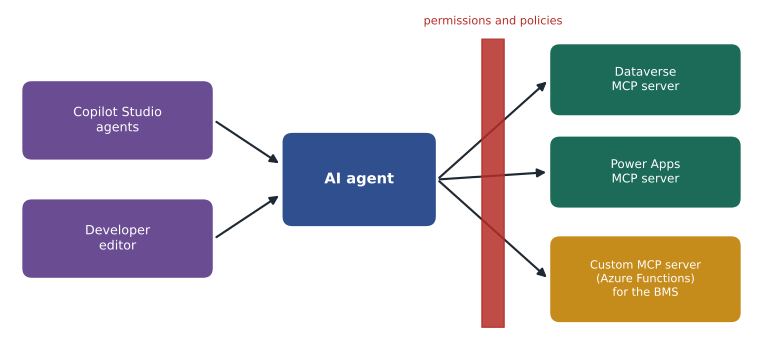
For developers, MCP raises the same security questions as any integration. An agent using the Dataverse MCP server works with the permissions of the signed-in user, so it cannot reach more than that user could, but it can reach everything that user can, quickly and at scale. A custom MCP server must authenticate its callers, validate inputs and log calls without personal data. Data policies apply to connectors used by agents. AB-400 includes designing custom connectors and MCP servers among its solution component skills.
Reviewing AI-generated code
Generated code is a draft written by a fast, confident junior colleague who has read a great deal and checked nothing. Signe's review checklist for AI-assisted changes was the same as for human ones, with extra attention to a few points.
| Check | Why it matters for generated code |
|---|---|
| Does it compile, and do tests pass? | Generated code often looks right and fails on details |
| Are the APIs and options current? | Models may suggest deprecated classes, such as OrganizationServiceProxy, or old CLI options |
| Which user does it run as? | Elevation is a common "fix" in generated code |
| Which columns and rows does it read? | Generated queries often request everything |
| Are there secrets or personal data? | Examples may embed keys or log full records |
| Does it match the design document? | The tool cannot know the stage, mode and filtering agreed in design |
| Is any of it copied from public code? | Public code filters and licence obligations need attention |
GitHub Copilot offers settings at the organization level, such as blocking suggestions that match public code and choosing which models are available, and Copilot code review can comment on pull requests. MSBA-303 covers those features. None of them replaces a human reviewer who understands the Dataverse pipeline.
Worked problem
Catching a deprecated pattern
A generated console tool for loading test data creates an OrganizationServiceProxy with a username and password, loops over 5,000 rows sending one Create each, and retries immediately on any error. List the problems and fixes.
Show solution
- OrganizationServiceProxy is deprecated; use ServiceClient from the Dataverse client library.
- Username and password authentication should be replaced by an application user with a certificate, federated credential or managed identity, or interactive sign-in for a developer tool.
- One request per row should become CreateMultiple or ExecuteMultiple in modest batches.
- Retries must wait for the Retry-After value from service protection errors instead of retrying immediately.
Answer: Four fixes: ServiceClient, modern authentication, bulk messages and proper back-off.
AI help with tests and documentation
Some of the most valuable uses of AI assistance are the least glamorous. GitHub Copilot is good at proposing test cases a developer did not think of, such as the leap-year edge case in a date calculation, and at writing the repetitive setup code for tests. It is good at drafting documentation from code, such as a summary of each plug-in step's registration for the technical design, which the developer then checks. It can explain an unfamiliar solution file or a legacy plug-in written by someone who left years ago. In each case the developer remains responsible for the result, but the tedious first draft takes minutes instead of an hour.
Building agents that use your code
Developers are increasingly asked to make their code usable by agents, not only by apps. A custom API with clear names, descriptions and typed parameters can be offered to a Copilot Studio agent as a tool. A custom connector with good operation descriptions lets an agent understand when to call it. An MCP server written by a developer can expose several operations at once to many agents. In each case the descriptions matter more than they used to, because an AI model reads them to decide what a tool does. "GetData" with no description is a poor tool; "Get open work orders for a building, with priority and due date" is a good one.
| Way to expose code to agents | Good for | Watch out for |
|---|---|---|
| Custom API as an agent tool | Transactional Dataverse operations | Execute privilege and user context |
| Custom connector | External APIs used by apps, flows and agents | Authentication and data policy classification |
| Custom MCP server | Several tools for many agents and clients | Authenticating callers and validating inputs |
| Agent flow | Multi-step deterministic processes an agent can start | Licensing in Copilot Credits |
Keeping up with AI features
AI features in Power Platform change faster than anything else in the platform. Features move from preview to general availability within months, names change, and some features are retired, as the canvas formula Copilot was. Signe's advice to Wiremu was to treat any AI feature as a dependency with an expiry date: note in the design which AI features a solution relies on, check their status in the release plans and Message center, and prefer designs where the AI part can be replaced without rebuilding the rest. That is another reason to keep deterministic rules in plug-ins and configuration, where they do not depend on a model.
A team policy for AI assistance
By the end of the term the CoE had written a short policy for AI-assisted development, based on the session. Developers could use GitHub Copilot with the college's organization settings, which blocked suggestions matching public code. Repository instructions files were required for every solution repository with code. Agents could run builds, tests and read-only commands; anything that changed an environment needed approval. AI-generated code went through the same pull request review as other code, and the reviewer, not the tool, was accountable. Personal data and secrets were never pasted into prompts. The policy fit on one page, and Rupert added it to the developer onboarding checklist that Wiremu had just completed.
Prompts that work well for platform code
Wiremu collected a few prompt patterns that produced better results. Naming the platform and version context helped: "a Dataverse plug-in for the Update message, PreOperation stage, using a pre-image called Pre". Asking for tests alongside code helped. Asking the assistant to explain its choice of stage, user context and columns surfaced mistakes quickly, because a wrong explanation was easier to spot than wrong code. And asking it to compare its output with the repository's instructions file caught rule breaks before review.
Common mistakes
MistakeAccepting generated plug-ins that run as SYSTEM.
InsteadCheck the user context against the design; default to the calling user.
MistakeLetting an agent run environment-changing pac commands unattended.
InsteadApprove any command that imports, deletes or resets.
MistakeRelying on the retiring Power Fx formula Copilot feature.
InsteadIt retires December 11, 2026; use current Copilot experiences or an editor assistant.
MistakeTurning on the Dataverse MCP server for every client without review.
InsteadAllow only the clients needed, and remember agents act with the user's full permissions.
By the end of the term Wiremu used Copilot more than before, not less, but differently. "It writes the first draft," he said. "The instructions file and the tests decide whether it survives."
Summary and key terms
- AI assistance spans GitHub Copilot in editors, Copilot in the Power Platform studios, plan designer, MCP servers and Microsoft Foundry.
- The canvas feature for creating and editing Power Fx formulas with Copilot, and Power Apps Ideas, retire on December 11, 2026.
- Repository instructions files steer GitHub Copilot toward the team's platform rules; agent mode needs limits on environment-changing commands.
- MCP lets agents call tools; the Dataverse MCP server is enabled by default only for Copilot Studio, and every call runs with the user's permissions.
- Generated code needs the same review as human code, with attention to current APIs, user context, queries, secrets and design fit.
- GitHub Copilot
- An AI coding assistant for editors and GitHub that suggests code, answers questions and can make changes in agent mode.
- Agent mode
- A GitHub Copilot mode that plans and makes multi-file changes and runs commands, checking the results.
- Model Context Protocol
- An open standard that lets AI agents discover and call tools provided by servers.
- Dataverse MCP server
- A Microsoft MCP server that exposes Dataverse tables and data to MCP clients such as Copilot Studio agents.
- Instructions file
- A repository file that gives an AI assistant standing context and rules for that codebase.
Practice problems
Work each problem on paper first, then reveal the answer to check.
Which MCP client is the Dataverse MCP server enabled for by default?
Show answer
Copilot Studio; other clients must be allowed by an administrator.
Name two things to check in AI-generated plug-in code.
Show answer
Any two of: the user it runs as, the columns it requests, whether APIs are current, secrets or personal data, and fit with the design.
When does the Copilot feature for creating and editing Power Fx formulas in canvas apps retire?
Show answer
December 11, 2026.
Lesson quiz · 5 questions
Score 60% or more to complete this lesson.
Create a free account to save your progress, take quizzes and earn a certificate.