
MSBA-270 · Lesson 4 of 12 · 19 min
Dataverse event pipeline
▶ Video coming soon A video version of this lesson is on the way.
The safety job rule was the first piece of server-side code in the facilities solution, and Signe used it to teach the event pipeline. She drew a line across the whiteboard, wrote "Update work order" at the left end and "saved in the database" at the right, and asked Wiremu where the plug-in should sit. He put it at the right end, after the save, so it could see the final values. "Then the photo check happens after the job is already closed," Maribeth said. That was the lesson in one sentence: where code runs in the pipeline decides what it can see and what it can stop.
Messages and the pipeline
Every operation in Dataverse is a message. Create, Retrieve, Update, Delete, Associate and Assign are built-in messages; custom APIs add new ones. When an app, a flow or an integration sends a message, Dataverse processes it through the event execution pipeline, a fixed sequence of stages. Developers register steps that attach their plug-in to a message, a table and a stage, and Dataverse runs those steps in order each time the message is processed.
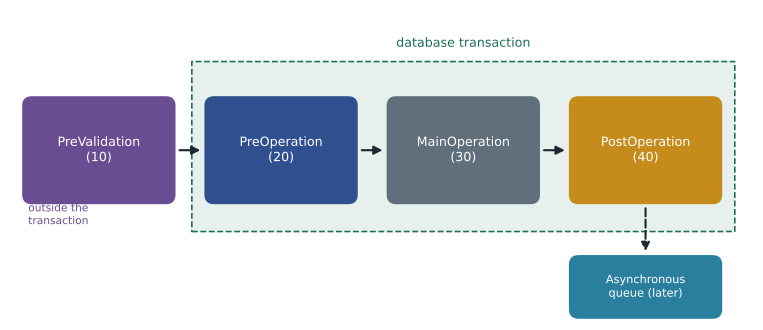
| Stage | Number | In the transaction? | Typical use |
|---|---|---|---|
| PreValidation | 10 | No (runs before the transaction starts) | Cancel early, before expensive work; checks that should not be rolled back |
| PreOperation | 20 | Yes | Validate or change the incoming data before it is saved |
| MainOperation | 30 | Yes | Dataverse performs the operation; only custom API logic is registered here |
| PostOperation | 40 | Yes, for synchronous steps | React to the saved data: create related rows, call other messages |
The transaction matters. Synchronous steps in PreOperation and PostOperation run inside the same database transaction as the operation. If any of them throws an error, Dataverse rolls back everything in the transaction, including the main operation, and the caller receives the error. That is how a plug-in stops a change: it throws an InvalidPluginExecutionException with a message the user will understand. PreValidation runs before the transaction begins, so it is the cheapest place to reject a request, but changes it makes are not rolled back if a later step fails.
Synchronous and asynchronous steps
A synchronous step runs while the caller waits. It can stop the operation and its changes are part of the transaction, but it adds to the time the user waits and must finish within two minutes. An asynchronous step runs later, after the operation has been saved, through the asynchronous service. The caller does not wait, the step cannot stop the original operation, and if it fails the failure is recorded in the system jobs list rather than shown to the user. Asynchronous steps suit work that can happen a few seconds later, such as sending data to another system or recalculating a summary.
| Question | Synchronous | Asynchronous |
|---|---|---|
| Can it stop the operation? | Yes, by throwing an exception | No |
| Does the user wait? | Yes | No |
| Part of the transaction? | Yes (Pre and PostOperation) | No |
| Where failures appear | As an error to the caller | In system jobs |
| Good for | Validation, setting values, required related changes | Integrations, notifications, heavy follow-up work |
The execution context
When Dataverse runs a plug-in, it passes an IServiceProvider, from which the plug-in gets the services it needs. The most important is the IPluginExecutionContext, which describes what is happening: the message name, the table, the stage, the depth, the user who started the operation, the user the plug-in runs as, and the input and output parameters. For Create and Update, the Target input parameter holds the row being saved, and for Update it contains only the columns that are changing. The plug-in also gets an IOrganizationServiceFactory to create an IOrganizationService for reading and writing other data, and an ITracingService for writing trace messages that help with debugging.
using System;
using Microsoft.Xrm.Sdk;

public sealed class BlockSafetyCloseWithoutPhoto : IPlugin
{
    public void Execute(IServiceProvider serviceProvider)
    {
        var context = (IPluginExecutionContext)serviceProvider.GetService(typeof(IPluginExecutionContext));
        var tracing = (ITracingService)serviceProvider.GetService(typeof(ITracingService));

        if (context.MessageName != "Update" || !context.InputParameters.Contains("Target")) return;
        var target = (Entity)context.InputParameters["Target"];
        if (!target.Contains("lcc_status")) return;                  // status not changing

        var status = target.GetAttributeValue<OptionSetValue>("lcc_status")?.Value;
        if (status != 100000003) return;                            // not 'Completed'

        var pre = context.PreEntityImages.Contains("Pre") ? context.PreEntityImages["Pre"] : null;
        var category = pre?.GetAttributeValue<OptionSetValue>("lcc_category")?.Value;
        var photos = pre?.GetAttributeValue<int?>("lcc_photocount") ?? 0;
        tracing.Trace("Category {0}, photos {1}", category, photos);

        if (category == 100000001 && photos == 0)                   // 'Safety'
            throw new InvalidPluginExecutionException(
                "A safety job needs at least one photo before it can be completed.");
    }
}
Images
For Update, the Target contains only the changed columns, so a plug-in often needs to know the other values on the row. Instead of retrieving the row again, which costs a request and time, the step can be registered with an entity image: a snapshot of chosen columns. A pre-image shows the row as it was before the operation; a post-image shows it after, and is available only in PostOperation. Images should list only the columns the plug-in needs, because larger images cost more. In the safety job plug-in, a pre-image with the category and photo count columns gave the code everything it needed without an extra call.
Filtering attributes, depth and recursion
A step on Update runs every time the row changes unless it is filtered. Filtering attributes limit the step to updates that include specific columns, so the safety job plug-in runs only when the status column changes, not when a technician edits a note. Filtering is one of the simplest and most effective performance settings in a registration.
Plug-ins can cause other operations, which can trigger other plug-ins, including the same one. The context's Depth property counts how deep the chain has gone. Dataverse stops chains that go too deep to prevent infinite loops, but a well-designed plug-in should avoid recursion in the first place: by filtering attributes, by not updating the same row it is handling (in PreOperation it can change the Target directly instead), and by checking depth only as a last safeguard. Changing the Target in PreOperation is especially useful, because the change is saved as part of the same operation with no extra request.
Worked problem
Choosing the stage for three rules
Signe has three rules for work orders: (1) reject a new work order whose due date is in the past; (2) set the priority rank, a number used for sorting, from the priority choice whenever priority changes; (3) after a safety job is created, create a notification row for the health and safety office. Which stage and mode suits each?
Show solution
- Rule 1 rejects bad input. It could run in PreValidation to fail early, or PreOperation; either is synchronous. PreValidation is cheaper because no transaction has started.
- Rule 2 changes a value on the same row. PreOperation is right: set the value on the Target and it is saved with the operation, with no extra update and no recursion.
- Rule 3 creates a related row after the work order exists. It can run in PostOperation. If the notification must exist whenever the job exists, synchronous keeps them in one transaction; if a short delay is fine, asynchronous keeps the user from waiting.
Answer: Validation in PreValidation or PreOperation, same-row changes in PreOperation on the Target, and related work in PostOperation, synchronous or asynchronous depending on whether it must succeed with the save.
Business events and other ways to react
Plug-ins are not the only way to react to pipeline events. Cloud flows with the Dataverse "When a row is added, modified or deleted" trigger react asynchronously without code. Service endpoints and webhooks registered in the Plug-in Registration Tool send the execution context to Azure Service Bus, Azure Event Hubs or an HTTPS endpoint, so another system can respond. Business events let developers define named events, including custom APIs marked as events, that other systems can subscribe to through Power Automate or Azure. The choice depends on whether the reaction must be inside the transaction (a synchronous plug-in), can be later inside Dataverse (an asynchronous plug-in or flow), or belongs in another system (a service endpoint, webhook or business event).
// Registration summary kept in the design document (not executable)
Assembly:   Lumenvale.Facilities.Plugins (in solution LumenvaleFacilities)
Step:       BlockSafetyCloseWithoutPhoto
Message:    Update      Table: lcc_workorder
Stage:      PreOperation (20)      Mode: Synchronous
Filtering:  lcc_status
Pre-image:  "Pre" with lcc_category, lcc_photocount
Run as:     Calling user
Plug-in packages and dependent assemblies
Plug-ins are compiled into a .NET assembly and registered in Dataverse. For a long time, a plug-in could not easily use third-party libraries, because Dataverse loaded only the registered assembly. Plug-in packages solved this: a developer builds a NuGet package that contains the plug-in assembly and its dependent assemblies, registers the package, and Dataverse loads the dependencies too. pac plugin init creates a project that can produce a package. Packages are the recommended approach when dependencies are needed, although each dependency adds to what must be reviewed and kept up to date, so Signe kept them to a minimum.
Custom APIs in the pipeline
A custom API defines a new message with named request parameters and response properties. When an app or integration calls it, Dataverse runs the message through the same pipeline as built-in messages. The developer associates a plug-in with the custom API, and that plug-in runs in the MainOperation stage, the one stage that is otherwise reserved for Dataverse itself. Other plug-ins can then be registered on the custom API's message in PreOperation or PostOperation, just as for Create or Update. A custom API can be bound to a table, so it is called on a specific row, or unbound, and it can be defined as a function, which must not change data and is called with GET, or an action, which can.
| Property | Choices | Effect |
|---|---|---|
| Binding type | Global, entity or entity collection | Called on its own, on one row or on a set of rows |
| Is function | Yes or no | Functions cannot change data and are called with GET in the Web API |
| Allowed custom processing step type | None, async only, or sync and async | Whether other developers may register steps on it |
| Execute privilege name | Optional | Restricts who may call it |
| Is private | Yes or no | Hides it from metadata discovery |
Debugging plug-ins
Plug-ins run on Microsoft's servers, so a developer cannot simply attach a debugger to them. There are three main tools. Tracing: when plug-in trace logging is turned on in the environment's settings, messages written to ITracingService are stored in the plug-in trace log, along with the exception details when a plug-in fails, and they can be read in the model-driven app or queried. The plug-in profiler: in the Plug-in Registration Tool, a developer can profile a step, reproduce the operation, and then replay the captured execution in Visual Studio with a debugger attached, stepping through the code with the real context. Unit tests: lesson 9 shows how most logic can be tested on the developer's machine before it ever reaches Dataverse.
Trace logging has a cost, so environments usually log only exceptions in production and all traces in development. The trace messages themselves should be short and useful: which branch was taken, which IDs were involved, how long a call took. They should never contain personal data, a rule lesson 7 returns to.
Choosing between a plug-in and a cloud flow
Makers often ask why a developer would write a plug-in when a cloud flow with the Dataverse trigger can react to the same change. The answer is in the pipeline. A flow runs asynchronously, outside the transaction, after the change is saved; it cannot stop the change, its effects appear seconds later, and it may run under a connection that belongs to a particular user. A synchronous plug-in runs inside the transaction, can stop the change, and its effects are visible immediately. Flows are excellent for notifications, approvals, integrations and work that can wait. Plug-ins are right for validation, values that must be set with the save, and logic that must be consistent with it. Many solutions use both: the safety job plug-in blocks the bad change, and a flow notifies the health and safety office when a safety job is completed.
| Need | Cloud flow | Synchronous plug-in |
|---|---|---|
| Stop an invalid change | Cannot | Can |
| Send an email or Teams message | Well suited | Possible, but slows the save |
| Set a value as the row is saved | Only afterward, with another update | Directly on the Target |
| Who can change it | Makers | Developers |
Common mistakes
MistakeValidating in PostOperation asynchronously.
InsteadAn asynchronous step cannot stop the operation; validate synchronously in PreValidation or PreOperation.
MistakeCalling Update on the same row from a PreOperation plug-in.
InsteadChange the Target in PreOperation; it is saved with the operation.
MistakeRegistering Update steps with no filtering attributes.
InsteadFilter on the columns the logic depends on.
MistakeRetrieving the whole row to read one column.
InsteadRegister a pre-image with just the columns needed.
Wiremu rewrote his whiteboard line with the plug-in in PreOperation and the pre-image beside it. Maribeth tested it the next day in the developer environment by trying to close a safety job from the model-driven app, from the Field Tech canvas app and from a cloud flow. All three received the same message. "That is the point of the pipeline," Signe said. "One rule, every door."
Summary and key terms
- Every Dataverse operation is a message processed through the event pipeline: PreValidation (10), PreOperation (20), MainOperation (30) and PostOperation (40).
- Synchronous steps in PreOperation and PostOperation share the operation's transaction; throwing InvalidPluginExecutionException rolls it back.
- Asynchronous steps run later in PostOperation, cannot stop the operation and report failures in system jobs.
- The execution context gives the message, table, stage, users, depth and Target; images supply other column values cheaply.
- Filtering attributes, changing the Target in PreOperation and avoiding recursion keep plug-ins efficient; flows, service endpoints, webhooks and business events are other ways to react.
- Message
- A named Dataverse operation, such as Create or Update, that the pipeline processes.
- Step
- A registration that attaches a plug-in to a message, table, stage and mode.
- Execution context
- The object a plug-in receives describing the operation, its parameters, users and depth.
- Target
- The input parameter holding the row being created or the columns being updated.
- Pre-image
- A snapshot of chosen columns of a row before the operation, registered with a step.
Practice problems
Work each problem on paper first, then reveal the answer to check.
In which stage can asynchronous plug-in steps be registered?
Show answer
Only in PostOperation.
How does a plug-in stop an operation and show a message?
Show answer
It throws InvalidPluginExecutionException with the message, which rolls back the transaction.
Why use filtering attributes on an Update step?
Show answer
So the step runs only when the columns it cares about change, which saves time and avoids unnecessary runs.
Lesson quiz · 5 questions
Score 60% or more to complete this lesson.
Create a free account to save your progress, take quizzes and earn a certificate.