
MSBA-270 · Lesson 3 of 12 · 19 min
Developer tools: Power Platform CLI and VS Code
▶ Video coming soon A video version of this lesson is on the way.
On Wiremu's second day Signe asked him to set up his machine the way the team worked. He expected to install one tool. By lunch he had installed Visual Studio Code, the Power Platform Tools extension, the .NET SDK, Node.js, Git, and the Plug-in Registration Tool, and he had a developer environment of his own called Wiremu Dev. "The studio is where makers live," Signe said. "Your code lives on your laptop and in the repository. The CLI is the bridge between the two."
Microsoft Power Platform CLI
The Microsoft Power Platform CLI, run with the command pac, is a cross-platform command-line tool for developers and administrators. It creates projects for component framework controls and plug-ins, authenticates to environments, exports, unpacks, packs and imports solutions, runs solution checker, manages environment and administrative settings and works with code apps and other newer project types. It can be installed on its own, as a .NET tool, or through the Power Platform Tools extension for Visual Studio Code, which adds a panel for switching between environments and runs pac in the editor's terminal.
The CLI matters because it turns work that happens in a browser into commands that can be repeated, scripted and run in pipelines. A solution export done by hand in the maker portal is a one-off. The same export run as a command can be put into a script that a build server runs every night.
| Task | Typical command group | Used for |
|---|---|---|
| Sign in to environments | pac auth | Create, list and switch authentication profiles |
| Work with solutions | pac solution | Init, export, unpack, pack, import, check, add references |
| Build code components | pac pcf | Create a component project and push a test build |
| Build plug-ins | pac plugin | Create a plug-in project |
| Inspect the environment | pac org and pac env | Show the current environment, list environments |
| Administer | pac admin | Create, back up, copy and reset environments |
# Sign in to a developer environment and check the connection
pac auth create --environment https://lumenvale-wiremu-dev.crm3.dynamics.com
pac auth list
pac org who

# Export the facilities solution as unmanaged and unpack it for source control
pac solution export --name LumenvaleFacilities --path ./out/LumenvaleFacilities.zip
pac solution unpack --zipfile ./out/LumenvaleFacilities.zip --folder ./src/LumenvaleFacilities
pac auth create stores an authentication profile, which pac then uses for later commands. A developer usually has one profile per environment and switches between them with pac auth select. In a pipeline the profile is created with a service principal, an application registered in Microsoft Entra ID, instead of a person's account, so builds do not depend on anyone being signed in.
Solutions as source code
A solution exported from Power Platform is a zip file. Zip files are poor at showing what changed, so developers unpack solutions into a folder of XML, JSON and other files that Git can track. SolutionPackager, which the CLI wraps in pac solution unpack and pac solution pack, splits the zip into one file per component, such as a table, form, view or web resource, and can rebuild a zip from the folder. Reviewers can then see that a pull request changed one form and added two columns, rather than "a new version of the zip".
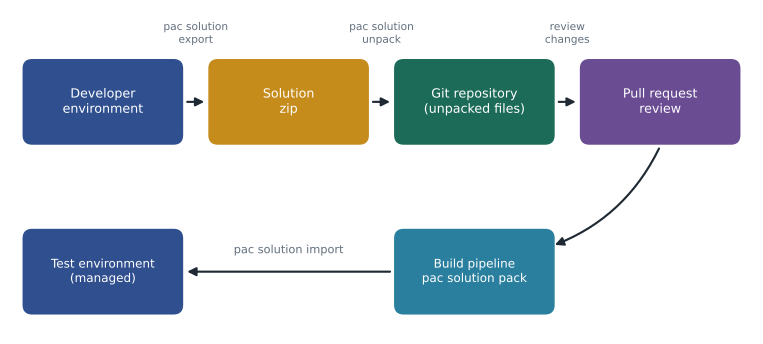
Power Platform also has Git integration built into the maker experience, which connects a solution in an environment directly to an Azure DevOps Git repository and lets makers commit and pull changes from the studio. Lumenvale's makers used it for low-code solutions in the registrar environments. Signe's team used both: Git integration for makers, and CLI-based export and unpack in pipelines for solutions that also contained code. Either way, the repository, not any one environment, became the record of what the solution should contain.
Visual Studio Code and the Power Platform Tools extension
Visual Studio Code is the usual editor for TypeScript and JavaScript work, such as component framework controls, client scripts, code apps and custom connector definitions. The Power Platform Tools extension brings the CLI into the editor, shows the authentication profiles and environments in a side panel, and offers commands and snippets for common tasks. Many developers also install the Power Fx language support and Dataverse-related extensions. C# plug-ins can be built in Visual Studio Code with the .NET SDK, although many developers still prefer Visual Studio for debugging .NET code.
Code apps in particular are built entirely in a code editor. A developer creates a web project with a framework such as React or Vue, adds the Power Apps client library for code apps, connects the project to an environment and to the connectors the app needs, runs it locally and then pushes it to Power Platform, which hosts it. Code apps became generally available on February 5, 2026. Power Platform's managed host signs users in with Microsoft Entra ID, handles connector consent, enforces data policies at run time, applies Conditional Access, controls sharing and reports health in Monitor. Users of code apps need a Power Apps Premium licence, and the environment must have the code apps feature turned on.
// Calling a Power Platform connector from a code app (TypeScript, simplified)
import { WorkOrdersService } from "./generated/services/WorkOrdersService";

export async function loadOpenSafetyJobs() {
  const result = await WorkOrdersService.getAll({
    select: ["lcc_name", "lcc_priority", "lcc_duedate"],
    filter: "lcc_category eq 'Safety' and statecode eq 0",
    orderBy: ["lcc_duedate asc"],
    top: 50,
  });
  return result.data ?? [];
}
Other tools a developer uses
The Plug-in Registration Tool registers plug-in assemblies and packages, steps, images, service endpoints and webhooks, and it can run the plug-in profiler for debugging. It installs through the CLI. XrmToolBox is a popular community toolbox for Dataverse, with tools for metadata browsing, bulk data changes, FetchXML building and security analysis; it is not a Microsoft product, so Lumenvale allowed it only in developer environments. Power Platform Build Tools for Azure DevOps and GitHub Actions for Power Platform run the same solution tasks as the CLI inside pipelines. Monitor, opened from the maker portal, shows the events in a running canvas, model-driven or code app, including network calls and their timing. Application Insights, part of Azure Monitor, collects telemetry from apps, plug-ins and code apps when configured.
| Tool | Main use | Notes |
|---|---|---|
| Power Platform CLI (pac) | Projects, solutions, environments | Scriptable; used locally and in pipelines |
| Visual Studio Code + Power Platform Tools | Editing TypeScript, JavaScript and solution files | Shows profiles and environments; runs pac |
| Plug-in Registration Tool | Registering plug-ins, steps, images and endpoints | Includes the plug-in profiler |
| Power Platform Build Tools / GitHub Actions | CI/CD pipelines | Same tasks as pac, as pipeline steps |
| Monitor | Watching app events and calls live | Works for canvas, model-driven and code apps |
| XrmToolBox | Community utilities for Dataverse | Not Microsoft-supported; use with care |
Setting up a developer environment
A developer environment is a free environment for an individual developer to build and test in, with Dataverse included and capacity that does not count against the tenant's production capacity in the usual way. Administrators can control who may create them. Lumenvale gave each developer one, created from the same base solution set as test so that dependencies matched. The rule was simple: nothing was built directly in test or production. Changes went from a developer environment to source control to test to production.
Worked problem
A first plug-in project from the command line
Wiremu needs to start the plug-in that blocks closing a safety job without a photo. Outline the steps from an empty folder to a registered plug-in in his developer environment.
Show solution
- Run pac plugin init in a new folder to create a C# class library project set up for Dataverse plug-ins, including a strong-name key.
- Write the plug-in class that implements IPlugin and checks the work order's category and photo count.
- Build the project with dotnet build to produce the assembly, or a plug-in package if dependencies are needed.
- Open the Plug-in Registration Tool, connect to Wiremu Dev and register the assembly.
- Register a step on the Update message of the work order table, in the PreOperation stage, filtered to the Status column.
- Add the plug-in assembly and step to the facilities solution so they travel with it.
Answer: pac plugin init creates the project; the code is built locally, registered with the Plug-in Registration Tool and added to the solution so it moves through ALM like everything else.
# Create projects with the CLI
mkdir SafetyJobPlugins && cd SafetyJobPlugins
pac plugin init

cd ../RoomPicker
pac pcf init --namespace Lumenvale --name RoomPicker --template field --run-npm-install

# Check a solution before it goes to test
pac solution check --path ./out/LumenvaleFacilities_managed.zip --outputDirectory ./reports
Authentication profiles in more detail
pac can hold many authentication profiles at once, which matters for a developer who works across several environments in a day. Each profile records the account or service principal, the tenant and, optionally, a default environment. pac auth list shows them with an asterisk next to the active one, pac auth select switches, and pac auth delete removes a profile that is no longer needed. Commands that act on an environment use the active profile's environment unless a different environment is passed as an option. Signe's habit, which she passed on to Wiremu, was to run pac org who before any command that changed data, because importing a solution into the wrong environment is an easy mistake and an awkward one to undo.
Interactive sign-in suits a developer at a laptop. For automation, a profile can be created with an application ID and a client secret or certificate, or, in GitHub Actions and Azure DevOps, with workload identity federation so that no secret is stored at all. The pipeline tasks in Build Tools and the GitHub actions use service connections or secrets configured in the pipeline platform rather than profiles on a machine, but the idea is the same.
A repository layout that works
A repository for a solution with code needs a predictable shape so that anyone can find things. Lumenvale settled on a simple layout for the facilities repository, which every new solution copied.
| Folder | Contents |
|---|---|
| src/LumenvaleFacilities | The unpacked solution files from pac solution unpack |
| src/Plugins | The C# plug-in project, with decision logic in a Rules folder |
| src/Controls/RoomPicker | The component framework project for the floor plan control |
| src/WebResources | Client scripts in TypeScript, compiled to JavaScript for the solution |
| tests | Unit and integration test projects, and Playwright tests |
| deploy | Deployment settings files for test and production |
| docs | The technical design document, decision log and diagrams |
| .github/workflows | Build and release workflows |
Build outputs, such as compiled assemblies, node_modules folders and packed solution zips, were excluded through a .gitignore file. They were produced by the build pipeline every time, so storing them would only create noise and the risk that someone deployed an old file.
Choosing between Visual Studio and Visual Studio Code
Wiremu asked whether he needed Visual Studio at all. For component controls, client scripts and code apps, Visual Studio Code is enough and is what most developers use. For plug-ins, both work: the .NET SDK builds the projects from any editor, and Visual Studio offers richer debugging and refactoring for C#. The team's rule was that the project files had to build with the dotnet command line, whatever editor the developer used, because that is what the pipeline does. If a project built only inside one person's Visual Studio installation, it was not finished.
Keeping tools current
The CLI and the extension are updated often, sometimes monthly, with new commands and changed options. Developers should update them regularly and pin the version used by pipelines, so that a build does not change behaviour because a tool updated overnight. pac reports its own version, and the pipeline tasks in Build Tools and the GitHub actions let a team choose which CLI version to install. When a command behaves differently from the documentation, the first check is the installed version. Lumenvale updated developer machines on the first Monday of each month and changed the pinned pipeline version only after a test build passed with the new release.
Common mistakes
MistakeBuilding directly in the test environment.
InsteadBuild in a developer environment and move changes through source control and pipelines.
MistakeCommitting solution zip files to Git.
InsteadUnpack solutions into files so changes can be reviewed, and pack them again in the build.
MistakeUsing a personal account for pipeline authentication.
InsteadUse a service principal registered in Microsoft Entra ID.
MistakeMemorizing CLI options from old blog posts.
InsteadRun pac help, or the help for a command group, because options change between releases.
Wiremu's first unpacked solution surprised him: the facilities solution became more than four hundred files. "Most of them you will never touch," Signe said. "But when a form breaks, you will be very glad you can see exactly which line changed."
Summary and key terms
- The Power Platform CLI (pac) creates projects, authenticates to environments, exports, unpacks, packs, imports and checks solutions, and manages environments.
- Unpacking solutions into files lets Git track individual components; Git integration in the studio offers a maker-friendly path to the same goal.
- Visual Studio Code with Power Platform Tools is the main editor for TypeScript and JavaScript work; code apps are built entirely in code and hosted by Power Platform.
- The Plug-in Registration Tool, Build Tools, GitHub Actions, Monitor and Application Insights complete the toolset.
- Each developer should have a developer environment; nothing is built directly in test or production.
- Power Platform CLI
- The pac command-line tool for creating projects, managing solutions and environments, and automating Power Platform tasks.
- Authentication profile
- Saved sign-in details that pac uses to connect to an environment.
- SolutionPackager
- The tool, wrapped by pac solution unpack and pack, that splits a solution zip into files and rebuilds it.
- Developer environment
- A free environment for one developer to build and test in.
- Plug-in Registration Tool
- A tool for registering plug-in assemblies, steps, images and service endpoints in Dataverse.
Practice problems
Work each problem on paper first, then reveal the answer to check.
Why unpack a solution before committing it?
Show answer
So that each component is a separate file and reviewers can see exactly what changed.
What should a pipeline use to authenticate pac to an environment?
Show answer
A service principal, an application registered in Microsoft Entra ID, rather than a person's account.
Which command creates a component framework project?
Show answer
pac pcf init, with a namespace, a name and a template such as field or dataset.
Lesson quiz · 5 questions
Score 60% or more to complete this lesson.
Create a free account to save your progress, take quizzes and earn a certificate.