
MSBA-270 · Lesson 8 of 12 · 19 min
Solutions and ALM for developers
▶ Video coming soon A video version of this lesson is on the way.
The facilities solution had grown quickly. By November it held the inspection tables from the summer, the Facilities Hub app and Field Tech from October, three flows, two prompts, an agent and now Wiremu's plug-in. Makers were still changing forms in Facilities Dev while the developers committed code to the repository. Rupert's question for this session was blunt: "When we deploy in December, how do we know that what arrives in production is exactly what we tested, with the plug-in, without someone's half-finished form?" The answer was application lifecycle management done with a developer's discipline.
Solutions, publishers and managed solutions
A solution is the container that moves customizations between environments. Every component a developer creates, such as a plug-in assembly, a step, a custom API, a web resource, a component control, a custom connector or an environment variable, should be added to a solution. Each solution has a publisher, which sets the prefix for new components; at Lumenvale it is lcc. In development, solutions are unmanaged, so their components can be edited. They are exported as managed solutions for test and production, where components cannot be edited directly and can be removed cleanly by uninstalling the solution.
Managed solutions protect production from accidental changes, but they also mean that any fix has to go through development and the pipeline again. That is intended. Signe's rule was that nobody, including the developers, made unmanaged changes in test or production, because those changes would sit in a separate layer, survive future imports in confusing ways and be lost from source control.
Solution layers
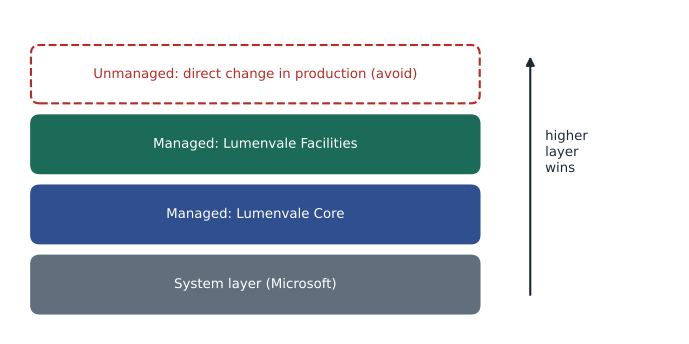
When several solutions change the same component, Dataverse keeps each change as a layer. The system layer holds Microsoft's base definition. Each managed solution adds a layer on top, in the order they were installed. At the very top is the unmanaged layer, which holds any direct customization made in that environment. The component behaves according to the combined layers, with higher layers winning where they conflict. The solution layers view in the maker portal shows the stack for any component, which is the first place to look when a form in production does not look like the form in test.
Dependencies and segmentation
Components depend on one another: a form depends on its table's columns, a plug-in step depends on its assembly and its table, a flow depends on its connection references. Dataverse tracks these dependencies and refuses to import a solution whose dependencies are missing in the target, or to delete a component that something else needs. Developers can view dependencies for any component and should plan solutions so dependencies point in one direction.
Large organizations split customizations into several solutions, known as solution segmentation. Lumenvale used a small core solution, Lumenvale Core, holding shared tables such as Building, Room and Campus and the publisher's shared security roles, and separate solutions for Facilities and Registrar that depended on Core. Each solution should include only the components it changes, not whole tables with every column and form, because adding more than needed creates layers on components the solution does not really own and makes uninstalling harder. When adding an existing table, the developer chooses which subcomponents to include.
| Practice | Reason |
|---|---|
| One publisher for the organization | Consistent prefixes and clear ownership |
| Shared components in a core solution | Other solutions depend on it; dependencies point one way |
| Include only changed subcomponents | Fewer layers, cleaner upgrades and uninstalls |
| Environment variables for settings | Values differ per environment without editing the solution |
| Connection references in flows | Each environment supplies its own connections |
| Increase the version on every release | Clear record of what is installed where |
Environment variables and connection references
Environment variables hold values that differ between environments, such as a URL, a number, a JSON setting or a secret reference. The definition travels in the solution; the current value is set in each environment, ideally during deployment. Connection references let flows and other components refer to a connection by role, such as "Facilities Dataverse" or "Student Records connector", rather than to someone's personal connection. During import, each connection reference is mapped to a connection in the target environment. Both are set automatically in pipelines through a deployment settings file, a JSON file that lists environment variable values and connection reference mappings for each target.
{
  "EnvironmentVariables": [
    { "SchemaName": "lcc_BmsAlarmFeedBaseUrl", "Value": "https://bms-test.example.lumenvale.ca/api" },
    { "SchemaName": "lcc_SafetyEscalationMinutes", "Value": "30" }
  ],
  "ConnectionReferences": [
    { "LogicalName": "lcc_FacilitiesDataverse", "ConnectionId": "<test connection id>",
      "ConnectorId": "/providers/Microsoft.PowerApps/apis/shared_commondataserviceforapps" }
  ]
}
Pipelines
Power Platform offers two families of deployment automation. Pipelines in Power Platform are built into the platform: an administrator sets up a pipeline with development, test and production stages, and makers deploy solutions from the maker portal with approvals, deployment settings and history recorded in a host environment. They suit low-code teams and are what Lumenvale's registrar and facilities makers used. Power Platform Build Tools for Azure DevOps and GitHub Actions for Power Platform run the same operations as CLI tasks inside general-purpose CI/CD pipelines, which suits solutions that include code, because the pipeline can also build the plug-in, run unit tests and run solution checker before packing.
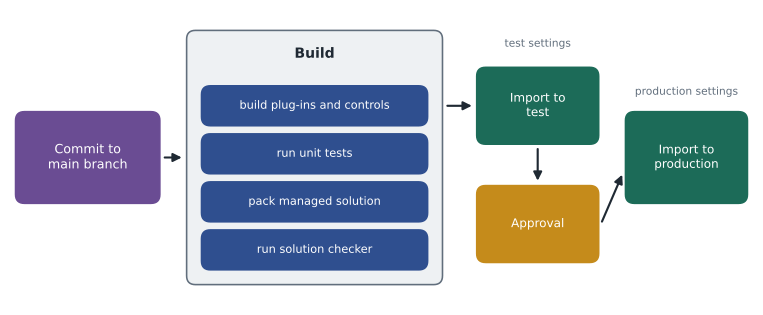
# GitHub Actions workflow (excerpt) for the facilities solution
jobs:
  build:
    runs-on: windows-latest
    steps:
      - uses: actions/checkout@v4
      - name: Build plug-ins
        run: dotnet build src/Plugins/Lumenvale.Facilities.Plugins.csproj -c Release
      - name: Run unit tests
        run: dotnet test tests/Lumenvale.Facilities.Tests.csproj
      - name: Pack managed solution
        uses: microsoft/powerplatform-actions/pack-solution@v1
        with:
          solution-folder: src/LumenvaleFacilities
          solution-file: out/LumenvaleFacilities_managed.zip
          solution-type: Managed
Many teams combine the two: developers run a code pipeline that produces a tested managed solution artifact, and the deployment to production uses pipelines in Power Platform so that approvals and history sit in one place with the low-code solutions. Lumenvale planned that combination for December.
Upgrades, versions and source control
Importing a newer version of a managed solution can be done as an upgrade, which replaces the old version and removes components no longer in the solution, or as an update, which leaves components that were removed in place. Upgrade is the usual choice, because it keeps the target in step with source control. Every release should increase the solution's version number, following a consistent scheme, so administrators can see which build is installed. In source control, the main branch represents what is in production or about to be, feature work happens in branches, and pull requests are reviewed before merging. The unpacked solution in the repository is the authority; if an environment disagrees with it, the environment is wrong.
Worked problem
Diagnosing a form that differs in production
After a December release, dispatchers report that the work order form in production is missing the new Safety Notes field, although it appears in test. The release imported the managed Facilities solution as an upgrade. What do you check?
Show solution
- Open the solution layers view for the form in production.
- If there is an unmanaged layer on top, someone customized the form directly in production; that layer overrides the managed version and hides the new field.
- Remove the unmanaged layer (or ask the administrator to), so the managed layer from the Facilities solution applies.
- Record the cause and remind makers that changes go through development.
Answer: An unmanaged layer in production was overriding the managed form. Removing it restored the tested version.
Solution checker and quality gates
A pipeline is only as good as the checks in it. Lumenvale's build failed if any of these failed: compilation with warnings treated as errors, unit tests, solution checker with no critical or high issues, and a check that the solution version had been increased. The release to test ran integration tests after import; the release to production needed Delphine's approval for facilities changes and Maribeth's for registrar changes, recorded in the pipeline. Managed Environments added a safety net: the production environment was set to run solution checker on import and block solutions with critical issues, so even a manual import could not bypass the rule.
Patches, clones and why teams avoid them
Dataverse once encouraged solution patches, small solutions containing only changed components that layered on top of a parent, and clone operations that rolled patches into a new version. Patches complicate source control and layering, and Microsoft's current guidance for most teams is to export and import the whole solution as a new version, using upgrade. Lumenvale did not use patches. When a quick fix was needed, it went through the same pipeline as any release, which took about forty minutes from merge to production.
Working alongside makers
The trickiest part of developer ALM in Power Platform is that makers and developers often change the same solution. A maker adjusts a form in Facilities Dev while a developer adds a plug-in step. The rule that kept this manageable was simple: the development environment is always exported and committed before a release, so the repository captures makers' changes as well as code, and makers do not make changes in test or production. For larger teams, each developer can work in their own environment and the team can use Git integration so that makers commit from the studio and developers commit from the command line to the same repository, with pull requests reviewed by both.
| Situation | Practice |
|---|---|
| A maker changes a form while a developer changes code | Export and commit both before the release build |
| Two developers change the same plug-in | Feature branches and pull requests, as in any code base |
| A maker wants to try an idea | Their own developer environment, not the shared development environment |
| An urgent fix is needed in production | Fix in development, merge, and release through the pipeline |
Versioning
A version number such as 1.4.2.0 tells administrators which build is installed and lets support staff match a reported problem to a commit. Lumenvale used the first number for major changes, the second for releases with new features, the third for fixes and the fourth for the build number, set automatically by the pipeline with pac solution version or the equivalent pipeline task. The version also matters for upgrades: Dataverse will not import an older version of a managed solution over a newer one, which protects against accidental rollbacks.
Rolling back a release
Sometimes a release has to be reversed. With managed solutions and a pipeline, rolling back usually means deploying the previous version again. Because Dataverse will not import an older version over a newer one, the team either rebuilds the previous commit with a higher version number or, where supported, uninstalls the newer version and reinstalls the old one, taking care with data in any new columns or tables that the newer version added. Uninstalling a managed solution deletes the components it introduced, including tables and their data, so a rollback plan must say what happens to data created since the release. Lumenvale's preferred approach was to roll forward: fix the problem in development and release a new version quickly, keeping rollback by reinstallation for the rare case where the release could not stay in place even for an hour.
| Approach | When to use | Risk |
|---|---|---|
| Roll forward with a fix | Most problems | Takes as long as a release |
| Rebuild the previous commit with a higher version | A change must be removed quickly | Removed components may still have data |
| Uninstall and reinstall the previous version | Severe problems, small new components | Deletes data in components the release added |
One more habit completed the picture: every release produced short release notes, generated from the pull requests merged since the previous version, listing what changed for users and what changed underneath. Delphine read the user section before approving; the service desk read both.
Common mistakes
MistakeAdding whole tables with all subcomponents to every solution.
InsteadInclude only the components and subcomponents the solution changes.
MistakeFixing a bug directly in production.
InsteadFix in development, commit, build and deploy through the pipeline.
MistakeLeaving environment variable values in the solution for every environment.
InsteadSet values per environment through deployment settings.
MistakeImporting new versions as updates by habit.
InsteadUse upgrade so removed components are removed in the target too.
Rupert left the session with an answer to his question. What arrived in production would be the managed artifact built from a commit, tested in Facilities Test and approved, with the settings for production applied automatically. "And if anyone changes a form in production," Signe added, "the layers view will tell on them."
Summary and key terms
- Solutions carry all components, including developer code, between environments; they are unmanaged in development and managed in test and production.
- Dataverse stores changes as solution layers, with the unmanaged layer on top; direct changes in production cause confusing results.
- Dependencies should point in one direction, and segmented solutions should include only the components they change.
- Environment variables and connection references, set through deployment settings files, let one solution work in every environment.
- Pipelines in Power Platform suit low-code deployment; Build Tools and GitHub Actions run CLI tasks in CI/CD pipelines that also build and test code.
- Managed solution
- A solution whose components cannot be edited in the target and can be uninstalled as a unit.
- Solution layer
- One solution's change to a component, stacked with other layers to give the component's behaviour.
- Environment variable
- A solution component that holds a value set separately in each environment.
- Connection reference
- A solution component that refers to a connection by role, mapped to a real connection in each environment.
- Deployment settings file
- A JSON file with environment variable values and connection reference mappings for a target environment.
Practice problems
Work each problem on paper first, then reveal the answer to check.
Why should production environments receive managed solutions?
Show answer
So components cannot be edited directly there and the solution can be upgraded or removed cleanly.
What does the unmanaged layer contain?
Show answer
Direct customizations made in that environment, which sit above all managed layers.
What is the difference between an upgrade and an update import?
Show answer
An upgrade removes components no longer in the solution; an update leaves them in place.
Lesson quiz · 5 questions
Score 60% or more to complete this lesson.
Create a free account to save your progress, take quizzes and earn a certificate.