
MSBA-242 · Lesson 9 of 12 · 19 min
Agent security and access
▶ Video coming soon A video version of this lesson is on the way.
Before the Policy Service Assistant went to production, Wendell asked for a security review. His first question was not about the agent at all. "List every way a person or a system can reach this agent, and every way the agent can reach something else. Then tell me who decided each one." The answer filled a page: makers who could edit it, groups who could chat with it, channels it was published to, connections it used and under whose identity, an MCP server outside Quillfield, and administrators who could change any of the above. Agent security is the discipline of making each of those paths deliberate, minimal and visible. This lesson works through them in layers.
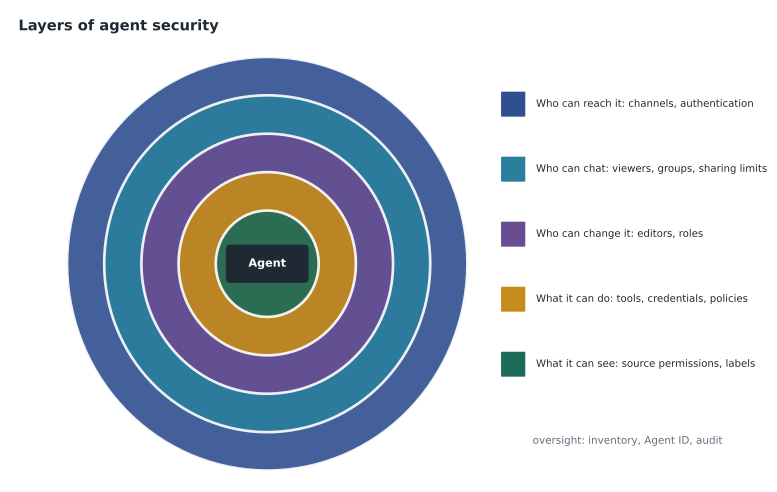
Who can change the agent
In Copilot Studio, people who work on an agent are given one of two roles on it. An Editor can edit, configure, share and publish the agent. A Viewer can only chat with it. Editor permissions can be granted only to individual users, never to security groups, which keeps the list of people who can change an agent short and named. Environment security roles sit underneath: to edit agents in an environment at all, a person needs an appropriate maker role there.
Quillfield applied two rules. In development, only the three makers who worked on agents had maker roles, and each agent listed its editors in its documentation. In test and production, nobody had editor rights on agents at all, because managed solutions arrived through the pipeline and nobody should edit them in place. That rule, from Lesson 5, is also a security control: if nobody can edit production, nobody can quietly change what production does.
Who can chat with the agent
Owners and editors share an agent with viewers, either as individuals or, where allowed, as security groups. Sharing with groups is easier to manage and audit than sharing with long lists of individuals; Quillfield shared the Policy Service Assistant with two groups, the contact centre and commercial lines, and nobody else. Publishing to a channel makes the agent available there, but sharing decides who is allowed to use it.
Administrators can constrain sharing through sharing limits, a Managed Environments control in the Power Platform admin center, applied to one environment or through environment group rules. The documented rules are worth knowing exactly.
| Rule | Effect when selected |
|---|---|
| Let people grant Editor permissions | Owners can share with individual editors |
| Let people grant Viewer permissions | Owners and editors can share with individual viewers and with security groups |
| Only share with individuals | Owners and editors can share only with individual viewers, not groups |
| Limit number of viewers | Caps how many viewers an agent can have when group sharing is off |
Three details matter in practice. Rules take effect when someone tries to share: existing access is not removed, but an agent that falls out of compliance can only be unshared until it complies again. Rules can take up to an hour to apply. And sharing limits apply only to agents that require authentication, which is one more reason to block unauthenticated chat with a data policy, as Quillfield did in Lesson 7. In development, Rasmus set a limit of 15 viewers with group sharing off, so a development agent could never quietly become a production service for half the company.
How users are authenticated
Authentication decides how the agent knows who the user is. Authenticate with Microsoft signs users in with their Microsoft Entra ID account automatically in Teams, Microsoft 365 Copilot and SharePoint, and suits internal agents. Manual authentication configures an identity provider, often with OAuth 2.0, and suits agents on websites or agents whose users are not in your tenant. No authentication allows anyone who can reach the channel to chat, and should be confined to genuinely public agents in environments without access to internal data.
Authentication also governs what the agent can do on the user's behalf. Knowledge sources that trim results by permission, such as SharePoint and Dataverse, and tools that use end-user credentials both depend on the agent knowing who the user is. That is why Quillfield's rule from the previous course was firm: read tools use end-user credentials, and maker-provided credentials need written justification and a narrow service identity. A tool that runs with the maker's credentials gives every user of the agent the maker's access through that tool.
Administrators can now enforce that rule technically. A setting for sharing agents with embedded maker credentials, in preview in November 2026, lets administrators block sharing or publishing of agents whose tools use maker credentials that other users cannot reuse. Connections that use end-user credentials are not affected. When the setting blocks something, the tool shows a sharing policy violation, and the maker can resolve it by switching to end-user credentials where the connector supports them.
Worked problem
Reviewing credentials before release
The Policy Service Assistant has five tools: GetPolicy, ListDrivers, the change request flow, the service-note writer and the Northmark appetite MCP server. Which credentials should each use, and what should the review record?
Show solution
- GetPolicy and ListDrivers read client data and BrokerDesk enforces access per user: end-user credentials.
- The change request flow creates records that must be attributed to the requesting representative: end-user credentials for the request, with approval by an underwriter.
- The service-note writer appends notes and nothing else; a dedicated service identity with write access only to notes is justified, documented and reviewed.
- The Northmark appetite server serves the same public appetite guidance to everyone; its OAuth connection is configured once for Quillfield, with read-only tools enabled.
- Record each decision, the reason and the owner, and recheck when tools change.
Answer: Four tools act as the user or serve non-sensitive shared data; one uses a narrow, documented service identity. Every exception to end-user credentials has a reason, an owner and a review date.
Channels and their secrets
Each channel adds its own exposure. Teams and Microsoft 365 Copilot inherit the tenant's identity and access controls. Website channels and Direct Line use secrets or tokens that let a web page or application talk to the agent; if a secret leaks, anyone holding it can reach the agent through that route. Direct Line and web channel security settings, which require secured access, are among the settings that do not travel in solutions, so they must be configured and checked in each environment. Data policies can block channels entirely, and Quillfield blocked every channel except Teams and Microsoft 365, plus Direct Line for one internal web page.
What the agent can see and do
An agent can see what its knowledge sources and tools return, and it can do what its tools allow. The strongest control is therefore least privilege in the systems behind it. Expose only the connector operations the agent needs, as Pascal did with BrokerDesk. Return lean responses without sensitive fields. Use dedicated service identities with narrow rights where a service identity is unavoidable. And fix oversharing in the sources themselves: an agent grounded in SharePoint will show users anything they already have access to, so a site shared with everyone in the company is a problem before any agent is involved.
Information protection still applies. Microsoft Purview's auditing records Copilot Studio activity for compliance teams, and Microsoft documents how Purview capabilities apply to Copilot Studio agents, including sensitivity labels on the content agents use. Check the current Purview documentation for which capabilities apply to your agent's channels and knowledge sources, because coverage has been expanding.
Agents as identities
Agents increasingly have identities of their own. Microsoft Entra Agent ID, generally available in 2026, gives agents identities in Microsoft Entra ID with owners, sponsors and managers, and lets administrators apply Conditional Access policies to agents, including blocking agent identities assessed as high risk, and manage their access through access packages. Agent registries in the Microsoft 365 admin center and Agent 365 bring agents from different sources into one inventory where administrators can see owners, block agents and act on agents without owners.
For a security review, that means asking: does this agent have an identity, who sponsors it, what access does that identity have, and does it appear in the organization's agent inventory with a named owner? An agent without an owner is an agent nobody will retire, update or answer for. Quillfield required every production agent to have a named business owner and a named technical owner in the inventory before its first production deployment.
Threats specific to agents
Agents face attacks that traditional apps do not. Prompt injection is the most important: instructions hidden in content the agent reads, such as an email, a web page or a document, that try to make it ignore its own instructions or take actions the user did not ask for. When the malicious text arrives through content rather than from the user, it is called cross-prompt injection. Autonomous agents that read incoming email, like Quillfield's certificates-mailbox agent, are especially exposed, because the attacker writes the input.
Copilot Studio includes protections against prompt injection and harmful content, and Microsoft has added options for near real-time protection in which an external threat-detection system, such as Microsoft Defender, can review an agent's planned actions and block them. Microsoft's security team also published guidance in February 2026 on the most common risks in Copilot Studio agents and how to detect and prevent them. Built-in protections reduce risk; design reduces it more. Treat all content the agent reads as untrusted. Keep tools that change data behind human approval. Give autonomous agents narrow identities that can do little harm if misled. Never let an agent send external email or move money without a person in the loop.
| Risk | Example | Control |
|---|---|---|
| Oversharing through knowledge | Agent quotes a document shared with everyone | Fix source permissions; restrict knowledge scope |
| Excessive tool rights | Maker credentials expose BrokerDesk to all users | End-user credentials; block embedded maker credentials |
| Prompt injection | An email tells the agent to forward all certificates | Untrusted-input instructions; narrow identity; human approval |
| Unapproved channels | Agent published to a public web page | Data policy channel blocks; Direct Line security |
| Orphaned agents | Maker leaves; agent keeps running | Named owners in the inventory; regular review |
| Unauthenticated access | Anyone with the link can chat | Block unauthenticated chat by policy |
The security review
Quillfield's review, adapted from Wendell's page of questions, became a standing checklist for every agent before its first production deployment and after any change that added a tool, knowledge source or channel. It asked who can edit, who can chat, how users authenticate, which credentials each tool uses, what each tool can read and write, which channels are used and how they are secured, how the agent handles untrusted content, whether it has an identity and owners in the inventory, and what is logged. The review took about an hour for the Policy Service Assistant and found two issues: an old test connection still listed in development, and a SharePoint library in the knowledge sources that included an archive folder with client correspondence. Both were fixed before release.
Oversight across the organization
Agent security is not only a property of each agent; it is also about seeing all of them. Administrators have several places to look. The Power Platform admin center's inventory lists agents across environments with their owners, connectors and usage, and lets administrators block or delete them. The agent management area of the Microsoft 365 admin center provides an agent registry, with cards for pending requests, agents at risk and agents without owners, and the ability to approve, block or reassign ownership. Agent 365, generally available since May 2026 and licensed per user or included in Microsoft 365 E7, extends that oversight to agents from other sources. Microsoft Entra ID shows agent identities and their access.
Quillfield's platform team checked these views monthly. The first check, in October, found four agents nobody had registered: two experiments in developer environments, which were fine, and two agents in the default environment created before the 2025 clean-up, one of them connected to a SharePoint library of client renewals. Its maker had left the company. Rasmus blocked it the same day, confirmed with the business that nobody used it, and retired it with the Lesson 10 checklist. Regular oversight finds what individual reviews cannot, because individual reviews only cover the agents someone knows about.
Security also depends on people knowing what the agent may and may not be used for. Quillfield's welcome message for the Policy Service Assistant told representatives that the agent showed only what BrokerDesk allowed them to see, that it could not cancel or change coverage, and that they should not paste client banking details into it. A one-page guide on the contact centre intranet repeated those points with examples. Clear guidance reduces the chance that users put sensitive data where it does not belong, which no technical control fully prevents.
Common mistakes
MistakeSharing an agent with large lists of individuals.
InsteadShare with security groups where allowed, and review membership.
MistakeUsing maker-provided credentials for convenience.
InsteadUse end-user credentials; justify and narrow any service identity.
MistakeRelying on the agent to keep data private.
InsteadApply least privilege in the source systems and fix oversharing there.
MistakeTreating content the agent reads as trusted.
InsteadAssume prompt injection; keep changes behind approval and identities narrow.
MistakeLeaving agents without named owners.
InsteadRecord business and technical owners in the agent inventory before release.
Summary and key terms
- Editors can change and share an agent and are granted only as individuals; viewers can only chat.
- Sharing limits in Managed Environments control editor and viewer sharing, group sharing and viewer counts, for agents that require authentication.
- Authentication and end-user credentials let source systems enforce each user's permissions; maker credentials need strong justification.
- Channels, especially Direct Line and web, need their security settings configured in each environment.
- Agents have identities, owners and an inventory, and face prompt injection; combine built-in protections with least-privilege design.
- Editor
- A person who can edit, configure, share and publish an agent.
- Viewer
- A person who can only chat with an agent.
- Sharing limits
- Managed Environments controls on how agents can be shared.
- End-user credentials
- Tool connections that act with the signed-in user's own permissions.
- Prompt injection
- Instructions hidden in input or content that try to subvert an agent.
- Microsoft Entra Agent ID
- Identities for agents in Microsoft Entra ID, with owners, sponsors and access controls.
Practice problems
Work each problem on paper first, then reveal the answer to check.
Why can Editor permissions not be granted to groups?
Show answer
Microsoft restricts editor sharing to individuals, keeping the people who can change an agent named and few.
What does the embedded maker credentials setting block?
Show answer
Sharing or publishing agents whose tools use maker credentials that other users cannot reuse.
Why are autonomous agents that read email especially exposed to prompt injection?
Show answer
The attacker can write the content the agent reads and acts on.
Lesson quiz · 5 questions
Score 60% or more to complete this lesson.
Create a free account to save your progress, take quizzes and earn a certificate.