
MSBA-242 · Lesson 4 of 12 · 20 min
Analytics and transcripts
▶ Video coming soon A video version of this lesson is on the way.
Testing tells you how an agent behaves on the questions you thought of. Analytics tells you how it behaves on the questions people actually ask. The HR Leave Assistant had been live since September 21, 2026, and by November it had handled several thousand conversations. Thomasina Gauthier-Nkemelu, the HR policy lead and the agent's business owner, wanted to know three things: what employees were asking, how often the agent resolved their question, and where it was failing. Everything she needed was on the agent's Monitor page and in its transcripts. This lesson explains what those show, how the numbers are calculated, who can see the data and how to turn it into improvements.
Where analytics lives
Each agent has a Monitor page, reached from the menu bar at the top of the agent in Copilot Studio. It brings together usage, outcomes, satisfaction, knowledge and tool use and AI-generated insights for that agent. For classic topics, a topic-level view is available from the topic list. Three properties of the data shape how you read it.
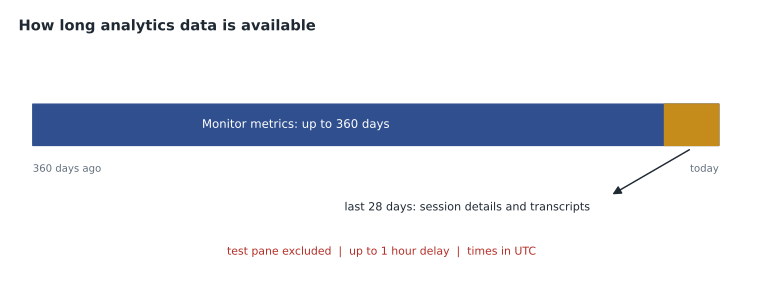
First, test pane activity is excluded. Only conversations in published channels count, which is what you want: the numbers describe real use. Second, the data has time limits. Monitor data is kept for up to 360 days, but session details and transcripts are available in Copilot Studio only for the last 28 days. All timestamps are in UTC, which matters for an organization in Saskatoon when someone asks why Monday morning's peak appears at 3 p.m. Third, the data is not instant. Data can take up to an hour after a session ends to appear, general metrics refresh up to every two hours, and AI-based metrics refresh daily.
Conversations and sessions
Analytics counts sessions, not messages, and understanding how sessions are formed prevents most misreadings. A conversation is the exchange between a user and the agent in a channel; it times out after 30 minutes of inactivity (or three minutes after an end-of-conversation event on the telephony channel). A conversation can contain one or more analytics sessions. For agents on the standard harness, each session is associated with the last custom topic the user triggered, or with the last system topic if no custom topic ran. That association is what lets topic-level analytics show how each topic performs.
Each session ends with an outcome. The three named in Microsoft's documentation are resolved, escalated and abandoned. A resolved session ended with the user's need met, typically confirmed by the user or by the end of a topic that marks resolution. An escalated session ended with a hand-off to a person or another channel. An abandoned session ended without resolution or escalation: the user stopped responding or left. A high share of escalated or abandoned sessions points at topics or areas that need work. Some views also separate sessions where the user never meaningfully engaged, which is worth checking before drawing conclusions from small numbers.
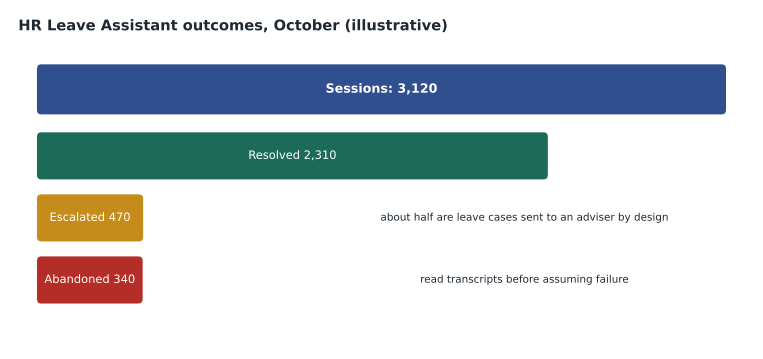
Outcomes need interpretation. At Quillfield, a large share of the HR agent's escalations were correct: some leave requests must go to an HR adviser by design, so an escalation there was the agent doing its job. Treating every escalation as failure would have pushed the team to make the agent answer things it should not. Equally, some abandoned sessions were successes: an employee asked a simple question, got the answer and closed Teams without saying thank you. The outcome category is a starting point for investigation, not a verdict.
The main metrics
The Monitor page groups metrics into two families. General metrics, refreshed up to every two hours, include sessions, user questions, knowledge source use, tool use, connected agents, reactions, session outcomes and estimated savings, together with an AI-generated summary. AI metrics, refreshed daily, include a measure of response quality, sentiment analysis (in preview), classification of questions into themes, and custom metrics you define. Themes themselves are regenerated weekly, with new questions classified daily.
| Metric | Question it answers | Watch for |
|---|---|---|
| Sessions and user questions | How much is the agent used? | Sudden drops can mean a channel or sign-in problem |
| Session outcomes | How often is the need met, handed off or dropped? | Rising abandonment in one topic or theme |
| Knowledge source use | Which sources answer questions? | An old or duplicate source answering more than expected |
| Tool use | Which tools run, how often, with what success? | Tool errors after an API or connector change |
| Reactions and satisfaction | Do users find answers helpful? | Clusters of negative reactions on one theme |
| Themes | What are people asking about? | New themes the agent was not designed for |
| Response quality | How good are answers, judged by AI? | Trends rather than single values |
Satisfaction and reactions
Copilot Studio measures user opinion in two ways. The customer satisfaction score comes from survey responses at the end of sessions associated with a topic, and a trend chart shows how it moves. Reactions are the thumbs-up and thumbs-down users give individual responses, with optional comments. A customer comments summary, in preview, groups those comments into themes. Survey responses are sparse, because most users skip surveys, and they skew towards people with strong feelings. Read satisfaction alongside outcomes and transcripts, never alone. The HR agent's satisfaction score of 4.3 out of 5 was encouraging, but it rested on about a tenth of sessions.
Themes
Themes group real user questions by subject using AI. They are the quickest way to see what people actually need. In October the HR agent's largest themes were vacation balances, parental leave eligibility and the leave application form. A smaller theme, "leave during probation", had a high abandonment rate. Reading its transcripts showed that the policy page said nothing clear about probation, so the agent hedged and employees gave up. The fix was a content change on the HR SharePoint site, not a change to the agent. Themes also feed testing: from the themes view you can create a theme-based test set, in preview, so that the questions people really ask become part of evaluation.
Autonomous agents
Agents that run from event triggers have runs as well as conversations. A run-based session starts when the agent receives a trigger payload and covers the actions it takes in response; if a trigger fails before a payload arrives, no session is recorded. When an agent has both kinds, the Monitor page offers a hybrid view where you can choose conversations, runs or both. The certificates-mailbox agent that Quillfield built in the previous course was measured this way: runs per day, actions per run, and the share of drafts brokers approved, corrected or rejected, which the team tracked in a separate report.
Transcripts
Metrics show patterns; transcripts show what actually happened. A transcript is the record of a conversation: what the user said, what the agent said and, depending on the view, which topics, tools and knowledge were involved. In Copilot Studio you can view session details and download transcripts for periods within the last 28 days. Transcripts are also stored in Dataverse in the agent's environment, where retention is governed separately from the 28-day window by the environment's own settings. If you need transcripts for longer, for example for quality review or regulatory reasons, plan where they will be kept, who can read them and when they will be deleted, before the agent goes live.
Transcripts contain whatever users typed, which can include personal information. Access is therefore controlled more tightly than access to metrics. To view transcript information, a person needs the Bot Transcript Viewer security role in the environment, in addition to the Analytics Viewer role that an agent owner can grant for the Monitor page. Owners can grant Analytics Viewer only to individuals, not to groups, which keeps the list deliberate.
Worked problem
Deciding who sees what
Thomasina wants her two senior HR advisers to see the HR agent's analytics. One of them also needs to read transcripts to improve answers. Wendell wants to know how access is controlled. What roles should each person get?
Show solution
- Give both advisers the Analytics Viewer role on the agent, as individuals, so they can open the Monitor page.
- Ask the environment administrator to assign the Bot Transcript Viewer security role only to the adviser who will read transcripts.
- Record the reason for transcript access and review it each quarter.
- Agree that transcripts are read in Copilot Studio and not downloaded to personal storage; downloads go to the HR team's restricted site.
- Tell employees, in the agent's welcome message and the HR intranet, that conversations are recorded to improve the service.
Answer: Metrics for both, transcripts for one, with the transcript role granted by the environment administrator, a documented reason and a review. Telling users that conversations are recorded is part of using transcripts fairly.
Reading transcripts well
Reading transcripts at random is slow and tends to find whatever you were already looking for. Read with a purpose. Start from a signal: a theme with high abandonment, a tool with errors, a cluster of negative reactions. Download or open the transcripts for that slice and read 10 to 20 of them. For each, note what the user needed, what the agent did, where it went wrong if it did, and what kind of fix would help: content, instructions, a tool, a topic or nothing. The categories from the issue log in Lesson 1 work here too.
Look for the user's words, not just the agent's. Users rephrase when the agent misunderstands, and those rephrasings show exactly what the agent is missing. In the Policy Service Assistant's first two weeks, representatives typed "endorsement" about 60 times; BrokerDesk and the agent called the same thing a "change request". Adding the synonym to the tool and agent descriptions cut rephrasing on that task sharply.
Beyond the Monitor page
Some needs go beyond what the Monitor page offers. For engineering-level telemetry, such as custom events, timings and errors across many agents, Copilot Studio can send telemetry to Azure Application Insights, where it can be queried and alerted on. Administrators can allow or block this with the "Application Insights in Copilot Studio" connector in data policies, and the Application Insights settings are among the things that do not travel in solutions, so they must be configured in each environment. For organization-wide oversight, activity in Copilot Studio is also recorded for auditing in Microsoft Purview, where compliance teams can search it alongside other Microsoft 365 activity. And for cost, the Power Platform admin center has its own reports, covered in Lesson 8.
Quillfield used Application Insights for the Policy Service Assistant only, because it called four external systems and Pascal Wojtyniak's integration team wanted timings and error rates for each call. The HR agent, simpler and lower-risk, used the Monitor page alone. Matching the depth of monitoring to the risk and complexity of the agent is a reasonable rule.
From analytics to action
Analytics is only worth collecting if someone acts on it. Quillfield set a monthly agent review for each production agent: the business owner, the maker and, every other month, the compliance officer. Each review looked at the same things in the same order: usage and outcomes against the previous month; the top themes and any new ones; the three themes with the worst outcomes, with transcript findings; tool errors; satisfaction and reactions; and cost. Each review ended with no more than three actions, each with an owner and a date. In November the HR agent's three actions were the probation content fix, a new question in the core test set for parental leave eligibility, and a check of why sessions from the Regina office were unusually short.
| Signal | First thing to check | Typical fix |
|---|---|---|
| Theme with high abandonment | Transcripts in that theme | Content on the source page; clearer instructions |
| Tool errors rising | Connector and API status; recent changes | Connector update; error descriptions |
| Old document answering often | Knowledge source contents | Remove or update the document |
| Many rephrasings | Users' own words | Synonyms in descriptions; new examples |
| Satisfaction falling | Reactions with comments | Depends on the comments; often length or accuracy |
Savings and value
The Monitor page includes an estimate of savings, based on values you configure for what a resolved session or an automated action is worth, such as minutes of staff time. The estimate is only as good as those values, so agree them with the business owner and record where they came from. Thomasina used the HR team's own figure: an adviser spent about six minutes on a typical leave balance enquiry by email. Applied naively to all 2,310 resolved sessions in October, that value suggested more than 200 hours saved, far more than the roughly 8 adviser hours the team had actually measured. The difference was that most resolved questions would never have reached an adviser: employees would have found the answer themselves. Thomasina set the savings value to apply only to the leave application and eligibility topics, about 80 sessions a month, and the estimate then matched the measured figure.
Use savings to compare an agent with itself over time and to support decisions, not as a precise financial figure. The number assumes every counted session would otherwise have taken the full time, which is why choosing which sessions count matters as much as the value itself. Present it with that caveat, alongside outcomes and cost, and it becomes a useful part of the monthly review rather than a figure that invites argument.
Common mistakes
MistakeTreating every escalation as failure.
InsteadSeparate designed hand-offs from escalations caused by gaps.
MistakeExpecting test pane conversations in analytics.
InsteadAnalytics counts published channels only; test pane activity is excluded.
MistakeRelying on satisfaction scores alone.
InsteadRead them with outcomes, reactions and transcripts; survey responses are sparse.
MistakeGranting transcript access broadly.
InsteadGive the Bot Transcript Viewer role only to those who need it, with a recorded reason.
MistakeReviewing analytics without deciding actions.
InsteadEnd each review with a few owned actions and check them next time.
Summary and key terms
- The Monitor page shows usage, outcomes, satisfaction, knowledge and tool use, themes and AI metrics for published channels only.
- Monitor data is kept up to 360 days; session details and transcripts are available in Copilot Studio for the last 28 days.
- Sessions end as resolved, escalated or abandoned; interpret outcomes with transcripts before acting.
- Viewing transcripts needs the Bot Transcript Viewer role in addition to Analytics Viewer.
- A regular agent review turns analytics into a few owned actions each month.
- Monitor page
- The Copilot Studio page that shows an agent's analytics.
- Analytics session
- A unit of conversation that analytics counts and assigns an outcome to.
- Session outcome
- How a session ended: resolved, escalated or abandoned.
- Theme
- An AI-generated grouping of real user questions by subject.
- Transcript
- The record of a conversation between a user and an agent.
- Bot Transcript Viewer
- The security role needed to view transcript information.
Practice problems
Work each problem on paper first, then reveal the answer to check.
Why might an escalated session be a success?
Show answer
Some requests must go to a person by design; the hand-off is the correct outcome.
How long are transcripts available in Copilot Studio?
Show answer
For periods within the last 28 days; Dataverse retention is governed separately.
What did themes reveal about the HR agent?
Show answer
A "leave during probation" theme with high abandonment, caused by unclear policy content.
Lesson quiz · 5 questions
Score 60% or more to complete this lesson.
Create a free account to save your progress, take quizzes and earn a certificate.