
MSBA-242 · Lesson 11 of 12 · 19 min
Troubleshooting common failures
▶ Video coming soon A video version of this lesson is on the way.
At 9:40 on a Monday in November, Cormac posted in the contact centre channel: "Assistant is broken." Within ten minutes there were six replies, each describing something different. One representative got "Something went wrong" on every question. Another said policy lookups worked but change requests did not. A third said it was fine for her. That is what real agent incidents look like: vague first reports, several symptoms, and a strong temptation to start changing things. This lesson sets out a method for troubleshooting agents and works through the failures that come up most often, so that the team fixes the actual cause instead of the most visible symptom.
A method before a fix
Good troubleshooting follows the same sequence every time, because the sequence is what stops you guessing.
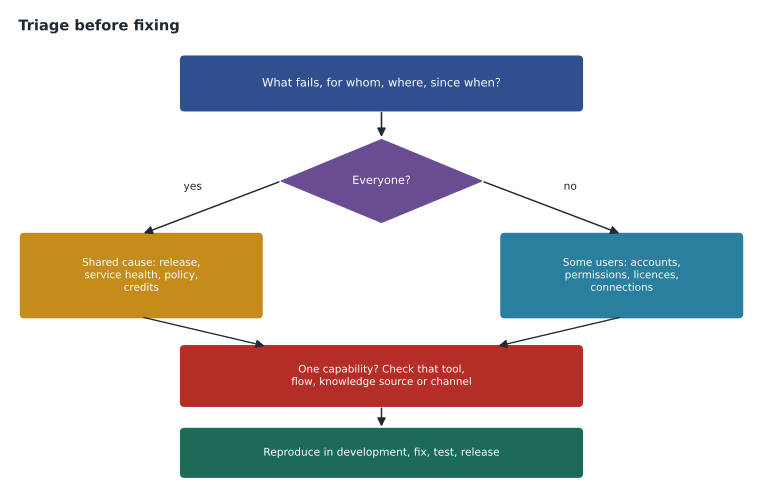
Pin down the symptom. Ask for the exact question, the exact response, the channel, the time and the user. "Assistant is broken" is not testable; "Asking to add a driver to AU483920 in Teams at 9:35 returned 'Something went wrong'" is.
Scope it. Does it affect everyone or some people? The whole agent or one capability? One channel or all? Since when? The answers narrow the cause dramatically. A failure for everyone since 9:30 on every capability points at something shared: the platform, a release, a data policy, credits. A failure for some people on one capability points at permissions or connections.
Check what changed. Look at the release history (was there a deployment this morning?), recent data policy changes, connected system changes, the Microsoft 365 and Power Platform service health pages for incidents, and the capacity pages for environments out of credits. Most incidents follow a change.
Reproduce, then fix in development. Reproduce the failure, ideally in development with a test account that matches the affected users. Read the activity map. Fix it there, test the fix, and release it through the pipeline, or roll back if the cause is the last release. Then record it in the issue log and add a test case so it cannot quietly return.
At 9:52 Rasmus had the scope: "Something went wrong" affected everyone, but only for questions that started a change request; lookups worked; the representative who said "fine for her" had only done lookups. A flow problem, then, not an agent problem. The flow's run history showed every run since 9:28 failing at the Outlook step. The connection used by the flow's Outlook connection reference had been created by a service account whose password had been rotated that morning by a scheduled security job. Re-authenticating the connection fixed it at 10:05. The follow-up action was to move that connection to a service principal so password rotation could not break it again.
Common failures and their causes
Most agent incidents fall into a small number of patterns.
| Symptom | Likely causes | Where to look |
|---|---|---|
| "Something went wrong" or an error message for everyone | Failed tool or flow; broken connection; platform incident; release error | Activity map; flow run history; service health; release history |
| Works for some users, fails for others | Permissions in the source; licence differences; per-user connections not consented | Compare accounts; test as an affected user |
| Knowledge answers missing or "I don't know" | User lacks access to the content; content not indexed yet; unsupported file or size; source removed | Knowledge source settings; test as the user; content location |
| Wrong tool or topic chosen | Overlapping or vague descriptions; new tool added; instruction change | Activity map; recent releases; tool descriptions |
| Repeated sign-in prompts | Authentication or single sign-on misconfiguration; consent not granted | Authentication settings; app registration; channel |
| Cannot publish | Data policy violation | Error banner Details; Channels page download |
| Flows stop running | No credits left in the environment; flow turned off; connection broken | Capacity pages; flow status; run history |
| Users see old behaviour | Not published after deployment; client cache | Published version; post-deployment checklist |
| Slow answers | Many tool calls; slow external system or MCP server; very large knowledge retrieval | Activity map timings; Application Insights |
Tool and flow failures
When a tool fails, the activity map in the test pane shows the call and its error, and for agent flows the run history shows each run, which step failed and the error returned. Connector errors carry HTTP status codes that point at the cause: 401 or 403 usually mean authentication or permission, 404 a missing record or a changed address, 429 throttling, and 500-range errors a problem in the remote system. Agents should be designed to handle these gracefully, as in Lesson 1, but the cause still needs fixing at the source.
Connections are the most common single cause of tool failures in production. They expire, their underlying accounts change, consents are withdrawn, or they were created by a person who has left. Connection references in solutions make it possible to repoint a tool at a new connection without changing the agent, and service principals or managed service accounts make connections far less fragile than personal ones.
Knowledge failures
When an agent says it cannot find something that exists, ask first whether the user can see it. Knowledge sources that trim by permission return nothing the user cannot open, so a document shared only with HR will never appear in an answer to a representative. If the user can open it, check whether it is in a supported format and size, whether it has been indexed since it was added or changed, and whether it is actually inside the configured source. An agent configured for a SharePoint site will not find a document stored in a personal OneDrive and linked from that site.
The opposite failure, an answer that uses the wrong or outdated document, usually means duplicate or stale content. The HR agent once quoted a 2024 version of the vacation policy that someone had saved in an archive folder inside the HR site. Knowledge source use on the Monitor page showed which documents were answering questions; the archive folder was moved out of the source.
Routing failures
If the agent chooses the wrong tool or topic, read the activity map for the failing question, then look at what changed. Routing problems almost always follow a change: a new tool whose description overlaps an old one, an instruction edit, a new knowledge source the orchestrator now prefers, or a model change. Compare the descriptions of the tools involved and make them distinct, then rerun the core test set's tool use method, which exists to catch exactly this.
Authentication failures
Repeated sign-in prompts, or tools that ask for consent every time, point at authentication configuration rather than the agent's logic. For agents using single sign-on in Teams or a website, the app registration and the agent's authentication settings must agree, and the channel must be configured for it. Manual authentication settings are among the settings that do not travel in solutions, so an agent that signs in correctly in test and incorrectly in production often has a setting configured in one and not the other. The post-deployment checklist exists to catch that.
Publishing and policy failures
If the Publish button is unavailable or an error banner appears, a data policy is the most likely reason. The banner's Details button, and the download option on the Channels page, list each violation. The fix is either to change the agent, for example to remove a blocked connector or channel, or to ask for a policy exception through the process in Lesson 7. Policy changes made by administrators can also break agents that were previously fine, so check the policy change log when an agent that published last week cannot publish today.
Cost-related failures
If flows stop and the agent still answers simple questions, check the environment's Copilot Credit status. When an environment runs out of credits with no overage option, new agent flow runs are blocked while the agent continues with interactions that do not need flows. A hard stop on an agent turns it off entirely when its limit is reached. Either can look like a technical failure to users. The capacity pages and Manage Agents page in the Power Platform admin center show immediately whether this is the cause.
Worked problem
Diagnosing "it only fails for the Regina team"
Representatives in the Regina office report that the Policy Service Assistant cannot find any commercial policies. Saskatoon representatives can. What is the likely cause, and how do you confirm it?
Show solution
- Scope: one office, one kind of record, every channel. That points at permissions, not the agent.
- Check GetPolicy calls in the activity map for an affected user's question: the tool returns 403.
- Compare a Regina representative's BrokerDesk access with a Saskatoon representative's: Regina staff lack the commercial lines role.
- Confirm with the business: Regina representatives were meant to handle commercial calls from November.
- Fix in BrokerDesk, not in the agent: grant the role, then retest as a Regina test account.
Answer: A permissions gap in BrokerDesk, which the agent correctly enforced. The agent was working as designed; the access model had not caught up with a business change. The only agent change was to make the access message name the team that grants commercial access.
Evidence for support
Some problems need Microsoft support. Before opening a request, gather evidence: the environment, the agent, the exact question and response, the time in UTC, the channel, the user's account type, and the conversation identifier, which appears in transcripts and session details. The test pane can also save a snapshot of a conversation for diagnosis. Support requests for Power Platform and Copilot Studio are opened from the Power Platform admin center. A request with a reproducible example and identifiers is resolved far faster than "the agent is broken".
After the incident
Every incident should leave the agent stronger. Quillfield's practice after any production incident that affected more than a handful of users was a short post-incident review, written within two working days: what happened, the timeline, the cause, how it was found, what fixed it and what would prevent it or detect it sooner. The Outlook connection incident produced three actions: move the connection to a service principal, add a monitoring flow that tested each production connection every hour and alerted the platform team on failure, and add "rotation affects connections" to the security team's change checklist. None of them changed the agent; all of them made it more reliable.
| Incident | Cause | Prevention added |
|---|---|---|
| Change requests failing for everyone | Service account password rotated | Service principal connection; hourly connection check |
| HR agent quoting an old policy | Archive folder inside knowledge source | Knowledge scope review each quarter |
| Driver details asked twice | Release 1.6.0 instruction change | Rolled back; conversation test set for driver changes |
| Regina team cannot see commercial policies | Missing BrokerDesk role | Access request step in team onboarding |
Monitoring that finds problems first
The best incident is the one users never notice. Quillfield added three kinds of proactive monitoring after its first incidents. A scheduled flow in production ran five smoke-test questions against the Policy Service Assistant every hour during business hours, as a service account with a representative's permissions, and alerted the platform team if any failed or took more than 20 seconds. A second flow tested each production connection hourly. And Application Insights alerts notified Pascal's team if error rates on BrokerDesk calls rose above a set level.
Proactive checks have a cost, because smoke tests in production are real conversations that consume credits and appear in analytics. Keep them few and simple, run them as a dedicated account so their sessions can be filtered out of reviews, and agree with the business owner how often they run. Quillfield's hourly checks used about 40 credits a day, which everyone agreed was a small price for finding the Outlook connection failure at 9:30 rather than when the first representative noticed.
Monitoring also needs someone to respond. Alerts went to a Teams channel watched by the platform team during business hours, with a named person on duty each day. An alert that nobody reads is worse than no alert, because it creates a record that the problem was known.
Communication during an incident matters as much as the fix. Within 15 minutes of Cormac's message, Rasmus posted in the contact centre channel that the team knew change requests were failing, that lookups still worked, and that representatives should log change requests in BrokerDesk directly until further notice. A second message at 10:07 said the problem was fixed. Representatives who know what is happening, and what to do meanwhile, are far more patient with a failing tool than those left guessing.
Common mistakes
MistakeChanging the agent before scoping the failure.
InsteadEstablish who, what, where and since when; most incidents follow a change.
MistakeAssuming "not found" means the content is missing.
InsteadCheck whether the affected user can open the content first.
MistakeFixing production directly during an incident.
InsteadReproduce and fix in development, then release or roll back through the pipeline.
MistakeRelying on personal accounts for production connections.
InsteadUse service principals or managed service accounts, with connection checks.
MistakeClosing an incident without prevention.
InsteadWrite a short post-incident review with actions that prevent or detect recurrence.
Summary and key terms
- Pin down the symptom, scope it by users, capability, channel and time, check what changed, then reproduce and fix in development.
- Most incidents follow a change: a release, a data policy, a connection, a connected system or the platform.
- Tool and flow failures show in the activity map and run history; status codes point at causes.
- Knowledge failures are usually permissions, indexing, location or stale content; routing failures follow description or instruction changes.
- Credit exhaustion and data policies can look like technical failures; check capacity and policy status early.
- Triage
- The first stage of troubleshooting: scoping a failure before investigating causes.
- Run history
- The record of an agent flow's runs, including failed steps and errors.
- Service health
- The admin center pages that report Microsoft service incidents.
- Conversation identifier
- The unique identifier of a conversation, used when investigating or contacting support.
- Post-incident review
- A short written account of an incident's cause, fix and prevention.
- Throttling
- A service limiting requests, often signalled by HTTP status 429.
Practice problems
Work each problem on paper first, then reveal the answer to check.
What did scoping reveal in the Monday incident?
Show answer
Only change requests failed, so the cause was in the flow, which led to the broken Outlook connection.
A representative cannot get an answer from a document you can see. What do you check first?
Show answer
Whether the representative has access to that document in its source.
Why add a test case after fixing an incident?
Show answer
So the same failure is caught automatically if it ever returns.
Lesson quiz · 5 questions
Score 60% or more to complete this lesson.
Create a free account to save your progress, take quizzes and earn a certificate.