
MSBA-242 · Lesson 7 of 12 · 19 min
Data loss prevention for agents
▶ Video coming soon A video version of this lesson is on the way.
An agent is a new way for data to move. It reads from knowledge sources, calls tools that reach other systems, and writes its answers into whatever channel a user is in. Every one of those paths is a place where data could go somewhere it should not: client details pasted into a public website search, a flow that copies a policy record to a personal mailbox, an agent published on a channel nobody approved. In Power Platform the first line of defence against those paths is the data policy, often still called a DLP policy, for data loss prevention. Rasmus was responsible for Quillfield's data policies, and Wendell for deciding what they should allow. This lesson explains how data policies apply to Copilot Studio agents, what they can control, what makers see when they hit one, and how to design policies that protect data without stopping useful work.
What a data policy is
A data policy is a set of rules, created by administrators in the Power Platform admin center, that classifies connectors into groups and decides which connectors can be used together. Policies apply to the environments in their scope: all environments including future ones, selected environments, or all environments except some. A tenant-scoped policy applies to every agent in every environment. Creating policies requires a tenant administrator or the Environment Admin role, and when several policies apply to the same environment, the most restrictive combination wins.
Connectors are placed in one of three groups. Business connectors can be used together. Non-business connectors can be used together. Blocked connectors cannot be used at all. The essential rule is that a single app, flow or agent cannot combine connectors from the Business group with connectors from the Non-business group, because data cannot be shared between groups. If SharePoint and Dataverse are Business and a social media connector is Non-business, an agent cannot read client data from Dataverse and post it to social media.
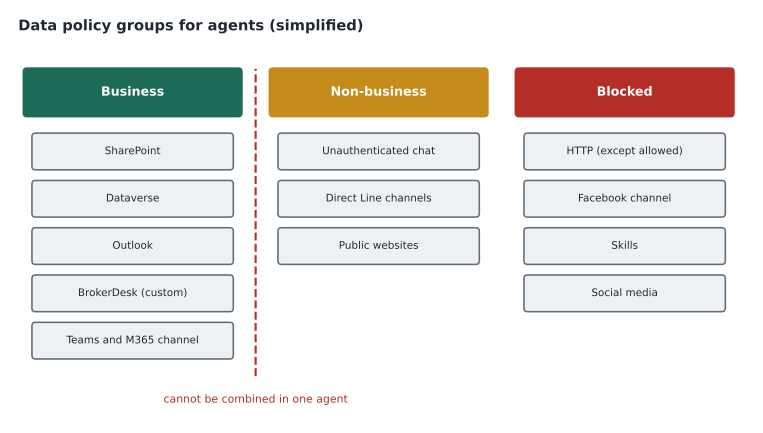
Data policy enforcement for Copilot Studio agents has been in effect for all tenants since early 2025, as announced in Message center post MC973179. An earlier ability to exempt individual agents from enforcement is no longer supported, so agents that were once exempt are now subject to the same rules as everything else. Enforcement is real time: when a policy changes, makers and users feel the effect without republishing.
What policies can control in Copilot Studio
For agents, data policies cover far more than the connectors used as tools. Copilot Studio exposes several of its own capabilities as connectors so that administrators can classify them.
| Area | Connector to classify | What blocking it does |
|---|---|---|
| Authentication | Chat without Microsoft Entra ID authentication in Copilot Studio | Requires agents to authenticate users |
| Knowledge | SharePoint; public websites (with endpoint filtering) | Blocks those knowledge sources, or only certain sites |
| Channels | Direct Line channels; Teams and Microsoft 365 channel; Facebook; Omnichannel; SharePoint channel; WhatsApp | Stops agents being published to those channels |
| Telemetry | Application Insights in Copilot Studio | Stops agents sending telemetry to Application Insights |
| Requests | HTTP (with endpoint filtering) | Blocks direct HTTP calls, or all but allowed endpoints |
| Tools | Prebuilt and custom Power Platform connectors | Blocks those connectors as tools, including MCP tools that rely on them |
| Skills | Skills with Copilot Studio | Blocks Azure Bot Service skills |
| Events and evaluations | Microsoft Copilot Studio | Blocks event triggers and automated evaluations run with authenticated accounts |
Two details catch people out. Connectors added after 2019, which includes *Chat without Microsoft Entra ID authentication in Copilot Studio* and *Direct Line channels in Copilot Studio*, usually land in the Non-business group by default, and many organizations block that group automatically. An agent built in a sandbox with no policy may therefore stop working when it moves to an environment with a stricter one. And Direct Line is allowed by default for channels, so an administrator who wants to restrict channels must block it deliberately if that is the intent.
Endpoint filtering
Some connectors are too useful to block entirely and too broad to allow without limits. For HTTP requests and for SharePoint and public websites used as knowledge, administrators can use endpoint filtering: allowing or denying specific endpoints or patterns instead of the whole connector. This is configured per connector in the policy's connector settings. Quillfield allowed public website knowledge only for the Northmark appetite guide's public site and two government sites with regulations, and denied every other site. HTTP was blocked except for the BrokerDesk API host, which some legacy flows still called directly.
Worked problem
Requiring authentication for every agent
Wendell wants a guarantee that no Quillfield agent can be used by someone who has not signed in, while allowing a public-facing recruitment agent in a separate environment. How should the policies be set?
Show solution
- In the policy for the three QIB Agents environments, place Chat without Microsoft Entra ID authentication in Copilot Studio in the Blocked group.
- Confirm the effect: in those environments the No authentication option is unavailable to makers, and agents that use it cannot be published.
- Create a separate environment for the recruitment agent with its own policy that allows unauthenticated chat but blocks every connector that reaches client data.
- Scope the strict policy to all environments except the recruitment environment, so new environments get the strict rule automatically.
- Record the exception, its owner and its review date.
Answer: Block unauthenticated chat everywhere by default and make exceptions by environment, not by agent. The public agent lives in a place where it cannot reach client data at all.
What makers and users see
When a policy blocks something, Copilot Studio shows it rather than failing silently. Blocked capabilities appear disabled in the maker experience: a blocked connector cannot be selected when adding a tool, a restricted channel cannot be chosen when publishing, and hovering over the item explains why. If unauthenticated chat is blocked, "No authentication" and some manual authentication options are unavailable. If skills are blocked, adding one reports an error and suggests contacting an administrator. If event triggers are blocked, an error appears in the triggers section of the agent's overview page.
If an existing agent violates a policy, for example because the policy changed after it was built, the Publish button becomes unavailable and an error banner appears with a Details button. On the Channels page the maker can expand the error and download a file listing each violation on its own row. Users of an already-published agent can also see error messages when they hit a blocked capability. That is why policy changes need communication, covered later in this lesson.
Administrators can make those messages more helpful. Using the PowerShell cmdlets for data policy error settings, they can add an administrator contact email and a "learn more" link to the error messages makers see. These settings apply to all Power Platform apps in the tenant. Quillfield pointed the link at a short intranet page explaining the policies and how to request an exception.
# Add contact details and a help link to data policy error messages (illustrative)
$errorSettings = @{
    ErrorMessageDetails = @{
        enabled = $true
        url = "https://intranet.quillfield.example/power-platform/data-policies"
    }
    ContactDetails = @{
        enabled = $true
        email = "power-platform-admins@quillfield.example"
    }
}
Set-PowerAppDlpErrorSettings -TenantId $tenantId -ErrorSettings $errorSettings
Designing policies for agents
A good set of policies for agents follows the environment strategy. Quillfield used three layers.
A tenant-wide baseline. Applied to all environments, it blocked connectors nobody should use with company data, blocked unauthenticated chat, and kept the default environment limited to Microsoft 365 connectors. New environments inherited it automatically.
An agent environments policy. Applied to the three QIB Agents environments, it placed the connectors the agents need in the Business group: SharePoint, Dataverse, Outlook, Teams, the BrokerDesk custom connector and the Teams and Microsoft 365 channel. It allowed public website knowledge only for listed sites and blocked the Facebook and WhatsApp channels, skills and HTTP except for listed endpoints.
Environment-specific adjustments. In production only, the *Microsoft Copilot Studio* connector was blocked, which stopped automated evaluations there, because nobody needed to run them in production and they would have run with authenticated accounts against live data. The certificates-mailbox agent, which uses an event trigger, lived in a separate production environment where that connector was allowed. Lesson 8 returns to that agent.
| Decision | Quillfield's choice | Reason |
|---|---|---|
| Unauthenticated chat | Blocked in all agent environments | Every user must be known |
| Public website knowledge | Allowed only for listed sites | Approved reference content only |
| HTTP requests | Blocked except the BrokerDesk API host | All other integrations use connectors |
| Channels | Teams and Microsoft 365 only; Direct Line for one internal web page | Internal agents only |
| Evaluations | Allowed in development and test; blocked in production | Testing happens before production |
| Custom connectors | Business group after review | Each new one reviewed by integration and compliance |
Custom connectors and MCP
Custom connectors appear in data policies like any other connector, and they can be classified once they exist in an environment. Quillfield's rule was that a new custom connector started in the Blocked group in production until Pascal's team and Wendell had reviewed it, then moved to Business. Policies can also block specific actions of a connector, so a connector with both read and delete operations can be allowed with its delete actions blocked.
Model Context Protocol servers add a subtlety. Tools from a connected MCP server that rely on Power Platform connectors are governed through those connectors, so blocking a connector also blocks MCP tools that depend on it. When Northmark Mutual's appetite server was connected through a custom connector, classifying that connector controlled the server's tools as well. Review MCP connections with the same care as any other connector, because a single server can expose many tools.
Finding affected agents
Before changing a policy, find out what it will affect. Microsoft suggests using the Copilot Studio page of the Center of Excellence Starter Kit Power BI dashboard to see agents and their connectors, noting that classic chatbots do not appear there and can be listed with a Power Automate flow instead. Microsoft has also said the CoE Starter Kit is no longer actively maintained, with its core capabilities now in the Power Platform admin center, whose inventory lists agents across environments. When a policy has already broken an agent, the Details and Download options on the agent show every violation.
Rasmus's practice was to change a policy first in development, wait a day, check which agents showed violations, and only then apply the change to test and production, with a message to the affected makers a week in advance. Policy changes that break a production agent without warning are the quickest way to lose the trust of the people building agents.
Data policies are not the whole answer
Data policies control which connectors and capabilities can be used together. They do not decide what data an agent may see within an allowed connector, who can chat with an agent, or whether an answer is appropriate. Those are handled by permissions in the source systems, authentication and sharing (Lesson 9), sensitivity labels and Microsoft Purview, and the agent's own design and testing. An agent can comply with every data policy and still show a user a document they should not see, if that user has been given access to it in SharePoint. Data policies are necessary, not sufficient.
Exceptions and change control
Policies need a way to say yes as well as no. Makers will sometimes need a connector or channel the policy blocks, and a clear exception process stops them working around the rules. Quillfield's process was a short request form: the agent, the connector or capability, the business reason, the data involved, how long it was needed and who would own it. Wendell reviewed the data and compliance questions, Rasmus the platform questions, and an approved exception was implemented by environment, never by weakening the tenant-wide policy.
Every exception had an expiry date. Two months before it, the owner was asked whether it was still needed. Of the first six exceptions granted in 2026, two were withdrawn at review because the agents that needed them had been retired or redesigned. Policies themselves were changed the same way as agents: tested first in development, recorded with the reason and the date, and announced to makers in advance. The change history became useful during troubleshooting, when the first question about a newly broken agent was often "did a policy change?"
It is also worth checking policies from the user's side now and then. Rasmus kept a short list of things that should be impossible in production, such as publishing an agent without authentication, adding a public website that was not on the allowed list, or calling an HTTP endpoint other than BrokerDesk, and once a quarter he tried each one in a test copy of the production policy. A policy that silently allows something it was meant to block is only discovered by trying.
Common mistakes
MistakeBuilding in an environment with no policy, then moving to one with a strict policy.
InsteadApply the same policy layers to development, test and production so problems appear early.
MistakeAssuming Direct Line is restricted unless allowed.
InsteadDirect Line is allowed by default; block it explicitly if channels must be limited.
MistakeBlocking HTTP or public websites completely when only a few endpoints are needed.
InsteadUse endpoint filtering to allow specific endpoints.
MistakeChanging a production policy without checking which agents it affects.
InsteadTest the change in development, list violations, and warn makers in advance.
MistakeTreating data policies as complete data protection.
InsteadCombine them with source permissions, authentication, sharing controls and Purview.
Summary and key terms
- Data policies classify connectors as Business, Non-business or Blocked; an agent cannot combine Business and Non-business connectors.
- Enforcement for agents has applied to all tenants since early 2025, and agent exemptions are no longer supported.
- Policies can control unauthenticated chat, knowledge sources, channels, telemetry, HTTP, tools, skills, event triggers and evaluations.
- Endpoint filtering allows specific HTTP endpoints and websites instead of whole connectors.
- Blocked capabilities appear disabled to makers, violations block publishing, and error messages can include a contact and help link.
- Data policy
- A Power Platform rule set that classifies connectors and controls which can be used together.
- Business group
- The connector group intended for business data; its connectors can be combined.
- Non-business group
- A connector group that cannot be combined with the Business group.
- Blocked group
- Connectors that cannot be used at all in the policy's scope.
- Endpoint filtering
- Allowing or denying specific endpoints for connectors such as HTTP or public websites.
- Policy scope
- The set of environments a data policy applies to.
Practice problems
Work each problem on paper first, then reveal the answer to check.
How would you force every agent in an environment to authenticate users?
Show answer
Block the Chat without Microsoft Entra ID authentication in Copilot Studio connector in that environment's policy.
What happens to MCP tools when the connector they rely on is blocked?
Show answer
They are blocked too.
Why did Quillfield block the Microsoft Copilot Studio connector in production?
Show answer
To stop automated evaluations running with authenticated accounts against live data; testing happens earlier.
Lesson quiz · 5 questions
Score 60% or more to complete this lesson.
Create a free account to save your progress, take quizzes and earn a certificate.