
MSBA-242 · Lesson 5 of 12 · 19 min
Solutions and environment strategy
▶ Video coming soon A video version of this lesson is on the way.
In the previous course, Quillfield's agents were built in a development environment and promoted through test to production. That sentence hides most of the work. Which environments exist, who can do what in each, what an agent actually consists of, how it is packaged and what has to be configured again on arrival are all decisions, and getting them wrong is the most common reason an agent that worked in development fails in production. Rasmus Okonjo, Quillfield's Power Platform administrator, owned these decisions. This lesson covers the environment strategy he set up and the solutions that carry agents through it.
Environments
An environment in Power Platform is a container for apps, flows, agents and data, with its own Dataverse database, security roles and settings. Copilot Studio agents live in environments, and so does everything they use: connection references, environment variables, Dataverse tables, flows and transcripts. Separating work into environments is how you keep experiments away from production and production data away from experiments.
Microsoft's ALM guidance for Copilot Studio recommends at least three environments: development, where makers build in a secure, low-audience space; test, where changes are checked before release; and production, where users rely on the agent. Production should be a production-type environment; development and test should be sandbox environments, which can be copied, reset and backed up for testing. Every environment should be secured with a Microsoft Entra security group so that only its members can access it.
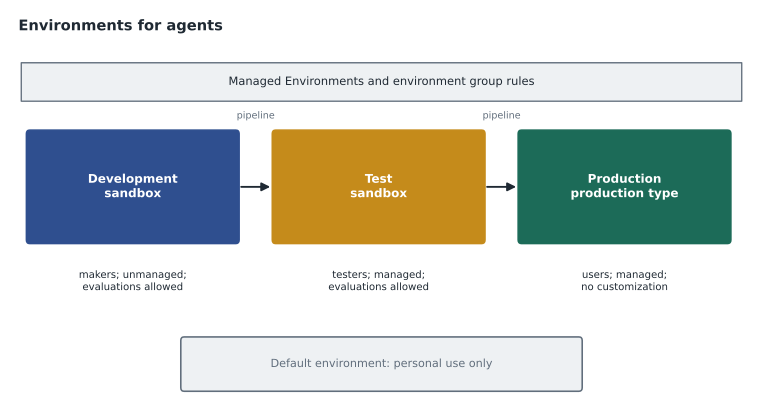
Rasmus also had to deal with the default environment. Every tenant has one, and by default every licensed user can create things in it. In 2025 Quillfield had discovered more than 40 small agents and flows in the default environment, made by curious staff, some connected to SharePoint sites with client documents. He did not ban experimentation; he redirected it. The default environment was reserved for personal productivity, with a data policy that blocked business connectors, and anyone who wanted to build something for a team was given access to a shared development environment instead. Makers who wanted a private space to learn could create developer environments, which are free, personal and isolated.
Managed Environments and environment groups
Managed Environments is a set of premium governance capabilities that administrators turn on per environment. For agents, the most important are sharing limits (covered in Lesson 9), usage insights sent to administrators, the ability to require solution checker results before import, and support for pipelines, which in Power Platform deploy into Managed Environments. Quillfield made all three agent environments managed.
Environment groups let administrators organize environments and apply rules to every environment in a group at once, so settings stay consistent instead of drifting. Rasmus created a group called "QIB Agents" for the three environments and applied rules for sharing, data policies and AI features at the group level. When a fourth environment was later created for a separate claims project, joining it to the group applied the same baseline in minutes.
| Setting | Development | Test | Production |
|---|---|---|---|
| Environment type | Sandbox | Sandbox | Production |
| Security group | QIB-Agent-Makers | QIB-Agent-Makers and QIB-Agent-Testers | QIB-All-Staff |
| Solutions | Unmanaged; makers customize here | Managed, imported by pipeline | Managed, imported by pipeline |
| Who can edit agents | Makers | Nobody (import only) | Nobody (import only) |
| Evaluations | Allowed | Allowed | Blocked by data policy |
| Data | Invented test data | Copy of masked data | Live data |
What an agent is made of
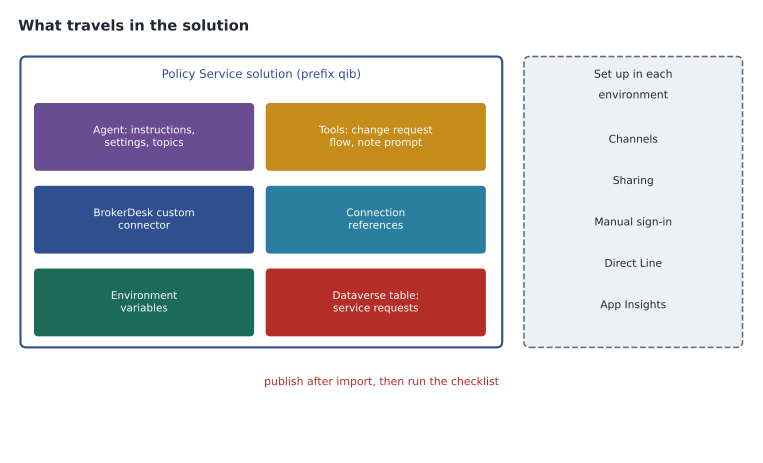
An agent is not one object. It is a set of components in Dataverse: the agent itself with its instructions and settings; its topics, in the classic experience; its knowledge source definitions; its tools, including connector actions, agent flows and prompts; the custom connectors those tools use; the connection references that point at actual connections; environment variables for values that differ between environments; Dataverse tables it reads or writes; and any child agents or component collections. Moving an agent means moving all of the parts it depends on, in a consistent state.
That is what a solution does. A solution is a container that groups components so they can be moved between environments together. Microsoft's guidance is to work in the context of a solution from the start, using a custom publisher with its own prefix, and to create separate solutions only when components genuinely need to be deployed on different schedules. Quillfield's publisher used the prefix "qib", so its tables and components carried names such as qib_servicerequest, which made it obvious what belonged to the company and what came from Microsoft or other vendors.
Makers can set a preferred solution so that new components they create go into it automatically. Without one, new topics, flows or connection references can land in the default solution, and the agent that reaches test is missing a part. That was the single most common failure in Quillfield's first deployments: a new tool flow built during a quick fix, saved outside the solution, and the import into test either failed or produced an agent whose tool pointed at nothing.
Managed and unmanaged
Solutions come in two forms. An unmanaged solution is the working form in development: its components can be edited, and removing the solution leaves the components behind. A managed solution is the finished, locked form for downstream environments: components arrive ready to run, cannot be edited directly, and removing the solution removes them. Microsoft's guidance is to export and deploy managed solutions everywhere except development, and not to customize outside development.
The reason is control. If someone edits an agent directly in production to fix an urgent problem, production no longer matches development, the next deployment may overwrite the fix or fail, and nobody can say with confidence what is running. With managed solutions, every change starts in development, passes through test and arrives in production by the same route. When an urgent fix is needed, it is made in development and pushed through quickly, not typed into production.
Worked problem
An urgent fix without breaking the rules
On a Thursday afternoon the Policy Service Assistant starts telling representatives that a common commercial policy type is "unknown". Tomasz wants it fixed today. How should the team fix it without editing production?
Show solution
- Reproduce the problem in development using the same question; the activity map shows a new status code from BrokerDesk that the response description does not mention.
- Update the custom connector's response description and the agent instruction in the development solution.
- Run the core test set in development and the specific failing question.
- Deploy through the pipeline to test, rerun the core set, then deploy to production with an expedited approval.
- Record the fix and add the failing question to the core test set.
Answer: The same path as any change, done quickly. A same-day pipeline deployment took about 40 minutes end to end; an edit in production would have taken five minutes and left production different from development for every future release.
Environment variables and connection references
Two kinds of component exist specifically to make solutions portable. An environment variable holds a value that differs between environments, such as an API base URL, a mailbox address or a SharePoint site. The solution carries the variable's definition; each environment supplies its own value. A connection reference points a tool or flow at a connection without embedding the connection itself; each environment maps the reference to a connection that exists there. Microsoft's guidance is to use environment variables for environment-specific settings and secrets, and connection references for environment-specific connections and credentials.
Before environment variables, makers hard-coded the development BrokerDesk address into flows and connector settings, then edited them by hand in each environment. Hard-coded values are invisible until they cause a production agent to write to a development system, which is what had happened to an earlier Quillfield flow in 2025. With environment variables, the Policy Service solution carried three: the BrokerDesk base URL, the Northmark appetite server URL and the underwriter approvals mailbox. During each import the pipeline asked for their values, and it asked for connections for the BrokerDesk, Outlook and Dataverse connection references.
Secrets need extra care. Environment variables can be of a secret type that refers to a value stored in Azure Key Vault, so the secret itself is never stored in the solution or visible to makers. Pascal's team used that pattern for the API key of the one carrier integration that did not support OAuth.
What does not travel
Not everything about an agent is solution-aware. Microsoft lists items that must be configured in the downstream environment after deployment: Application Insights settings, manual authentication settings, Direct Line and web channel security settings, deployed channels and sharing with makers or users. Some settings also need a final step: after a managed solution is imported, the agent typically needs to be published in the target environment before users see the new version.
Quillfield turned that list into a post-deployment checklist that the person approving each production deployment completed and signed. It covered publishing; checking the Teams and Microsoft 365 Copilot channels; checking sharing against the approved groups; confirming the manual authentication settings for the one agent that used them; running five smoke-test questions as a representative test account; and confirming that analytics recorded the session. The checklist took about ten minutes and prevented every repeat of the early mistakes.
Component collections and reuse
When several agents need the same topics, knowledge or tools, component collections let you share a reusable set of them across agents in an environment, and export and import them through solutions so teams can release on independent schedules. Quillfield created one collection with its standard escalation topic, the "talk to a person" logic and the shared privacy notice, used by both the HR agent and the Policy Service Assistant. A change to the privacy notice then needed one update and one deployment.
Source control
Solutions are what moves; source control is the record of what changed. Microsoft's guidance recommends enabling Power Platform's native Git integration, which connects an environment's solutions to a Git repository so that each change is committed with a history. For a professional team, that history answers questions that solution versions alone cannot: who changed the agent instructions, when, and what exactly the old text said. Quillfield connected its development environment to a repository in its Azure DevOps organization and adopted a simple rule: every change to an agent was committed with a short message linking to the request or issue it addressed.
Data in each environment
Environments separate data as well as configuration, and each one needs a deliberate decision about what data it holds. Development should use invented data wherever possible. Quillfield's development copy of BrokerDesk contained about 500 fictional clients with invented policy numbers, and test cases used only those. Test needs data realistic enough to find real problems, so Quillfield's test environment used a copy of production data with names, addresses, dates of birth and banking details masked by Pascal's team before loading. Production holds live data and nothing else.
The same applies to knowledge sources. A development agent pointed at the production HR SharePoint site would answer from live content while being edited by makers who might not be entitled to all of it. Each environment's environment variables pointed at its own site: an HR test site with copies of policy pages for development and test, the live site for production. When HR changed a live page, the change was copied to the test site so test results stayed meaningful.
Writing the strategy down
Rasmus wrote Quillfield's environment strategy on two pages: the environments and their types, who belongs to each security group and how membership is requested, the data each environment may hold, the data policies that apply, the solutions and publishers in use, and the rule that nobody customizes outside development. The document was short enough that makers actually read it, and it answered most of the questions they would otherwise have asked him. It also gave auditors a single place to see how agents were governed, which saved a week of questions during the annual review.
One more decision belongs in the strategy: how many agents share an environment. Quillfield kept all business agents in one set of three environments, because they shared connectors, policies and owners, and created separate environments only when an agent needed different rules, such as the certificates-mailbox agent with its event trigger, or a public agent that must never reach client data. Each extra environment adds administration, security groups and pipeline stages, so the default should be to share environments until there is a clear reason not to, and then to separate cleanly.
Common mistakes
MistakeBuilding team agents in the default environment.
InsteadReserve the default environment for personal use; build shared agents in a governed development environment.
MistakeCreating components outside the solution.
InsteadSet a preferred solution so new components land in it automatically.
MistakeEditing agents directly in production.
InsteadDeploy managed solutions and make every change in development.
MistakeHard-coding URLs and mailboxes in flows and tools.
InsteadUse environment variables, with Key Vault secrets for sensitive values.
MistakeAssuming channels and sharing move with the solution.
InsteadUse a post-deployment checklist for settings that are not solution-aware.
Summary and key terms
- Use at least three environments: development and test as sandboxes, production as a production environment, each secured with a Microsoft Entra group.
- Managed Environments and environment groups apply governance consistently; pipelines deploy into Managed Environments.
- Solutions carry an agent and its dependencies; work in a solution with a custom publisher prefix and a preferred solution.
- Deploy managed solutions outside development; use environment variables and connection references for values that differ between environments.
- Channels, sharing, manual authentication, Direct Line and web security and Application Insights must be configured after deployment.
- Environment
- A Power Platform container with its own Dataverse database, roles and settings.
- Managed Environment
- An environment with premium governance capabilities turned on.
- Solution
- A container that groups components so they can move between environments together.
- Managed solution
- A locked, deployable solution whose components cannot be edited directly.
- Environment variable
- A solution component that holds a value supplied separately in each environment.
- Connection reference
- A solution component that points tools and flows at a connection mapped in each environment.
Practice problems
Work each problem on paper first, then reveal the answer to check.
Why should production receive managed rather than unmanaged solutions?
Show answer
Managed components cannot be edited in place, so production always matches what was developed and tested.
What does a preferred solution prevent?
Show answer
New components being created outside the solution and missing from deployments.
Name three things that must be configured after importing an agent solution.
Show answer
Any three of: channels, sharing, manual authentication settings, Direct Line and web security, Application Insights.
Lesson quiz · 5 questions
Score 60% or more to complete this lesson.
Create a free account to save your progress, take quizzes and earn a certificate.