
MSBA-242 · Lesson 10 of 12 · 19 min
Updating and retiring agents
▶ Video coming soon A video version of this lesson is on the way.
An agent in production is never finished. The content it draws on changes, the systems it calls change, the people who use it change what they ask, Microsoft changes the platform and models underneath it, and eventually the business need it serves changes or disappears. By late November 2026 the HR Leave Assistant had been updated nine times since launch, and Quillfield had also retired its first agent: a pilot "office directory" agent from early 2026 that Microsoft 365 Copilot had made redundant. This lesson covers how to manage change to a live agent safely and how to retire one cleanly, so that nothing is left running, exposed or paying for itself after nobody needs it.
Kinds of change
Changes to a live agent fall into a few kinds, and each carries different risk.
| Change | Example | Risk | Minimum testing |
|---|---|---|---|
| Knowledge content | HR updates the parental leave page | Answers change without any agent change | Spot-check affected questions; scheduled core rerun |
| Instructions | Shorter answers; new refusal wording | Broad, often surprising effects | Full core and boundaries sets |
| Tools and flows | New BrokerDesk operation; flow step added | Routing changes; new data paths; cost | Core, boundaries, permissions; security review |
| Model | New primary model | Tone, length, tool choice all shift | All sets; side-by-side comparison |
| Channels and sharing | Publish to Microsoft 365 Copilot | New audience and rendering | Channel tests; sharing check |
| Platform | Microsoft changes orchestration or retires a feature | Behaviour changes without your action | Scheduled reruns; Message center review |
The first and last rows deserve emphasis, because they are changes nobody at Quillfield made to the agent itself. When HR rewrote the parental leave page in October, the HR Leave Assistant's answers changed the same day. The new page was clearer and the answers improved, but the core test set's expected answer for one question was now out of date and the case started failing. Content owners need to know that their pages feed an agent, and the agent's owner needs to know when those pages change. Thomasina added a line to the HR team's page-editing checklist: "This page is used by the HR Leave Assistant; tell the agent owner about substantive changes."
Publishing updates
Changes reach users only when the agent is published in the environment where users reach it. In Quillfield's setup, that meant deploying a new managed solution version through the pipeline and then publishing in production, as part of the post-deployment checklist. In Teams and Microsoft 365 Copilot, users generally see the published version without doing anything, though a Teams client that has cached the agent may need a moment or a restart to pick up changes to its app details. Channels configured once, such as the Teams app package, do not need reconfiguring for each content release.
Pipelines import solutions as an upgrade by default, replacing the previous version's components with the new version's. Components removed from the solution in development are removed in the target when the upgrade completes. That is usually what you want, and it is another reason to keep every component inside the solution: a component that exists only in production, added by hand, is outside the upgrade and will drift.
Telling users what changed
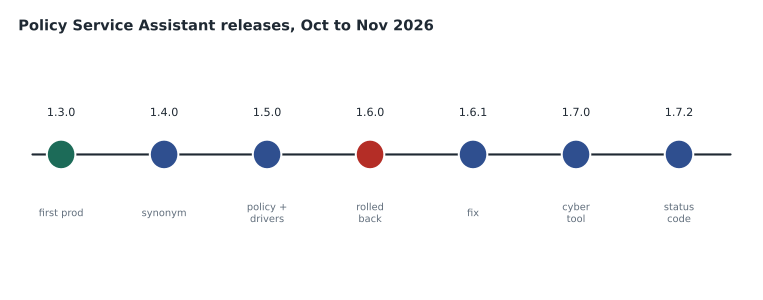
Users notice changes, and unexplained changes erode trust. A short release note for each production release, posted where users will see it, explains what is new, what is different and what to do if something seems wrong. Quillfield posted them in the contact centre's Teams channel each Wednesday. The note for version 1.5.0 read, in full: "The assistant now shows drivers with the policy summary, so you usually won't need to ask separately. If you need full driver details, ask for them. Tell your team lead if anything looks wrong." Release notes also help the agent review: when a theme changes in analytics, the notes show which release might have caused it.
Changes you did not make
Some of the most important changes come from outside. Connected systems change: an API adds a field or a status code, a connector version changes, an MCP server adds or changes tools. Tools from a connected MCP server update automatically when the server changes, which is convenient and also means the agent's capabilities can change without a release. When Northmark Mutual added a cyber appetite tool to its server in November, it appeared in Quillfield's connection. Because only selected tools were enabled, it was not available to the agent until Yusra reviewed it, tested it in development and released it in version 1.7.0. Enable MCP tools individually for exactly this reason.
The platform changes too. Microsoft adds models and retires older ones, changes orchestration, introduces new experiences and deprecates features. Classic and new agent experiences now run side by side and agents cannot be converted between them, so a decision to move an agent to the new experience is a rebuild, not an upgrade. Watch the Message center in the Microsoft 365 admin center and the Copilot Studio release information for announcements that affect your agents, and keep the scheduled core test run from Lesson 2: it is the cheapest early warning that something underneath has moved.
Model updates
Model changes are worth a planned process. When a new model becomes available or an existing primary model is scheduled for retirement, run the model comparison from Lesson 2 in development, review the differences with the business owner, adjust instructions if needed, and release the change like any other, with its own release note. Do not change the model and anything else in the same release; if behaviour shifts, you want to know which change caused it.
Ownership changes
People move on, and agents outlive their makers. Plan for it before it happens. Each production agent should have a named business owner who decides what it should do and a named technical owner who keeps it working, both recorded in the agent inventory. When an owner leaves, ownership should be reassigned deliberately: in the agent's sharing, in the solution's documentation, in the inventory and, for agents with their own identities, in Microsoft Entra ID, where sponsors and owners of agent identities can be managed. The agent management area of the Microsoft 365 admin center highlights agents without owners, which is a useful monthly check.
Connections are the trap. A tool connection created by a maker who leaves may stop working when that person's account is disabled. Delegated deployments with service principals (Lesson 6) and connection references mapped to service or shared connections in production reduce that risk, which is one more reason to use them.
When to retire an agent
Retire an agent when the need has gone, when something better covers it, or when keeping it safe costs more than it is worth. Signals include falling usage over several months, a growing share of questions now answered by Microsoft 365 Copilot or another agent, a source system being replaced, or an owner nobody can find. Quillfield's office directory agent met three of those: usage had fallen by more than 80 percent since Microsoft 365 Copilot reached most staff, Copilot answered the same questions from people's profiles, and its maker had moved to another role.
Retiring cleanly
Switching an agent off is easy. Retiring it cleanly means making sure nothing it touched is left behind: no channel still advertising it, no flow still running, no connection or service identity still holding rights, no data kept longer than allowed and no cost still accruing. Quillfield wrote a retirement checklist after its first retirement.
Worked problem
Retiring the office directory agent
Put the steps for retiring Quillfield's office directory agent in a safe order, from decision to clean-up.
Show solution
- Confirm the decision with the business owner and record why, with the usage evidence.
- Tell users two weeks ahead what to use instead (Microsoft 365 Copilot), and change the agent's greeting to say it is being retired.
- On the retirement date, remove it from channels and unshare it, so users can no longer reach it.
- Turn off any triggers and disable flows the agent used; remove connections and any service identity rights.
- Export transcripts or analytics only if the records policy requires them, store them in the approved location, and let the rest expire.
- Remove the solution from production, and from test and development when no longer needed; update the agent inventory and remove credit allocations or limits.
Answer: Decide, communicate, cut off access, stop activity and access to other systems, handle records, then remove and tidy up. Done in that order, no user is surprised, nothing keeps running and nothing keeps access.
A few points need care. Removing a managed solution removes its components from that environment, including Dataverse tables defined in the solution and their data. If the agent created business records other systems still need, move them first or keep the table in another solution. Transcripts and analytics live in the environment; check the records retention policy before deleting the environment or solution, and do not keep transcripts longer than the policy allows simply because nobody decided to delete them. Inventory entries in the Microsoft 365 admin center and agent identities in Microsoft Entra ID should be removed or marked retired so that nobody later wonders whether the agent is still running.
| Item | Retirement action | Who |
|---|---|---|
| Channels and sharing | Remove from channels; unshare | Technical owner |
| Triggers and flows | Turn off; disable or remove | Technical owner |
| Connections and service identities | Delete connections; remove rights | Technical owner and integration team |
| Transcripts and analytics | Export only if required; otherwise let expire | Business owner with records manager |
| Solution and data | Remove solution after moving data still needed | Platform administrator |
| Inventory, identity and capacity | Mark retired or remove; release allocation and limits | Platform administrator |
Retiring part of an agent
More often than retiring a whole agent, you retire part of one: a tool replaced by a better one, a topic no longer needed, a knowledge source superseded. Treat these as changes, with the same testing, and remember their dependencies. When Quillfield replaced the ListDrivers tool's separate call with the combined GetPolicy response, the ListDrivers operation stayed available for specific requests, but an old flow that called it for a monthly report was found and updated before the description changed. Search for every use of a component before you change or remove it.
Keeping test sets current
Test sets age along with the agent. Expected answers go out of date when policies or content change; cases stop being challenging when the agent has long since mastered them; new tasks arrive that no case covers. Quillfield reviewed each agent's test sets every quarter and after any substantive content change. The review updated expected answers, retired cases that duplicated others, and added new cases from the latest themes and from every incident since the last review.
Treat the test sets as part of the agent. Store the import files in the same source control repository as the solution, so that a change to an expected answer has a history and a reason like any other change. When Thomasina's team rewrote the parental leave page, the commit that updated the expected answer in the core set referenced the HR change request, and anybody reading the history later could see why the answer had changed.
Requests for change from users
Users will ask for changes, and a simple intake keeps them manageable. Quillfield used a short form in the contact centre's Teams channel: what you asked, what the agent did, what you expected, and how often it happens. Requests were triaged in the weekly release planning: quick content or description fixes went into the next release, larger requests went to the monthly agent review, and requests outside the agent's purpose were declined with an explanation. In the first two months the form received 41 requests; 23 led to changes, 11 were already planned, and 7 were outside the agent's scope. Representatives who saw their suggestions appear in release notes became the agent's best advocates.
A final habit ties change and retirement together: give every agent a review date. At least once a year, the business owner confirms that the agent is still needed, still owned and still worth its cost, and the technical owner confirms that its connections, identities and permissions are still appropriate. Agents that nobody is willing to reconfirm are candidates for retirement. The review takes an hour and prevents the slow build-up of forgotten agents that every organization with many makers eventually faces.
Common mistakes
MistakeAssuming nothing changes unless the agent is edited.
InsteadWatch content, connected systems, MCP servers and the platform, and rerun tests on a schedule.
MistakeEnabling every tool from an MCP server automatically.
InsteadEnable tools individually so new ones are reviewed before the agent can use them.
MistakeChanging the model together with other changes.
InsteadRelease model changes on their own, after comparison testing.
MistakeSwitching an agent off and calling it retired.
InsteadRemove access, stop activity, revoke connections, handle records, then remove components and inventory entries.
MistakeRemoving a managed solution without checking its data.
InsteadMove records other systems need before removal, since tables in the solution are removed with it.
Summary and key terms
- Live agents change through content, instructions, tools, models, channels and the platform; each kind needs its own level of testing.
- Changes reach users only when published; pipeline imports upgrade components by default.
- Release notes, owners and inventory records keep changes visible and agents accountable.
- Retire agents when the need has gone or something better covers it, using a checklist.
- Clean retirement removes access, stops activity, revokes connections, handles records and removes components and inventory entries.
- Release note
- A short message to users describing what changed in a release.
- Upgrade import
- Importing a newer managed solution version that replaces the previous version's components.
- Business owner
- The person accountable for what an agent should do.
- Technical owner
- The person accountable for keeping an agent working.
- Retirement
- The planned removal of an agent and everything it uses.
- Message center
- The Microsoft 365 admin center area where Microsoft announces service changes.
Practice problems
Work each problem on paper first, then reveal the answer to check.
Why did a test case start failing after HR edited a page, when nobody changed the agent?
Show answer
The agent answers from that page, so its answer changed and the expected answer in the test set became out of date.
Why enable MCP server tools individually?
Show answer
New tools added to the server then need review and release before the agent can use them.
What does removing a managed solution do to its Dataverse tables?
Show answer
It removes them and their data from that environment.
Lesson quiz · 5 questions
Score 60% or more to complete this lesson.
Create a free account to save your progress, take quizzes and earn a certificate.