
MSBA-242 · Lesson 6 of 12 · 19 min
Pipelines and application lifecycle management
▶ Video coming soon A video version of this lesson is on the way.
For the HR Leave Assistant, Quillfield had moved solutions by hand: export a managed solution from development, download the file, sign in to test, import it, fill in the connections and environment variables, then do the same again for production. It worked, and it took Yusra most of a morning each time. It also depended on her remembering every step, and twice the wrong file was imported. For the Policy Service Assistant, with four integrations and a weekly release rhythm, Rasmus set up pipelines in Power Platform. This lesson covers application lifecycle management for agents: how pipelines work, how to add approvals, how to extend them, when to use other tools, and how to recover when a release goes wrong.
Application lifecycle management
Application lifecycle management, or ALM, is the set of practices that govern how software moves from idea to production and is maintained there: version control, environments, testing, deployment, release approval and rollback. For agents it covers everything in the previous lesson, plus the mechanics and controls of moving solutions. The AB-620 study guide, with skills measured as of December 18, 2026, names four ALM skills for Copilot Studio: create a solution, add existing agents to a solution, create and use environment variables, and implement and extend Pipelines in Microsoft Power Platform.
Adding an existing agent to a solution deserves a word, because many agents start life outside one. In Copilot Studio or the Power Apps maker portal you can open a solution and add an existing agent; the agent's required components can be added with it. Check the solution afterwards for anything the agent uses that was not added, such as a flow created before the solution existed, a custom connector or an environment variable. An agent that depends on something outside its solution will import into test with a broken reference.
How pipelines work
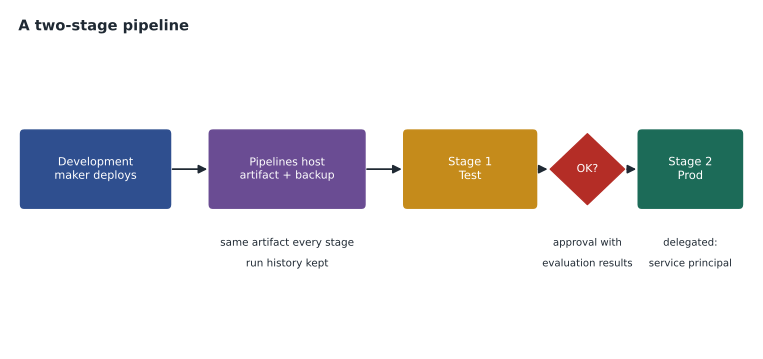
A pipeline is a defined route for a solution from a development environment through one or more target environments, configured once by an administrator and run by makers with a few clicks. Pipelines are managed from a pipelines host, an environment that stores the pipeline configuration and every deployment artifact. The host should be a production environment and cannot be the same as any development or target environment it serves. Administrators with the Deployment Pipeline Administrator role configure pipelines in the Deployment Pipeline Configuration app, opened from Manage pipelines.
Each pipeline links environments as either a development environment, where solutions come from, or target environments, where they go. Targets are arranged in stages, such as test and then production, and a solution moves through them in order. Crucially, the same exported artifact is deployed to every stage. What was tested is exactly what reaches production; nobody can export a slightly different version for production, and a solution cannot skip a stage.
All environments used in pipelines must be Managed Environments, with one exception: developer environments used as development sources do not need to be managed. Microsoft has been tightening this. From October 2026, administrators are notified when a pipeline deploys to an unmanaged target, and they have 30 days to make the environment managed before future deployments to it are blocked, with one further 30-day extension available per environment. Quillfield's environments were already managed, so the change did not affect it, but organizations that set up pipelines years ago should check.
Running a deployment
From the development environment, a maker opens the solution, chooses to deploy, selects the pipeline and stage, and confirms. Before deployment starts, the pipeline validates the solution's connections and environment variables for the target: the maker supplies or confirms a connection for each connection reference and a value for each environment variable. Administrators can preconfigure some connections so makers do not need access to production credentials. One limitation is worth knowing: a connection reference that has no value in either the solution or the target cannot be updated during deployment, though a value deployed earlier can be updated in the target.
The pipeline exports the solution as managed, stores the artifact and a backup on the host, and imports it into the target. The default import behaviour is to upgrade the solution without overwriting customizations, and advanced import options cannot be changed. Each run is recorded in the pipeline's run history, with who deployed what, when and to where. In the target environment, you can see the deployed solution layers and what changed between them.
| Step | Done by | At Quillfield |
|---|---|---|
| Configure the pipeline and stages | Deployment Pipeline Administrator | Rasmus, once |
| Choose solution, pipeline and stage | Maker in development | Yusra |
| Supply connections and environment variable values | Maker, or preconfigured by admin | Preconfigured for production |
| Approve deployment to production | Approver | Tomasz and Rasmus |
| Import and record the run | Pipeline | Automatic |
| Post-deployment checklist | Approver or maker | Rasmus, ten minutes |
Approvals and delegated deployments
In a standard deployment, the maker who requests it is the identity that performs it, and so owns the deployed objects in the target. For production, that is rarely what you want: it means makers need rights in production, and production objects end up owned by individuals who may change roles or leave. Delegated deployments solve this. A stage can be configured to deploy as a service principal or as the pipeline owner, with different identities for different pipelines and stages if needed. The deploying identity then owns what it deploys.
Delegated deployments are also where approvals fit. A delegated stage can require approval before it runs: the maker requests the deployment, an approver reviews and approves, and only then does the pipeline deploy as the delegated identity. Quillfield configured its production stage this way. Tomasz approved for the business and Rasmus for the platform; either could reject with a comment. Makers never needed any role in production.
Worked problem
Designing a production approval
Wendell asks what evidence an approver should see before approving a production deployment of the Policy Service Assistant. Design the approval request.
Show solution
- Require a deployment note from the maker: what changed, why, and the issue or request it addresses.
- Attach the exported evaluation results from test for the core and boundaries sets, and state whether release thresholds were met.
- Name any new connections, environment variables, tools or knowledge sources, and any data policy impact.
- Confirm the change was committed to source control, with the commit reference.
- State the rollback plan: the previous version number and who will redeploy it if needed.
Answer: A short, standard request with the change, the evidence, the new dependencies, the source control reference and a rollback plan. Approvers can then decide in minutes, and the record explains every production change later.
Extending pipelines
Pipelines can be extended for organization-specific steps. Microsoft documents extension points that pause a deployment at defined moments, such as before export or before deployment to a stage, until custom logic marks it to continue or stop. That logic is usually a Power Automate flow triggered by the pipeline event. Quillfield used one extension: before the production stage, a flow checked that the requested version had a matching commit in the repository and that the test-stage evaluation results were attached, and posted the request to the approvers' Teams channel. Only then did the approval begin.
Developers can also run pipelines from the command line with the Power Platform CLI's pipeline commands, and pipelines can be integrated with Azure DevOps, GitHub and other continuous integration tools for detailed differences between versions and for source control. Because unmanaged solutions and managed backups are stored on the host for every deployment, the host is also a useful archive of exactly what was deployed.
Other deployment tools
Pipelines are built for makers and administrators who want ALM without writing build scripts. Microsoft's ALM guidance positions three options. Power Platform pipelines are low-setup and built into the platform, suited to citizen developers. GitHub Actions for Power Platform suit development and administration teams managing several environments. Azure DevOps with the Power Platform Build Tools suits enterprise teams that want full control. All three move solutions; they differ in how much you script and where the process lives. One more constraint decides some cases: pipelines cannot deploy to a different tenant, so cross-tenant deployment needs Azure DevOps or GitHub.
# Export the managed solution from development (illustrative)
pac auth create --environment https://qib-agents-dev.crm.dynamics.com
pac solution export --name QIBPolicyService --path ./out/QIBPolicyService_managed.zip --managed

# Import into test, then publish customizations
pac auth create --environment https://qib-agents-test.crm.dynamics.com
pac solution import --path ./out/QIBPolicyService_managed.zip
Pascal's integration team already ran Azure DevOps for BrokerDesk itself. For agents that depended on BrokerDesk API changes, they wanted the agent deployment and the API deployment in one release. They used Azure DevOps for those releases and Power Platform pipelines for everything else. Mixing tools is common; what matters is that each solution has one agreed route to production.
Versioning and release rhythm
Every solution has a version number. Increase it with every deployment so run history, solution layers and approval records all refer to the same version. Quillfield used a simple scheme: the major number changed for a significant redesign, the minor number for each release, and the build number for urgent fixes. The Policy Service Assistant reached production as version 1.3.0 in late October and was at 1.7.2 by late November.
A regular release rhythm helps everyone. Quillfield released agent changes to production on Wednesdays, after the weekly evaluation run, with urgent fixes allowed any day through the expedited approval described in the previous lesson. Representatives knew when changes would arrive, team leads knew when to look for them, and the agent review in Lesson 4 knew which version it was reviewing.
Rolling back
Sometimes a release has to be undone. Pipelines support redeploying a previous version, but only when the corresponding pipeline setting is enabled, so turn it on before you need it. Because each deployment stores its artifact on the host, the previous managed solution is available to redeploy. Rolling back restores components, not data: records an agent created, transcripts and analytics remain. Think about what a rollback means for in-flight work, such as change requests started under the new version.
In November a release changed how the agent asked for driver details, and representatives in the Regina office reported that it now asked for a licence number twice. The issue was confirmed within an hour. Rasmus redeployed the previous version through the pipeline, which took about 20 minutes, and the fix went out the next morning as 1.6.1. Nobody edited production.
Testing inside the release process
A pipeline moves solutions; it does not decide whether a solution is good enough. Quillfield tied the two together. After each deployment to the test stage, Yusra ran the four test sets in the test environment, signed in as the appropriate test accounts, exported the results and attached them to the production approval request. The pipeline extension described above checked that the results were attached before the approval started. Approvers read the summary, any case that had changed from pass to fail, and the deployment note.
Running evaluations in test rather than development matters, because test holds the managed solution exactly as production will receive it, with test-environment connections and environment variables. Twice, a change passed in development and failed in test: once because a new environment variable had no value in test, and once because a connection reference pointed at a connection that did not have access to the test copy of BrokerDesk. Both would have failed in production.
A release in practice
A typical Wednesday release of the Policy Service Assistant ran like this. On Tuesday afternoon Yusra finished the week's changes in development, committed them, ran the core set and deployed to test. Overnight nothing ran. On Wednesday morning she ran all four sets in test and attached the results. The pipeline extension posted the request to the approvers' channel at about 10:00. Tomasz and Rasmus approved by 11:00. The production stage ran as the service principal in about 15 minutes. Rasmus completed the post-deployment checklist, and the release note went to the contact centre channel before lunch. Total effort was under two hours, most of it the evaluation runs, and every step left a record.
Keep the pipeline itself under change control too. Who can edit stages, which identity a delegated stage uses, which approvers are required and whether redeployment of previous versions is enabled are all decisions with security consequences. Quillfield recorded the pipeline configuration in the same two-page strategy document as the environments, reviewed it each quarter, and limited the Deployment Pipeline Administrator role to Rasmus and one deputy, so that the controls protecting production could not be loosened quietly.
Common mistakes
MistakeAdding an agent to a solution and assuming its dependencies came too.
InsteadCheck the solution for flows, connectors and environment variables the agent uses.
MistakeLetting makers deploy to production as themselves.
InsteadUse delegated deployments with a service principal and an approval.
MistakeDeploying to unmanaged target environments.
InsteadMake target environments managed; notifications and blocking began in October 2026.
MistakeLeaving rollback for when it is needed.
InsteadEnable redeployment of previous versions in advance and know the previous version number.
MistakeRunning different deployment routes for the same solution.
InsteadAgree one route to production per solution, whichever tool it uses.
Summary and key terms
- ALM for agents covers solutions, environment variables and pipelines; AB-620 lists these as skills.
- Pipelines deploy one artifact through ordered stages from a development environment, managed from a pipelines host.
- All pipeline environments must be Managed Environments except developer environments.
- Delegated deployments run as a service principal or pipeline owner and support approvals before production.
- Pipelines can be extended with custom steps, scripted with the CLI, or replaced by GitHub Actions or Azure DevOps where needed.
- Application lifecycle management
- Practices that govern how software is versioned, tested, deployed and maintained.
- Pipeline
- A configured route that deploys a solution through ordered target environments.
- Pipelines host
- The environment that stores pipeline configuration and deployment artifacts.
- Stage
- One target environment step in a pipeline, such as test or production.
- Delegated deployment
- A deployment performed by a service principal or pipeline owner rather than the requesting maker.
- Rollback
- Redeploying a previous version to undo a release.
Practice problems
Work each problem on paper first, then reveal the answer to check.
Why does deploying one artifact to every stage matter?
Show answer
What reaches production is exactly what was tested, and no stage can be skipped.
What problem do delegated deployments solve?
Show answer
Makers no longer need production rights, and deployed objects are owned by a stable identity.
When would you choose Azure DevOps or GitHub over pipelines?
Show answer
For cross-tenant deployments, or when the agent must release together with other code under a scripted process.
Lesson quiz · 5 questions
Score 60% or more to complete this lesson.
Create a free account to save your progress, take quizzes and earn a certificate.