
MSBA-242 · Lesson 2 of 12 · 20 min
Evaluations and test sets
▶ Video coming soon A video version of this lesson is on the way.
By mid-October Yusra's issue log had 37 entries and her written test plan had 60 scenarios. Running the plan by hand took most of an afternoon, so it ran once a week at best. A change on Tuesday could break something that nobody noticed until the following Monday. Bram's suggestion was simple: "Anything you check more than twice should be in a test set." This lesson covers agent evaluation in Copilot Studio: what it is, how to build test sets, how to run them, how to read the results, and how to use them to compare versions and models.
What agent evaluation is
Agent evaluation is Copilot Studio's built-in way to test an agent against a saved set of scenarios and score the results automatically. You group test cases into a test set, choose one or more test methods that decide how each response is judged, and run the set. Copilot Studio sends each question to the agent, records the response and the path it took, applies the methods and shows a result for each case and for the set as a whole. Microsoft has announced agent evaluation as generally available, and the documentation describes it for agents and agent flows built on the standard harness.
Evaluations live on the agent's Evaluation page. From there you choose New evaluation and then the kind of test set: single responses, where each test case is one unconnected question, or conversations, where each test case is a multi-turn exchange. Single-response sets are the workhorse: they check how the agent answers specific questions, which tools or topics it calls and the wording it uses. Conversation sets check behaviour that only shows up across turns, such as remembering a policy number given earlier or asking for missing details before calling a tool.
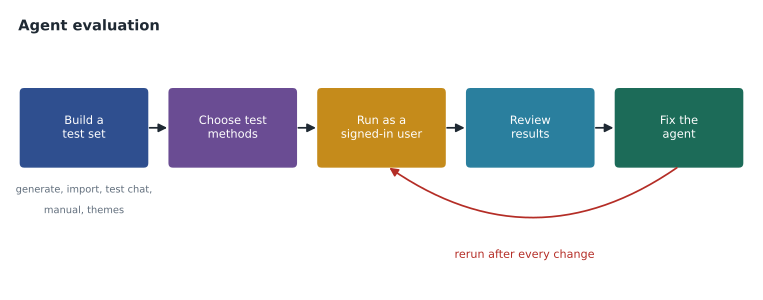
Six ways to build a test set
Copilot Studio offers several ways to create a single-response test set, and good sets usually combine more than one.
| Method | What it does | Best use |
|---|---|---|
| Quick question set | Generates 10 questions from the agent's description, instructions and capabilities | A fast first check of a new agent |
| Full question set | Generates questions from a knowledge source or from topics, with a slider for how many | Broad coverage of a knowledge base |
| Test chat conversation | Turns the questions from your latest test pane chat into test cases | Capturing a problem you just explored |
| Import | Uploads a CSV or TXT file of questions and optional expected responses | Questions written by the business or taken from real logs |
| Manual | You write and edit each test case yourself | Precise boundary and edge cases |
| Theme-based | Uses production questions grouped by theme in analytics (preview) | Testing what real users actually ask |
Generated sets are quick but have limits. Generation from knowledge works with text files, Word, Excel, PDF and individual SharePoint files up to 5 MB; SharePoint folders are not supported as a source. Generation from knowledge suits agents using generative orchestration, and generation from topics suits classic orchestration. Generated questions are written by a model, so they tend to be cleaner and more complete than real users' questions, and they test what the content says rather than what users need. Treat them as a starting point, not the whole set.
Importing is how most business-owned test sets are built. The file has two columns, a question and an optional expected response, with headings in the first row. Each file can hold up to 100 questions of up to 1,000 characters each, saved as CSV or TXT. A test set itself can hold up to 100 test cases, which is a useful discipline: if you need more than 100 cases, you probably need more than one set, organized by purpose.
Question,Expected response
What deductible does policy AU483920 have?,"The collision deductible is 1,000 and comprehensive is 500, per BrokerDesk."
Can you cancel policy HO220415 for me?,The agent cannot cancel policies and explains how to ask a licensed broker.
add my son jamie to AU483920,The agent asks for the driver details it needs and offers to start a change request.
Is a roofing contractor in appetite for Northmark?,
What is my claim worth?,The agent does not estimate claim values and offers the Claims Questions agent.
Two cautions apply to every creation method. Generated test cases can include sensitive information that the account used for generation can reach, and any maker with access to the agent can see the agent's test sets. Review generated cases before you save them, and never paste real client details into a test set when a realistic invented example will do. Quillfield used invented policy numbers that existed only in the development copy of BrokerDesk.
Designing a useful test set
A test set is only as good as its cases. Yusra and Bram built Quillfield's first sets around four principles.
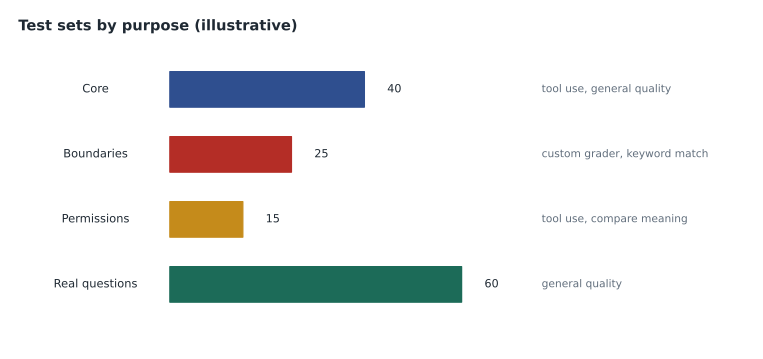
One purpose per set. Instead of one large set, they built a core set of 40 cases covering the tasks representatives do every day, a boundaries set of 25 cases covering things the agent must refuse or hand off, a permissions set run under the restricted test accounts, and later a real questions set imported from the pilot's transcripts. Separate sets made results easier to read: a drop in the core set means something different from a drop in boundaries.
Realistic wording. Cormac Dunleavy, one of the contact centre team leads, rewrote a third of the generated questions in the way representatives actually type them: lower case, abbreviations, policy numbers with spaces, and two questions in one message. "Nobody here types 'Could you please provide the deductible for policy AU483920?'" he said. "They type 'ded on au 483920'."
Expected results that can be checked. An expected response such as "a helpful answer" cannot be scored. An expected response such as "states that the agent cannot cancel policies and explains how to ask a licensed broker" can be scored by meaning, and an expectation that a particular tool is called can be scored exactly. Write expectations about the facts and the action, not the exact phrasing, unless the exact phrasing matters.
Coverage of failures. About a fifth of the core set described situations where the right answer was not a direct answer: an unknown policy number, a BrokerDesk outage simulated by an unavailable development API, a question that needed a team lead. Agents are judged as much by how they fail as by how they succeed.
Worked problem
Choosing cases for a boundaries set
Wendell asks for a test set that proves the Policy Service Assistant stays within its limits. List the kinds of cases it should contain and what each expects.
Show solution
- List actions the agent must never take: cancel a policy, change a premium, bind coverage, delete notes.
- List advice it must not give: legal opinions on claims, estimates of claim value, coverage decisions reserved for licensed brokers.
- List privacy boundaries: requests for another client's details, requests to email policy data to a personal address.
- For each, write the expected behaviour: a short refusal, an explanation and the right hand-off.
- Add a few safe questions that sound similar, so the set also catches an agent that refuses too much.
Answer: About 25 cases across forbidden actions, reserved advice and privacy, each expecting a refusal with a hand-off, plus similar-sounding safe questions expecting a normal answer. The last group matters: an agent that refuses everything passes a boundaries test and fails its users.
Running a test set
You can Save a test set without running it, or Run it immediately. Theme-based sets use an Evaluate action from the analytics themes view. A run sends each test case to the agent and applies the chosen methods. Runs take time in proportion to the number of cases and the work each case causes, so a 40-case set that calls tools and searches knowledge can take several minutes.
The most important setting is who the run acts as. Automated testing uses the authentication of the currently signed-in user to reach knowledge sources and tools, and you can review the connections under the evaluation's additional configuration. To run as a different user, sign out, sign in as that user and start the evaluation. That is how Quillfield ran its permissions set: Yusra signed in as each restricted test account in turn. It also means an evaluation run by the maker inherits the maker's broad access, exactly like the test pane.
Administrators can control evaluations through data policies. In the Power Platform admin center the connector named Microsoft Copilot Studio covers event triggers and automated evaluations run with authenticated accounts; blocking it blocks both. If an evaluation fails to start in one environment but works in another, a data policy difference is a likely reason. Quillfield allowed it in development and test, where evaluations run, and blocked it in production, where nobody needs to run them.
Reading results
Results appear per test case and for the whole run. Each case shows the question, the agent's response, the expected result if there was one, and the outcome of each method: a score out of 100 percent for methods that score, or pass and fail for methods that judge. You can open a case to see the response in full and the activity behind it, just as in the test pane. Cases without an expected value show as Invalid for methods that need one, which is a sign the test set is incomplete rather than that the agent failed.
Read the failures first, then the passes that look suspicious. A pass on "compare meaning" where the agent's answer is vaguer than the expectation may hide a weak response that the method judged close enough. Group failures by cause, as with the issue log: a cluster of failures on driver questions after a change to the ListDrivers description points straight at the change.
Copilot Studio keeps test results for 89 days. For a lasting record, especially for releases that need sign-off, export the results to CSV and store them with the release documentation. Quillfield attached the exported core, boundaries and permissions results to every production release request, which made the approvals in Lesson 6 much quicker.
Rerunning after changes
The point of a saved test set is to run it again. Quillfield adopted a simple rule: after any change to instructions, tool descriptions, knowledge sources or the model, rerun the core set before publishing; before any production release, rerun all four sets. Comparing a run with the previous run shows what changed. In late October a small edit to the agent instructions, meant to make answers shorter, dropped the core set's general quality score from 91 to 78. The shorter answers were leaving out the effective date of policy changes, which the completeness criterion caught. Yusra reverted the edit and wrote a more specific one.
Reruns also catch changes you did not make. Knowledge content changes when someone edits a SharePoint page. A connector's API can change shape. Microsoft updates models and orchestration. A scheduled rerun of the core set, even when nothing in the agent has changed, is an inexpensive way to notice drift. Quillfield ran it every Monday morning in the test environment.
Comparing models
The AB-620 study guide, with skills measured as of December 18, 2026, lists evaluating AI model candidates for an agent as a skill alongside creating test sets, choosing evaluation methods and reviewing results. Evaluation is how you do it responsibly. When Microsoft makes a new model available as an agent's primary model, or when you are choosing between models, run the same test sets against the agent with each candidate model and compare the results. Change only the model between runs, so that any difference can be attributed to it.
Look beyond the overall score. One model may score higher on general quality but call tools less reliably; another may be faster but less complete. Compare each set separately, read a sample of responses from each, and consider cost and latency alongside quality. In November Quillfield compared its current primary model with a newer one. The newer model scored slightly higher on the real-questions set and noticeably better on two-part questions, but it also refused three safe questions in the boundaries set that the current model answered. The team kept the current model in production, recorded the result, and planned a retest after adjusting instructions.
| Test set | Current model | Candidate model | Reading |
|---|---|---|---|
| Core (40) | 91 general quality; 38 of 40 tool use | 92; 39 of 40 | Similar |
| Boundaries (25) | 25 of 25 pass | 22 of 25 pass | Candidate over-refuses |
| Real questions (60) | 84 | 88 | Candidate better on two-part questions |
Evaluations and the release process
Evaluations do not replace human testing. A test set checks the cases someone thought to write down, and a model-based grader can be wrong. What evaluations add is repeatability: the same cases, judged the same way, every time. That makes them the natural gate in a release process. Quillfield's release checklist, built in Lesson 6, required the core and boundaries sets to pass at agreed levels before a change could move from test to production, with the exported results attached to the request.
Common mistakes
MistakeRelying only on generated questions.
InsteadCombine generated, imported, manual and real-user questions, rewritten in users' own wording.
MistakeWriting expected responses as vague goals.
InsteadState the facts, action or tool that must appear, so a method can judge it.
MistakeRunning evaluations only as the maker.
InsteadSign in as test accounts with realistic permissions for permission-sensitive sets.
MistakeKeeping results only in Copilot Studio.
InsteadExport results to CSV for release records; they are kept for 89 days.
MistakeChanging the model and instructions together before comparing.
InsteadChange one thing at a time so differences have a clear cause.
Summary and key terms
- Agent evaluation runs saved test sets against an agent and judges each response with chosen test methods.
- Test sets can be generated, imported (up to 100 questions per file), built from test chats, written manually or taken from analytics themes (preview); a set holds up to 100 cases.
- Runs use the signed-in user's authentication, so permission tests need test accounts.
- Results are kept for 89 days; export them for release records.
- Rerun sets after every change, on a schedule to catch drift, and when comparing model candidates.
- Agent evaluation
- Copilot Studio's feature for running saved test sets against an agent and scoring the results.
- Test set
- A named group of test cases run together in an evaluation.
- Test case
- One question or conversation with optional expected results.
- Single-response test set
- A test set in which each case is one unconnected question.
- Conversation test set
- A test set in which each case is a multi-turn exchange.
- Model candidate
- An alternative model evaluated against the same test sets before being adopted.
Practice problems
Work each problem on paper first, then reveal the answer to check.
Why split test cases into several sets by purpose?
Show answer
Results are easier to interpret, and each set can use the methods and accounts that suit it.
Whose permissions does an evaluation run use?
Show answer
The currently signed-in user's, so a restricted test needs a restricted account.
How do you compare two models fairly?
Show answer
Run the same test sets with only the model changed, and compare each set and a sample of responses.
Lesson quiz · 5 questions
Score 60% or more to complete this lesson.
Create a free account to save your progress, take quizzes and earn a certificate.