
MSBA-241 · Lesson 9 of 12 · 18 min
Calling child agents and connected agents
▶ Video coming soon A video version of this lesson is on the way.
By mid-November 2026 the Policy Service Assistant had nine tools, two knowledge sources and a growing list of requests: claims questions, billing questions, and the odd representative asking it how much vacation they had left. Yusra noticed the planner starting to hesitate. Asked about "a claim on AU483920", it sometimes looked up the policy, sometimes searched the service manual and once tried to open a change request. "We are asking one agent to know too much," Bram said. "Some of this belongs to other agents." This lesson is about when and how to split work across agents in Copilot Studio.
Ways to bring in other agents
Copilot Studio lets a main agent use other agents, which all appear on the main agent's Agents page. Microsoft Learn describes three groups in November 2026.
| Kind | What it is | Status (Nov 2026) |
|---|---|---|
| Child agent | A lightweight agent created inside the main agent, grouping its own instructions, tools and knowledge | Available |
| Connected Copilot Studio agent | Another Copilot Studio agent in your environment, published and managed on its own | Available |
| External agent over the A2A protocol | An agent from any platform that supports the Agent2Agent protocol | Available |
| Microsoft Foundry agent | An agent built and hosted in Microsoft Foundry | Preview |
| Fabric data agent | An agent that answers questions over Microsoft Fabric data | Preview |
| Microsoft 365 Agents SDK agent | A pro-code agent built with the Agents SDK | Preview |
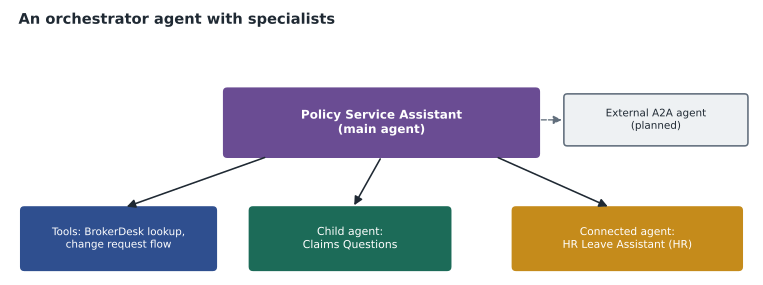
Under generative orchestration, the main agent's planner treats each of these as another component it can choose, by its name and description, exactly as it chooses tools. When it calls one, the other agent handles its part of the request and returns a result, and the main agent continues. This is the orchestrator and specialists pattern, and it is the multi-agent design most organizations start with.
Child agents
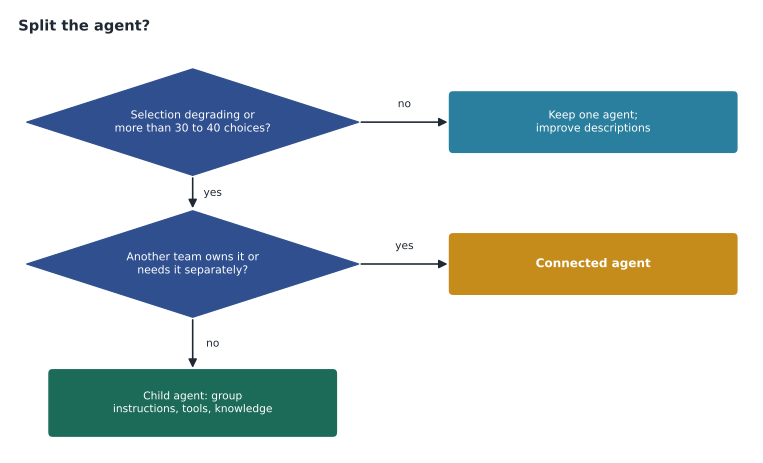
A child agent lives inside the main agent. It has its own instructions, and you can give it its own tools and knowledge, but it is published, configured and moved between environments as part of the main agent. Think of it as a way to organize a single agent's work into well-described sections. Microsoft's guidance is to use child agents when you are building one use case, one developer or a small team manages it, you want to group tools, instructions and knowledge logically, and you do not need separate configuration, authentication, deployment or reuse elsewhere.
Yusra created a child agent called Claims Questions. It had its own instructions ("Answer questions about the claims process from the Claims Guide. Never say whether a claim will be paid. For a specific claim, give the claims advocate's contact details from the policy"), the Claims Guide as its knowledge source, and the BrokerDesk lookup tool so it could find the assigned advocate. Its description told the main planner: "Use for any question about claims: how to report one, what happens next, who handles it. Not for policy changes." The hesitation disappeared: claims questions went to the child agent, changes stayed with the change request flow.
Connected agents
A connected agent is a separate Copilot Studio agent that the main agent can call. It keeps its own owner, its own settings, including its model, its own publishing and its own application lifecycle. Microsoft suggests considering connected agents when the main agent's tool selection degrades, which can happen with more than about 30 to 40 choices of tools, topics and agents, or even with fewer if their descriptions are similar; when multiple teams manage parts of the solution; when agents need separate publishing, settings or ALM; or when you want an agent reusable by more than one other agent.
The HR Leave Assistant was the obvious candidate. HR owned it, had tuned it for months and would not want the contact centre editing it. Thomasina Gauthier-Nkemelu, HR's policy lead and the agent's business owner, agreed to let it be connected, and Yusra added it to the Policy Service Assistant from the Agents page. For this to work, the HR agent had to be in the same environment and published, and HR had to allow other agents to connect to it, a setting on the connected agent itself. Representatives could then ask "How much vacation do I have left?" in the contact centre agent and get the HR agent's answer, under their own identity, without a second app.
Worked problem
Child or connected?
For each, decide whether a child agent or a connected agent fits: (a) a Billing Questions section of the contact centre agent, built by Yusra, using the billing FAQ. (b) The finance team's existing Premium Payments agent, which they update weekly. (c) A Claims Questions section that only the contact centre uses. (d) A Commercial Appetite agent that the contact centre, the commercial lines team and the renewals team all want.
Show solution
- Ask who owns and changes it. (b) is owned by finance; (a) and (c) by Yusra.
- Ask whether others will reuse it. (d) will be used by three teams.
- Ask whether it needs separate settings or publishing. (b) has its own release rhythm.
Answer: (a) and (c) are child agents: one owner, one use case, no reuse. (b) and (d) are connected agents: separate ownership, and in (d) reuse across several agents.
Writing descriptions for agents
An agent's description is its job advertisement to the planner, and it deserves the same care as a tool description. State what the agent handles, the kinds of questions, and what it does not handle. "HR assistant" is weak. "Answers employees' own leave and benefits questions from Quillfield HR policy, and starts leave applications for the employee asking. Not for questions about other employees, payroll errors or anything client-related" is strong. When two agents have overlapping descriptions, the planner chooses inconsistently, which is a common cause of the degradation that prompted the split in the first place.
In the new agent experience you can also name connected agents in the main agent's instructions and in skills, for example "For questions about an employee's own leave, use the HR Leave Assistant." The AB-620 outline from December 18, 2026 lists referencing tools and connected agents from instructions and skills as skills, alongside designing multi-agent solutions and integrating an existing Copilot Studio agent.
What passes between agents
When the main agent calls another agent, it passes the request and relevant context, and receives a response. Design with that boundary in mind. The called agent should not need the whole conversation to do its job, and the main agent should not depend on the internal steps of the called agent. Where the called agent needs to act as the user, as the HR agent does to read the employee's own leave balance, authentication must line up: the user authentication settings of both agents must be compatible, and the called agent's tools still run with the credentials it is configured to use. Bram tested the HR connection with three accounts to make sure representatives saw only their own balances.
The costs of splitting
Splitting is not free. Microsoft notes that each extra orchestration hop adds latency, and that more agents mean more testing and governance work. A question that passes from the main agent to a connected agent and back involves two rounds of planning. Credits are consumed in both agents. And when something goes wrong, you trace it across two activity maps. The right number of agents is the smallest number that keeps each one's job clear. Quillfield ended with one main agent, one child agent and one connected agent, and deliberately did not split billing questions out, because there were only four billing tools and their descriptions were distinct.
Agents from other platforms
Not every useful agent is built in Copilot Studio. The Agent2Agent (A2A) protocol is an open standard, launched by Google in 2025 and now governed through the Linux Foundation with Microsoft among its supporters, for agents on different platforms to discover each other, exchange tasks and return results. Copilot Studio can call agents that are available over A2A. Northmark Mutual told its brokers it planned an A2A quoting agent in 2027; when it arrives, Quillfield's agent could hand a quote request to Northmark's agent rather than calling individual tools. MSBA-311 covers A2A and multi-agent orchestration in depth.
Within Microsoft's own stack, agents built in Microsoft Foundry, Fabric data agents and agents built with the Microsoft 365 Agents SDK can also be connected, all in preview in November 2026. Lesson 11 covers Foundry agents. The pattern is the same for each: a description the planner reads, a connection that authenticates, and a boundary of request and response.
Governance for multi-agent solutions
Once agents call each other, ownership questions multiply. Who approves a change to the HR agent's instructions that alters what the contact centre agent hears? Quillfield wrote a one-page agent contract for each connected agent: what it handles, what it returns, who owns it, how changes are announced and how long notice is given. HR agreed to tell Yusra two weeks before any change to the leave agent's scope. It is the same discipline as an API agreement, applied to agents.
Testing a multi-agent solution
Test each agent alone before testing them together, just as you test each tool alone. The HR Leave Assistant already had its own test set from HR's pilot. Yusra then built a routing test set for the main agent: 60 questions, each labelled with the component that should handle it. Twenty were plain policy questions for the main agent's own tools, fifteen were claims questions for the child agent, ten were leave questions for the connected HR agent, and fifteen were deliberately ambiguous, such as "Can I take Friday off to deal with my own car insurance claim?", which touches both HR and claims.
The first run routed 49 of the 60 correctly. Most failures were ambiguous questions sent to only one agent when the right answer needed both. Two changes helped: a sentence in the main agent's instructions ("If a question involves both the staff member's own leave and a client matter, answer each part with the right agent and combine the answers"), and sharper descriptions that named the boundary between the claims child agent and the change request flow. The second run routed 57 correctly, and the three remaining cases were genuinely unclear, so the agent now asked a short clarifying question for them. MSBA-242 covers evaluations and test sets in detail, including automated evaluation runs.
Monitoring hand-offs in production
Once live, watch the hand-offs as well as the answers. Analytics and transcripts show which agent handled each part of a conversation. Quillfield reviewed a weekly sample of conversations that involved a connected agent, looking for three things: requests sent to the wrong agent, answers that contradicted each other across agents, and slow turns where the extra hop pushed response time past what representatives would wait on a call. The third mattered most in a contact centre, where a client is on the line. Calls to the HR agent averaged about two seconds longer than direct answers, which representatives accepted because leave questions never happen while a client is waiting.
One more practical point: name agents so people can tell them apart. In Copilot Chat and Teams, users see agent names, and two agents called "Assistant" and "Helper" invite confusion. Quillfield's convention was team and purpose, such as "HR Leave Assistant" and "Policy Service Assistant", which also helped the planner, since names are read alongside descriptions.
Common mistakes
MistakeSplitting into many agents early.
InsteadStart with one agent and split only when selection degrades or ownership requires it.
MistakeGiving agents vague or overlapping descriptions.
InsteadSay what each agent handles and what it does not.
MistakeUsing a connected agent for a section only one team builds.
InsteadUse a child agent for grouping within one agent.
MistakeConnecting another team's agent without an agreement.
InsteadAgree scope, ownership and change notice in writing.
MistakeForgetting authentication across agents.
InsteadMake sure user identity flows correctly and test with several accounts.
Summary and key terms
- A main agent can call child agents, connected Copilot Studio agents and external agents such as A2A, Foundry, Fabric and Agents SDK agents.
- Child agents group instructions, tools and knowledge inside one agent with one owner.
- Connected agents keep their own ownership, settings and publishing, and suit reuse or selection that degrades past about 30 to 40 choices.
- The planner chooses agents by description, so describe each clearly and without overlap.
- Splitting adds latency, cost and governance work, so use the fewest agents that keep each job clear.
- Child agent
- A lightweight agent defined inside a main agent, published and managed with it.
- Connected agent
- A separate Copilot Studio agent that a main agent can call, with its own settings and lifecycle.
- Orchestrator agent
- A main agent that routes parts of requests to specialist agents and tools.
- Agent2Agent (A2A)
- An open protocol for agents on different platforms to exchange tasks and results.
- Agent description
- The text a planner reads to decide when to hand work to an agent.
- Agent contract
- A written agreement on what a connected agent handles, returns and how it changes.
Practice problems
Work each problem on paper first, then reveal the answer to check.
At about how many choices does Microsoft say tool selection may degrade?
Show answer
More than about 30 to 40 tools, topics and agents, or fewer if descriptions are similar.
Why was the HR Leave Assistant connected rather than rebuilt as a child agent?
Show answer
HR owns and maintains it, with its own settings and publishing; connecting reuses it without taking it over.
Name two costs of splitting work across agents.
Show answer
Added latency from extra orchestration hops, and more testing, governance and credit consumption.
Lesson quiz · 5 questions
Score 60% or more to complete this lesson.
Create a free account to save your progress, take quizzes and earn a certificate.