
MSBA-241 · Lesson 11 of 12 · 18 min
Integrating with Foundry agents
▶ Video coming soon A video version of this lesson is on the way.
Quillfield has a small data science team of three, led by Ngozika Pellerano, who work in Azure rather than in the Power Platform. In 2026 they built something the commercial lines team loved: a submission review agent in Microsoft Foundry that reads a new commercial submission (application, loss history, inspection report) and lists what is missing or unusual before it goes to a carrier. It used a carefully tuned prompt chain, an Azure AI Search index of five years of loss reports and an evaluation suite Ngozika's team ran every week. When Solveig asked whether the contact centre agent could "just ask Ngozika's agent", the answer touched on how Copilot Studio and Foundry fit together.
Copilot Studio and Microsoft Foundry
Microsoft Foundry, known until late 2025 as Azure AI Foundry, is Microsoft's platform for building AI applications and agents in Azure. It offers a large catalogue of models, the Foundry Agent Service for building and hosting agents, tools for evaluation and safety, and Foundry Tools, the AI services formerly known as Azure AI services. Foundry is aimed at professional developers and data scientists, works with code and SDKs, and runs inside an organization's Azure subscription with Azure networking, identity and monitoring.
Copilot Studio is aimed at makers and business teams, works mostly without code, and lives in Power Platform environments. The two are designed to work together rather than compete. A common pattern, and the one Quillfield adopted, is a Copilot Studio agent in front of users, calling specialist agents and knowledge built in Foundry where deeper engineering pays off.
| Copilot Studio | Microsoft Foundry | |
|---|---|---|
| Main builders | Makers, business technologists | Developers, data scientists |
| How you build | Low-code designer, natural language | Code, SDKs, portal |
| Where it runs | Power Platform environments | Azure subscription |
| Strengths | Channels, connectors, flows, Microsoft 365 integration | Model choice and tuning, custom pipelines, evaluation, Azure networking |
| Governed by | Power Platform admin center, data policies | Azure role-based access, policies and monitoring |
The AB-100 architect track expects you to choose between them, or combine them, for a given solution; MSBA-310 covers that decision in depth. For AB-620, the relevant skills are integrating Foundry capabilities into a Copilot Studio agent, which in the December 18, 2026 outline appears as "Connect to Foundry IQ".
Three ways to use Foundry from Copilot Studio
In November 2026 a Copilot Studio agent can draw on Foundry in three main ways.
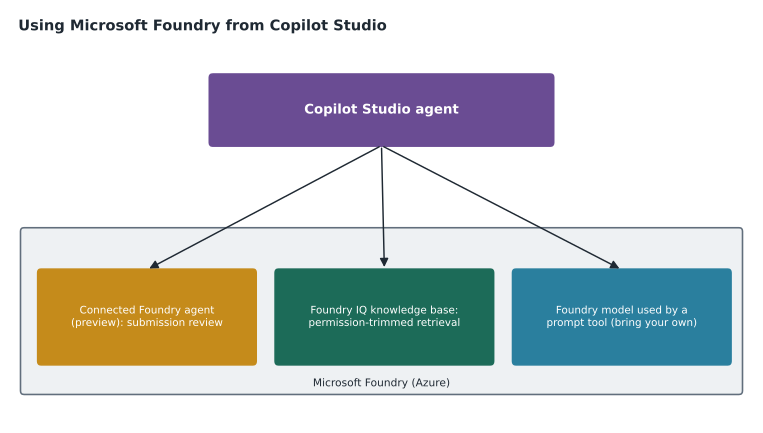
Connect a Foundry agent. From the main agent's Agents page, you can add a Microsoft Foundry agent as an external agent, in public preview in November 2026. The planner then treats it like any connected agent: it reads the Foundry agent's name and description, decides when to hand it work, passes the request and receives the result. The Foundry agent keeps its own models, tools, knowledge and evaluation, maintained by the team that built it.
Use Foundry IQ as knowledge. Foundry IQ is a knowledge layer in Foundry: teams create knowledge bases over their data, with enterprise controls such as customer-managed keys, access control lists, network isolation and Microsoft Entra ID integration, and retrieval that plans queries and ranks results rather than doing a single search. A Copilot Studio agent can add a Foundry IQ knowledge base as knowledge. Microsoft introduced this integration in preview in July 2026, and press coverage in October 2026 reported it as generally available, with authentication by API key, client certificate, service principal or Microsoft Entra ID, and support for Azure Private Link and Power Platform virtual network connections. Check the current status in your tenant before relying on it.
Use a Foundry model in a prompt. Prompt tools can use models deployed in Foundry through bring your own model, as Lesson 7 mentioned, for cases where the team has a specialized or tuned model.
Connecting the submission review agent
Bram and Ngozika worked through the connection together, and their checklist shows what matters.
| Question | Their answer |
|---|---|
| What exactly should the contact centre agent ask it? | Only: "Review submission S-xxxx for missing items." Not general underwriting questions. |
| What does it return? | A short list of missing documents and flags, each with a reason, no client financials |
| Who can call it? | The Copilot Studio agent's connection, through a Foundry project with role-based access |
| Whose data can it see? | Submissions in the commercial lines index; it checks the caller is on the commercial lines team |
| What if it is slow or down? | The main agent says the review is unavailable and offers to create a task for an account executive |
| Who owns changes? | Ngozika's team, with two weeks' notice to Yusra, as in the agent contract from Lesson 9 |
The description they wrote for the planner was specific: "Reviews one commercial insurance submission by submission number and lists missing documents and unusual items for an account executive. Use only when a staff member asks to check or review a submission. Not for personal lines, quotes or claims." The first test showed one problem: representatives typed "check Ridgeline's submission" without a number, and the planner passed the client name. Ngozika's agent did not search by name. A sentence in the main agent's instructions fixed it: ask for the submission number, or look it up with the BrokerDesk tool first.
Worked problem
Connected agent or knowledge base?
Ngozika's team also maintains a Foundry IQ knowledge base of 40,000 loss-control inspection reports. Solveig wants account executives to ask "What did inspectors find at bakeries with deep fryers?" in the contact centre agent. Should Bram connect the submission review agent and ask it, or add the knowledge base?
Show solution
- Identify the task. The question is retrieval across many reports, not a review of one submission.
- Check the submission review agent's scope. Its description limits it to one submission by number; stretching it to open questions would blur its job.
- Check the knowledge base's controls. It has access control lists and Entra ID integration, so results can be limited to people allowed to see inspection reports.
- Consider cost and latency. Retrieval from a knowledge base is one generative answer; a connected agent adds a second round of planning.
Answer: Add the Foundry IQ knowledge base as knowledge, with a description limiting it to inspection findings, and keep the submission review agent for single-submission reviews. Each component then does one clear job.
Identity and security across platforms
Crossing from Power Platform into Azure means crossing identity and governance boundaries. On the Copilot Studio side, the connection to Foundry runs as some identity, typically a service principal or managed identity for agent-to-agent calls, or the user through Entra ID where the Foundry side supports it. On the Foundry side, Azure role-based access control decides what that identity can call, and the Foundry agent's own tools decide what data it touches. Map the whole path: user, Copilot Studio agent, connection identity, Foundry project, Foundry agent, data source. At each step ask what can be accessed and by whom.
Network design may matter too. Ngozika's Foundry project ran with private networking, so Copilot Studio reached it through a Power Platform virtual network connection rather than over the public internet. Pascal's team had set that up a year earlier for other integrations, which saved weeks. Organizations without it should plan the network path early, because it often takes longer to approve than the agent takes to build.
Observability and evaluation
One reason to keep the submission review agent in Foundry was its evaluation suite. Every week Ngozika's team ran 300 past submissions through it and compared its flags with what underwriters had actually asked for, tracking precision and recall over time. Copilot Studio has its own evaluation features, covered in MSBA-242, but the teams agreed that Foundry's evaluation would remain the source of truth for the review agent, and Copilot Studio's tests would check routing: does the main agent send the right requests to it?
Tracing across the two platforms needs attention. Copilot Studio's activity map shows that the Foundry agent was called and what it returned; Foundry's tracing shows what happened inside. Quillfield passed a correlation ID with each request, a reference number recorded on both sides, so a problem reported by a representative could be followed end to end.
When not to use Foundry
Foundry is powerful but it adds a second platform, a second team and a second bill. Ngozika was the first to say that most of the contact centre agent should stay in Copilot Studio. A rule of thumb from their discussions: use Foundry when you need what only it provides, such as tuned models, custom retrieval pipelines, heavy evaluation or Azure-only data, and when a team exists to run it. Otherwise, Copilot Studio's knowledge, tools and flows are simpler to build and govern.
Costs on both sides
A request that crosses into Foundry is billed twice, in two currencies. On the Copilot Studio side, the hand-off counts as an agent action and the main agent's answer as a generative answer, in Copilot Credits. On the Foundry side, the Foundry agent's model calls, search queries and tools are billed to the Azure subscription by usage, usually by tokens and search units. Neither bill shows the other. Hamish set up a monthly view that put both together for the submission review route: about 900 reviews a month, roughly 7 credits each in Copilot Studio and a Foundry cost dominated by the model reading long loss histories. The combined cost per review was still small next to the twenty minutes an account executive used to spend checking a submission by hand, but the exercise caught one waste: the main agent was sending the whole conversation with each request, which Ngozika's agent then read in full. Sending only the submission number cut the Foundry tokens per review by more than half.
Ownership and support
A cross-platform solution needs a clear support path. When a representative reports that "the submission check is wrong", who looks first? Quillfield's answer was a short runbook. Yusra's team checks the Copilot Studio side: did the planner call the right agent with the right number, did the answer come back intact? If the request reached Foundry correctly and the review itself was wrong, the ticket moves to Ngozika's team, who check the Foundry trace and, if needed, add the case to their evaluation set so the fix is tested every week afterwards. The runbook also named who could switch the integration off in an emergency: the Copilot Studio agent owner could remove the connected agent, and the Foundry team could disable the project's endpoint, either of which left the rest of the contact centre agent working.
That separation is the main benefit of integrating rather than merging. Each team keeps the platform it knows, users get one place to ask, and when something changes on one side the other side is protected by a narrow, well-described interface.
A note on preview features
Several integrations in this lesson are in preview in November 2026, and preview features come with conditions: they may change, may have limited support, and are not recommended for production without accepting Microsoft's preview terms. Quillfield's policy was to allow preview features in production only with a written risk note, a fallback that keeps the main agent working if the feature is withdrawn, and a monthly check of its status. For the Foundry agent connection the fallback was simple: if the connection failed, the main agent offered to create a task for an account executive to run the review in Foundry directly. Treat status labels as facts to check regularly, not as permanent properties, because they change with each release wave.
Common mistakes
MistakeMoving everything to Foundry because it is more powerful.
InsteadUse Foundry for what needs it and keep the rest in Copilot Studio.
MistakeConnecting a Foundry agent with a vague description.
InsteadDescribe its narrow job so the planner calls it only for that.
MistakeIgnoring preview status for Foundry agent connections.
InsteadTreat preview features with care in production and check status regularly.
MistakeLeaving the identity path undocumented.
InsteadMap user, connection identity, Foundry project, agent and data source.
MistakeHaving no way to trace a request across platforms.
InsteadPass a correlation ID and use both platforms' tracing.
Summary and key terms
- Microsoft Foundry, formerly Azure AI Foundry, is Microsoft's pro-code platform for models, agents, evaluation and AI services in Azure.
- A Copilot Studio agent can connect a Foundry agent (preview), add a Foundry IQ knowledge base as knowledge, or use a Foundry model in a prompt.
- Foundry IQ knowledge bases bring enterprise controls and planned retrieval; check their current status in your tenant.
- Connecting platforms means mapping identity, access and network paths end to end.
- Use Foundry where its capabilities are needed and a team can run it; keep simpler work in Copilot Studio.
- Microsoft Foundry
- Microsoft's Azure platform for building, evaluating and hosting AI applications and agents.
- Foundry Agent Service
- The Foundry service for building and running agents.
- Foundry IQ
- A Foundry knowledge layer of knowledge bases with enterprise controls and planned retrieval.
- Knowledge base
- In Foundry IQ, a governed collection of data that agents retrieve from.
- Service principal
- An identity for an application, used to authenticate one service to another.
- Correlation ID
- A reference passed with a request so it can be traced across systems.
Practice problems
Work each problem on paper first, then reveal the answer to check.
Name the three main ways a Copilot Studio agent can use Foundry in November 2026.
Show answer
Connect a Foundry agent (preview), add a Foundry IQ knowledge base as knowledge, and use a Foundry model in a prompt tool.
Why did Quillfield keep the submission review agent in Foundry?
Show answer
Its tuned prompts, search index and weekly evaluation suite were maintained there by the data science team.
What does a correlation ID help with?
Show answer
Following one request through both Copilot Studio and Foundry when diagnosing a problem.
Lesson quiz · 5 questions
Score 60% or more to complete this lesson.
Create a free account to save your progress, take quizzes and earn a certificate.