
MSBA-241 · Lesson 10 of 12 · 18 min
Extending Microsoft 365 Copilot
▶ Video coming soon A video version of this lesson is on the way.
About 200 Quillfield staff had Microsoft 365 Copilot licences by November 2026, and Celestine's steering group noticed a pattern in the adoption numbers: people used whatever was in front of them. Representatives with the contact centre agent open in Teams used it; account executives, who lived in Outlook and Copilot Chat, rarely opened it. "Can the agent come to where they already are?" she asked. It could, and the question opened a wider topic: the many ways to extend Microsoft 365 Copilot itself, and how they relate to what the team had built in Copilot Studio.
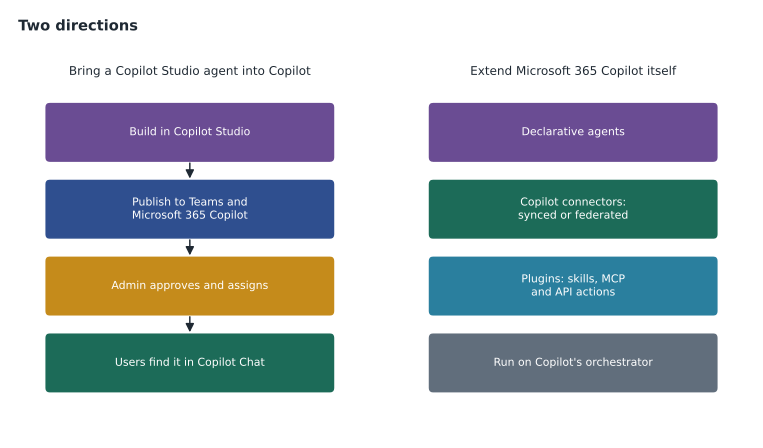
There are two directions to keep straight. You can bring a Copilot Studio agent into Microsoft 365 Copilot, so people find it in Copilot Chat and the Microsoft 365 apps. And you can extend Microsoft 365 Copilot with new knowledge and capabilities, using declarative agents, Copilot connectors and plugins. The two overlap, and Microsoft's names for the pieces have changed several times, so this lesson works from what each piece does.
Publishing a Copilot Studio agent to Microsoft 365 Copilot
Copilot Studio agents can be published to the Microsoft Teams and Microsoft 365 Copilot channel. Once published and made available, the agent appears in the agents list in Copilot Chat and can be @mentioned or opened from the Microsoft 365 Copilot app, as well as used in Teams. The agent keeps everything it has in Copilot Studio: its tools, flows, connected agents and knowledge. What changes is where people meet it.
Making it available to people is an administrator step. Agents published to the organization appear for approval in the Microsoft 365 admin center, where administrators can approve, assign to particular users or groups, block or remove them. In 2026 Microsoft brought agent management together under Agent 365, generally available since May 1, 2026, which gives an inventory of agents with their owners and permissions. At Quillfield, tenant administration sat with the IT team, and the contact centre agent was assigned to the contact centre and commercial lines groups only.
Cost follows the rule MSBA-240 explained. When a user with a Microsoft 365 Copilot licence uses an employee-facing agent in Copilot Chat, Teams or SharePoint under their own authenticated identity, classic answers, generative answers and tenant graph grounding are not charged to the agent's capacity. Agent actions such as tool calls, agent flows and autonomous runs are still billed. Bringing the contact centre agent into Copilot Chat for licensed account executives therefore cost little extra for questions, and the usual rates for tool calls.
Declarative agents
A declarative agent is a version of Microsoft 365 Copilot customized with instructions, knowledge and actions, which runs on Copilot's own orchestrator and models rather than on a separate engine. You declare what it should do; Copilot does the planning. Declarative agents can be built without code in Agent Builder inside Microsoft 365 Copilot, in Copilot Studio, or by developers with Microsoft's developer tools. Microsoft's extensibility guidance in November 2026 recommends its Work IQ Dev Tools as the starting point for professional development, adding the Agents Toolkit and SDKs only when a scenario needs them.
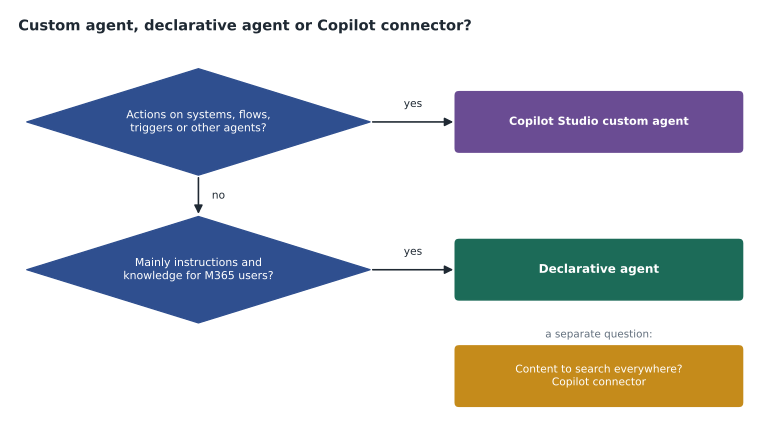
The difference from a Copilot Studio custom agent matters in design. A declarative agent inherits Copilot's orchestration, model and many of its protections, and is limited to the extension points Copilot supports. A Copilot Studio agent with its own orchestration can use the full range of tools in this course, topics, agent flows, autonomous triggers and connected agents, and can be published to channels outside Microsoft 365. Yusra's procedures agent from MSBA-110 started as a declarative agent made with Agent Builder; Bram rebuilt it in Copilot Studio when it needed to look up policy records and start flows.
| Declarative agent | Copilot Studio custom agent | |
|---|---|---|
| Orchestrator and model | Microsoft 365 Copilot's | The agent's own, with model choice |
| Where it runs | Copilot Chat and Microsoft 365 apps | Teams, Microsoft 365 Copilot, websites and other channels |
| Built with | Agent Builder, Copilot Studio or developer tools | Copilot Studio |
| Extends with | Knowledge, Copilot connectors, MCP and API actions | All tool types, flows, triggers and other agents |
| Good for | Knowledge-focused helpers close to everyday work | Process agents that act on business systems |
Copilot connectors
Copilot connectors, previously called Microsoft Graph connectors, bring content from outside Microsoft 365 into the reach of Copilot and agents. Microsoft now distinguishes two kinds. Synced Copilot connectors ingest external content into Microsoft Graph, where it is indexed alongside mail, files and chats, with access control lists so that people only see items they are allowed to see. Federated Copilot connectors retrieve external content in real time through the Model Context Protocol rather than copying it. Prebuilt connectors exist for many common systems, and organizations can build their own.
Copilot connectors are knowledge, not tools. Once an administrator sets one up, Microsoft 365 Copilot can use the content in answers, and Copilot Studio agents can add it as a knowledge source; this is what the AB-620 bullet "Connect to Copilot connectors" refers to. Microsoft's guidance stresses that the Power Platform connectors used as tools in Copilot Studio are a different integration model and should not be treated as equivalent. Quillfield's IT team set up a synced Copilot connector for BrokerDesk's document store of policy wordings, so that both Copilot Chat and the contact centre agent could find the wording of a client's endorsement with a citation, while live policy data still came through the custom connector.
Worked problem
Which extension mechanism?
Match each need to a mechanism: (a) Account executives want Copilot Chat to find past proposals stored in an external document system. (b) Account executives want the contact centre agent's policy lookup inside Copilot Chat. (c) A small team wants a "Renewal Prep" helper that follows fixed instructions and uses SharePoint renewal files. (d) A developer wants Copilot to call a rating API directly when drafting a quote.
Show solution
- Content that should be searchable across Copilot is a Copilot connector: (a).
- An existing Copilot Studio agent that should appear in Copilot Chat is published to the Microsoft 365 Copilot channel: (b).
- A knowledge-focused helper with instructions, close to everyday work, suits a declarative agent made in Agent Builder: (c).
- An API capability inside a declarative agent is an API or MCP action on that agent: (d).
Answer: (a) Copilot connector; (b) publish the Copilot Studio agent to the Teams and Microsoft 365 Copilot channel; (c) declarative agent; (d) API or MCP action on a declarative agent.
Plugins and actions for Copilot
Microsoft packages extensions for Microsoft 365 Copilot as plugins distributed through the organization's registry or, for public solutions, through Partner Center and Microsoft Marketplace. In Microsoft's November 2026 guidance a plugin can bundle several capabilities: declarative agents; skills, which teach repeatable tasks through instructions and resources; synced and federated Copilot connectors; plugin connectors that reference a remote MCP server from the app manifest; and MCP and API plugins for declarative agents, which give a declarative agent a technical action to call. An API plugin is built from an OpenAPI description, much like the REST API tools of Lesson 4.
For a Copilot Studio maker, the practical point is that the same back-end can serve both worlds. Pascal's BrokerDesk API could be wrapped as a custom connector for Copilot Studio agents and described as an API plugin for a declarative agent, or published once as an MCP server that both could use. Each route has its own governance: Copilot Studio tools under Power Platform data policies, Copilot extensions under Microsoft 365 admin controls. Decide deliberately, and avoid three integrations to the same system owned by three different teams.
Grounding in work data
Microsoft 365 Copilot's answers draw on work data: mail, meetings, chats, files and people, through Microsoft Graph and what Microsoft now groups under Work IQ. Copilot Studio agents can use this too. Tenant graph grounding lets an agent ground answers in the user's Microsoft 365 data with semantic search, and is billed at 10 credits per message for users without a Microsoft 365 Copilot licence, but included for licensed users as described above. In the new agent experience, Microsoft IQ capabilities, including Work IQ, can be added to agents, some in preview. The design question is always whether an agent needs the user's whole work context or only specific sources; narrower grounding is cheaper and more predictable.
Where to put an agent
The steering group's final decision combined several of these. The contact centre agent stayed a Copilot Studio agent, published to Teams and Microsoft 365 Copilot and assigned to two groups. The procedures helper for account executives became a declarative agent in Agent Builder grounded in the service manual and the BrokerDesk wordings connector. And a synced Copilot connector made policy wordings available to all licensed staff in Copilot Chat. Hamish's adoption numbers a month later showed account executives' use of the policy lookup tripling once it appeared in Copilot Chat, which was the point of Celestine's question.
Responsible extension
Every extension widens what Copilot can see or do, so the questions from earlier lessons apply here too. For a Copilot connector, check that the source system's permissions are carried into the index, because a synced connector that indexes everything as visible to everyone turns a well-governed document store into an oversharing problem. MSBA-102 and MSBA-204 cover oversharing and Purview controls in depth. For an action on a declarative agent, apply the same rules as for tools: narrow operations, end-user authentication where possible, confirmation before changes. For an agent published into Copilot Chat, remember that it now meets many more people, in a context where they may not realize which agent is answering, so make its name and description tell users plainly what it is for.
Wendell added a line to Quillfield's AI-use policy after this project: every agent or extension that appears in Copilot Chat must have a named owner, a one-sentence purpose that users can see, and a review date. The inventory in the Microsoft 365 admin center made the first review, in November 2026, a short exercise: eleven agents, of which two were retired because nobody used them.
Testing in Copilot Chat
An agent that works in the Copilot Studio test pane can behave a little differently in Copilot Chat, because users reach it through @mentions, the agents list or suggestions, and they bring the habits of a general assistant with them. Test in the real channel with pilot users before wide release. Yusra ran a one-week pilot with eight account executives, who found two issues: they expected the agent to remember the client they had asked about earlier in the day (it did not, across separate conversations), and they asked for things outside its scope, such as drafting a whole renewal letter, which the agent now declined politely while pointing them to Copilot itself.
Keep an eye on the pace of change in this area. Between 2024 and 2026 Microsoft renamed Graph connectors as Copilot connectors, introduced federated connectors through MCP, added skills to plugins and launched Agent 365 for agent management. The underlying choices, though, have stayed the same: where people meet the agent, what content it can search, what actions it can take, and who governs each part. Learn those, and new names become easy to place.
Common mistakes
MistakeTreating Copilot connectors as tools.
InsteadCopilot connectors bring content in for search; Power Platform connectors provide tools.
MistakeRebuilding a working Copilot Studio agent as a declarative agent just to reach Copilot Chat.
InsteadPublish the existing agent to the Teams and Microsoft 365 Copilot channel.
MistakeAssuming licensed users make every agent interaction free.
InsteadAnswers and grounding are included for licensed users; tool calls, flows and autonomous runs are billed.
MistakeBuilding several integrations to one system in different places.
InsteadChoose one back-end pattern per system and govern it.
MistakePublishing an agent without admin approval and assignment.
InsteadPlan who approves and which groups get it.
Summary and key terms
- Copilot Studio agents can be published to the Teams and Microsoft 365 Copilot channel and approved and assigned by administrators.
- Declarative agents customize Microsoft 365 Copilot with instructions, knowledge and actions on Copilot's own orchestrator.
- Copilot connectors, formerly Graph connectors, are synced into Microsoft Graph or federated through MCP, and act as knowledge.
- Plugins package declarative agents, skills, connectors and MCP or API actions for Microsoft 365 Copilot.
- Choose a custom agent for actions and processes, a declarative agent for knowledge helpers, and a Copilot connector for searchable content.
- Declarative agent
- A customized version of Microsoft 365 Copilot defined by instructions, knowledge and actions.
- Copilot connector
- A connector that makes external content available to Copilot, by syncing it into Microsoft Graph or retrieving it through MCP.
- Synced connector
- A Copilot connector that ingests and indexes external content with access controls.
- Federated connector
- A Copilot connector that retrieves external content in real time through MCP.
- API plugin
- An action, described by OpenAPI, that a declarative agent can call.
- Tenant graph grounding
- Grounding an agent's answers in the user's Microsoft 365 work data.
Practice problems
Work each problem on paper first, then reveal the answer to check.
How do you make an existing Copilot Studio agent available in Copilot Chat?
Show answer
Publish it to the Teams and Microsoft 365 Copilot channel and have an administrator approve and assign it.
What is the difference between synced and federated Copilot connectors?
Show answer
Synced connectors copy and index content into Microsoft Graph; federated ones fetch content in real time through MCP.
Name one thing a Copilot Studio custom agent can do that a declarative agent cannot.
Show answer
Use autonomous triggers, agent flows or connected agents, or publish to channels outside Microsoft 365.
Lesson quiz · 5 questions
Score 60% or more to complete this lesson.
Create a free account to save your progress, take quizzes and earn a certificate.