
MSBA-241 · Lesson 1 of 12 · 18 min
Tools and actions
▶ Video coming soon A video version of this lesson is on the way.
The HR Leave Assistant had been live for a month when Tomasz Rybak, who runs Quillfield's contact centre, came to the steering group with a different kind of request. "The HR agent answers questions," he said. "My team needs something that does things. When a client calls to add a driver to their auto policy, my people look the policy up in BrokerDesk, check the coverage, open a change request, email the underwriter and then write a note. Five screens, eleven minutes. I want an assistant that can look things up and start the paperwork for them." Celestine Nwachukwu-Hale approved a discovery phase that afternoon, and Yusra Kamaludin and Bram Oosterhuis started sketching what they called the Policy Service Assistant.
Answering from knowledge, as the HR agent mostly does, is only half of what Copilot Studio agents can do. The other half is acting: reading a record from a business system, creating a request, sending a message, calling another agent. In Copilot Studio, everything an agent can do beyond talking and searching its knowledge is a tool. Older documentation and many blog posts call these actions, and some screens still use both words. This course is about choosing, building, describing and securing those tools.
What a tool is
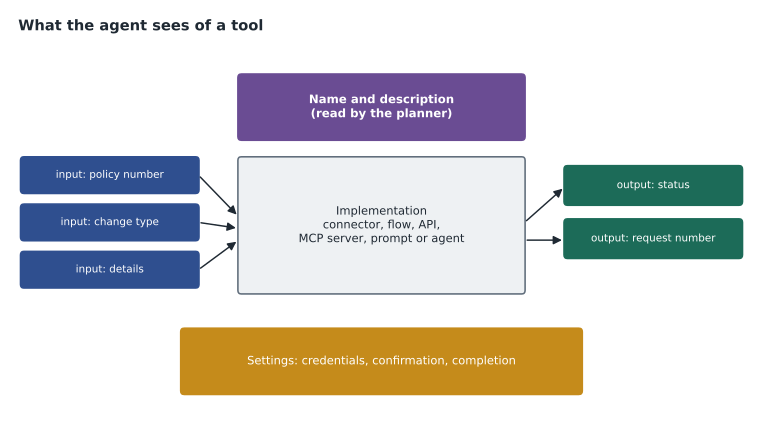
A tool is a packaged capability that the agent can call with inputs and that returns outputs. It might wrap a single connector operation, such as "Get a row from Dataverse", or a multi-step automated flow, a call to a REST API, a server that speaks the Model Context Protocol, a prompt that runs a language model with fixed instructions, or another agent altogether. Whatever is inside, the agent sees the same few things from outside: a name, a description, a list of inputs with their own descriptions, a list of outputs, and some settings about authentication and confirmation.
That outside view matters because of how generative orchestration works. As MSBA-240 explained, the planner reads each message and the descriptions of every tool, topic, knowledge source and agent available, then builds a plan. It never looks inside the tool. If the description of the BrokerDesk lookup tool says only "Gets a policy", the planner will guess when to use it and what to pass. If it says "Looks up one client policy in BrokerDesk by policy number and returns the policy type, status, effective and expiry dates, named insureds, listed drivers or locations, and deductibles. Use it whenever a staff member gives a policy number or asks about a specific client policy. Do not use it to search by client name", the planner can use it well.
The kinds of tools
Copilot Studio offers several families of tools. In the classic experience, which is generally available and which most production agents use in November 2026, the Add a tool dialog groups them roughly like this. In the new agent experience, previewed since June 2026, the tool list is shorter: connectors, MCP servers and workflows, with other capabilities arriving as skills and connected agents.
| Tool type | What is inside | Typical use |
|---|---|---|
| Prebuilt connector action | One operation of a Power Platform connector | Send an Outlook email, read a SharePoint list item, create a Dataverse row |
| Custom connector action | An operation of a connector your organization defined | Call an internal API that has no prebuilt connector |
| Agent flow | A deterministic multi-step flow built in Copilot Studio | Validate input, call several systems, wait for an approval |
| REST API | Operations from an OpenAPI description | Expose selected endpoints of an API directly as tools |
| Model Context Protocol server | Tools and resources published by an MCP server | Use a vendor's or your own MCP server |
| Prompt | A language model call with fixed instructions and inputs | Classify, extract or rewrite text predictably |
| Agents | A child agent or a connected agent | Hand a whole task to a specialist agent |
The AB-620 skills outline that takes effect on December 18, 2026 puts most of this in its second domain, "Integrate and extend agents in Copilot Studio", weighted at 20 to 25 percent. Its bullets talk about connecting to Copilot connectors, configuring MCP servers, connectors and workflows as tools, connecting to Foundry IQ and Fabric IQ, and designing multi-agent solutions. "Workflows" is the new experience's name for the deterministic automations that the classic experience calls agent flows; Lesson 3 explains the difference. The skills you learn here carry across both experiences, because a tool's outside view is the same in each.
Choosing the right kind
Yusra listed what the Policy Service Assistant needed to do and, for each item, asked Bram which kind of tool fitted. The pattern that emerged is worth learning, because the same questions come up on every project.
| Need | Tool chosen | Why |
|---|---|---|
| Look up a policy by number | Custom connector to the BrokerDesk API | BrokerDesk has an internal REST API but no prebuilt connector |
| Open a change request and route it to an underwriter | Agent flow | Several steps, an approval and a record must always happen the same way |
| Check a carrier's appetite for a risk | The carrier's MCP server | The insurer Northmark Mutual publishes its appetite guide through MCP |
| Summarize a long call note into three lines | Prompt tool | A fixed instruction gives consistent, short summaries |
| Find the right procedure in the service manual | Knowledge, not a tool | Searching documents is what knowledge sources are for |
| Answer staff leave questions | Connected agent (HR Leave Assistant) | An existing agent already does it well |
Three rules of thumb came out of the discussion. First, prefer the simplest tool that does the job: a single connector action is easier to secure and cheaper to run than a flow that wraps it. Second, put anything that must always happen the same way, such as writing an audit note or getting an approval, into a deterministic flow rather than trusting the model to remember every step. Third, do not build a tool for what knowledge already does: searching a manual is retrieval, not an action.
Worked problem
Tool or knowledge?
A team lead asks for a tool that "finds the cancellation rules for a home policy". The rules are in the service manual on SharePoint, which is already a knowledge source. Should Yusra build a tool?
Show solution
- Ask whether the request reads from a document or from a system of record. Cancellation rules live in a document.
- Check whether the knowledge source already covers the manual. It does, and generative answers cite it.
- Decide what is missing. Staff also want to know whether a specific policy can be cancelled today, which depends on its status in BrokerDesk.
Answer: No new tool for the rules: knowledge already answers that. The policy-specific part uses the BrokerDesk lookup tool the team is already building. The agent combines a cited rule from the manual with the live policy status in one answer.
Inputs, outputs and descriptions
Every input a tool needs has a name, a type and a description. Under generative orchestration the planner fills inputs from the conversation when it can and asks the user for the rest. Good input descriptions tell it what format to expect: "The policy number, eight characters, two letters followed by six digits, for example AU123456." The description is also where you say what not to accept: "Never guess a policy number; ask the staff member if one was not given." You can also set an input to a fixed value, a variable from the conversation, or a value the agent must always ask for.
Outputs come back to the agent as structured values. The planner uses them to write its response, and topics can use them as variables. Keep outputs lean. A tool that returns every column of a policy record, including fields staff should not see in chat, invites the model to repeat them. If a system returns too much, filter it in a flow or select fewer fields in the API call before it reaches the agent.
Confirmation and completion
Two settings shape how a tool behaves in the conversation. Confirmation asks the user to approve before the tool runs. Turn it on for anything that changes data or sends something on the user's behalf; leave it off for read-only lookups, where an extra click only slows people down. Copilot Studio can show the inputs it is about to send, which gives the user a chance to catch a wrong policy number or date.
Completion settings decide what happens after the tool runs. The agent can write its own response from the outputs, send a specific message you write, or hand the results to a topic. Most tools in a generative agent let the agent respond, but you might send a fixed message for a tool whose result needs exact wording, such as "Your change request CR-48213 has been sent to underwriting. You will get a Teams message when it is approved."
Authentication for tools
Every tool that reaches another system needs a connection, and every connection runs as someone. Copilot Studio lets you choose, per tool, between end-user credentials, where the tool runs as the person chatting and they sign in to the connection the first time, and maker-provided credentials, where the tool always runs with a connection the agent's author or a service account set up. The choice is a security decision. End-user credentials mean the agent can only do what the user could already do, which suits the BrokerDesk lookup: a contact centre representative sees the policies BrokerDesk already lets them see. Maker-provided credentials let an agent do things the user cannot do directly, which is sometimes the point (for example, writing to an audit table) but must be designed and reviewed with care.
Wendell Pike-Amari, Quillfield's compliance officer, set a rule for the project: read tools use end-user credentials, and any tool with maker-provided credentials needs a written justification and a narrow service identity. Lesson 8 returns to this, because autonomous triggers can only use the maker's credentials.
Testing tools one at a time
Bram's habit, which Yusra adopted, was to test each tool on its own before relying on the planner to combine them. In the test pane, ask a question that should use exactly one tool and check the activity map: did the planner choose it, did it pass the right inputs, did the outputs come back as expected? Then try questions that should not use it. Only when each tool behaves alone is it worth testing combinations. When something goes wrong in a two-tool turn, the activity map shows which step failed, but you will not know whether the problem is the planner's choice or the tool itself unless you tested the tool alone first.
Tool calls cost Copilot Credits. MSBA-240 introduced the billing table: in November 2026, an agent action such as calling a tool is billed at 5 credits, generative answers at 2, and agent flows at 13 credits per 100 flow actions, on top of the agent action that called them. Tests in the agent's own test pane are not billed. A tool that fires on every message, or a planner that calls two tools when one would do, multiplies cost quickly, so tight descriptions save money as well as improving answers.
One last habit from the Quillfield team is worth copying: they wrote every tool's description in the agent brief before building the tool. Writing "what it does, what it needs, what it returns, when to use it, when not to" first forced the design questions early, such as whether search by client name was allowed, and the descriptions were ready to paste in when the tool existed.
Common mistakes
MistakeWriting a one-line tool description such as "Gets policy".
InsteadSay what the tool does, what it needs, what it returns, when to use it and when not to.
MistakeBuilding a tool to search documents.
InsteadUse a knowledge source for documents; build tools for systems and actions.
MistakeReturning every field a system offers.
InsteadReturn only what the agent needs, so it cannot repeat sensitive fields.
MistakeUsing maker-provided credentials by default.
InsteadDefault to end-user credentials and justify any exception.
MistakeTurning on confirmation for every lookup.
InsteadConfirm changes and messages sent on the user's behalf; let reads run.
Summary and key terms
- A tool is any capability the agent can call with inputs and outputs: connector actions, custom connectors, agent flows, REST APIs, MCP servers, prompts and other agents.
- The planner chooses tools from their names and descriptions, never from what is inside them.
- Choose the simplest tool that fits, use flows for steps that must always happen, and leave document search to knowledge.
- Inputs, outputs, confirmation and completion settings shape how a tool behaves in conversation.
- Each tool runs with end-user or maker-provided credentials, and that choice is a security decision.
- Tool
- A capability an agent can call with inputs and that returns outputs; older material calls it an action.
- Tool description
- The text the planner reads to decide when and how to call a tool.
- Confirmation
- A setting that asks the user to approve before a tool runs.
- End-user credentials
- A connection setting under which a tool runs as the person using the agent.
- Maker-provided credentials
- A connection setting under which a tool runs with a connection the agent's author set up.
- Completion setting
- What the agent does after a tool runs: respond itself, send a fixed message or pass results on.
Practice problems
Work each problem on paper first, then reveal the answer to check.
Why does the planner need good tool descriptions?
Show answer
It decides which tool to call, and what to pass, from the descriptions alone; it cannot see inside the tool.
Which tool family fits "always write an audit note and get an underwriter's approval"?
Show answer
An agent flow, because the steps must happen the same way every time.
Give one reason to use end-user credentials for a lookup tool.
Show answer
The agent can then only show records the user is already allowed to see in the source system.
Lesson quiz · 5 questions
Score 60% or more to complete this lesson.
Create a free account to save your progress, take quizzes and earn a certificate.