
MSBA-241 · Lesson 5 of 12 · 19 min
Model Context Protocol servers
▶ Video coming soon A video version of this lesson is on the way.
In October 2026, Northmark Mutual, one of the insurers Quillfield places most commercial business with, wrote to its brokers about a new service. Instead of a 90-page appetite guide in a PDF that changed every quarter, Northmark now offered an MCP server: brokers' agents could ask it directly whether Northmark would consider a risk, which coverages it offered for a business type, and what documents underwriting would need. Solveig Etxeberria, a commercial lines account executive, forwarded the email to Bram with one line: "Can our agent use this?" It could, and it took Bram less than an hour to connect it in development. Deciding whether it *should* took longer.
What the Model Context Protocol is
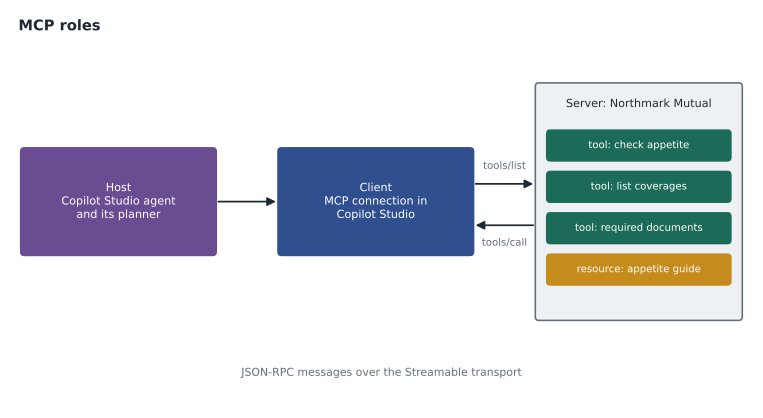
The Model Context Protocol (MCP) is an open standard, first published by Anthropic in late 2024 and now supported across the industry, including by Microsoft, for connecting AI applications to tools and data. It defines how an AI application, called the host, uses a client to talk to a server that offers capabilities. A server can expose three kinds of capability: tools, which the model can call to take actions or fetch information; resources, which are pieces of data or content the application can read; and prompts, which are reusable prompt templates. The messages between client and server use JSON-RPC.
The attraction is the same as for any standard. A vendor writes one MCP server and every compliant AI application can use it, rather than building a separate connector or plugin for each. A company can wrap an internal system once and offer it to Copilot Studio agents, to developers' coding assistants and to other AI tools at the same time.
{ "jsonrpc": "2.0", "id": 7, "method": "tools/list" }

{ "jsonrpc": "2.0", "id": 7, "result": { "tools": [
  { "name": "check_appetite",
    "description": "Says whether Northmark Mutual will consider a commercial risk, by business type, province or state, revenue and years in business.",
    "inputSchema": { "type": "object",
      "properties": {
        "business_type": { "type": "string" },
        "region": { "type": "string" },
        "annual_revenue": { "type": "number" },
        "years_in_business": { "type": "integer" } },
      "required": ["business_type", "region"] } } ] } }
MCP in Copilot Studio
Copilot Studio supports MCP servers as a tool type in both the classic and new agent experiences. In the classic experience you add one from the agent's Tools page by choosing to add a new tool and selecting Model Context Protocol, which opens an onboarding wizard. You enter a server name, a server description and the server URL, choose an authentication type, and then create or select a connection and add it to the agent. A second route, for more control, imports an OpenAPI-style schema as a custom connector in Power Apps, with a setting that marks the endpoint as an MCP server.
Four facts about Copilot Studio's MCP support are worth remembering, all checked against Microsoft Learn in November 2026:
| Fact | What it means for you |
|---|---|
| MCP requires generative orchestration | An agent using classic orchestration cannot use MCP tools |
| Tools and resources are supported; prompts are not | A server's prompt templates are ignored |
| Streamable HTTP is the transport; SSE has not been supported since August 2025 | Older servers that only speak server-sent events must be upgraded |
| Changes on the server appear automatically | Tools a server adds, changes or removes show up in the agent without editing it |
The server description deserves the same care as a tool description, because the orchestrator uses it to decide when to call the server at all. "Northmark API" says nothing. "Northmark Mutual commercial appetite: whether Northmark will consider a risk, what coverages it offers by business type, and what underwriting needs. Use for commercial risks only, never for personal home or auto" gives the planner what it needs.
Authentication for MCP servers
The wizard offers three authentication types. None is for public servers with nothing sensitive. API key sends a key in a header or query parameter whose name you enter. OAuth 2.0 comes in three forms: dynamic discovery, the simplest when the server supports it, uses OAuth dynamic client registration with a discovery endpoint so the agent finds the authorization and token endpoints automatically; dynamic uses dynamic client registration but you supply the authorization and token URLs; and manual requires a client ID, client secret, authorization URL, token URL, refresh URL and optional scopes. For the dynamic and manual options you copy the callback URL Copilot Studio shows and register it with the identity provider.
Northmark issued each broker an API key tied to its broker code. That raised a practical point: with API key authentication, the person using the agent provides the key, and Quillfield did not want 45 representatives handling a broker credential. Bram asked Northmark whether OAuth was available; it was, through Northmark's broker portal sign-in, using manual configuration. Each account executive already had a portal login, so signing in through the agent kept access personal and auditable.
Choosing which tools to allow
An MCP server can expose many tools, and it can add more later without asking. Copilot Studio lets you see the tools and resources a server publishes and choose which ones the agent may use. Northmark's server offered six tools: check appetite, list coverages, required documents, submit a quote request, check quote status and withdraw a submission. Bram enabled the first three, all read-only, and left the three that submit, track or withdraw business for a later phase, when they could go through an agent flow with Solveig's team's approval.
Dynamic updates cut both ways. They save you editing the agent each time the vendor improves a tool, but they also mean the vendor can change a tool's description or behaviour and your agent will follow. Microsoft's guidance is direct: the agent uses the server's names, descriptions, inputs and outputs, which can influence its behaviour, so connect only to trusted servers, review the tools exposed, confirm who operates the server and make sure its changes are controlled. You remain responsible for the tools your agent uses from non-Microsoft services.
Worked problem
Should we connect this server?
A start-up offers a free MCP server that "finds any business's risk profile from public data" for underwriting. Its website does not say where it is hosted or how data is handled. Solveig wants to try it. What should Bram consider?
Show solution
- Identify what the agent would send: client business names, addresses and perhaps revenue, which are confidential client information.
- Ask who operates the server, where it runs, what it logs and how long it keeps requests. The site does not say.
- Consider the description risk: a server you do not control writes the text the planner reads, which could steer the agent badly.
- Check the data policy: an unknown endpoint would need an administrator to allow it, which is a governance step, not a formality.
Answer: Not in production, and not with client data in development. Bram asked the vendor for a security and data-handling statement and suggested testing with invented businesses only. Northmark's server, by contrast, came from a carrier Quillfield already shared client data with under contract, which is why it passed review.
Building your own MCP server
MCP is not only for vendors. Pascal's team considered wrapping BrokerDesk as an MCP server instead of a custom connector. The case for it: one server could serve the Copilot Studio agent, developers' coding assistants and any future AI tool; the tool list would update itself as the team added operations; and descriptions would live with the code that implements them. The case against, for now: the custom connector already existed, data policies govern connectors in well-understood ways, and the team had more experience operating REST APIs. They decided to revisit MCP in 2027 for a second internal system. That kind of reasoning, rather than a preference for the newest standard, is what the AB-100 architect track expects.
Microsoft also publishes MCP servers of its own, such as servers for Dataverse and for Microsoft Graph data, and Copilot Studio offers some as ready-made tools. They behave like any other MCP server in an agent, with the advantage that Microsoft operates them under the same terms as the rest of the service.
MCP and data policies
Because an MCP server is reached through a connection, it falls under the environment's data policies like any connector. Administrators can block MCP servers entirely in an environment, allow only specific ones, or restrict endpoints. At Quillfield, the production data policy allowed Northmark's server by URL and blocked all other MCP endpoints until reviewed. Treat a new MCP server as you would a new vendor integration: review, approve, monitor.
Testing MCP tools
Test MCP tools as you would any tool: one at a time, with questions that should and should not use them. In the activity map you can see which MCP tool the planner chose and the inputs it sent. Two problems came up in Quillfield's testing. The planner sent province names ("Saskatchewan") where the server expected two-letter codes ("SK"); a sentence in the agent's instructions fixed it. And the server sometimes took several seconds to answer, so Yusra added an instruction to tell the user "Checking Northmark's appetite" before calling it, which made the wait feel intentional.
Tools and resources in practice
Most of what agents do with MCP servers is call tools, but resources are useful too. A resource is content the server makes available to read, identified by a URI, such as a document, a record or a list. Northmark's server published one resource: the current quarter's appetite guide as text. With it added, the agent could quote the guide's general rules (for example, that Northmark does not write new restaurant risks with deep fryers and no suppression system) without a separate tool call for every question, while still using the check appetite tool for a specific business. Resources fit content that changes on the vendor's schedule and should not be copied into your own knowledge sources, where it would go out of date.
MCP server or custom connector?
The same API can often be reached either way, and the choice is a design decision rather than a technical one. The table summarizes how Bram explained it to the steering group.
| Consideration | MCP server | Custom connector |
|---|---|---|
| Who writes the descriptions | The server operator, inside the server | Your team, in the connector definition |
| When tools change | Automatically, when the server changes | When you update and redeploy the connector |
| Reuse beyond Microsoft tools | Any MCP-compatible AI application | Power Platform agents, flows and apps |
| Governance | Data policies and your review of the server | Data policies, action controls and solutions |
| Best when | A trusted vendor already offers one, or many AI tools need the same system | You own the API and want tight, versioned control |
For Northmark, the answer was obvious: the carrier ran the server, kept its appetite current and described its own tools better than Quillfield could. For BrokerDesk, which Quillfield owns, the custom connector gave Pascal's team the control they wanted. Many organizations will end up with both patterns, and that is fine as long as each integration has an owner and a review.
Monitoring MCP tools after launch
Because a server can change underneath an agent, monitoring matters more for MCP tools than for tools you own. Quillfield set three simple checks for Northmark's server. A weekly review compared the list of tools the server exposed with the list approved at launch, so a newly added tool would be noticed before anyone relied on it. Analytics showed how often each MCP tool was called and how often calls failed. And Solveig's team agreed a contact at Northmark who would announce changes to tool descriptions, in the same way Pascal's team announced changes to the BrokerDesk API. When Northmark added a "check appetite for cyber cover" tool in November, the weekly review caught it, Wendell approved it after reading its description and inputs, and Bram enabled it the same day. The process took less than an hour, which is the point: governance for MCP need not be slow, but it must exist.
Common mistakes
MistakeConnecting any MCP server that looks useful.
InsteadReview who runs it, what data it receives and how its changes are controlled.
MistakeEnabling every tool a server offers.
InsteadEnable only what the agent needs, starting with read-only tools.
MistakeExpecting MCP prompts to work in Copilot Studio.
InsteadCopilot Studio supports MCP tools and resources, not prompts.
MistakeUsing MCP in an agent with classic orchestration.
InsteadTurn on generative orchestration; MCP requires it.
MistakeConnecting an old server that only supports SSE.
InsteadUse the Streamable transport; SSE is no longer supported.
Summary and key terms
- MCP is an open standard in which a host uses a client to call a server's tools, resources and prompts over JSON-RPC.
- Copilot Studio supports MCP tools and resources with generative orchestration, over the Streamable transport.
- The onboarding wizard takes a name, description, URL and authentication: none, API key or OAuth 2.0 (dynamic discovery, dynamic or manual).
- Server tools and descriptions update automatically, so trust and change control are essential.
- Treat each MCP server as a vendor integration governed by data policies, and enable only the tools you need.
- Model Context Protocol (MCP)
- An open standard for connecting AI applications to tools and data through servers.
- MCP server
- A service that exposes tools, resources or prompts to AI applications over MCP.
- MCP tool
- A callable capability an MCP server offers, with a name, description and input schema.
- MCP resource
- Data or content an MCP server offers for an application to read.
- Streamable HTTP
- The MCP transport Copilot Studio supports.
- Dynamic client registration
- An OAuth feature that lets a client register itself with the identity provider automatically.
Practice problems
Work each problem on paper first, then reveal the answer to check.
Which MCP capability types does Copilot Studio support?
Show answer
Tools and resources; prompts are not supported.
Why are dynamic tool updates a governance concern?
Show answer
The server operator can change tools and descriptions, and the agent follows without anyone editing it.
What does an agent need for MCP tools to work?
Show answer
Generative orchestration turned on and a connection to a server using the Streamable transport.
Lesson quiz · 5 questions
Score 60% or more to complete this lesson.
Create a free account to save your progress, take quizzes and earn a certificate.