
MSBA-241 · Lesson 12 of 12 · 23 min
Case study: an order-status agent
▶ Video coming soon A video version of this lesson is on the way.
To finish the project, Bram set the team a design exercise drawn from outside insurance, so that nobody could lean on what they already knew about BrokerDesk. Bramblecote Restaurant Supply, a food-service distributor in Winnipeg and one of Solveig's commercial lines clients, had asked Quillfield's team for advice on an agent idea, and its customer service manager, Ysolina Dragotti, had shared her brief. Bramblecote delivers to about 1,400 restaurants, cafés and institutions from one warehouse, with its own trucks for the city and a courier, Swiftline Couriers, for rural routes. Its customer service team of nine answers about 2,300 contacts a week, and more than half are some form of "Where is my order?"
This lesson works through the design in the order a real project would, with the reasoning at each step. Every decision draws on an earlier lesson. Try each step yourself before reading the answer.
The brief
Ysolina's brief, lightly edited, read:
| Need | Detail |
|---|---|
| Order status | Customers ask whether an order is confirmed, picked, on a truck or delivered, and when it will arrive |
| Delivery tracking | For courier deliveries, the courier's tracking status and estimated time |
| Changes | Customers ask to move a delivery to another day; a dispatcher must approve because routes are planned |
| Delays | When a truck is delayed, affected customers should hear before they call |
| Returns and credits | Finance already runs a returns agent for staff; customers should be able to start a return |
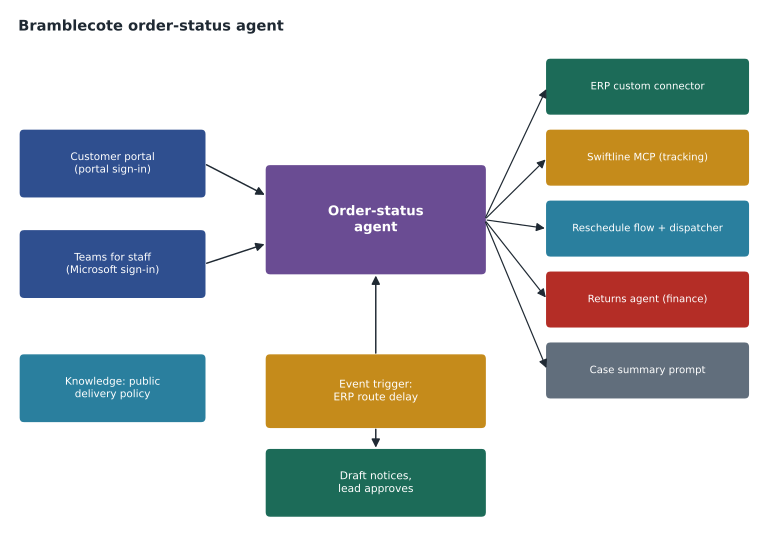
| Channels | The customer portal website, plus Teams for Bramblecote's own staff |
| Systems | ERP with a REST API (orders, customers, routes); Swiftline's MCP server; Dataverse for customer service cases |
Dariusz Kemmerling, Bramblecote's ERP lead, added two constraints: "Customers must never see another customer's orders, and nothing changes a route without a dispatcher."
Step 1: the audience and authentication
Worked problem
Who is the user, and how do they sign in?
The main audience is external: restaurant staff using the customer portal. How should the agent authenticate them, and what follows for knowledge sources and tools?
Show solution
- Recognize that customers are not in Bramblecote's Microsoft Entra ID tenant, so Authenticate with Microsoft does not fit them.
- Use manual authentication against the customer portal's own identity provider with OAuth 2.0, so each customer signs in with the account they already use for the portal.
- Note the consequence for knowledge: Dataverse knowledge needs Authenticate with Microsoft, so customer-facing answers cannot come from Dataverse knowledge. Use tools for customer data and public delivery-policy pages as knowledge.
- Plan a separate internal deployment for Bramblecote staff in Teams, which can use Authenticate with Microsoft.
Answer: Manual OAuth 2.0 authentication with the portal's identity provider for customers; Microsoft authentication for the staff version. Customer data comes only through tools that receive the signed-in customer's account from the token, never from what the customer types.
The last point in that answer is the most important design rule of the whole case. If the order lookup tool took a customer account number as an input the planner filled, a customer could type someone else's account number. Instead, the API reads the account from the access token that the customer's sign-in produced, and the tool has no account input at all. Dariusz's first constraint is met by the system, not by instructions.
Step 2: the tools
Worked problem
Matching needs to tool types
Choose a tool type for each need: order status, courier tracking, reschedule a delivery, notify customers of delays, start a return, summarize a case for staff.
Show solution
- Order status reads the ERP: a custom connector with OAuth and end-user credentials, exposing only GetOrder and ListMyOpenOrders.
- Courier tracking: Swiftline's MCP server, with only its read-only tracking tool enabled.
- Rescheduling must always follow the same steps with a dispatcher's approval: an agent flow.
- Delay notices start from an event, not a customer message: an event trigger on the ERP's route-delay records.
- Returns already have an agent owned by finance: a connected agent.
- Summarizing a case to a fixed format for staff: a prompt tool on the basic model.
Answer: Custom connector, MCP server, agent flow, event trigger, connected agent and prompt tool: six tool types, each chosen because it fits the job, not because it is available.
Step 3: descriptions
Yusra drafted the descriptions, because they decide whether the planner uses the tools well. Two of them show the pattern.
| Tool | Description |
|---|---|
| ListMyOpenOrders | Lists the signed-in customer's open orders with order number, order date, status and planned delivery date. Use when a customer asks about their orders without giving a number. Returns at most 20 orders. |
| Reschedule delivery (flow) | Asks a dispatcher to move one order's delivery to another day. Needs the order number and the requested date. Use only when the customer asks to change a delivery date. Tell the customer it is a request, not a confirmed change. |
| Swiftline tracking (MCP) | Gets the courier's current status and estimated arrival for a Swiftline tracking number. Use only for orders whose delivery method is courier. |
Step 4: the reschedule flow
Worked problem
Designing the reschedule flow
Lay out the reschedule flow's steps so the customer gets a quick answer and no route changes without a dispatcher.
Show solution
- Trigger: when an agent calls the flow, with inputs order number and requested date. The customer's account comes from the connection, not an input.
- Validate: the order belongs to the customer, is not already on a truck, and the requested date is a delivery day for that route.
- Create a reschedule request record in Dataverse and return its number and status to the agent immediately.
- Send an approval to the dispatcher for that route, with a time limit of four business hours and escalation to the dispatch supervisor.
- On approval, update the order in the ERP and notify the customer through the portal; on rejection, notify the customer with the dispatcher's reason; in all cases, record the outcome on the case.
Answer: The agent replies within seconds: "Request RS-3817 sent to dispatch. You will get a portal message within four business hours." The dispatcher approves or declines, and only then does the route change. Dariusz's second constraint is met by the flow.
Step 5: autonomous delay notices
Delays were the most valuable and the riskiest idea. When a truck runs late, the ERP marks its route as delayed. An event trigger on new delay records could start the agent, which would find the affected orders and tell the customers. Wendell, reviewing the design for Quillfield's team, raised the usual autonomous-agent questions: the trigger runs on maker credentials; the agent would be writing to many external customers at once; and a wrong delay record could send hundreds of wrong messages.
The design that answered him kept a person in the loop for the first phase. The trigger runs on a dedicated identity that can read routes and orders and create draft notices, nothing else. The agent groups the affected customers and drafts one message per route with the new estimate, and a customer service lead approves the batch with one click in Teams. After a month of approvals with no corrections, Ysolina could decide whether to let routine delays of under an hour go out automatically.
Step 6: estimating cost
Worked problem
A monthly credit estimate
Estimate the agent's monthly Copilot Credits using these assumptions: 4,000 customer conversations a month averaging 2 generative answers and 1.5 agent actions each; 300 reschedule flows of 15 actions each; 60 delay events, each a payload costing 2 credits plus one 12-action flow; 1,000 basic-tier case summaries. Use 2 credits per generative answer, 5 per agent action, 13 per 100 flow actions and 1 per 10 basic responses.
Show solution
- Generative answers: 4,000 x 2 = 8,000 answers x 2 = 16,000 credits.
- Agent actions: 4,000 x 1.5 = 6,000 actions x 5 = 30,000 credits.
- Reschedule flow actions: 300 x 15 = 4,500 actions; 4,500 / 100 x 13 = 585 credits.
- Delay events: 60 x 2 = 120 credits for payloads; 60 x 12 = 720 flow actions; 720 / 100 x 13 = about 94 credits.
- Case summaries: 1,000 / 10 x 1 = 100 credits.
Answer: About 16,000 + 30,000 + 585 + 120 + 94 + 100, or roughly 46,900 credits a month, a little under two capacity packs of 25,000. Agent actions dominate, so the best saving would come from tighter descriptions and instructions that avoid unnecessary tool calls. Customers are external, so the Microsoft 365 Copilot inclusion does not apply.
Step 7: governance and launch
The team's launch checklist pulled together every lesson's controls. Data policy: the production environment allows the ERP custom connector, Swiftline's MCP endpoint, Dataverse and the Microsoft 365 connectors in the Business group, blocks other MCP endpoints and allows event triggers only in this environment. Identities: customers through portal OAuth; staff through Microsoft; flows that write to the ERP through a narrow service identity; the delay trigger on its own identity. Agreements: an agent contract with finance for the returns agent and a data-handling statement from Swiftline. Testing: a routing test set of 80 questions including attempts to see other customers' orders, payload tests with fake delay records, and a pilot with 40 customers for two weeks. Monitoring: analytics reviewed weekly, flow run history daily, and a monthly cost review against the estimate.
What the team learned
When Bram reviewed the exercise with the team, three lessons stood out. First, the strongest protections were structural: the customer account came from the sign-in token, routes changed only through a flow with an approval, and the delay notices went out only after a person approved them. Instructions mattered, but they were the last line, not the first. Second, choosing the right tool type for each need kept every component simple: no tool did two jobs, and each had an owner. Third, the estimate showed that cost follows behaviour: an agent that calls tools when it does not need to is an expensive agent, and good descriptions are as much a budget control as a quality control.
Ysolina took the design back to Bramblecote with one change of her own: start with order status and tracking only, add rescheduling in the second month and delay notices in the third, measuring each step. That staged rollout, more than any single setting, is what makes an integrated agent succeed.
Step 8: measuring success
Before launch, Ysolina and the team agreed how they would judge the agent after its first three months. The measures were chosen to match the brief, not to flatter the agent.
| Measure | Baseline | Target after three months |
|---|---|---|
| "Where is my order?" contacts handled by people each week | About 1,250 | Under 600 |
| Customers who rate the agent's answer as helpful | Not measured | 80 percent or more |
| Reschedule requests answered by dispatch within four business hours | About 60 percent by phone | 95 percent |
| Delay notices sent before customers called | None | Most delays of over an hour |
| Incidents of a customer seeing another customer's data | Not applicable | Zero |
The last row is not a target to be traded off against the others. One incident would mean stopping the agent and reviewing the design, which everyone agreed in writing before launch. Agreeing the stop conditions in advance, when nobody is under pressure, is part of designing an agent people can trust.
Common mistakes
MistakeLetting the planner pass a customer account number.
InsteadTake the account from the sign-in token inside the API or connection.
MistakeUsing Dataverse knowledge for external customers.
InsteadDataverse knowledge needs Microsoft authentication; use tools for customer data.
MistakeSending autonomous messages to customers from day one.
InsteadStart with drafts a person approves, then widen authority on evidence.
MistakeAssuming the Microsoft 365 Copilot inclusion covers customer conversations.
InsteadExternal users are billed at the normal rates.
MistakeLaunching every capability at once.
InsteadStage the rollout and measure each step.
Summary and key terms
- Start from the audience: external customers need their own authentication, which shapes which knowledge and tools are possible.
- Choose a tool type per need: connectors for systems, MCP for vendor services, flows for fixed processes, triggers for events, connected agents for others' work, prompts for narrow language tasks.
- Put the strongest protections in structure: tokens for identity, flows for approvals, people for autonomous messages.
- Estimate credits from expected volumes; agent actions usually dominate.
- Govern with data policies, narrow identities, agreements, test sets and monitoring, and roll out in stages.
- Order-status agent
- An agent that answers customers' questions about orders and deliveries from business systems.
- Access token
- A credential issued at sign-in that identifies the user to an API.
- Staged rollout
- Releasing an agent's capabilities in steps, measuring each before the next.
- Routing test set
- Questions labelled with the component that should handle them, used to test planner choices.
- Launch checklist
- The list of controls that must be in place before an agent goes live.
- Draft-and-review
- A design in which an agent prepares work and a person approves it before it takes effect.
Practice problems
Work each problem on paper first, then reveal the answer to check.
Why does the order lookup tool have no account number input?
Show answer
So a customer cannot ask for another customer's orders; the API takes the account from the sign-in token.
Which part of the design meets "nothing changes a route without a dispatcher"?
Show answer
The reschedule agent flow, which changes the route only after the dispatcher's approval.
What dominated the cost estimate, and how could it be reduced?
Show answer
Agent actions; tighter descriptions and instructions that avoid unnecessary tool calls.
Lesson quiz · 5 questions
Score 60% or more to complete this lesson.
Create a free account to save your progress, take quizzes and earn a certificate.