
MSBA-241 · Lesson 2 of 12 · 19 min
Power Platform connectors
▶ Video coming soon A video version of this lesson is on the way.
The first tools Yusra added to the Policy Service Assistant were the easy ones: sending an Outlook email to an underwriter, posting a message in the contact centre's Teams channel, and reading the list of open service tasks from a SharePoint list. None of them needed any code. Each came from a Power Platform connector, the same connectors that Power Automate and Power Apps use, and each took about ten minutes to add, describe and test. "Connectors are the part people underrate," Bram told her. "They look simple, but most of the governance questions in this project will be about which connectors the agent may use and whose account each one runs as."
What a connector is
A connector is a wrapper around a service's API that the Power Platform knows how to call. It defines the service's operations, each with inputs and outputs, and the way to authenticate. Microsoft publishes well over a thousand connectors, from Microsoft services such as Outlook, SharePoint, Teams, Dataverse and Excel Online to third-party services such as Salesforce, ServiceNow, DocuSign and many insurance and finance systems. Each operation a connector offers can become a tool in Copilot Studio.
Connectors come in two licensing classes. Standard connectors cover most Microsoft 365 services. Premium connectors include Dataverse, many enterprise third-party systems, and every custom connector your organization builds. In Power Apps and Power Automate the class decides which user licence is needed. In a Copilot Studio agent, the agent's own capacity covers its use of connectors, but the class still matters for data policies, which treat connectors by group and are written by administrators who think in these terms.
Connectors and connections
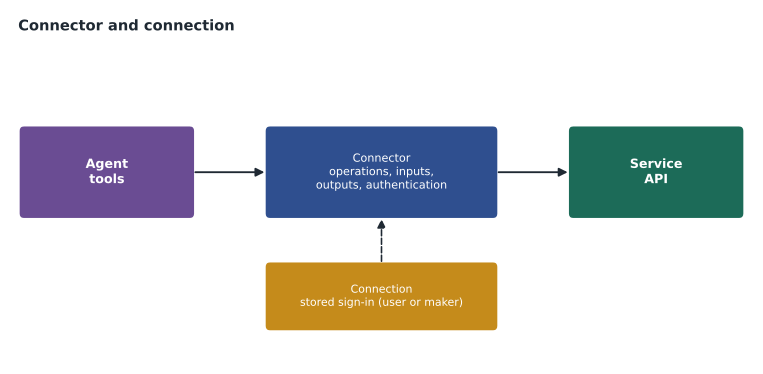
Two words cause most of the confusion. A connector is the definition: the list of what the service can do. A connection is an authenticated instance of a connector: Yusra's sign-in to Outlook, or a service account's sign-in to BrokerDesk. A tool uses a connector operation, and at run time it needs a connection to call the service.
In Copilot Studio each tool's settings say which credentials to use. With end-user credentials, each person chatting with the agent is asked the first time to sign in to the connection, and the tool then acts as them. With maker-provided credentials, the tool uses the connection the maker set up when adding the tool, for everyone. For most Microsoft 365 connectors used in an employee-facing agent, end-user credentials are the natural choice: an email sent from the agent should come from the person who asked for it, and a SharePoint read should only return items they can already see.
| Credentials | Acts as | Good for | Watch out for |
|---|---|---|---|
| End-user | The person chatting | Reading their data, sending mail as them, actions that need accountability | First-use sign-in prompts; the action fails if the user lacks permission |
| Maker-provided | The connection the maker set up | Writing to a shared log, reading reference data everyone may see | Anyone who can chat can use the maker's access through the tool |
Adding a connector tool
Adding a connector action follows the same steps whatever the connector. In the agent, open Tools, choose to add a tool, search for the connector and pick the operation. Copilot Studio creates or reuses a connection, imports the operation's inputs and outputs, and generates a default name and description from the connector's own documentation. The defaults are written for people building flows, not for a planner, so the real work begins after the tool appears.
Yusra's "Send an email (V2)" tool shows why. The default description said the operation "sends an email message". Under generative orchestration that is far too broad: the planner might decide to email clients directly. Her rewrite said: "Sends an email from the staff member's own mailbox to a Quillfield underwriter about a client policy. Use only when the staff member asks to email an underwriter. Never send email to clients or external addresses." She also fixed the To input to accept only addresses in the Quillfield underwriting distribution groups, using an input description and a check in a topic, and set Subject to always begin with the policy number.
Worked problem
Tightening a default connector tool
The "Post message in a chat or channel" Teams tool has inputs for the team, channel and message, all filled freely by the planner. Staff use the agent to post handover notes in the contact centre channel only. How should Yusra configure it?
Show solution
- Set the team and channel inputs to fixed values (the Contact Centre team and its Handovers channel) so the planner never chooses them.
- Leave only the message input open, with a description: "A short handover note: client name, policy number, what was done and what is next."
- Rewrite the tool description: "Posts a handover note to the Contact Centre Handovers channel. Use when the staff member asks to hand over a call."
- Turn on confirmation, because a channel post is visible to the whole team.
Answer: With fixed team and channel values and one described input, the tool can only do the one job it is for. In testing, a request to "tell the claims team" no longer posted in the wrong place; the agent replied that it could only post contact centre handovers.
Data policies
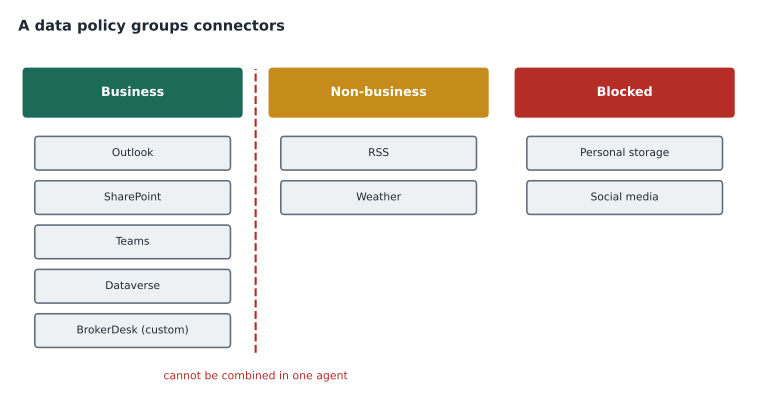
Administrators govern connectors with data policies (also called data loss prevention, or DLP, policies) in the Power Platform admin center. A data policy sorts connectors into Business, Non-business and Blocked groups. Within one agent or flow, connectors from the Business group cannot be combined with connectors from the Non-business group, and blocked connectors cannot be used at all. Policies can apply to the whole tenant or to particular environments.
Data policies matter for agents in three ways. They decide which connectors a maker can add as tools at all. They can restrict connector actions, so that a connector is allowed but its delete operation is not. And they can restrict the endpoints a connector may reach, which is how organizations stop an HTTP connector from posting data to arbitrary internet addresses. Copilot Studio also respects data policies for its own capabilities, such as knowledge sources, channels and event triggers, which appear as connectors in the policy editor.
Debates about data policies usually come down to the default environment. At Quillfield, the default environment's policy blocks every connector except a short list of Microsoft 365 ones, so anyone can try ideas without reaching business systems. The production environment for agents has a policy that puts the Microsoft 365 connectors, Dataverse and the BrokerDesk custom connector in Business, and blocks social media and personal storage connectors. When Yusra tried to add a consumer file-sharing connector in development to import a spreadsheet, the policy stopped her, which was the point.
Throttling, limits and reliability
Connectors call real services, and real services have limits. Most connectors throttle requests per connection over a time window, and the services behind them have their own limits. For a conversational agent this is rarely a problem, because people type slowly. It becomes one when a tool runs in a loop inside a flow, or when an autonomous trigger fires on every new email in a busy mailbox. Design for limits: return small result sets, filter at the source, avoid tools that fetch hundreds of rows, and test with realistic volumes before launch.
Connectors also fail in ordinary ways. A connection expires when a password changes, a service is briefly unavailable, or a user lacks permission. Under generative orchestration the agent sees the error and usually tells the user something went wrong, but a vague apology is not a good experience. Yusra added an instruction: "If a tool fails, say which step failed in plain words, give the policy number, and suggest opening BrokerDesk directly." For tools where failure needs handling, such as retrying or logging, wrap the connector in an agent flow, which has proper error handling.
Connectors for Microsoft 365 data
Some of the most useful connectors reach Microsoft 365 itself. The Office 365 Outlook connector sends mail, reads a mailbox and manages calendar events. The SharePoint connector reads and writes list items and files. The Microsoft Teams connector posts messages and adaptive cards. The Office 365 Users connector looks up a person's manager or profile. In an agent that runs with end-user credentials, these act within the user's own permissions, which makes them safe building blocks.
Do not confuse these with Copilot connectors, which bring external content into Microsoft 365 so that Microsoft 365 Copilot and agents can search it. They used to be called Microsoft Graph connectors. A Copilot connector is a knowledge mechanism, not a tool. Microsoft's own extensibility guidance makes the same point: Power Platform connectors used in Copilot Studio are a different integration model from Copilot connectors. The AB-620 bullet "Connect to Copilot connectors" is about using that indexed content as knowledge; Lesson 10 covers it.
Choosing connector operations wisely
Many connectors offer several versions of the same operation, such as "Send an email (V2)" alongside an older deprecated one, or a "Get items" and a "Get item". Choose the current version and the narrowest operation. "Get item" by ID is safer than "Get items" with a free-text filter, because the planner cannot accidentally request the whole list. For Dataverse, prefer operations with explicit filters and selected columns, a topic Lesson 6 develops.
Finally, document what each connector tool is for in the agent's solution. Quillfield's convention, which Hamish Quarrington set up while estimating costs, was a short table in the agent brief: tool name, connector, operation, credentials, confirmation, and owner. It made the data policy review with Wendell a fifteen-minute meeting rather than an afternoon of clicking through settings.
Connectors in the new agent experience
In the new agent experience, connectors appear as one of three tool types, next to MCP servers and workflows. The idea is the same: an operation becomes a tool with a name, description, inputs and outputs, and a connection decides whose access it uses. What changes is where you refer to tools. In the new experience you can name tools in the agent's instructions and in skills, for example "To check a policy, use the BrokerDesk lookup tool; never guess policy details." The AB-620 outline that takes effect on December 18, 2026 lists this as a skill: referencing skills, tools and connected agents from within agent instructions. Naming tools explicitly in instructions makes the planner's choices more predictable, especially when two tools could plausibly answer the same request.
Reviewing connector tools before launch
Before the Policy Service Assistant moved to test, Wendell asked for a short review of every connector tool. The checklist the team used is a good starting point for any agent.
| Question | What a good answer looks like |
|---|---|
| What can this tool change? | Nothing, or one clearly named record type |
| Whose access does it use? | End-user credentials, or a justified service identity with narrow rights |
| Which inputs can the planner fill? | Only those that must vary; the rest are fixed |
| Does it ask before acting? | Yes for changes and messages; no for reads |
| What does it return? | Only the fields the agent needs to answer |
| Is the connector allowed in production? | Yes, in the Business group of the production data policy |
| Who owns it? | A named person who will answer when it breaks |
The review found one problem. The SharePoint "Get items" tool for open service tasks had no filter, so the planner could ask for the whole list of 4,000 tasks and then summarize them, which was slow and expensive. Yusra replaced it with a flow that took a staff member's name, filtered the list at the source to that person's open tasks, and returned at most twenty. The flow cost a few credits more per call but cut response time from twenty seconds to three.
Common mistakes
MistakeKeeping the connector's default description.
InsteadRewrite it for the planner: purpose, scope, when to use and when not to.
MistakeLetting the planner fill every input freely.
InsteadFix inputs that should never change, such as the team or channel.
MistakeThinking a connector and a connection are the same thing.
InsteadThe connector is the definition; the connection is the stored sign-in it runs with.
MistakeAssuming a Copilot connector is a tool.
InsteadCopilot connectors bring content into Microsoft 365 for search; Power Platform connectors give tools.
MistakeIgnoring data policies until launch.
InsteadCheck the target environment's policy before choosing connectors.
Summary and key terms
- Power Platform connectors wrap service APIs as operations, each of which can become an agent tool.
- A connector is a definition; a connection is an authenticated instance that runs as a user or as the maker.
- Default connector descriptions are written for flow builders; rewrite them for the planner and fix inputs that should not vary.
- Data policies group connectors into Business, Non-business and Blocked, and can restrict actions and endpoints.
- Design for throttling and failure, and keep Power Platform connectors distinct from Copilot connectors.
- Connector
- A definition of a service's operations, inputs, outputs and authentication for the Power Platform.
- Connection
- An authenticated instance of a connector that a tool uses at run time.
- Premium connector
- A connector in the premium licensing class, such as Dataverse or any custom connector.
- Data policy
- An admin rule that groups connectors and controls which can be used together or at all.
- Connector action control
- A data policy setting that blocks particular operations of an allowed connector.
- Copilot connector
- A mechanism that indexes external content into Microsoft 365 for Copilot and agents to search, formerly called a Graph connector.
Practice problems
Work each problem on paper first, then reveal the answer to check.
What is the difference between a connector and a connection?
Show answer
The connector defines what a service can do; the connection is the stored sign-in a tool uses to call it.
Why fix the team and channel inputs on a Teams posting tool?
Show answer
So the planner cannot post somewhere else; only the message varies.
What does a data policy stop when it separates Business and Non-business connectors?
Show answer
It stops one agent or flow from using connectors from both groups together, which limits data leaking between them.
Lesson quiz · 5 questions
Score 60% or more to complete this lesson.
Create a free account to save your progress, take quizzes and earn a certificate.