
MSBA-222 · Lesson 9 of 12 · 19 min
Call queues and auto attendants
▶ Video coming soon A video version of this lesson is on the way.
Callers to Corvallin's main number used to hear a recorded greeting that had not been updated since the agency had three branches instead of four. Option 2 still promised a branch that had moved. After hours, callers were told to "leave a message", and the messages sat on the old system until someone checked them the next morning, including the occasional message from a family whose relative had been discharged from hospital that evening. Replacing that menu was the most visible part of Felix's project, and the part that most affected clients.
Teams Phone has two voice applications for handling calls to a shared number. An auto attendant answers a call and directs it, with a greeting, menu options and rules for business hours, after hours and holidays. A call queue holds callers until an agent is free and distributes calls among a group of agents. Most organizations use them together: the auto attendant answers the main number and sends callers to the right queue. The MS-700 outline asks candidates to manage auto attendants and call queues, and the exam usually tests routing choices and configuration details.
Resource accounts
Both auto attendants and call queues are reached through resource accounts. A resource account is a special account in Microsoft Entra ID, created in the Teams admin center or with PowerShell, that represents the voice application. To receive calls from the PSTN, the resource account needs a phone number and the free Teams Phone Resource Account licence. A voice application can have more than one resource account, for example one for a toll number and one for a toll-free number, and a resource account without a phone number can still be the target of a transfer from another auto attendant.
Felix created four resource accounts: one for the main line auto attendant, one for the scheduling queue, one for the intake queue and one for the after-hours nurse line. Each had a clear name that would make sense to the next administrator, such as "AA Main Line" and "CQ Scheduling".
Auto attendants
An auto attendant has a greeting (text that is read aloud by speech synthesis, or an uploaded audio file), a menu of options, business hours and holiday schedules, and settings for language, time zone and how callers can reach people. Menu options can send callers to a person, a call queue, another auto attendant, a voicemail box (a shared voicemail for a Microsoft 365 group), an external phone number or an announcement. Callers can choose options by pressing keys or, if voice input is turned on, by speaking. The auto attendant can also let callers dial by name or dial by extension, searching the directory within limits the administrator sets.
Different call flows apply during business hours, after hours and on holidays. A holiday is defined once in a holiday schedule and then linked to auto attendants, so a statutory holiday added in one place applies everywhere it is linked. An operator option gives callers a way to reach a person, which most callers want, and Microsoft recommends keeping it.
Call queues
A call queue has agents, a routing method, music or a message for callers while they wait, and rules for what happens when the queue is too full or a caller waits too long. Agents can be added as individual users, as members of a group, or as the members of a Teams channel, which is called collaborative calling and lets the team see and discuss calls in the channel. Agents need Teams Phone licences.
There are four routing methods. Attendant routing rings all available agents at once, and the first to answer takes the call. Serial routing rings agents one at a time in a set order. Round robin shares calls evenly by rotating which agent rings first. Longest idle rings the agent who has been free the longest, which spreads work fairly in busy queues. Presence-based routing adds a rule that skips agents whose Teams presence shows them as busy, in a meeting or away, so calls do not ring people who cannot answer. Conference mode connects calls faster by joining the caller to the agent through a conference, and Microsoft recommends turning it on.
| Routing method | How calls are offered | Good fit |
|---|---|---|
| Attendant | All available agents at once | Small teams where speed matters most |
| Serial | One agent at a time in a fixed order | A main agent with backups |
| Round robin | Rotating first agent | Teams that want calls shared evenly |
| Longest idle | Agent free for longest first | Busy queues; fairness and speed |
Overflow handles a queue that is full: when the number of waiting calls reaches the maximum, new calls can be disconnected, sent to a person, another queue, an auto attendant, voicemail or an external number. Timeout handles a caller who has waited too long, with the same choices. A third rule handles the case where no agents are available or signed in. Callers can also be offered a callback, in which the caller leaves the queue but keeps their place and the queue calls them back, if the organization turns it on.
# Create the scheduling queue with longest idle routing and presence-based routing
$q = New-CsCallQueue -Name "CQ Scheduling" -RoutingMethod LongestIdle `
    -PresenceBasedRouting $true -ConferenceMode $true -AllowOptOut $true `
    -DistributionLists $schedulingGroupId -LanguageId "en-CA" `
    -TimeoutThreshold 300 -TimeoutAction SharedVoicemail -TimeoutActionTarget $schedulingGroupId `
    -OverflowThreshold 15 -OverflowAction SharedVoicemail -OverflowActionTarget $schedulingGroupId
# Link the queue to its resource account
New-CsOnlineApplicationInstanceAssociation -Identities $schedulingRaObjectId `
    -ConfigurationId $q.Identity -ConfigurationType CallQueue
Choosing settings for the scheduling queue
The scheduling team has six schedulers who work staggered shifts between 7:30 and 17:30. Felix chose longest idle with presence-based routing, so calls go to the scheduler who has been free the longest and skip anyone in a meeting. He allowed agents to opt out of the queue for short periods, for example while writing up a complicated change. The timeout was set to five minutes, after which callers can leave a message in the scheduling shared voicemail, which the team checks hourly. The overflow limit was set at 15 waiting calls, which the team had never reached in a normal morning.
The intake queue is different. It has four intake nurses who often take long calls with families and hospitals. Felix chose attendant routing, so that a new referral rings every available intake nurse and the first free one answers, because a hospital discharge planner should never wait long. Callbacks are turned on, so a family member who has waited two minutes can ask to be called back instead of holding.
Worked problem
Calls ring a scheduler who is in a meeting
In the first week, a scheduler complains that queue calls ring her while she is presenting in a meeting. The queue uses longest idle routing. What setting is missing, and what else should she know?
Show solution
- Calls ring agents according to the routing method; longest idle alone does not look at presence.
- Presence-based routing skips agents who are busy, in a meeting, presenting or away.
- Felix checks the queue and finds presence-based routing was off on the pilot queue.
- He turns it on and reminds agents they can also opt out of the queue for short periods.
Answer: Turn on presence-based routing; agents in meetings or presenting are then skipped.
Who can change voice applications
Business needs change faster than IT tickets. A holiday is announced, a greeting needs updating, or a team needs to close early for training. Teams lets administrators delegate some changes to authorized users through a voice applications policy. An authorized user, typically a team leader, can change business hours, holidays, greetings and, for queues, agent opt-in settings for the voice applications they are authorized for, without having admin access to the Teams admin center. They make the changes in Teams itself.
Corvallin made the reception lead an authorized user for the main line auto attendant, so she can update the after-hours greeting during a storm closure, and the scheduling supervisor an authorized user for the scheduling queue. Both were trained to make changes and to tell IT when they had done so.
Monitoring queues
Supervisors want to know how many calls were answered, how long callers waited and how many abandoned the call. The Teams admin center and the Power BI reports for auto attendants and call queues provide historical figures. Real-time views for agents and supervisors come with the Queues app in Teams Premium, which lesson 6 mentioned, and some features of the Teams client show agents the calls waiting in their queues. Felix used the historical report for the first month to check that the five-minute timeout was right; very few callers reached it, so it stayed.
Writing greetings callers understand
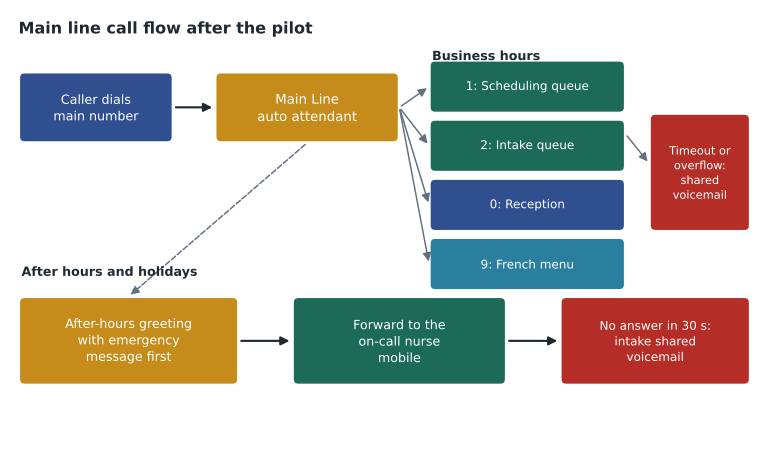
Felix rewrote the main line greeting with the reception lead and the scheduling supervisor. The old greeting listed six options; the new one has three, because the call logs showed that almost all callers wanted scheduling, intake or reception. It starts with the most important information first: "If this is a medical emergency, hang up and call 9-1-1." The after-hours greeting gives the on-call nurse option immediately, because that is why most people call at night.
Lesson 10 covers emergency calling in more detail. Greetings should be short, use plain words, say the option before the key ("For scheduling, press 1") and be read by a clear voice. Teams can read text greetings with speech synthesis in many languages, which makes changes quick, and Corvallin added a French version of the menu, chosen by pressing 9.
| Old main line | New main line |
|---|---|
| Six options, including a branch that had moved | Three options: scheduling, intake, reception |
| After-hours messages checked next morning | After-hours option forwards to the on-call nurse |
| Greeting changed only by a contractor | Reception lead updates greetings as an authorized user |
| No emergency message | Emergency message at the start |
| English only | French menu on option 9 |
The after-hours nurse line
The after-hours path needed care. The on-call nurse changes every week, and the nurse carries a work mobile phone rather than sitting at a computer. Felix configured the after-hours call flow to transfer to an external number: the on-call mobile, which is passed from nurse to nurse each week. Because the phone itself moves, the configuration does not change. As a backup, if the mobile does not answer within 30 seconds, the call goes to the intake shared voicemail, which sends an email to the intake team and to the on-call manager.
Testing the call flow
Before the numbers were ported, Felix tested every path through the main line with the temporary number: each menu option during business hours, the after-hours flow, the holiday flow (by temporarily adding a test holiday), the operator option, the French menu, the queue timeout, the queue overflow (by asking six colleagues to call at once with one agent signed in), and the callback option. He recorded each test in a table and repeated the most important ones after the port on November 9. Two problems were found: the French menu read the English holiday greeting, and the intake queue's overflow pointed to an old test voicemail. Both were fixed before clients ever heard them.
Agents making outbound calls for the queue
Agents often need to call clients back on behalf of the queue. Teams lets an administrator allow agents to place outbound calls using the number of the queue's resource account, so the client sees the queue's number rather than the agent's own. This works alongside the caller ID policy from lesson 8 and is configured on the queue and in the agents' policies. Felix enabled it for the scheduling queue, so a scheduler returning a voicemail can choose to call as the scheduling queue, which keeps the client's callback going to the team rather than to one person.
Agents also need to know when they are on duty. Agents who are opted out of a queue receive no calls from it, and agents who forget to opt back in after a break leave the queue short. The scheduling supervisor reviews agent opt-in status at the start of each shift, and the queue's no-agent rule sends calls to the shared voicemail with a message saying the team will call back, rather than leaving callers waiting indefinitely.
| Queue setting | Scheduling queue | Intake queue |
|---|---|---|
| Routing method | Longest idle | Attendant |
| Presence-based routing | On | On |
| Agent opt-out | Allowed | Allowed |
| Timeout | 5 minutes to shared voicemail | 3 minutes; callback offered after 2 minutes |
| Overflow | 15 waiting calls to shared voicemail | 8 waiting calls to the scheduling queue |
| Outbound calls as the queue | Allowed | Allowed |
Common mistakes
MistakeGiving an auto attendant a user licence.
InsteadUse a resource account with the Teams Phone Resource Account licence.
MistakeRemoving the operator option to push callers through the menu.
InsteadKeep a way to reach a person; callers who cannot get one often hang up.
MistakeUsing longest idle routing without presence-based routing in a team that presents often.
InsteadTurn on presence-based routing so agents in meetings are skipped.
MistakeAsking IT to change holiday greetings every time.
InsteadMake a team leader an authorized user through a voice applications policy.
Summary and key terms
- Auto attendants answer and direct calls with greetings, menus, business hours and holiday schedules; call queues distribute calls among agents.
- Both are reached through resource accounts with the free Teams Phone Resource Account licence.
- Routing methods are attendant, serial, round robin and longest idle; presence-based routing skips busy agents; conference mode connects faster.
- Overflow, timeout and no-agent rules decide what happens when a queue cannot answer; callbacks let callers keep their place.
- Authorized users, set through voice applications policies, can update greetings, hours and holidays.
- Auto attendant
- A Teams voice application that answers calls and directs callers with menus and schedules.
- Call queue
- A Teams voice application that holds callers and distributes calls to agents.
- Routing method
- The rule a call queue uses to choose which agent to ring.
- Presence-based routing
- A call queue option that skips agents whose presence shows they cannot answer.
- Overflow
- What a call queue does with new calls when too many are waiting.
- Timeout
- What a call queue does with a caller who has waited longer than the limit.
- Authorized user
- A person allowed to change selected settings of a voice application without admin rights.
- Collaborative calling
- Connecting a call queue to a Teams channel so its members act as agents.
Practice problems
Work each problem on paper first, then reveal the answer to check.
Which routing method rings every available agent at once?
Show answer
Attendant routing.
Where is a statutory holiday defined so that several auto attendants use it?
Show answer
In a holiday schedule linked to each auto attendant.
How can a team leader change a greeting without admin rights?
Show answer
By being made an authorized user through a voice applications policy.
Lesson quiz · 5 questions
Score 60% or more to complete this lesson.
Create a free account to save your progress, take quizzes and earn a certificate.