
MSBA-222 · Lesson 7 of 12 · 19 min
Introduction to Teams Phone
▶ Video coming soon A video version of this lesson is on the way.
Corvallin's head office phone system was eleven years old. It ran on a server in a cupboard next to the kitchen, the maintenance contract was about to double in price, and only one person, a contractor who came in twice a year, knew how to change the menu that callers heard. Felix had been asked to replace it with Teams Phone before the contract renewed in January 2027. The four branches would follow later, in a separate project covered in the MS-721 programme, but head office would go first, with 30 staff, the main reception line, the scheduling team and the client intake line.
This lesson introduces Teams Phone at the level a Teams administrator needs: what it is, how it connects to the public telephone network, how phone numbers and licences work, and what has to be in place before a user can make and receive phone calls. Lessons 8 to 11 build on it with calling policies, call queues and auto attendants, emergency calling and call quality.
What Teams Phone is
Teams Phone is Microsoft's cloud phone system. It lets a Teams user make and receive calls to and from ordinary phone numbers on the public switched telephone network (PSTN), with features such as voicemail, call transfer, call forwarding, hold, delegation, call parking and shared lines. Calls between Teams users inside the organization are free and do not use the PSTN at all. A call becomes a PSTN call when one end is an ordinary phone number.
Teams Phone has two parts that must both be in place. The Teams Phone licence gives a user the phone system features. PSTN connectivity connects Teams to the telephone network so that calls can reach ordinary numbers. Microsoft offers several ways to get PSTN connectivity, and an organization can mix them, for example using one option at head office and another at branches.
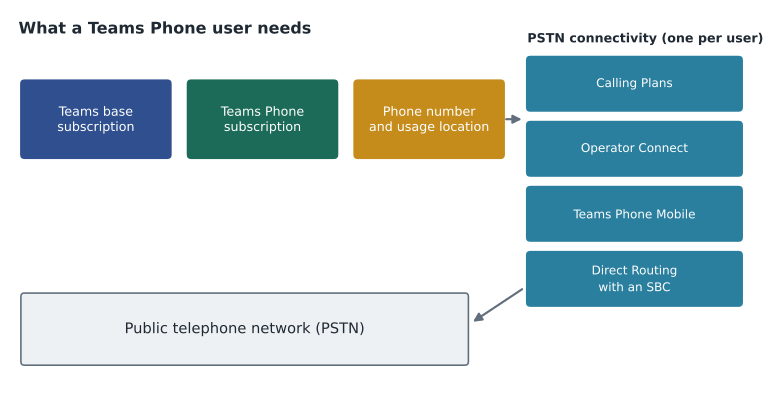
PSTN connectivity options
Microsoft Calling Plans are the simplest option. Microsoft acts as the phone company: it provides the phone numbers and carries the calls, and the organization buys a Calling Plan licence for each user, with domestic or international minutes. Calling Plans are available in a limited list of countries, which includes Canada and the United States. Nothing needs to be installed on site.
Operator Connect lets the organization use a phone company that has joined Microsoft's Operator Connect programme. The operator provides numbers and carries calls, and the connection is managed from the Teams admin center: the administrator chooses the operator, agrees a contract with it and then assigns its numbers to users. There is still no equipment to manage.
Teams Phone Mobile gives a user's mobile phone number, from a participating mobile operator, to Teams, so the same number rings on the mobile phone and in Teams. It suits staff who work mostly on their mobiles.
Direct Routing connects Teams to the PSTN through a session border controller (SBC) that the organization or a partner manages. It is the most flexible option: it can keep an existing phone company, connect to an existing phone system during a migration, and serve countries where Calling Plans are not available. It also needs the most skill to run, because someone must configure and maintain the SBC and the voice routes. The MS-721 course on phone systems covers Direct Routing in depth.
| Option | Who provides numbers and calls | Equipment to manage | Typical fit |
|---|---|---|---|
| Calling Plans | Microsoft | None | Small and medium sites in supported countries |
| Operator Connect | A participating phone company | None | Organizations that want their own operator without managing hardware |
| Teams Phone Mobile | A participating mobile operator | None | Mobile-first workers |
| Direct Routing | The organization's chosen carrier through an SBC | Session border controller | Complex needs, migrations, unsupported countries |
Felix chose Calling Plans for the head office pilot. Thirty users, one site and a straightforward call pattern did not justify an SBC, and Calling Plans let him have numbers working within days. The branches, which share an old system with complex call routing, will be looked at separately in 2027, where Operator Connect or Direct Routing may fit better.
Licences for Teams Phone
A user who makes PSTN calls needs a licence that includes Teams, a Teams Phone licence (called Teams Phone Standard, included in Microsoft 365 and Office 365 E5 and available as an add-on for other suites) and, if Calling Plans are used, a Calling Plan licence, which Microsoft also sells bundled with Teams Phone. Users on Operator Connect or Direct Routing need Teams Phone but pay their operator for calls instead of buying a Calling Plan.
Services that answer calls, such as auto attendants and call queues, use resource accounts, which are special accounts that hold a phone number for the service. Resource accounts need the Teams Phone Resource Account licence, which Microsoft provides at no cost in limited numbers. Shared devices such as a reception phone or a meeting room use their own licences, covered in the MS-721 course on Teams Rooms and devices.
| Who or what | Licences needed for PSTN calling (Calling Plans) |
|---|---|
| Head office user | E3 (includes Teams) + Teams Phone + Calling Plan, or a bundle of the last two |
| User on E5 | E5 (includes Teams Phone) + Calling Plan |
| Main line auto attendant | Resource account with Teams Phone Resource Account licence |
| Scheduling call queue | Resource account with Teams Phone Resource Account licence |
| Reception common area phone | A shared device licence |
Phone numbers
Teams uses two kinds of phone number. User numbers are assigned to people. Service numbers are assigned to services, such as auto attendants, call queues and conferencing bridges, and they can usually handle many simultaneous calls. An organization gets numbers in three ways: by acquiring new ones from Microsoft (for Calling Plans) or from its operator, by porting existing numbers from its current phone company, or, with Direct Routing, by using numbers the carrier already routes to the SBC.
Porting matters because organizations rarely want to change their published phone numbers. Corvallin's main number has been printed on brochures and fridge magnets for years. Felix submitted a port order for the main number and the 30 head office direct numbers, with a firm order date of Monday, November 9, 2026, chosen so that problems could be fixed during a quiet week. Until the port completed, he tested with temporary numbers acquired from Microsoft.
# Assign a Calling Plan number to a user (Teams PowerShell)
Set-CsPhoneNumberAssignment -Identity "t.klimaszewski@corvallincare.example" `
    -PhoneNumber "+15550101234" -PhoneNumberType CallingPlan
# Assign a service number to the main line resource account
Set-CsPhoneNumberAssignment -Identity "mainline@corvallincare.example" `
    -PhoneNumber "+15550101000" -PhoneNumberType CallingPlan
# Remove a number when someone leaves
Remove-CsPhoneNumberAssignment -Identity "former.user@corvallincare.example" -RemoveAll
What a user needs before the first call
For a user to make and receive PSTN calls, several things must line up: the right licences, a phone number assigned with the correct number type, a usage location that matches the country of the number, the user signed in on a Teams client that supports calling, and, for Direct Routing, an online voice routing policy that sends calls to the right SBC. When a number is assigned, Teams turns on the user's ability to use enterprise voice automatically. The user then sees the Calls app with a dial pad.
The emergency address must also be in place before the user makes calls, which lesson 10 explains. With Calling Plans, a validated emergency address is required before a number can be assigned to a user.
Worked problem
The dial pad is missing
A head office user licensed for Teams Phone and a Calling Plan says she has no dial pad in Teams the day after Felix assigned her a number. A colleague assigned at the same time has one. What should Felix check?
Show solution
- Confirm the number assignment and type with Get-CsOnlineUser: the number is there.
- Confirm the licences: both Teams Phone and the Calling Plan are assigned.
- Check the calling policy and that the user has fully signed out and back in to Teams.
- Check the usage location: it is set to a different country from the number, because she transferred from another office.
Answer: Fix the usage location, then ask her to sign out and back in. Licences, numbers and usage location must all agree before calling works.
Voicemail and basic call features
Teams Phone includes Cloud Voicemail. Voicemail messages are stored in the user's Exchange Online mailbox, transcribed and delivered to Teams and Outlook. Voicemail policies control features such as whether voicemail transcription and translation are on, the maximum message length and whether users can set custom greetings. Users set up their own call answering rules: whether calls ring other people at the same time, forward after a time, or go straight to voicemail.
Other features that come with Teams Phone include call transfer (blind or consultative), call park and retrieve, delegation so that an assistant can make and receive calls for a manager, call groups so that a team can share incoming calls, and shared line appearance. Lesson 8 covers the policies that control them.
Planning the head office pilot
Felix wrote a one-page plan for the pilot. It listed the users (30 head office staff, chosen so that every head office team had at least one person in the pilot), the services (main line, scheduling, intake and an after-hours line for the on-call nurse), the numbers (all to be ported from the old provider), the devices (headsets for everyone, a desk phone for reception) and the dates. He ran the pilot with temporary numbers from Monday, October 19, 2026, moved the real numbers on November 9, and planned to retire the old system in January 2027 once the branches had a separate plan.
The plan also listed what would not change. Branch phones stayed on the old system, and calls from head office to branches would go over the PSTN until the branch project was finished. Home-care nurses kept their mobile phones; they were not part of Teams Phone, because they rarely sat at a desk and their mobile phones already handled emergency calls with the right location. This kept the pilot small enough to support.
| Item | Pilot decision | Reason |
|---|---|---|
| Users | 30 head office staff | Small enough to support closely |
| Connectivity | Calling Plans | One site, simple needs, no hardware |
| Numbers | Ported on November 9, 2026 | Keep published numbers; quiet week |
| Devices | Headsets; one reception desk phone | Most staff already use Teams on laptops |
| Branches | Not included | Separate 2027 project |
| Home-care nurses | Not included | Mobile phones remain their main phone |
Shared calling
Microsoft has also introduced shared calling, which lets a group of users make and receive calls using the phone number of a resource account instead of each having their own number. It suits staff who need to call clients occasionally but do not need a personal direct number, because it reduces the number of user numbers and Calling Plan minutes needed. Felix considered it for a group of part-time administrative staff and kept it on the list for the branch project, where many staff share a few lines today.
Devices for Teams Phone
Most head office pilot users made calls from Teams on their laptops with a headset, which Microsoft's certified device programme tests for good audio. The reception desk needed something different: a physical phone that the reception lead could pick up without unlocking a laptop, and that kept working when she stepped away. Felix chose a certified Teams desk phone signed in with her own account. Lesson 9 adds the auto attendant and queues that route calls to her, and the MS-721 course on devices covers common area phones, which are signed in with a shared account and suit places like a staff room or a lobby.
Mobile users can make Teams Phone calls from the Teams mobile app, with the same number as on their laptop. For pilot users who travel between head office and the branches, this meant they could take calls on the road without giving clients their personal mobile number, a privacy benefit that several of them mentioned in the pilot survey.
Felix also wrote a short rollback plan for the port date. If the port failed, the old provider would keep the numbers until the problem was fixed, and pilot users would keep using their temporary numbers. In the event the port completed on time, and the rollback plan was never needed, but having it meant nobody panicked when the first test call took longer than expected to connect.
Common mistakes
MistakeAssuming a Teams Phone licence alone lets a user call ordinary numbers.
InsteadTeams Phone also needs PSTN connectivity: a Calling Plan, an operator or Direct Routing.
MistakeAssigning a number before setting the user's usage location.
InsteadSet the usage location to the number's country first.
MistakeBuying full user licences for an auto attendant.
InsteadUse a resource account with the free Teams Phone Resource Account licence.
MistakeScheduling a number port for a busy Monday morning with no fallback.
InsteadChoose a quiet date and test with temporary numbers first.
Summary and key terms
- Teams Phone is the cloud phone system; PSTN calls need both a Teams Phone licence and PSTN connectivity.
- Connectivity options are Calling Plans, Operator Connect, Teams Phone Mobile and Direct Routing.
- User numbers are for people; service numbers are for services such as auto attendants and call queues.
- Numbers are acquired, ported or provided by the carrier, and assigned with Set-CsPhoneNumberAssignment.
- Resource accounts hold numbers for services and use the Teams Phone Resource Account licence.
- Cloud Voicemail stores messages in Exchange Online and is controlled by voicemail policies.
- Teams Phone
- Microsoft's cloud phone system for Teams.
- PSTN
- The public switched telephone network: the ordinary phone system.
- Calling Plan
- A Microsoft licence that provides phone numbers and PSTN calling minutes.
- Operator Connect
- A programme that lets participating phone companies provide numbers and calling for Teams.
- Direct Routing
- Connecting Teams to the PSTN through a session border controller.
- Session border controller
- A device or service that connects Teams to a phone carrier for Direct Routing.
- Resource account
- An account that holds a phone number for a voice service such as an auto attendant.
- Number porting
- Moving existing phone numbers from one phone company to another.
Practice problems
Work each problem on paper first, then reveal the answer to check.
Which connectivity option needs the organization to manage a session border controller?
Show answer
Direct Routing.
What licence does a call queue's resource account need?
Show answer
The Teams Phone Resource Account licence.
Where are Teams voicemail messages stored?
Show answer
In the user's Exchange Online mailbox.
Lesson quiz · 5 questions
Score 60% or more to complete this lesson.
Create a free account to save your progress, take quizzes and earn a certificate.