
MSBA-222 · Lesson 10 of 12 · 19 min
Emergency calling basics
▶ Video coming soon A video version of this lesson is on the way.
Of all the parts of the head office pilot, emergency calling was the one Felix would not let anyone hurry. If a scheduler collapses at her desk on the third floor and a colleague calls 9-1-1 from Teams, the call must reach the right emergency service, and the dispatcher must know which building and which floor to send help to. If a head office manager working from home makes the same call from her laptop, the dispatcher must not send an ambulance to head office. A phone system that gets this wrong is worse than no phone system.
This lesson explains how Teams Phone handles emergency calls: emergency addresses and places, static and dynamic emergency calling, the policies that control routing and security desk notification, and the legal requirements that apply in Canada. It is an introduction at the depth of the MS-700 exam. The MS-721 course on phone systems covers emergency calling with Direct Routing and session border controllers in detail.
Why location matters
When someone calls an emergency number from a traditional desk phone, the phone company knows the address the line is installed at, and it passes that address to the public safety answering point (PSAP), the emergency call centre that answers the call. A Teams user is not tied to a line. The same person may call from a desk at head office, a meeting room on another floor, a branch office, a café or home, using a laptop, a mobile app or a desk phone. Teams therefore has to work out where the caller is at the moment of the call and send that location with the call.
Regulators require this. In Canada, the CRTC requires providers of phone services that can call 9-1-1 to route calls to the right emergency centre and provide location information, and the country is moving to Next-Generation 9-1-1, which carries richer location data. Teams Phone has features designed to help organizations meet these rules, but the organization is responsible for configuring them correctly.
Emergency addresses and places
An emergency address is a civic address that Teams stores and validates against a database before it can be used. A place adds detail inside the address, such as a floor, wing or room, for a more precise location. Addresses and places are created in the Teams admin center under Locations, or with PowerShell. With Calling Plans, Operator Connect and Teams Phone Mobile, a user must have a validated emergency address before a phone number can be assigned, which is called the registered address for the user.
Felix created the head office address and three places: the ground floor with reception, the second floor and the third floor. He also created addresses for the branches, although branch users were not yet on Teams Phone, because the branch network would eventually need them for dynamic emergency calling.
Static and dynamic emergency calling
With static emergency calling, the user's registered address is sent with an emergency call. That works for people who always call from the same place, but not for people who move. Dynamic emergency calling uses the network the Teams client is connected to at the moment of the call. The client sends details of its network connection to the Location Information Service (LIS), which looks them up against the network identifiers the administrator has entered and returns a location if there is a match.
Microsoft's documentation, updated in September 2026, sets the order in which identifiers are matched, and the first match wins: a wireless access point (identified by its BSSID), then an Ethernet switch and port (identified by chassis ID and port ID, reported through the LLDP protocol), then an Ethernet switch, and finally a subnet. The administrator enters these identifiers in the LIS and links each one to an emergency address and place. Subnet lookups work only when the user's external IP address matches one of the organization's trusted IP addresses; switch and access point lookups work regardless.
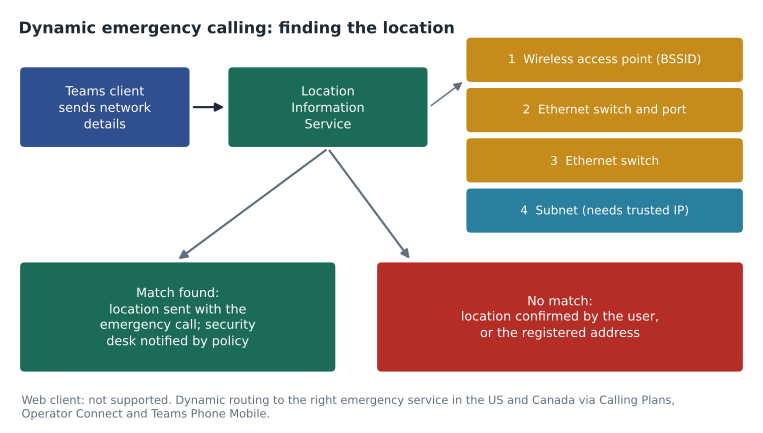
If the client is on a network the LIS does not know, such as a home network, Teams can ask the user to confirm or enter their location, and that location is used for emergency calls from that network. Microsoft describes this as emergency addresses for remote locations. For Corvallin's managers who work from home, Felix explained in the pilot training that Teams would ask for their home address the first time they used it at home, and that they must confirm it accurately.
Network sites and policies
Administrators also define network sites and subnets in the Teams admin center's network topology. A network site groups the subnets at one physical location, and policies can be assigned to a site so that they apply to anyone who connects from it. A policy assigned to a network site overrides the same type of policy assigned to the user while the user is at that site.
Two policies matter. The emergency calling policy applies to every connectivity option and controls security desk notification: who is notified when someone makes an emergency call, and how. Notification can be a chat message to a group, or a call that lets the group listen to the emergency call muted or join it unmuted. The policy can treat each emergency number differently; in the United States, for example, organizations often skip notifications for calls to 933, the test number that reads back the address the system holds. The emergency call routing policy applies only to Direct Routing and defines emergency numbers and the route each one uses through the SBC. Assigning it to Calling Plan users has no effect.
# Emergency calling policy: notify the security desk group by chat and a muted call
New-CsTeamsEmergencyCallingPolicy -Identity "HeadOffice-Emergency" `
    -NotificationGroup "emergency-notify@corvallincare.example" `
    -NotificationMode ConferenceMuted
# Apply it to everyone connected at the head office network site
Set-CsTenantNetworkSite -Identity "HeadOffice" -EmergencyCallingPolicy "HeadOffice-Emergency"
# Map a third-floor wireless access point to the third-floor place
Set-CsOnlineLisWirelessAccessPoint -BSSID "F0-AA-11-22-33-44" `
    -LocationId $thirdFloorLocationId -Description "HO 3F east AP"
Which clients support it
Dynamic emergency calling works on the Teams desktop clients for Windows and macOS, the mobile apps, Teams phones and Teams Rooms, and Teams for VDI. Subnet locations work on all of these; Wi-Fi locations work on all except Teams phones; switch and port locations need LLDP, which Windows supports and macOS supports with additional software. The Teams web client does not support dynamic emergency calling or security desk notification, which is why lesson 8 turned off web PSTN calling in the calling policy.
Dynamic routing to the correct emergency centre, based on the location found, is provided for users in the United States and Canada by Calling Plans, Operator Connect and Teams Phone Mobile partners. In other countries, emergency calls are routed according to the registered address, and Direct Routing organizations rely on their SBC and carrier.
| Item | Head office pilot setting |
|---|---|
| Emergency address | Head office civic address, validated |
| Places | Ground floor (reception), second floor, third floor |
| Trusted IP | Head office external IP address |
| LIS entries | One subnet per floor; every wireless access point mapped to its floor |
| Emergency calling policy | HeadOffice-Emergency on the head office network site |
| Notification group | Reception lead, facilities manager, Felix |
| Remote workers | Prompted to confirm their address when on an unknown network |
| Web PSTN calling | Off in every calling policy |
Testing emergency calling
Emergency calling must be tested, but it must not be tested by calling a real emergency centre without arrangement. In Canada, organizations check their configuration through their provider's test procedures and arrange any live tests with the local emergency service in advance. Felix tested from each floor of head office, from a meeting room and from home, recorded the location each test returned, and fixed a mismatch on the second floor, where one access point had been mapped to the wrong place.
Worked problem
An emergency call from home
A head office manager on Teams Phone works from home two days a week. On her first day at home after the pilot started, she dismissed the prompt asking for her location. What happens if she makes an emergency call, and what should Felix do?
Show solution
- Her home network is not in the LIS, so no network match is found.
- She did not confirm a location, so Teams has no location for this network and may fall back to her registered address at head office.
- Emergency services could be sent to the wrong address.
- Felix contacts her, asks her to enter and confirm her home address in Teams settings, and repeats the point in the pilot training for all remote workers.
Answer: Without a confirmed home location the call could carry the head office address. Remote users must confirm their location when prompted.
Keeping the location data accurate
Dynamic emergency calling is only as good as the data in the LIS, and networks change. A new access point installed during an office renovation, a switch replaced after a failure or a subnet split for a new floor can all leave gaps or wrong mappings. Felix added two controls. Every network change request now includes a step to update the LIS, and every quarter he exports the LIS entries and compares them with the network team's inventory of access points, switches and subnets. Any device that appears in one list but not the other is investigated.
The quarterly check also includes a test call to the provider's test service from each floor, or the equivalent test arranged with the provider, and a check that the notification group still contains the right people. In the first quarterly check, the facilities manager listed in the group had left, and her replacement had not been added; the group was a Microsoft 365 group, so adding the new manager fixed it at once.
| Quarterly check | What it catches |
|---|---|
| Compare LIS entries with network inventory | New, moved or removed access points, switches and subnets |
| Test call from each floor | Wrong place mappings |
| Review notification group membership | People who have left or changed roles |
| Review trusted IPs | Changed internet connections |
| Review remote worker reminders | Staff who have stopped confirming home locations |
Branches and home-care nurses
The branches were outside the pilot, but Felix wrote down what they would need: addresses and places for each branch, LIS entries for each branch network, trusted IPs for each branch internet connection, and an emergency calling policy that notifies the branch manager and the on-call manager. Home-care nurses were a different case. They carry work mobile phones and call emergency services from the mobile network, which provides location in its own way. Corvallin decided that nurses would continue to use their mobile phones, not Teams, for emergency calls, and the training says so plainly.
Explaining emergency calling to staff
Staff do not need to know how the LIS works, but they do need to know three things. When you call 9-1-1 from Teams at head office, the dispatcher receives your floor. When you work somewhere else, Teams may ask where you are, and you must answer truthfully. And if you are a home-care nurse, use your mobile phone, not Teams, for emergencies. Felix's training slide said exactly that and nothing more, and the pilot survey showed that every pilot user could repeat it.
Emergency calling and the auto attendant
Emergency calling also touches the voice applications from lesson 9. An auto attendant does not place emergency calls itself, but its greeting can remind callers to hang up and dial the emergency number, as Corvallin's does. Emergency numbers dialled by users are handled by the user's emergency settings, not by any auto attendant or queue, so an emergency call from a scheduler goes straight to the emergency service, never to the main line menu.
The calling policy matters too. A user who has turned on simultaneous ringing or forwarding should never find that an emergency service's callback is lost. When a PSAP calls back an emergency caller, Teams treats the callback specially so that it reaches the person who called, which is one reason the callback number sent with emergency calls must be the user's own number or a number that reaches them. Felix checked this in the pilot by confirming, through the provider's test, that the callback number sent for each pilot user was correct.
Common mistakes
MistakeLeaving web PSTN calling on.
InsteadTurn it off; the web client does not support dynamic emergency calling.
MistakeAssigning an emergency call routing policy to Calling Plan users.
InsteadEmergency call routing policies apply only to Direct Routing.
MistakeRelying on subnet matching without trusted IPs.
InsteadAdd the site's external IP addresses as trusted IPs, or use switch or access point identifiers.
MistakeTesting by placing an unannounced call to a real emergency centre.
InsteadUse the provider's test procedures and arrange live tests in advance.
Summary and key terms
- Emergency calls need the caller's current location, which regulators require providers and organizations to supply.
- Emergency addresses are validated civic addresses; places add floor or room detail.
- Dynamic emergency calling matches access point, then switch and port, then switch, then subnet; subnet matches need trusted IPs.
- The emergency calling policy controls security desk notification for all connectivity options; the emergency call routing policy is for Direct Routing only.
- Policies assigned to network sites override user policies at that site.
- The web client does not support dynamic emergency calling; turn off web PSTN calling.
- PSAP
- Public safety answering point: the centre that answers emergency calls.
- Emergency address
- A validated civic address used for emergency calls.
- Place
- A more precise location within an emergency address, such as a floor.
- Dynamic emergency calling
- Finding a caller's location from the network the Teams client is connected to.
- Location Information Service
- The Teams service that maps network identifiers to emergency locations.
- Trusted IP address
- An external IP address of the organization's network, used to decide whether subnet lookups apply.
- Security desk notification
- Alerting chosen people when someone makes an emergency call.
- Dispatchable location
- A location precise enough for responders to find the caller, such as address plus floor.
Practice problems
Work each problem on paper first, then reveal the answer to check.
In what order does the LIS try to match network identifiers?
Show answer
Wireless access point, Ethernet switch and port, Ethernet switch, then subnet.
Which policy notifies a security desk when someone calls an emergency number?
Show answer
The emergency calling policy.
Why turn off web PSTN calling?
Show answer
The Teams web client does not support dynamic emergency calling or security desk notification.
Lesson quiz · 5 questions
Score 60% or more to complete this lesson.
Create a free account to save your progress, take quizzes and earn a certificate.