
MSBA-222 · Lesson 6 of 12 · 18 min
Teams Premium features
▶ Video coming soon A video version of this lesson is on the way.
When Corvallin planned its Teams relaunch in the spring of 2026, Ines Duvernay-Sato, the IT manager, approved Teams Premium licences for the 20 clinical leads who run case conferences. The reason was protection rather than polish: watermarks on shared content, sensitivity labels that lock meeting options, and the ability to stop people from copying the meeting chat. In the same planning cycle, Microsoft changed what Teams Premium includes. Some features that had been premium moved into the standard enterprise licences on April 1, 2026, and Teams Premium licences bought after that date no longer added event capacity. Ines had to explain all of this to the finance office, which wanted to know what exactly it was paying for.
This lesson explains what Teams Premium offers after the April 2026 changes, which features moved to the enterprise licences, how Teams Premium is licensed and assigned, and how to decide who needs it. The MS-700 outline does not have a separate Teams Premium objective, but Premium features appear throughout the meetings objectives, such as custom meeting templates and advanced webinars, so candidates need to know where the line falls.
What changed on April 1, 2026
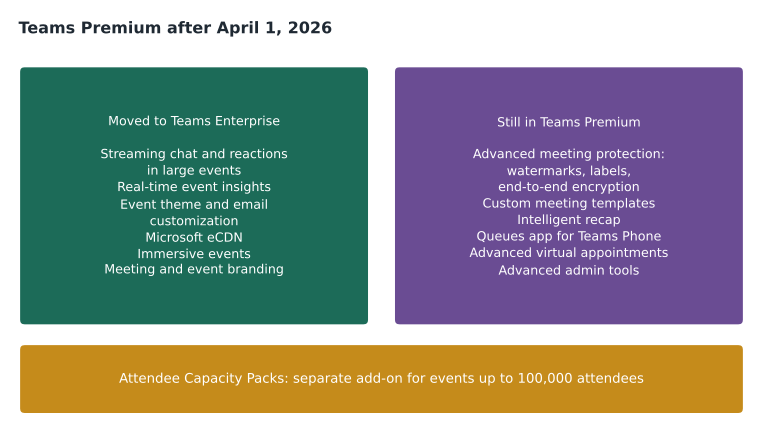
Microsoft announced in early 2026 that it would extend access to several advanced Teams capabilities. From April 1, 2026, a set of event features moved from Teams Premium into Teams Enterprise, meaning the Teams service included in Microsoft 365 and Office 365 enterprise licences. They include streaming chat and reactions in large events, real-time event insights for organizers, customization of event themes and emails, Microsoft eCDN for event bandwidth, and immersive events. Organizational branding for meetings and events moved too. The Attendee Capacity Pack add-on became the way to scale events up to 100,000 attendees.
At the same time, Microsoft extended Microsoft Places features to licences that include an Outlook calendar, and renamed Teams Shared Devices to Teams Shared Space, which covers up to four desks per licence. Customers who bought Teams Premium before April 1 keep their existing features until their licences expire, while Premium licences bought afterwards provide the remaining Premium features only.
What Teams Premium still includes
Microsoft's announcement listed the capabilities that remain in Teams Premium. They fall into a few groups, and Microsoft's own list should be checked whenever a licensing decision is made, because the boundary has moved more than once.
Advanced meeting protection includes watermarking of shared content and video, so that a screenshot shows who took it; sensitivity labels for meetings, which apply a set of protected options from Purview to the meeting; the option to prevent copying of chat; limits on who can record; and end-to-end encryption for meetings, which encrypts audio, video and content so that only participants can decrypt them, at the cost of turning off recording, transcription and Copilot.
Custom meeting templates let administrators create templates with options set and locked, as lesson 1 described. Intelligent recap builds chapters, speaker timelines, mentions and suggested tasks from a recorded and transcribed meeting. Advanced communication features include the Queues app for Teams Phone, which lets call queue agents and supervisors see queue status and handle calls in a dedicated app, covered in lesson 9. Advanced virtual appointments add features such as SMS reminders, a branded waiting room and analytics for appointments booked with Bookings. Advanced collaboration tools give administrators extra controls and analytics.
| Need | Where it comes from after April 2026 |
|---|---|
| Town hall for 3,000 staff with streaming chat and reactions | Enterprise licence (Teams Enterprise) |
| Event for 25,000 attendees | Attendee Capacity Pack add-on |
| eCDN for a large internal event | Enterprise licence |
| Watermark on a confidential case conference | Teams Premium |
| Locked custom meeting template | Teams Premium |
| Intelligent recap with chapters | Teams Premium |
| Copilot recap from the transcript | Microsoft 365 Copilot licence |
| Queues app for call queue agents | Teams Premium |
Teams Premium and Copilot
Teams Premium and Microsoft 365 Copilot overlap but are not the same. Copilot is a separate licence that gives a user an AI assistant across Microsoft 365, including in Teams meetings, where it answers questions and summarizes discussions using the transcript. Teams Premium's intelligent recap produces structured outputs from recordings without the user asking. Some organizations buy both for different groups. For a Teams administrator, the useful questions are: what does each group of users need, which licence provides it today, and which policies need to be set so that the feature works as intended.
At Corvallin, the clinical leads have Teams Premium for protection, and a separate Copilot pilot group of 60 office staff, set up for the spring 2027 Copilot rollout, has Copilot licences. Some clinical leads are in both groups. Teodor kept a simple matrix in the licensing workbook so that nobody had to remember which licence did what.
Licensing and assignment
Teams Premium is an add-on licence assigned to users. It requires a base licence that includes Teams. Most Premium features are tied to the organizer: if a clinical lead organizes a meeting with a watermark, attendees do not need Premium to attend it, but they will see the watermark. Some features are tied to the user who uses them, such as the Queues app for agents. Assigning licences through group-based licensing in Microsoft Entra ID, which the earlier courses covered, makes it easy to add or remove Premium as people change roles.
Before buying, an administrator should check three things: whether the feature is now part of the enterprise licence, whether it is tied to the organizer or each user, and whether the licence was bought before or after April 1, 2026, which affects what it provides. Corvallin's existing 20 licences were bought in March 2026, so they keep the full older feature set until renewal; at renewal, Ines will check whether the remaining Premium features still justify the cost for each lead.
# List users assigned Teams Premium, using Microsoft Graph PowerShell
Connect-MgGraph -Scopes "User.Read.All","Organization.Read.All"
$sku = Get-MgSubscribedSku | Where-Object SkuPartNumber -like "*TEAMS_PREMIUM*"
Get-MgUser -All -Filter "assignedLicenses/any(x:x/skuId eq $($sku.SkuId))" `
    -ConsistencyLevel eventual -CountVariable n | Select-Object DisplayName, UserPrincipalName
Sensitivity labels for meetings
Sensitivity labels for meetings deserve a closer look, because they are one of the strongest reasons Corvallin kept Teams Premium. A label is created in Microsoft Purview, configured with meeting settings, and published to users. When an organizer applies the label to a meeting, the label sets and locks options such as who can bypass the lobby, who can present, whether recording is allowed, whether chat can be copied, whether watermarks are applied and whether end-to-end encryption is used. Because the label controls the options, the organizer cannot weaken them.
Corvallin's Clinical Confidential label, the same one used on clinical teams, has meeting settings that keep external participants in the lobby, block recording, prevent copying of chat and apply watermarks to shared content. The Case Conference template applies the label automatically. Labels for meetings require Teams Premium for the organizer, and they rely on the label policy being published in Purview, which the Purview course in this programme covers in detail.
Worked problem
Deciding who needs Teams Premium
The finance office asks whether Corvallin should add Teams Premium for the communications team (four people) before the next town hall. The town hall has 450 attendees and will use moderated Q&A, eCDN and branding. Should it?
Show solution
- List the features the town hall needs: town hall capability, moderated Q&A, eCDN and branding.
- Check where each comes from after April 2026: all are in the enterprise licence, and 450 attendees is well inside the limits.
- Check whether the team needs any remaining Premium feature: they do not run protected meetings or call queues.
- Recommend no Premium licences for the communications team; review again if they need intelligent recap or larger events.
Answer: No. Everything the town hall needs is now part of the enterprise licence.
Watermarks and end-to-end encryption in practice
The clinical leads tested the protection features in a pilot case conference before using them with families. Watermarks worked as expected: each participant's email address appeared across shared content and across the video of the person sharing, faintly enough to read through. One lead found that watermarks made small text on a shared medication chart harder to read, so the template was adjusted to use a lighter watermark and the leads were asked to share charts at a larger zoom.
End-to-end encryption raised a different question. It gives the strongest protection for the audio and video of a meeting, but it turns off recording, transcription, Copilot and some other features, and it limits the meeting size. Dr. Ostrander-Bey decided that case conferences did not need it, because the label already blocked recording and the lobby kept unexpected people out, while the loss of live captions for transcription-based features would harm participants who relied on them. End-to-end encryption stayed available as an option in the template for the rare conferences that involve legal proceedings.
| Protection | What it guards against | Trade-off |
|---|---|---|
| Lobby for external participants | Unexpected people joining | Someone must admit each person |
| Recording blocked by label | A lasting copy of client details | No recording for people who missed the meeting |
| Watermark on shared content | Screenshots leaking without a trace | Small text can be harder to read |
| Prevent copying chat | Chat text pasted elsewhere | Participants cannot copy useful links |
| End-to-end encryption | Interception of meeting media | No recording, transcription or Copilot |
Reviewing Premium each year
Because the boundary between Premium and the enterprise licences has moved, Corvallin added a yearly Premium review to its licensing calendar, held a month before renewal. Ines and Teodor list which Premium features each licensed group used in the past year, using the Teams admin center usage reports, and compare them with Microsoft's current feature list. Features that moved to the enterprise licence are crossed off; groups that used nothing on the remaining list lose their licences at renewal. It is a dull meeting, but it is the only way to stop paying for features that have become free.
Explaining the licence boundary to finance
Ines's note to the finance office avoided feature lists. It grouped Teams spending into three questions. Does anyone need to protect meetings beyond what labels and the lobby give for free? For Corvallin, yes: the clinical leads, which justified their Premium licences. Does anyone need larger events than the enterprise limits? No: the biggest event was 450 people. Does anyone need AI help with meetings? Yes, but that is a Copilot question, handled by the Copilot pilot budget rather than Teams Premium. The finance office accepted the note, and asked for the same three questions to be answered at each renewal.
Writing the boundary down also helped the help desk. When a user asked why a colleague's meetings had a watermark and theirs did not, the answer was simple: watermarks come from Teams Premium, which only the clinical leads have, and they use it for case conferences.
Advanced virtual appointments
Virtual appointments are worth a closer look for organizations that provide services to the public. With the Bookings app, a business sets up services, staff and availability, and clients book a time; each booking creates a Teams meeting that the client joins from a browser without installing Teams. The standard features cover booking and joining. The advanced features that remain in Teams Premium add text message reminders to clients, a branded lobby, queues that show staff which clients are waiting, and analytics on appointments, such as no-shows and wait times.
Corvallin considered virtual appointments for its intake service, where families of potential clients have an initial conversation with an intake nurse. The standard Bookings features covered most of what intake needed. Text reminders would have been useful, but the intake team decided to try the standard features first and revisit Premium at the annual review if no-shows remained a problem. This is the kind of decision the April 2026 changes make more common: try what the enterprise licence gives, and buy Premium only for a specific gap.
| Virtual appointment feature | Standard | Teams Premium (advanced) |
|---|---|---|
| Booking page and Teams meeting for each booking | Yes | Yes |
| Clients join from a browser | Yes | Yes |
| Email confirmations and reminders | Yes | Yes |
| Text message reminders | No | Yes |
| Waiting queue and analytics for staff | No | Yes |
Common mistakes
MistakeBuying Teams Premium to run larger town halls after April 2026.
InsteadUse the enterprise licence and Attendee Capacity Packs for event size.
MistakeAssigning Premium to every attendee of a protected meeting.
InsteadMost meeting protection features depend on the organizer's licence.
MistakeConfusing intelligent recap with Copilot.
InsteadIntelligent recap is a Teams Premium feature; Copilot is a separate licence.
MistakeUsing end-to-end encryption and expecting a transcript.
InsteadEnd-to-end encryption turns off recording, transcription and Copilot.
Summary and key terms
- On April 1, 2026, many event features moved from Teams Premium to Teams Enterprise, and Attendee Capacity Packs became the way to scale events.
- Teams Premium still provides advanced meeting protection, custom meeting templates, intelligent recap, the Queues app, advanced virtual appointments and admin tools.
- Teams Premium is an add-on; most meeting features depend on the organizer's licence.
- Sensitivity labels for meetings set and lock meeting options from Purview.
- Licences bought before April 1, 2026 keep their older features until they expire.
- Teams Premium
- An add-on licence that adds advanced meeting protection, intelligence and some communication features to Teams.
- Teams Enterprise
- The Teams service included in Microsoft 365 and Office 365 enterprise licences.
- Watermarking
- Overlaying the viewer's identity on shared content or video to discourage leaks.
- Sensitivity label for meetings
- A Purview label that sets and locks protective meeting options.
- End-to-end encryption
- Encryption of meeting media that only participants can decrypt, which turns off recording and transcription.
- Queues app
- A Teams app for call queue agents and supervisors, part of Teams Premium.
- Teams Shared Space
- The licence formerly called Teams Shared Devices, covering shared desks and spaces.
Practice problems
Work each problem on paper first, then reveal the answer to check.
Does an attendee need Teams Premium to see a watermark in a meeting organized by a Premium user?
Show answer
No; the feature depends on the organizer's licence.
Which licence gives eCDN for large events after April 2026?
Show answer
The enterprise licence (Teams Enterprise).
What happens to recording when a meeting uses end-to-end encryption?
Show answer
Recording is unavailable, as are transcription and Copilot.
Lesson quiz · 5 questions
Score 60% or more to complete this lesson.
Create a free account to save your progress, take quizzes and earn a certificate.