
MSBA-222 · Lesson 12 of 12 · 18 min
Case study: running a company-wide town hall
▶ Video coming soon A video version of this lesson is on the way.
Corvallin's autumn all-staff town hall took place on Wednesday, November 18, 2026, at 12:30, chosen because it is the one time of day when most home-care visits pause. It was the first all-staff event run as a Teams town hall rather than as a meeting, and the first since the Teams relaunch and the head office Teams Phone pilot. Ishbel Abelard, the executive director, wanted to explain the 2027 budget, introduce the plan to roll out Microsoft 365 Copilot to office staff in the spring, thank staff for a hard flu season, and take questions. About 450 people were invited: office staff at head office and the branches, and home-care staff joining from their cars, their homes or a quiet room in a client's building between visits.
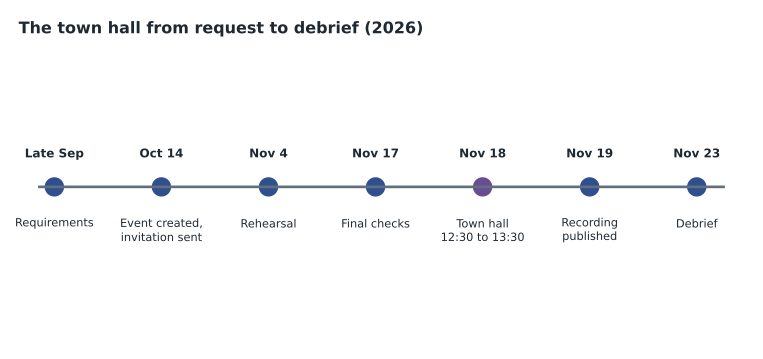
This capstone follows the town hall from the request in September to the debrief in the week after. It brings together the settings from this course: meeting and events policies, recording, accessibility, licensing, dial-in, the network and call quality. Read it as a worked example and then try the problems at the end, which ask you to make the same kinds of decisions for a different organization.
The requirements
Pascale gathered the requirements in a short meeting with Ishbel and her assistant in late September. The audience was internal only. Ishbel wanted to present with two other speakers, the finance director and Dr. Ostrander-Bey, the clinical director, and to answer questions at the end, including anonymous ones, because staff were more likely to ask hard questions anonymously. The event had to work for home-care staff on mobile phones with poor data, for about 30 staff who prefer French and for at least two deaf staff members. It had to be recorded for staff who could not attend, but the recording should be available only to staff, and only for a month.
| Requirement | Design decision | Covered in lesson |
|---|---|---|
| 450 internal attendees, broadcast style | Town hall with Optimize for large audience | 3 |
| Three presenters and a producer | Organizer, two co-organizers, presenters in green room | 3 |
| Anonymous questions | Moderated Q&A with anonymous posting allowed | 3 |
| Staff with poor data | Mobile app with audio-only fallback; recording for later | 4, 11 |
| French speakers | Professional French interpreter on a language channel | 5 |
| Deaf staff | CART captions plus live captions; sign language interpreter as spotlighted presenter | 5 |
| Recording for staff only, 30 days | Recording on; published to staff; expiration 30 days | 2 |
| Branch bandwidth | eCDN on | 3, 11 |
Licences and policies
Before any setup, Teodor checked the licences and policies. Pascale's E3 licence gave her advanced event features, which comfortably covered 450 attendees. No Teams Premium licence was needed, as lesson 6 showed, and no Attendee Capacity Pack. Her events policy, External-Events, allowed town halls. Her meeting policy, Standard-Meetings, allowed recording and transcription, which the recording and the CART captioner's work needed.
One gap appeared. The two co-organizers were assigned the Global events policy, which does not allow town halls. Teodor was not certain how far a co-organizer's own events policy affects what they can do in someone else's town hall, so rather than find out on the day, he added both co-organizers to the External-Events policy for the autumn and checked their access in the rehearsal. He also confirmed that Q&A was allowed in the events policy and that anonymous questions were permitted.
Setting up the event
Pascale created the event in the Teams calendar on October 14 with Optimize for large audience turned on. She invited the all-staff distribution group, added the finance director and Ishbel's assistant as co-organizers, and added Ishbel, Dr. Ostrander-Bey and the sign language interpreter as presenters. She turned on moderated Q&A, with anonymous questions allowed and Ishbel's assistant and a communications colleague as moderators. She turned on recording and set the published recording to be available to people in the organization.
In the event options she set up language interpretation with one French interpreter, booked through the agency Corvallin uses for family meetings, and requested CART captions, adding the captioner's link from the event options. She noted that attendees choose captions and interpretation themselves, so the invitation explained how. She did not allow attendee chat, because Ishbel preferred all questions to go through Q&A, where moderators could group duplicates and keep personal client details out of public view.
The invitation
The invitation said what the town hall was about, when it was, and how to join from a computer or the mobile app. It explained in two short lines how to turn on captions and how to choose the French interpretation channel. It told home-care staff that if their data was poor they could watch the recording the next day instead, and it reminded everyone that the event was not the place to discuss individual clients. It ended with an invitation to submit questions in advance by replying to Pascale, because some staff would be with clients at 12:30.
Lesson 4 covered dial-in for meetings, and a few branch staff asked whether they could phone into the town hall. Town halls are built for app viewers rather than callers, so Pascale offered the recording instead, and set up a small separate meeting with dial-in at the North Branch for staff who wanted to listen together and send questions through their manager.
The rehearsal
On November 4, the presenters, interpreter and captioner joined a rehearsal event, set up the same way, with a dozen IT and communications staff as attendees. The rehearsal found four problems, which is exactly why rehearsals exist. Dr. Ostrander-Bey's laptop used a Bluetooth headset that dropped out when she moved; Felix gave her a wired certified headset. The interpreter could not hear the finance director clearly because he spoke away from his microphone; he moved closer. The sign language interpreter's video was not spotlighted when slides were shared; Pascale practised spotlighting her alongside the content. And one of the slides used red and green alone to show budget changes, which a colour-blind attendee pointed out; the finance director added labels.
Worked problem
The interpreter cannot hear
During the rehearsal, the French interpreter says the finance director's audio is quiet and occasionally breaks up. Other attendees hear him well enough. Call Analytics for the director shows low packet loss and normal jitter. What is the most likely cause and fix?
Show solution
- Good network measures make a network fault unlikely.
- Others hear him adequately, so the problem is level and clarity rather than loss.
- Interpreters need clearer audio than ordinary listeners, because they must catch every word while speaking.
- The director is speaking away from a laptop microphone; a headset or moving closer fixes it.
Answer: A microphone problem, not the network. A headset gives the interpreter clear audio.
The day
On November 17, Felix ran the checks from lesson 11: eCDN on, presenters on wired connections with certified headsets, a test call from the boardroom checked in Call Analytics, and real-time analytics turned on for the presenters. The help desk received a one-page briefing with answers to the five most likely questions, such as how to turn on captions and where to find the recording.
The green room opened at 12:00. Pascale checked each presenter's audio, confirmed the interpreter and captioner were connected, and queued the first slides. At 12:30 she started the event. Ishbel spoke for twenty minutes, the finance director for fifteen and Dr. Ostrander-Bey for ten. Moderators published 23 questions out of 61 submitted, grouping duplicates; 14 were anonymous. The most-asked question was whether Copilot would read clients' records, which Ishbel answered by explaining that the Copilot pilot in spring 2027 was for office staff only and that the data protection work described in the earlier courses of this programme had to be finished first.
Two things went wrong. Eight minutes in, a branch manager reported that her branch's viewers had frozen; real-time analytics showed nothing wrong with the presenters, and the branch's internet link was briefly saturated by a large software update that had started at noon. The network team paused the update and the stream recovered within a minute. Later, a moderator accidentally published a question that named a client; she unpublished it within seconds, and Pascale added a second review step for future events.
After the event
The recording was published to staff on November 19, with a 30-day expiration on the published recording, and the transcript was kept with it. Pascale downloaded the attendance report: 412 people attended live, an average of 41 minutes each, and 96 more watched the recording in the first week. The Q&A export went to Ishbel's assistant, who answered the 38 unpublished questions in a written follow-up sent the next week. The post-event survey went to all staff.
The debrief on November 23 listed what worked and what to change. Captions and interpretation were used by more people than expected, including staff watching in noisy places. The software update incident led to a rule that no large updates start during scheduled town halls. The client-name incident led to the second moderator review. And the North Branch listening session was popular enough to repeat at every branch next time.
| Measure | Result |
|---|---|
| Invited | About 450 |
| Attended live | 412 |
| Average time watched | 41 minutes |
| Watched the recording in the first week | 96 |
| Questions submitted / published | 61 / 23 (14 anonymous) |
| Survey: could follow the event | 94 percent |
| Incidents | Branch stream freeze (update traffic); one question unpublished |
A planning checklist you can reuse
After the debrief, Pascale turned the town hall plan into a checklist for future events, stored in the communications team's channel. It is short enough to use and long enough to stop the problems seen this time. Teodor added the IT items, and Felix added the network items. The checklist is organized by time before the event, because that is how people work through it.
| When | Communications | IT and network |
|---|---|---|
| Six weeks before | Requirements meeting; book interpreter and CART | Check licences and events policies for all roles |
| Four weeks before | Create event; send invitation with captions and interpretation guidance | Confirm recording, Q&A and anonymous settings |
| Two weeks before | Rehearsal with all presenters | Provide certified headsets; check presenters' clients |
| Day before | Final run of show; brief moderators | eCDN check; test call; freeze large updates |
| On the day | Green room 30 minutes early; moderate Q&A | Real-time analytics; help desk on standby |
| Week after | Publish recording; answer unpublished questions; survey | Review quality data; record lessons learned |
Applying the same method elsewhere
The method works for any large event: start from what the audience needs, translate each need into a setting, check that the people involved have the licences and policies those settings require, rehearse with the real people, and review afterwards. A school board planning a staff address, a hospital planning a public information session or a company running a product launch will choose different settings, but the steps are the same. The exam asks the same kind of question in a compressed form: given a scenario, which event type, licence and policy settings fit. Working through a real plan like this one makes those questions much easier.
For Corvallin, the town hall also marked the end of the first phase of its Teams work. The relaunch had tidied the teams, the meetings policies had settled, the head office phones were on Teams Phone, and the branches were next. Felix's branch telephony project, with its own requirements and a harder network, would start in January 2027.
What the exam takes from this
An exam question will not describe Corvallin's town hall, but it will describe a scenario like it. You might be told the audience size, whether attendees need to speak, the licences available and an accessibility need, and asked which event type, licence or setting fits. Reading the scenario as Pascale and Teodor did, requirement by requirement, leads to the answer.
One last point from the debrief deserves repeating: the people who made the event work were not only IT. The interpreter, the captioner, the moderators and the branch managers who gathered staff to watch together all had a part, and the plan named each of them, so that everyone knew what was expected before the day.
Common mistakes
MistakeAssuming every organizer or co-organizer has the right events policy.
InsteadCheck policies for each role before the rehearsal.
MistakeSkipping the rehearsal for an all-staff event.
InsteadRehearse with the real presenters, interpreter and captioner.
MistakeLetting large software updates run during a major event.
InsteadCoordinate with the network and device teams to avoid competing traffic.
MistakePublishing questions without a review for sensitive details.
InsteadModerate Q&A, with a second check for organizations that handle personal information.
Summary and key terms
- Start from requirements: audience, interaction, accessibility, recording and network constraints.
- Check licences and events and meeting policies for every role before setup.
- Configure the town hall with co-organizers, presenters, moderated Q&A, captions, interpretation, recording and eCDN.
- Rehearse with the real people and fix device, audio and accessibility problems found there.
- Monitor the event with real-time analytics and a briefed help desk; review attendance, Q&A and survey results afterwards.
- Run of show
- The planned sequence and timing of an event's segments.
- Moderator
- A person who reviews and publishes Q&A questions in an event.
- Rehearsal
- A practice run of an event with the real presenters and settings.
- Attendance report
- A report of who attended an event and for how long.
- Debrief
- A review after an event of what worked and what to change.
Practice problems
Work each problem on paper first, then reveal the answer to check.
Kestrelmoor School District wants a 3,500-person staff address with reactions and Q&A, and presenters in two buildings. Which licence capability and event type fit?
Show answer
A town hall with Optimize for large audience; enterprise licences allow up to 3,000 engaged attendees, so for 3,500 with engagement they need an Attendee Capacity Pack or to limit engagement to view-only with Q&A up to 10,000.
The district's IT lead wants deaf staff to follow the event accurately. What should she arrange?
Show answer
CART captions, sign language interpreters as spotlighted presenters, and guidance on live captions and sign language view.
Several schools share slow internet links. What should she turn on and check?
Show answer
eCDN, and coordinate so no large updates or backups run during the event.
Lesson quiz · 5 questions
Score 60% or more to complete this lesson.
Create a free account to save your progress, take quizzes and earn a certificate.