
MSBA-203 · Lesson 8 of 12 · 19 min
Incidents and alerts
▶ Video coming soon A video version of this lesson is on the way.
The first seven chapters of the workbook were about prevention. The next two are about what happens when prevention fails, and the AB-650 exam gives them weight: it expects an administrator to manage alerts in Defender for Office 365 and to investigate and respond to email and collaboration threats. This lesson covers the queue: how alerts are created, how they become incidents, how incidents are triaged, assigned, classified and closed, and how alert policies in Defender for Office 365 decide what gets raised in the first place. Lesson 9 covers the investigation itself.
Alerts and incidents
An alert is a single detection from one product: a phishing message delivered and later removed by zero-hour auto purge, a malicious URL click, a suspicious inbox rule, a risky sign-in, malware on a device. An incident is a group of alerts that Defender XDR has correlated because they share users, devices, mailboxes, files, IP addresses or timing and appear to be one attack. Incidents are the unit of work. Teams that work alert by alert see the same attack three or four times and miss the connections between the pieces.
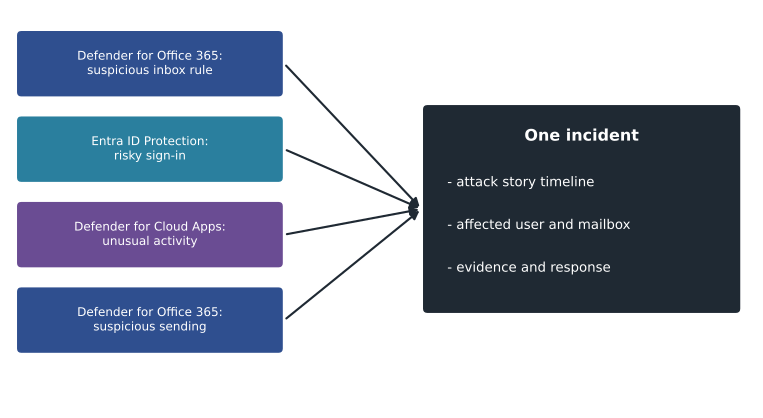
The incident page brings together everything needed to understand the attack. The attack story shows the alerts on a timeline with a graph of the entities involved. The alerts tab lists each detection with its source and status. The assets tab lists users, mailboxes, devices, apps and cloud resources affected. Investigations show any automated investigations and their results. Evidence and response lists every file, process, URL, email message, IP address and other artifact, with its verdict and any remediation taken. Organizations with Security Copilot see a generated summary and guided response suggestions; Corvallin's licences do not include Security Copilot, which Microsoft includes with Microsoft 365 E5 and E7, so Teodor noted the feature without relying on it.
Severity, status and assignment
Every incident has a severity, inherited from its most severe alert: informational, low, medium or high. Severity is Microsoft's estimate of potential impact, not a measure of certainty. It also has a status, active, in progress or resolved, and an assigned to field. The workbook's first rule after the daily routine was that no incident stays unassigned for more than one working hour.
| Severity | Corvallin response target | Who |
|---|---|---|
| High | Triage within 30 minutes, day or night | Teodor in hours; the monitoring partner after hours, with a phone call to Teodor or Ines |
| Medium | Triage the same working day | Teodor or Ama |
| Low | Triage within two working days | Ama's team |
| Informational | Review weekly in bulk | Ama's team |
Those targets came out of the September review. The coordinator's first alert had been low severity, and it had sat for more than a day. Under the new targets it would have been triaged the next morning at the latest, and its link to the risky sign-in alert would have been visible on the incident page.
Classification and determination
When an incident is resolved, the analyst records a classification and, where relevant, a determination. The classification says what kind of result it was:
| Classification | Meaning | Example determinations |
|---|---|---|
| True positive | A real attack or malicious activity | Phishing, malware, compromised account, unwanted software |
| Informational, expected activity | The detection was reasonable but the activity was legitimate or authorized | Security testing, approved administrative action, confirmed user activity |
| False positive | The detection was wrong; nothing suspicious happened | Not malicious, not enough data to validate |
Accurate classification has three benefits. It feeds Microsoft's detection models. It drives the organization's own metrics, so a report of "how many real attacks did we have?" counts true positives rather than every alert. And it builds a record that makes tuning decisions defensible. Teodor's workbook added a fourth requirement: every incident closed as a true positive gets a short comment answering four questions, how it started, what it reached, how it was contained and what will change.
Working the queue efficiently
The Incidents queue can be filtered by status, severity, assignment, service source, category, tags and time range, and saved filters make the daily routine quicker. Tags help group related work; Corvallin used tags such as "Kittiwake" for incidents in the newly acquired clinic's tenant once it was connected for monitoring, and "Simulation" for incidents created by attack simulation training, which lesson 10 explains. Incidents that the correlation engine kept separate but that are clearly the same attack can be linked by moving alerts between incidents, and duplicates can be resolved with a reference to the main incident.
Some alerts arrive in large numbers and add nothing. Defender lets administrators create alert tuning rules, formerly called suppression rules, that automatically resolve or hide alerts matching specific conditions, for example an alert raised every time an approved vulnerability scanner runs. Tuning is powerful and dangerous in equal measure. A rule written too broadly can hide a real attack that resembles the noise. Corvallin's rule was that only Teodor or Ines could create tuning rules, each needed a narrow condition, an expiry date and a comment, and the list was reviewed monthly.
Alert policies in Defender for Office 365
Email and collaboration alerts come from alert policies, which define the activity that triggers an alert, its severity, its category and who is notified. Microsoft provides default alert policies for common threats and administrative risks, and administrators can create custom alert policies for activities that matter to their organization.
| Default alert policy (examples) | Why it matters |
|---|---|
| A potentially malicious URL click was detected | A user clicked a link that Safe Links later identified as malicious |
| Email messages containing malicious URL removed after delivery | Zero-hour auto purge acted; recipients may already have clicked |
| Email messages containing malware removed after delivery | Malware reached inboxes before detection |
| Suspicious email sending patterns detected | A mailbox may be compromised and sending spam or phishing |
| User restricted from sending email | Outbound limits blocked a user, a strong sign of compromise |
| Suspicious inbox forwarding or manipulation rule | A classic step in business email compromise |
| Email reported by user as malware or phish | Staff reports that need review |
| Elevation of Exchange admin privilege | An unexpected change to admin rights |
Custom alert policies can watch for activities in the unified audit log, with thresholds and scopes. Teodor created two. The first alerts when any user creates an inbox rule that moves or deletes messages containing the words invoice, payment, bank or remittance, the pattern the September attacker used. The second alerts when anyone adds a mail flow rule or changes the outbound spam policy, because those are high-impact changes that should be rare. Both send notifications to the IT shared mailbox, which the partner also watches.
// Inbox rules created or changed in the last 14 days that move or delete mail
CloudAppEvents
| where Timestamp > ago(14d)
| where ActionType in ("New-InboxRule", "Set-InboxRule", "UpdateInboxRules")
| extend Rule = tostring(RawEventData.Parameters)
| where Rule has_any ("DeleteMessage", "MoveToFolder", "MarkAsRead")
| project Timestamp, AccountDisplayName, ActionType, Rule
| order by Timestamp desc
The September incident, read again
Teodor reopened the coordinator's resolved incident from September and walked the IT team through it as a teaching case, reading the attack story from left to right.
| Time (September) | Alert or event | What it meant |
|---|---|---|
| 2, 09:03 | Message delivered from a look-alike document-signing domain | The lure arrived; no alert yet, because the link was clean at delivery |
| 2, 11:42 | Sign-in from an unfamiliar IP address with a relayed MFA approval | The adversary-in-the-middle page captured her session |
| 2, 11:51 | Atypical sign-in properties (low severity) | Entra ID Protection noticed the attacker's session |
| 2, 12:07 | Suspicious inbox manipulation rule | A rule began hiding replies containing "invoice" in a folder named RSS Subscriptions |
| 3, 08:30 to 08:52 | Suspicious email sending patterns; user restricted from sending email | The attacker sent fake invoices to suppliers and clients; outbound limits stopped the burst |
| 3, 14:20 | Incident triaged by Teodor | Containment began more than a day after the first alert |
Three lessons came out of the walk-through. The evidence had been in one place from the morning of September 2; the problem was that nobody was reading low-severity incidents. The attacker's first persistence step, the inbox rule, came only 25 minutes after the session was stolen, so any response measured in hours, not minutes, will be late; that is the argument for the partner's after-hours coverage and for automatic attack disruption where licensing allows. And the outbound restriction, a control nobody had thought about, did more than anything else to limit the damage, which is why the workbook now treats a "user restricted from sending" alert as urgent whatever its severity.
Measuring the queue
The leadership report in lesson 11 needs numbers, and the queue provides them. The two that matter most are time to triage, from incident creation to the first analyst action, and time to contain, from creation to the action that stopped the attacker. The Defender portal records when incidents are created, assigned, changed and resolved, and the incident data can be queried in advanced hunting or exported, so Teodor kept a simple monthly sheet. In September the coordinator's incident took 27 hours to triage. In October the median for medium and high incidents was 40 minutes, and in the first three weeks of November it was 22 minutes, helped by the partner's after-hours calls.
A third number keeps the first two honest: the share of incidents closed as true positives. A queue where nearly everything is a false positive trains people to stop looking; a queue where nothing is a true positive may mean detections are missing. Corvallin's autumn figures sat at about one real attack for every ten incidents, most of them phishing messages caught after delivery, which is a healthy balance for an organization of its size.
Handing incidents between people
Incidents often outlive a shift. The partner may contain an account at 11 at night, Teodor may investigate it the next morning, and Ama may finish the recovery with the user in the afternoon. The incident's comments and activity log carry the handover: every person who acts records what they did and what remains, and the assigned owner changes explicitly rather than by assumption. The workbook's handover note had three lines: what has been done, what is still open, and what the next person must not do, such as releasing a user from the sending restriction before persistence has been checked.
Notifications and escalation
Two kinds of notification exist. Incident email notifications, configured in the Defender XDR settings, send a message when incidents of chosen severities are created or updated, filtered by source. Alert policy notifications go to recipients named in each policy. Corvallin used both, but neither replaced the queue: notifications are a prompt to look, and the queue is where work is tracked.
Escalation needs to be written down before it is needed. The workbook's escalation page named, for each severity, who is called, by what channel, and what they are authorized to do without asking. The monitoring partner may revoke a user's sessions, disable an account, block a sender or URL in the Tenant Allow/Block List and isolate a device with Plan 2, then must call. Anything beyond that, such as deleting messages from every mailbox or contacting outside parties, needs Teodor or Ines. The page also listed the people outside IT who must be told about certain incidents: the privacy officer for anything touching client information, and the finance manager for anything involving payments.
Worked problem
Triage of a morning incident
At 8:10 the queue shows a new medium-severity incident: "Suspicious email sending patterns detected" and "User restricted from sending email" for a billing clerk, plus a low-severity "Atypical travel" sign-in alert. It is unassigned. What should Teodor do in the first fifteen minutes?
Show solution
- Assign the incident to himself and set it to in progress, so nobody else duplicates the work.
- Read the attack story: the risky sign-in came before the sending burst, which points to a compromised account, not a misbehaving app.
- Contain first: revoke the user's sessions and, if the sign-in was not hers, disable the account temporarily.
- Leave the sending restriction in place; do not release the user from Restricted entities yet.
- Notify the finance manager, because a billing mailbox may have sent payment instructions.
- Move to investigation, covered in lesson 9: messages sent, inbox rules, forwarding, MFA methods and app consents.
Answer: Assign, read the story, contain, keep the restriction, notify the business owner, then investigate. Severity was medium, but the combination of alerts makes it urgent.
Common mistakes
MistakeWorking each alert separately.
InsteadWork incidents, which show related alerts and assets together.
MistakeIgnoring low-severity alerts because they are low.
InsteadTriage them on a schedule; early stages of attacks often start low.
MistakeWriting broad alert tuning rules to quiet the queue.
InsteadKeep tuning rules narrow, commented, time-limited and reviewed.
MistakeClosing incidents without a classification.
InsteadClassify every incident so reports and models reflect reality.
Summary and key terms
- Alerts are single detections; incidents group related alerts into one attack and are the unit of work.
- Incident pages show the attack story, alerts, assets, investigations and evidence.
- Severity reflects potential impact; status and assignment track ownership; classification records the outcome.
- Alert tuning reduces noise but must be narrow and reviewed.
- Defender for Office 365 default and custom alert policies define which email and collaboration activities raise alerts.
- Alert
- A single detection from one security product.
- Attack story
- The incident view that shows alerts on a timeline with a graph of entities.
- Classification
- The recorded outcome of an incident: true positive, informational expected activity, or false positive.
- Alert tuning
- Rules that automatically resolve or hide alerts matching defined conditions.
- Alert policy
- A definition of the activity, severity and notification for an email and collaboration alert.
- Escalation
- The documented process for calling the right people with the right authority.
Practice problems
Work each problem on paper first, then reveal the answer to check.
Why does an incident's severity not tell you how certain the detection is?
Show answer
Severity estimates potential impact; certainty comes from the evidence in the investigation.
What is the difference between a false positive and informational, expected activity?
Show answer
A false positive is a wrong detection; expected activity is a correct detection of legitimate behaviour.
Give one reason to create a custom alert policy.
Show answer
To watch for an activity specific to the organization, such as inbox rules that hide payment emails.
Lesson quiz · 5 questions
Score 60% or more to complete this lesson.
Create a free account to save your progress, take quizzes and earn a certificate.