
MSBA-203 · Lesson 1 of 12 · 19 min
The Microsoft Defender XDR portal
▶ Video coming soon A video version of this lesson is on the way.
In the first week of October 2026, a few days after the coordinator's compromise described in the MSBA-101 course, Ines Duvernay-Sato put a single question on the agenda of the IT team's Monday meeting: "If the same attack started again this morning, where would we see it first, and who would act?" Nobody answered quickly. Teodor Klimaszewski knew the Microsoft Defender portal existed and had cleared alerts there. Ama Owusu-Pratt on the help desk had seen device warnings in Intune. Felix Okonkwo-Reyes, who looks after the network and Teams calling, had never signed in to it at all.
Ines asked Teodor to spend the autumn building what she called a threat protection workbook: a written description of how Corvallin Home Care is protected, which policies do the work, how the team responds when protection fails, and how the results are reported to the leadership team. This course follows that workbook, one chapter per lesson. It also follows the AB-650 exam, Administering Microsoft 365 and AI Services, which expects administrators to configure threat policies in Microsoft Defender for Office 365, manage its alerts, investigate and respond to email and collaboration threats, and run attack simulations and training campaigns. The other Defender products are covered too, because in a real tenant the email tools never work alone.
What Defender XDR brings together
Microsoft Defender XDR is Microsoft's extended detection and response suite. "Extended" means that it collects signals from several kinds of asset at once, rather than only from endpoints as older detection tools did. Each kind of asset has its own Defender product, and each product can be bought and licensed separately, but they report into one portal and share one incident queue.
| Product | What it protects | Typical signals |
|---|---|---|
| Exchange Online Protection (EOP) | All Exchange Online mailboxes; included with the mailbox | Spam, bulk mail, known malware, spoofed senders |
| Defender for Office 365 | Email and collaboration: Exchange Online, Teams, SharePoint and OneDrive files, Office apps | Phishing, impersonation, malicious links and attachments, compromised mailboxes |
| Defender for Endpoint | Windows, macOS, Linux, iOS and Android devices | Malware, suspicious processes, exploit attempts, vulnerable software |
| Defender for Identity | On-premises Active Directory and related identity servers | Credential theft, reconnaissance, lateral movement |
| Defender for Cloud Apps | Software as a service apps, including Microsoft 365 itself | Shadow IT, risky OAuth apps, unusual downloads and sharing |
| Microsoft Entra ID Protection | Sign-ins and user accounts in Entra ID | Risky sign-ins, leaked credentials, unfamiliar locations |
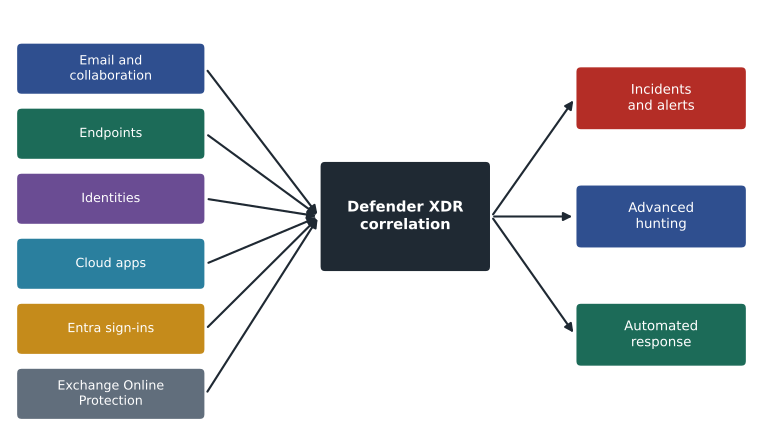
The suite's value is correlation. A phishing message is an email event; the click on its link is a URL event; the stolen session is a sign-in event; the hidden inbox rule is a mailbox event. Each product sees only its own piece. Defender XDR joins them by user, device, mailbox, file and time, and presents one incident with an attack story, as it did for the coordinator's compromise in September. Lessons 8 and 9 cover incidents and investigations in detail.
Finding your way around the portal
The portal lives at security.microsoft.com. Microsoft rearranges its navigation from time to time and lets each organization pin or hide items, so Teodor wrote his workbook in terms of the main areas rather than exact menu paths. In November 2026 the left-hand navigation was organized into groups like these:
| Area | What you do there |
|---|---|
| Home | A customizable overview with cards for active incidents, Secure Score, device health and recent threats |
| Investigation and response | The Incidents and Alerts queues, advanced hunting, custom detection rules, and the Action center with its history of automated and manual actions |
| Threat intelligence | Threat analytics reports on current campaigns and techniques, with your organization's exposure to each |
| Assets | Inventories of devices and identities, each with its own page, timeline and response actions |
| Exposure management | Microsoft Secure Score, security initiatives and recommendations, and attack surface views |
| Email and collaboration | Threat Explorer or real-time detections, quarantine review, submissions, the attack simulation training tools, and the threat policies for Defender for Office 365 |
| Cloud apps | Defender for Cloud Apps: cloud discovery, the app catalog, policies and app governance |
| Reports, Audit and Health | Built-in reports, the unified audit log search, and service health for the security products |
| System | Permissions, settings for each product, and partner or connected integrations |
Two shortcuts saved Teodor time from the first day. The global search box at the top of the portal finds users, devices, IP addresses, files and URLs across all products, so typing a user's address opens a page with that person's alerts, devices, sign-ins and mailbox activity in one place. And every incident, alert, user and device page has an action menu that offers the responses that make sense for that object, such as isolating a device, disabling a user in Active Directory or Entra ID, or soft-deleting an email message, provided the administrator holds the right permissions and the tenant has the right licence.
Microsoft Sentinel and the unified security operations platform
Larger organizations also run Microsoft Sentinel, Microsoft's cloud security information and event management service, which collects logs from firewalls, servers and non-Microsoft products. Microsoft has been moving Sentinel's day-to-day experience into the Defender portal, so that one analyst can work Defender and Sentinel incidents in the same queue and query both with advanced hunting. Corvallin does not run Sentinel; its partner does log collection for the network equipment under its own contract. Teodor noted the option in the workbook because the board's Zero Trust roadmap lists detection and automation as phase 3 for 2027, and that is when the question of a security information and event management service will come back.
Who can do what: permissions
The Defender portal respects two kinds of permission. Microsoft Entra roles apply across Microsoft 365: Security Administrator can manage security settings and policies, Security Operator can manage alerts and incidents and take many response actions, Security Reader and Global Reader can view but not change, and Global Administrator can do everything. Microsoft Defender XDR Unified role-based access control (Unified RBAC) lets an organization build custom roles in the portal from specific permissions, such as reading security data, managing alerts, taking email actions or changing configuration, and assign them to groups for particular data sources. Once Unified RBAC is activated for a workload, it replaces that workload's older product-specific roles.
Teodor mapped the team's jobs to roles with least privilege in mind, building on the Privileged Identity Management design from the MSBA-101 course.
| Person | What they need to do | Access |
|---|---|---|
| Teodor | Configure policies, investigate and respond | Security Administrator, eligible through PIM for 4 hours, with approval only for Global Administrator |
| Ama | Triage device alerts, isolate laptops, release quarantined mail for staff | A custom Unified RBAC role: alerts, device response, quarantine release |
| Ines | Read everything, approve major actions, report to leadership | Global Reader (permanent), Security Administrator eligible |
| Felix | See alerts about network devices and Teams Rooms | Security Reader for device data |
| Monitoring partner | After-hours triage and containment of high-severity incidents | Granular delegated admin privileges with Security Operator, time-limited and reviewed quarterly |
Partners such as Corvallin's monitoring firm should reach a customer tenant through granular delegated admin privileges (GDAP), which grant specific Entra roles for a set period, rather than through shared accounts or permanent Global Administrator rights. Teodor asked the partner for its GDAP relationship details and added a quarterly review to the calendar.
What each licence switches on
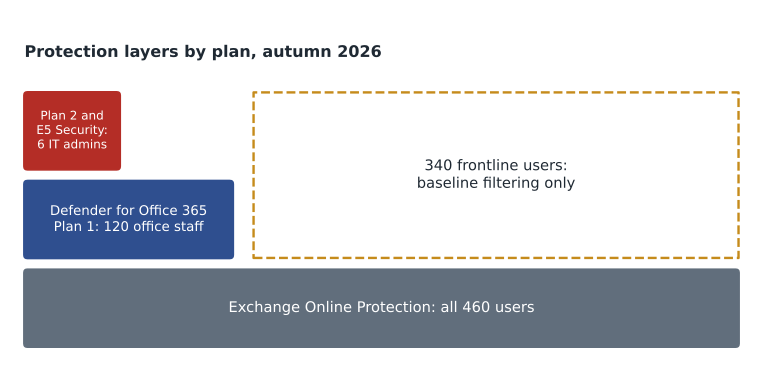
Defender capabilities depend on licences, and Corvallin's mix is typical of an organization that grew in stages. Its 120 office staff and managers hold Microsoft 365 E3, its 340 home care staff hold Microsoft 365 F3, and the six IT administrators also hold the Microsoft 365 E5 Security add-on. In June 2026 Microsoft began adding Defender for Office 365 Plan 1 to Microsoft 365 E3 and Office 365 E3, with the rollout running into August, so Corvallin's office staff gained Safe Links, Safe Attachments and impersonation protection over the summer without a new purchase. Microsoft's 2026 packaging update also brought built-in protection for Safe Links, Safe Attachments and anti-phishing to licensed users by default.
| Capability | Where it comes from | Corvallin coverage in November 2026 |
|---|---|---|
| Anti-spam, anti-malware, spoof protection | Exchange Online Protection with every mailbox | Everyone |
| Safe Links, Safe Attachments, impersonation protection, real-time detections | Defender for Office 365 Plan 1 | Office staff (E3, since summer 2026) and IT admins |
| Threat Explorer, automated investigation, attack simulation training, campaign views | Defender for Office 365 Plan 2 | IT admins (E5 Security); office staff during a trial |
| Endpoint detection and response, device isolation, vulnerability management | Defender for Endpoint Plan 2 | IT admins' devices |
| Basic endpoint protection, attack surface reduction, device control | Defender for Endpoint Plan 1 | Devices of E3 users |
| Defender for Identity, Defender for Cloud Apps, Entra ID P2 | E5 Security add-on | IT admins |
The table exposed a gap that Teodor wrote down plainly: the frontline staff, who make up three-quarters of the workforce, were covered mainly by Exchange Online Protection, and Microsoft's 2026 announcement named E3 plans, not the frontline plans. He did not guess. He opened the current Microsoft 365 service description for F3, listed which Defender features applied to frontline users, and put the question of extending Defender for Office 365 to them on the licensing review for the 2027 budget. Licensing rules also matter for features that act on many users at once: Microsoft expects every user who benefits from a Defender for Office 365 feature to be licensed for it, so a policy that technically reaches unlicensed users is not a licensing plan.
Settings that matter on day one
A few portal-wide settings deserve attention before any policy work. Email notifications for incidents send a message when a new incident of a chosen severity appears; Teodor set them for medium and high severity to the IT shared mailbox, which the monitoring partner also watches after hours. Preview features can be turned on in the portal settings so administrators see new capabilities early; Teodor turned them on for his own account only, because preview features change and he did not want the help desk working from screens that might move. The audit log must be on for investigations to work; it is on by default in Microsoft 365, and Teodor checked it with a search rather than assuming. Finally, data retention differs by product, and advanced hunting keeps 30 days of raw event data by default, which is why incidents should be investigated promptly rather than at the end of the month.
The morning routine
With the access plan agreed, Ines asked for a routine short enough to survive a busy week. Teodor's version took fifteen minutes on a quiet day.
| When | Where | What to look for |
|---|---|---|
| Every morning | Incidents queue, filtered to new and active | Anything high or medium severity; incidents assigned to nobody |
| Every morning | Submissions and the user reported messages tab | What staff reported overnight and how Microsoft classified it |
| Every morning | Quarantine review | Release requests from staff and messages held for admins only |
| Twice a week | Entra ID Protection risky users and sign-ins | Users at medium or high risk not yet remediated |
| Weekly | Threat analytics and Secure Score | New campaigns with exposure in the tenant; new recommended actions |
| Monthly | Reports | The leadership page described in lesson 11 |
Felix asked the obvious question: why not simply wait for the email notifications? Teodor's answer became the first rule in the workbook. Notifications tell you that something new arrived; the queue tells you what is still unresolved. In September the first alert about the coordinator had been a low-severity one, and nobody had opened it because nobody looked at low-severity items. An incident queue that only one person reads only on bad days is not a control.
Worked problem
Choosing the right role for a task
Ama needs to release a quarantined referral form for a branch scheduler, isolate a laptop that Defender for Endpoint has flagged, and view the incident it belongs to. She must not be able to change anti-phishing policies. Which access fits?
Show solution
- Releasing quarantined messages for others and isolating devices are response actions, not configuration changes.
- Security Administrator would also let her edit policies, which breaks the requirement.
- Security Reader would show her the incident but not let her act.
- A custom Unified RBAC role that grants alert management, device response and quarantine release, scoped to the right data sources, matches the task exactly.
Answer: Create a custom Unified RBAC role with only those permissions and assign it to a group that contains Ama, rather than giving her a broad built-in role.
Common mistakes
MistakeTreating the Defender portal as a place to visit only when an alert email arrives.
InsteadWork the Incidents queue daily, including low-severity items, so early signs are not ignored.
MistakeGiving the help desk Security Administrator so it can release quarantined mail.
InsteadGrant only the response permissions needed, with a custom Unified RBAC role or Security Operator.
MistakeAssuming every user has the Defender features the administrators see.
InsteadMap each feature to the licence that provides it and check which users actually hold that licence.
MistakeLetting a partner sign in with a shared administrator account.
InsteadUse granular delegated admin privileges with specific, time-limited roles and review them regularly.
Summary and key terms
- Defender XDR correlates signals from email, endpoints, identities, cloud apps and sign-ins into incidents.
- The Defender portal at security.microsoft.com groups its tools into areas such as investigation and response, exposure management, email and collaboration, and cloud apps.
- Permissions come from Entra roles and from Defender XDR Unified RBAC custom roles; least privilege applies to the help desk and partners too.
- Capabilities depend on licences: Exchange Online Protection for every mailbox, Defender for Office 365 Plan 1 now in Microsoft 365 E3, and Plan 2 tools such as Threat Explorer and attack simulation in E5-level licences.
- A short daily routine in the Incidents queue, submissions and quarantine is the foundation of threat protection.
- Defender XDR
- Microsoft's extended detection and response suite, which correlates signals across email, endpoints, identities and cloud apps.
- Incident
- A group of related alerts that together describe one attack, with the affected assets.
- Unified RBAC
- Defender XDR role-based access control that builds custom roles from specific permissions.
- GDAP
- Granular delegated admin privileges: time-limited, role-specific access for Microsoft partners.
- Exchange Online Protection
- The baseline email filtering included with every Exchange Online mailbox.
- Advanced hunting
- Querying raw event data across Defender products with Kusto Query Language.
Practice problems
Work each problem on paper first, then reveal the answer to check.
Name three kinds of signal Defender XDR correlates into one incident.
Show answer
Any three of: email events, endpoint events, identity events, cloud app events, Entra sign-in risk.
Why should a partner use GDAP rather than a shared Global Administrator account?
Show answer
GDAP grants specific roles for a limited time and is auditable; a shared account gives unlimited, untraceable access.
Which Defender for Office 365 plan includes attack simulation training?
Show answer
Plan 2.
Lesson quiz · 5 questions
Score 60% or more to complete this lesson.
Create a free account to save your progress, take quizzes and earn a certificate.