
MSBA-203 · Lesson 4 of 12 · 19 min
Defender for Identity
▶ Video coming soon A video version of this lesson is on the way.
When Teodor reached the identity chapter of his workbook, Felix asked whether it needed to exist at all. "We switched off Active Directory in 2022," he said. "Defender for Identity watches domain controllers. We don't have any." He was half right. Microsoft Defender for Identity was built to protect on-premises Active Directory, and Corvallin has been cloud-only since December 2022. But identity is still the front door to everything Corvallin owns, the September compromise began with a stolen identity, and the Defender portal now brings identity signals from Microsoft Entra ID and Defender for Identity together on the same pages. The AB-650 exam treats identity threat detection as part of securing a tenant, and two of Corvallin's likely futures, merging the Kittiwake clinic in 2027 and any future acquisition of an agency that still runs its own servers, would put on-premises directories back on the table.
So the chapter does three things. It explains what Defender for Identity does and how it is deployed, using the 2022 hybrid period from the MSBA-201 course as a "what we should have had" case. It shows how identity threats are detected and handled in the Defender portal for cloud-only accounts. And it records the plan for assessing any directory Corvallin inherits.
What Defender for Identity protects
Attackers who reach an on-premises network rarely stop at the first computer. They look for accounts, groups and computers in Active Directory, steal credentials from memory or from the network, move from machine to machine, and aim for control of the domain itself. Defender for Identity watches for exactly this behaviour on the servers that see it: domain controllers, plus Active Directory Federation Services (AD FS), Active Directory Certificate Services (AD CS) and Microsoft Entra Connect servers. It learns what normal looks like for each user and device, and raises alerts when activity matches known attack techniques or departs sharply from normal.
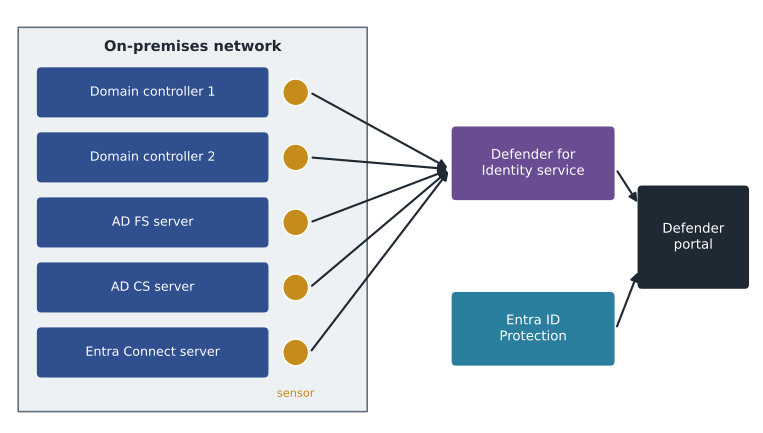
Detections are grouped by the stage of an attack they reveal. The names below are the categories Microsoft uses; the point for an administrator is to recognize what stage of an attack an alert represents, not how the technique works.
| Stage | What the alerts indicate | Typical response |
|---|---|---|
| Reconnaissance and discovery | Someone is mapping users, groups, computers or shares in the directory in an unusual way | Identify the source device and account; check whether the activity is an approved scan |
| Credential access | Attempts to steal or guess passwords, hashes or Kerberos tickets | Reset affected credentials; look for the device where the theft started |
| Lateral movement | An account or credential is being used to reach other machines | Isolate the devices involved; disable the account if it is compromised |
| Persistence and privilege escalation | Changes that give an attacker lasting or higher access, such as new privileged group members | Reverse the change; review all privileged accounts |
| Domain dominance | Activity that suggests control over the domain itself | Treat as a major incident and engage experienced responders |
How it is deployed
Defender for Identity is licensed per user through Microsoft 365 E5, the E5 Security add-on, Enterprise Mobility and Security E5 or as a standalone licence. Deployment means installing a sensor on each identity server. Two kinds of sensor exist. The classic sensor is a separate installation that reads network traffic and events on the server. The newer version 3 sensor is activated on domain controllers that are already onboarded to Microsoft Defender for Endpoint, so the same agent serves both products; Microsoft documents the supported Windows Server versions and the steps to move from the classic sensor. Either way, the sensor needs outbound access to the Defender for Identity cloud service, a Directory Service account that it uses to read Active Directory, and, for some response actions, an action account that can disable users or reset passwords in Active Directory.
Microsoft also recommends a set of auditing settings on domain controllers so the sensor sees the events it needs, and provides a readiness check that reports missing settings. A deployment is not finished when the sensor shows as running; it is finished when the health page in the Defender portal shows no open health issues for any sensor.
Worked problem
The 2022 hybrid period, revisited
Between February and December 2022, Corvallin ran two domain controllers and Microsoft Entra Connect (then Azure AD Connect) while it moved to Microsoft 365. Which servers would Defender for Identity have needed sensors on, and why does the Entra Connect server matter?
Show solution
- Both domain controllers need sensors, because every authentication and directory change passes through them.
- The Entra Connect server needs a sensor too. It holds a highly privileged account that can write to Entra ID and to Active Directory, so an attacker who controls it controls both directories.
- Corvallin had no AD FS or AD CS servers, so no sensors were needed there.
- The sensors would also have produced identity security posture assessments for the domain, which would have shown stale admin accounts before the migration.
Answer: Three sensors: two domain controllers and the Entra Connect server. Teodor's note in the workbook: the risky period was short, but the Entra Connect server was the most valuable target in the building and nobody was watching it.
Identity security posture
Defender for Identity does not only raise alerts; it also finds weaknesses before anyone exploits them. Its identity security posture assessments report on issues such as accounts with passwords that never expire, privileged accounts that are not protected by additional controls, insecure delegation settings, legacy protocols still in use, and dormant entities in sensitive groups. These assessments appear as recommended actions in Microsoft Secure Score under the identity category and in the exposure management area of the portal, so they can be planned and tracked alongside every other improvement. For an organization that acquires another business, running sensors on the acquired domain for a few weeks before migration produces a clear list of what to clean up first.
Honeytoken accounts are another simple, effective control. A honeytoken is a decoy account that no legitimate person or process ever uses. Tagging it as a honeytoken in Defender for Identity means any authentication attempt with it raises an alert, which is a strong signal that someone is exploring the directory.
Identity threats in a cloud-only tenant
For Corvallin today, the identity signals come from Microsoft Entra ID Protection, covered in the MSBA-202 course, and from the other Defender products. ID Protection calculates sign-in risk, the likelihood that a particular sign-in was not performed by the account owner, and user risk, the likelihood that an account is compromised, from signals such as anonymous IP addresses, unfamiliar sign-in properties, impossible travel, leaked credentials found by Microsoft and token anomalies. Those risk detections appear in the Defender portal and join incidents with related email and endpoint alerts, as the September compromise showed.
The Defender portal's identity pages pull this together. Searching for a user opens a page that combines Entra ID details, Defender for Identity data where it exists, risk level, recent sign-ins, devices, alerts and incidents, and a timeline of activity. From that page an administrator with the right permissions can take response actions.
| Action | Where it applies | When to use it |
|---|---|---|
| Confirm user compromised | Entra ID, raises user risk to high | When an investigation shows the account is in an attacker's hands; risk-based policies then force remediation |
| Require user to sign in again | Entra ID, revokes refresh tokens and sessions | Immediately after a credential or token theft |
| Suspend or disable the user | Entra ID, or Active Directory through Defender for Identity | When the account must stop working entirely during containment |
| Reset password | Active Directory through Defender for Identity, or Entra ID | After the attacker's access paths are removed |
| Mark as safe or dismiss risk | Entra ID | Only after confirming the activity was legitimate |
Order matters. In September, the coordinator's password was reset before her sessions were revoked and before the hidden inbox rule was found, so for a short time the attacker's stolen session kept working and replies kept disappearing into the rule's folder. Lesson 9 sets out the correct order. The identity chapter records only the principle: cut off the attacker's current access first, remove what they left behind second, and restore the user third.
Triage of an identity alert
Most identity alerts are not attacks, and the skill is telling the difference quickly. On Wednesday, November 4, 2026, Teodor's morning routine showed a medium-severity incident for Dr. Marguerite Ostrander-Bey: an "unfamiliar sign-in properties" risk detection from an IP address in another province, followed by access to her mailbox and to a SharePoint site of clinical policies. The incident contained no email alert and no device alert.
He worked through the questions in the workbook's identity triage checklist. Was the sign-in successful, and did it satisfy multifactor authentication? It was, using her passkey. Was there anything unusual after the sign-in: new inbox rules, new forwarding, new MFA methods, consent to an unfamiliar app, mass downloads? There was nothing. Did the location match anything known? Her calendar showed a home care conference in that city, and the IP address belonged to the conference hotel. Finally, he asked her, using the phone number in the HR record rather than replying to anything in the incident. She confirmed she had signed in from the hotel that morning.
Only then did he dismiss the risk and classify the incident as informational, expected activity, with a note pointing to the calendar entry and the phone call. The classification matters: it tells Microsoft's models and Corvallin's own reports that the detection was reasonable but the activity was legitimate, which is different from a false positive, where the detection itself was wrong, and from a true positive, a real attack. A passkey is phishing-resistant, so the risk was low from the start, but the checklist exists so that the one real attack in a hundred is not dismissed along with the ninety-nine harmless ones.
| Question | Where to look |
|---|---|
| Did the sign-in succeed, and how was it authenticated? | Sign-in details on the user page or in Entra sign-in logs |
| What happened afterwards? | User timeline, mailbox audit, inbox rules, MFA method changes, app consents |
| Does the context explain it? | Calendar, travel requests, known VPN or partner IP ranges |
| Does the user confirm it? | Contact through a trusted channel, never by replying to the alert or message |
Automatic attack disruption
In tenants with the right licensing and signals, Defender XDR can take some of these actions itself through automatic attack disruption. When it has high confidence that an attack such as business email compromise or an adversary-in-the-middle session theft is under way, it can contain the user account involved, for example by disabling it in Entra ID or in Active Directory through Defender for Identity, and tag the incident so the security team knows the action was automatic. The goal is to stop an attack in minutes rather than waiting for a person to wake up. Disruption actions are recorded in the Action center and can be undone by an administrator.
Automatic disruption depends on the products deployed and on licences, and organizations can exclude specific accounts, such as emergency access accounts, from automated containment. Teodor's workbook listed the two emergency access accounts and the partner's GDAP access as items to check on the exclusions page, so that an automated action could never lock out the people needed to recover.
The plan for inherited directories
Kittiwake, the clinic Corvallin acquired in November 2026, runs its own Microsoft 365 Business Premium tenant and, according to its owner, no servers. Teodor wrote a short procedure anyway, because the next acquisition might be different. Before any migration of an organization that runs Active Directory: confirm licensing for Defender for Identity for the period of the project; deploy sensors to every domain controller and identity server; resolve every health issue; run the identity security posture assessments and fix the highest-risk findings; tag a honeytoken account; and keep the sensors running until the last domain controller is switched off. Ines added one line: no trust or synchronization with an acquired directory until the posture assessment has been reviewed.
Common mistakes
MistakeAssuming Defender for Identity has nothing to offer once a tenant is cloud-only.
InsteadCloud identity risk comes from Entra ID Protection and joins Defender incidents; plan Defender for Identity for any on-premises directory you inherit.
MistakeInstalling sensors on domain controllers only.
InsteadInclude AD FS, AD CS and Entra Connect servers, which hold equally valuable secrets.
MistakeResetting a compromised user's password as the first step.
InsteadRevoke sessions and contain access first, remove persistence, then reset credentials.
MistakeLeaving emergency access accounts in scope for automated containment.
InsteadExclude them deliberately, and document and monitor the exclusions.
Summary and key terms
- Defender for Identity uses sensors on domain controllers, AD FS, AD CS and Entra Connect servers to detect attacks on Active Directory.
- Its alerts map to attack stages such as reconnaissance, credential access, lateral movement and domain dominance.
- Identity security posture assessments and honeytoken accounts find weaknesses and early exploration.
- In cloud-only tenants, Entra ID Protection provides sign-in and user risk that joins Defender incidents.
- Response actions include confirming compromise, revoking sessions and disabling accounts; automatic attack disruption can contain accounts on its own.
- Defender for Identity
- Microsoft's product for detecting attacks on on-premises Active Directory and related identity servers.
- Sensor
- The Defender for Identity component installed or activated on an identity server.
- Honeytoken account
- A decoy account whose use triggers an alert.
- Sign-in risk
- The likelihood that a sign-in was not performed by the account owner.
- User risk
- The likelihood that an account has been compromised.
- Automatic attack disruption
- Defender XDR's automated containment of users or devices during high-confidence attacks.
Practice problems
Work each problem on paper first, then reveal the answer to check.
Why does an Entra Connect server need a Defender for Identity sensor?
Show answer
It holds a privileged account that can change both Active Directory and Entra ID, making it a prime target.
What does "require user to sign in again" do?
Show answer
It revokes the user's refresh tokens and sessions so stolen tokens stop working.
What is a honeytoken account used for?
Show answer
As a decoy; any use of it signals that someone is exploring or attacking the directory.
Lesson quiz · 5 questions
Score 60% or more to complete this lesson.
Create a free account to save your progress, take quizzes and earn a certificate.